What is this?
Lawstronaut is the infrastructure layer that connects AI agents and software to millions of legal documents across 150+ jurisdictions, structured legal data, continuously updated, and ready to use via MCP.
Authentication
Production MCP server: https://mcp.lawstronaut.com
Transport: MCP over Streamable HTTP (POST /).
Public server card (tool listing, no auth):
https://mcp.lawstronaut.com/.well-known/mcp/server-card.json
Lawstronaut MCP supports Bearer token and OAuth 2.0 (client_id + client_secret). A paid subscription is required.
Get client ID, secret, or bearer token
- Visit lawstronaut.com and purchase a subscription.
- Log in to the developer portal.
- Open MCP server access from the Home menu.
- Create a client ID + client secret (OAuth) or a bearer token.
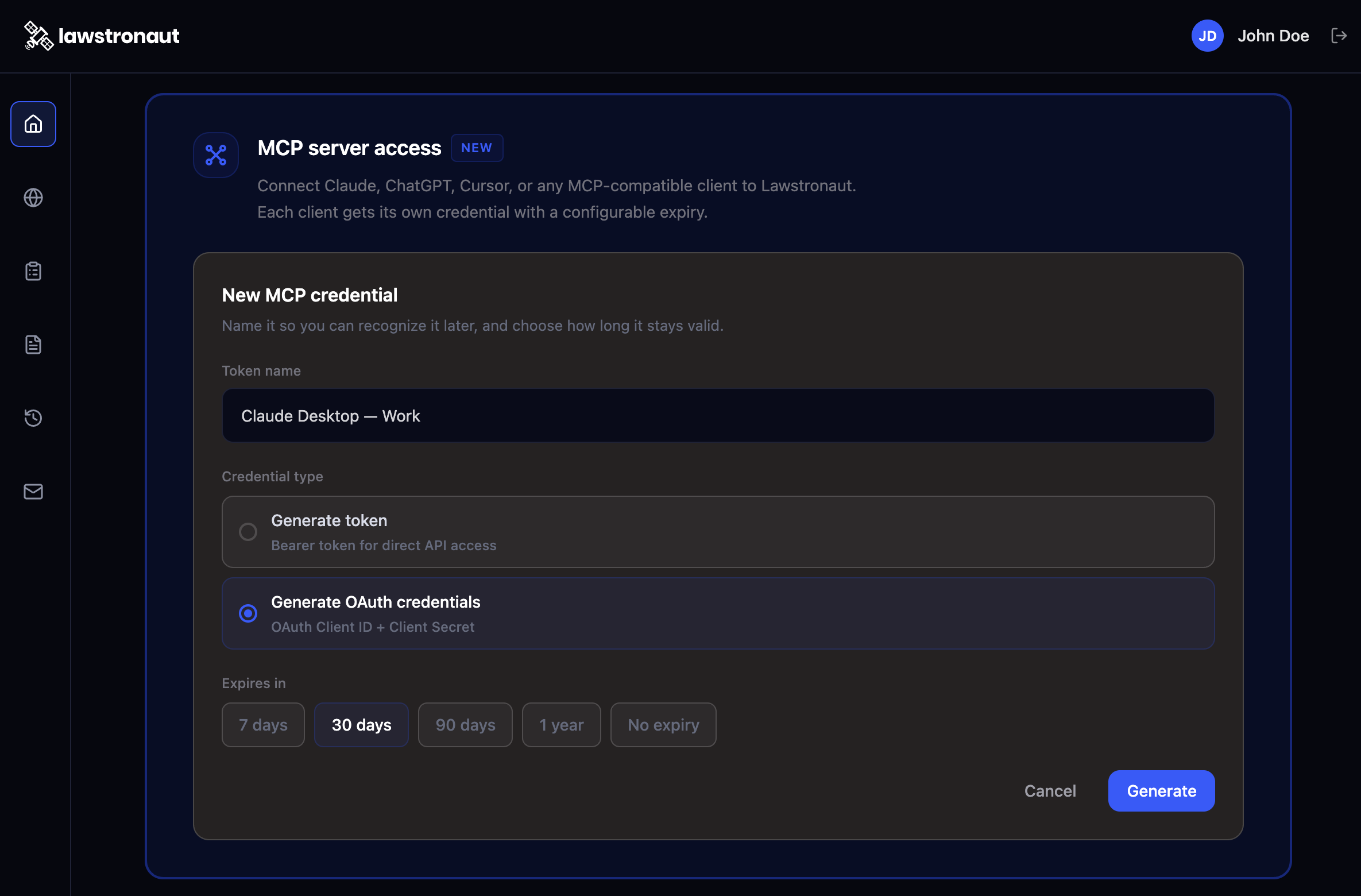
Option A — Bearer token
Use the bearer token from MCP server access:
Authorization: Bearer <your-token>
Set it in your environment:
export LAWSTRONAUT_MCP_BEARER_TOKEN="your-token-here"
Example configs: cursor-mcp.json, vscode-mcp.json, claude-code.mcp.json.
Option B — OAuth 2.0 (client_id + client_secret)
Use the client_id and client_secret created under MCP server access in the developer portal.
Flow: response_type=code → redirect with code → exchange at /oauth/token with grant_type=authorization_code, client_id, client_secret, code, and redirect_uri.
Clients that support MCP OAuth discovery only need the server URL — they handle the flow using your registered client_id / client_secret.
Example configs: cursor-mcp-oauth.json, vscode-mcp-oauth.json.
Setup
Pick your client, paste the config, and authenticate with your lawstronaut account. Most clients open a browser window for OAuth the first time an agent uses a lawstronaut tools.
Cursor
Bearer token
- Copy
cursor-mcp.json to .cursor/mcp.json (project) or ~/.cursor/mcp.json (global).
- Export
LAWSTRONAUT_MCP_BEARER_TOKEN.
- Restart Cursor. Check Output → MCP Logs if connection fails.
OAuth
- Copy
cursor-mcp-oauth.json to .cursor/mcp.json.
- Complete the OAuth sign-in when Cursor prompts you (uses your registered
client_id / client_secret).
Docs: Cursor MCP.
VS Code (GitHub Copilot agent / MCP)
Bearer token
- Copy
vscode-mcp.json to .vscode/mcp.json, or merge into your user MCP config.
- Run MCP: List Servers and enter your bearer token when prompted.
OAuth
- Copy
vscode-mcp-oauth.json to .vscode/mcp.json.
- Sign in through VS Code when prompted.
Docs: MCP configuration reference.
Claude Code (CLI)
Bearer token — CLI
export LAWSTRONAUT_MCP_BEARER_TOKEN="your-token-here"

claude mcp add --transport http lawstronaut-mcp https://mcp.lawstronaut.com \
  --header "Authorization: Bearer $LAWSTRONAUT_MCP_BEARER_TOKEN"
Bearer token — project file
Copy claude-code.mcp.json to .mcp.json in your project root.
OAuth
Add the server URL only and complete OAuth when prompted:
claude mcp add --transport http lawstronaut-mcp https://mcp.lawstronaut.com
Docs: Connect Claude Code to tools via MCP.
Claude Desktop (Anthropic app)
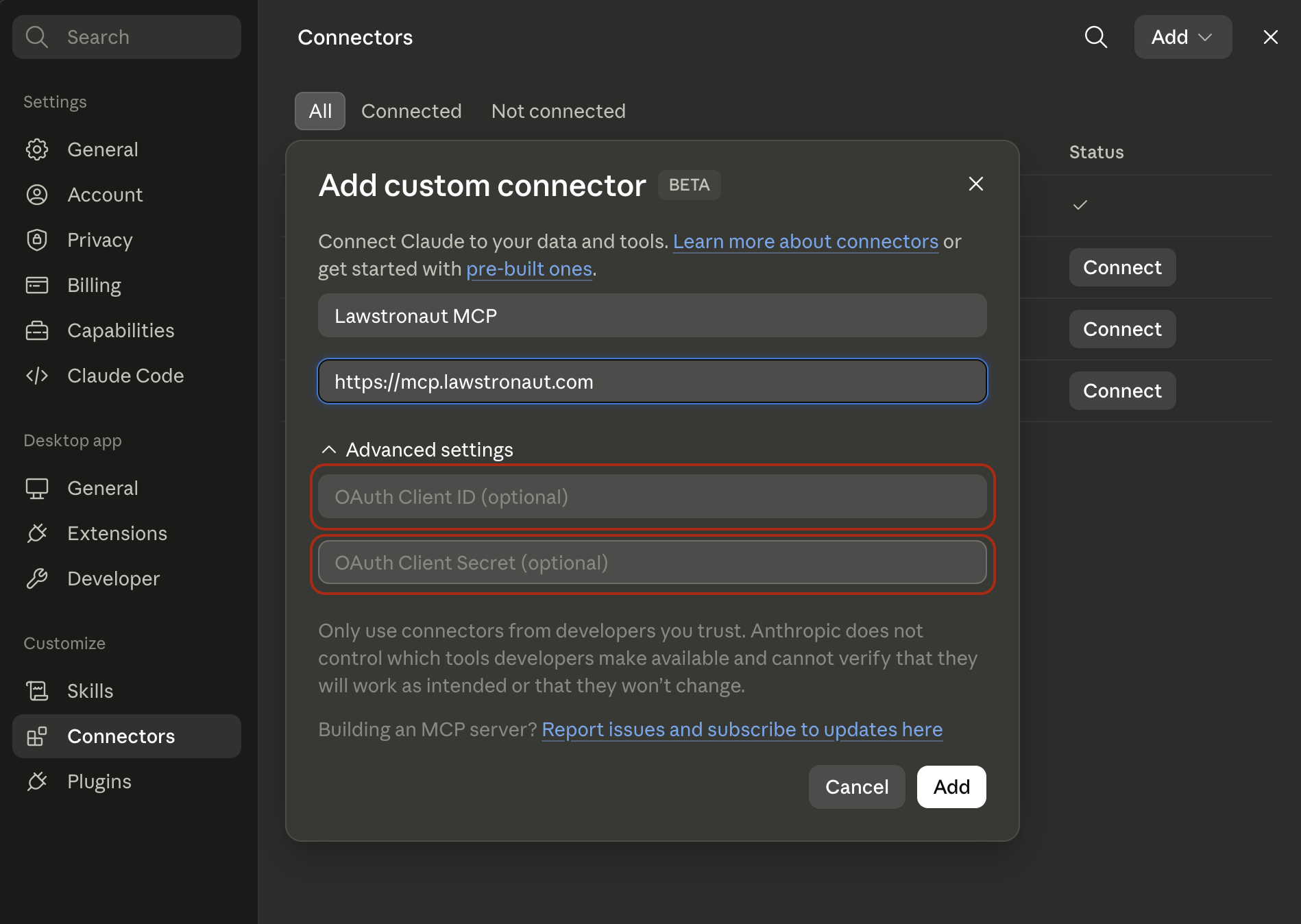
Claude Desktop is oriented toward stdio MCP servers. For this HTTP server, use Cursor, VS Code, or Claude Code, or any host that supports remote Streamable HTTP MCP.
Go to Customize, Connectors, click "+", Add Custom Connector, and fill the dialog:
Other hosts (Continue, Zed, custom agents, etc.)
Any client that supports MCP Streamable HTTP can connect with:
- URL:
https://mcp.lawstronaut.com
- Bearer:
Authorization: Bearer <token>
- OAuth: use discovery at
/.well-known/oauth-authorization-server with your client_id / client_secret
-
list_jurisdictions — List every country and state in the authenticated subscription (name, iso, type, documents_count). Call first to get valid ISO codes. Takes no parameters.
-
list_domains — List top-level legal domains (id, domain_id, domain). Pass domain_id to list_subdomains.
domain: Filter by domain name (string, optional)limit: Number of results to return (number, optional)next_id: Next ID to paginate the results (number, optional)
-
list_subdomains — List subdomains under one domain. Pass subdomain_id to list_categories.
domain_id: Filter by Domain ID (string, required)subdomain: Filter by subdomain name (string, optional)limit: Number of results to return (number, optional)next_id: Next ID to paginate the results (number, optional)
-
list_categories — List categories under one subdomain. Pass category_id to list_subcategories.
subdomain_id: Filter by Subdomain ID (string, optional)category_name: Filter by category name (string, optional)limit: Number of results to return (number, optional)next_id: Next ID to paginate the results (number, optional)
-
list_subcategories — List subcategories under one category. Pass subcategory_id to list_law_types.
category_id: Filter by Category ID (string, required)subcategory_name: Filter by subcategory name (string, optional)limit: Number of results to return (number, optional)next_id: Next ID to paginate the results (number, optional)
-
list_law_types — List law types under one subcategory. Last taxonomy step; does not return documents.
subcategory_id: Filter by Subcategory ID (string, required)law_type: Filter by law type name (string, optional)limit: Number of results to return (number, optional)next_id: Next ID to paginate the results (number, optional)
-
list_portals — List source portals for a jurisdiction. Filter by name, tag, language, or portal ID.
iso: Jurisdiction code from list_jurisdictions (e.g. BE, or US_CA for a state) (string, required)name: Case-insensitive substring of the portal name (string, optional)portal_tags: Exact portal tag; the portal must include this tag (string, optional)lang: Exact language name, e.g. English (string, optional)portal_id: Portal ID (number, optional)limit: Number of portals to return (number, optional)next_id: Next portal ID to return (number, optional)advanced_search: Advanced search enabled (boolean, required, default false)
-
list_authority_types — List authority types for a jurisdiction. Filter by portal name or authority type.
iso: Filter by Jurisdiction ISO code (e.g. 'US') (string, required)limit: Number of results to return (number, optional)next_id: Next portal ID to return (number, optional)portal_name: Filter by portal name (string, optional)authority_type: Filter by authority type (string, optional)
-
list_issuing_authorities — List issuing authorities for a jurisdiction. Filter by portal name or authority name.
iso: Filter by Jurisdiction ISO code (e.g. 'US') (string, required)limit: Number of results to return (number, optional)next_id: Next issuing authority ID to return (number, optional)portal_name: Filter by portal name (string, optional)issuing_authority: Filter by issuing authority (string, optional)
-
list_documents — List document metadata in a jurisdiction (title, dates, source, classification). Does not return the body, a citation bundle, or a source-file URL.
iso: Filter by Jurisdiction ISO code (e.g. 'US') (string, required)limit: Page size. Default 20, maximum 100 (integer, optional)portal: Filter by portal name (string, optional)portal_id: Filter by portal ID (number, optional)lang: Exact portal language name, for example English. Filters the portal, not the document language (string, optional)status: Filter by document status (string, optional)url: Filter by document URL (string, optional)is_repealed: Filter by repealed documents (boolean, required, default false)crawling_date: YYYY-MM-DD, or a range YYYY-MM-DD-to-YYYY-MM-DD (string, optional)last_updated: YYYY-MM-DD, or a range YYYY-MM-DD-to-YYYY-MM-DD (string, optional)last_amendment: YYYY-MM-DD, or a range YYYY-MM-DD-to-YYYY-MM-DD (string, optional)publication_date: YYYY-MM-DD, or a range YYYY-MM-DD-to-YYYY-MM-DD (string, optional)expiration_date: YYYY-MM-DD, or a range YYYY-MM-DD-to-YYYY-MM-DD (string, optional)effective_date: YYYY-MM-DD, or a range YYYY-MM-DD-to-YYYY-MM-DD (string, optional)date_of_enactment: YYYY-MM-DD, or a range YYYY-MM-DD-to-YYYY-MM-DD (string, optional)uuid: Filter by UUID (string, optional)next_id: Document id of the first row of the next page, from pagination.next_id. Omit on the first page (number, optional)include_total: Include total count in the response (boolean, required, default false)title: Filter by title (string, optional)version: Filter by version (string, optional)section_title: Filter by section title (string, optional)date_of_decision: YYYY-MM-DD, or a range YYYY-MM-DD-to-YYYY-MM-DD (string, optional)file_data_only: false returns documents with and without file metadata. true returns only documents with file metadata (boolean, required, default false)issuing_authority: Filter by issuing authority (string, optional)type_of_authority: Filter by type of authority (string, optional)source_identifier: Filter by source identifier (string, optional)source_secondary_identifier: Filter by secondary source identifier (string, optional)tag: Filter by portal tag (string, optional)issuing_authority_tags: Filter by issuing authority tags (array of strings, optional)
-
list_full_text — Return the plain-text body of matching documents (id, uuid, version, text). No Markdown structure and no citation metadata.
iso: Filter by Jurisdiction ISO code (e.g. 'US') (string, required)limit: Page size. Default 20, maximum 100 (integer, optional)portal: Filter by portal name (string, optional)portal_id: Filter by portal ID (number, optional)lang: Exact portal language name, for example English. Filters the portal, not the document language (string, optional)status: Filter by document status (string, optional)url: Filter by document URL (string, optional)is_repealed: Filter by repealed documents (boolean, required, default false)crawling_date: YYYY-MM-DD, or a range YYYY-MM-DD-to-YYYY-MM-DD (string, optional)last_updated: YYYY-MM-DD, or a range YYYY-MM-DD-to-YYYY-MM-DD (string, optional)last_amendment: YYYY-MM-DD, or a range YYYY-MM-DD-to-YYYY-MM-DD (string, optional)publication_date: YYYY-MM-DD, or a range YYYY-MM-DD-to-YYYY-MM-DD (string, optional)expiration_date: YYYY-MM-DD, or a range YYYY-MM-DD-to-YYYY-MM-DD (string, optional)effective_date: YYYY-MM-DD, or a range YYYY-MM-DD-to-YYYY-MM-DD (string, optional)date_of_enactment: YYYY-MM-DD, or a range YYYY-MM-DD-to-YYYY-MM-DD (string, optional)uuid: Filter by UUID (string, optional)next_id: Document id of the first row of the next page, from pagination.next_id. Omit on the first page (number, optional)include_total: Include total count in the response (boolean, required, default false)title: Filter by title (string, optional)with_empty_data: Include documents that have no stored plain text (text is null). Default omits them (boolean, required, default false)
-
list_markdown — Return the structured Markdown body of matching documents (id, uuid, version, markdown). Headings and lists stay intact.
iso: Filter by Jurisdiction ISO code (e.g. 'US') (string, required)limit: Page size. Default 20, maximum 100 (integer, optional)portal: Filter by portal name (string, optional)portal_id: Filter by portal ID (number, optional)lang: Exact portal language name, for example English. Filters the portal, not the document language (string, optional)status: Filter by document status (string, optional)url: Filter by document URL (string, optional)is_repealed: Filter by repealed documents (boolean, required, default false)crawling_date: YYYY-MM-DD, or a range YYYY-MM-DD-to-YYYY-MM-DD (string, optional)last_updated: YYYY-MM-DD, or a range YYYY-MM-DD-to-YYYY-MM-DD (string, optional)last_amendment: YYYY-MM-DD, or a range YYYY-MM-DD-to-YYYY-MM-DD (string, optional)publication_date: YYYY-MM-DD, or a range YYYY-MM-DD-to-YYYY-MM-DD (string, optional)expiration_date: YYYY-MM-DD, or a range YYYY-MM-DD-to-YYYY-MM-DD (string, optional)effective_date: YYYY-MM-DD, or a range YYYY-MM-DD-to-YYYY-MM-DD (string, optional)date_of_enactment: YYYY-MM-DD, or a range YYYY-MM-DD-to-YYYY-MM-DD (string, optional)uuid: Filter by UUID (string, optional)next_id: Document id of the first row of the next page, from pagination.next_id. Omit on the first page (number, optional)include_total: Include total count in the response (boolean, required, default false)title: Filter by title (string, optional)with_empty_data: Include documents that have no stored Markdown (markdown is null). Default omits them (boolean, required, default false)
-
document_presigned_url — Return a temporary signed URL to the original source file (PDF or other stored file) for one document. The URL expires.
uuid: Document UUID (string, required)
-
document_version — Retrieve one document at a specific version, including metadata and both text bodies.
uuid: Document UUID (string, required)version: Version (integer, required)
-
horizon_scan — Scan recent legal documents in one jurisdiction. Filter by topic, date window, status, and authority.
iso: One ISO code, e.g. IE, NL, US (string, required)since: Freshness window. yesterday, today, Nd / Nh / Nw (e.g. 7d), or ISO date YYYY-MM-DD (string, required, default yesterday)topic: Optional filter matched against the title, e.g. employee monitoring (string, optional)date_field: Which date to window on. crawl_date, publication_date, or last_updated (string, required, default crawling_date)status: Optional filter on status, e.g. new or updated (string, optional)issuing_authority: Optional filter on issuing authority (string, optional)type_of_authority: Optional filter on type of authority (string, optional)include_repealed: When false, drop documents where repealed is true (boolean, required, default false)max_per_jurisdiction: Max documents to return per jurisdiction, 1–100 (integer, required, default 20)
-
evidence_pull — Return one citation bundle: metadata, permanent legal_link, citation template, body, and a temporary source-file URL when one exists.
iso: Document's jurisdiction ISO code, e.g. IE, NL, US (string, required)uuid: Document UUID (string, required)include_text: Fetch the full body (boolean, required, default true)include_source_url: Fetch a temporary signed URL to the original file where available (boolean, required, default true)text_format: markdown (preserves structure) or plain (string, required, default markdown)
-
search — Search legal documents with OpenSearch. Returns matching documents and their metadata. Use list_documents to browse with structured filters and cursor pagination.
iso: Filter by Jurisdiction ISO code (e.g. 'US') (string, required)limit: Page size. Default 20, maximum 100 (integer, optional)portal: Filter by portal name (string, optional)portal_id: Filter by portal ID (number, optional)lang: Exact portal language name, for example English. Filters the portal, not the document language (string, optional)status: Filter by document status (string, optional)url: Filter by document URL (string, optional)is_repealed: Filter by repealed documents (boolean, required, default false)crawling_date: YYYY-MM-DD, or a range YYYY-MM-DD-to-YYYY-MM-DD (string, optional)last_updated: YYYY-MM-DD, or a range YYYY-MM-DD-to-YYYY-MM-DD (string, optional)last_amendment: YYYY-MM-DD, or a range YYYY-MM-DD-to-YYYY-MM-DD (string, optional)publication_date: YYYY-MM-DD, or a range YYYY-MM-DD-to-YYYY-MM-DD (string, optional)expiration_date: YYYY-MM-DD, or a range YYYY-MM-DD-to-YYYY-MM-DD (string, optional)effective_date: YYYY-MM-DD, or a range YYYY-MM-DD-to-YYYY-MM-DD (string, optional)date_of_enactment: YYYY-MM-DD, or a range YYYY-MM-DD-to-YYYY-MM-DD (string, optional)uuid: Filter by UUID (string, optional)next_id: Document id of the first row of the next page, from pagination.next_id. Omit on the first page (number, optional)include_total: Include total count in the response (boolean, required, default false)file_data_only: Filter by file data only (boolean, required, default false)version: Filter by version (string, optional)date_of_decision: YYYY-MM-DD, or a range YYYY-MM-DD-to-YYYY-MM-DD (string, optional)issuing_authority: Filter by issuing authority (string, optional)type_of_authority: Filter by type of authority (string, optional)source_identifier: Filter by source identifier (string, optional)source_secondary_identifier: Filter by secondary source identifier (string, optional)tag: Filter by tag (string, optional)issuing_authority_tags: Filter by issuing authority tags (array of strings, optional)keyword: Search text matched against the heading and the body. Omit it to list by filters only, newest document id first (string, optional)
All tools are read-only. OAuth tokens are issued with scope mcp:tools:read. Tool listing is public; tool calls require authentication.








