
A Rust CAD application with an MCP server for creating, inspecting and rendering drawings, either headlessly or through a connection to the desktop app.
8K
Media & Design
An MCP server that connects AI clients to ListenHub for podcast generation with 1-2 speakers, FlowSpeech voice generation, speaker lookup, and subscription queries.
Official ListenHub MCP Server is cataloged as an MCP server attributed to marswaveai. An MCP server that connects AI clients to ListenHub for podcast generation with 1-2 speakers, FlowSpeech voice generation, speaker lookup, and subscription queries. It is categorized under media design. See the capability inspector for recorded interfaces and their independent review status; consult upstream documentation for the current interface.
Installation configuration is not reviewed. No executable setup is offered for this entry; inspect the source repository before proceeding.
Catalog license label: Not specified. Check the source repository's current license and terms before using, modifying or distributing this software.
Capability definitions are not reviewed. Unreviewed imports are not exposed as trusted interfaces.
No reviewed records to display. This does not establish that upstream lacks this capability.
No reviewed records to display. This does not establish that upstream lacks this capability.
No reviewed records to display. This does not establish that upstream lacks this capability.
Email delivery is not connected. This page does not collect email addresses or create subscriptions.
Browse the registry for current listings instead.
Reviews for Official ListenHub MCP Server are not available yet
Review publishing and storage are not connected. This page does not collect or publish ratings or comments, including after sign-in.
Podcasts support Quick Listen, Deep Exploration, and Debate modes.
Yes, text-only podcast generation is supported as the first stage of a two-stage generation process, with audio generated afterward.
The server supports Stdio, HTTP SSE, and HTTP Streamable transport methods.
README.md · 0269633e63bb · Fetched 2026-11-13 12:52:32 UTC
Original upstream text, without AI rewriting. Scripts, forms and unsafe links are filtered for safety.
Showing the last retrieved documentation snapshot; check the source for current changes.
Official MCP Server for ListenHub, supporting AI podcast generation (single or dual-speaker), FlowSpeech creation, and more. Available for ListenHub Pro plan and above.





English | 简体中文
Installing Node.js
This server requires Node.js version 18 or higher. If you haven't installed Node.js yet, please follow the instructions below:
.pkg file and follow the installation wizardnode --version
npm --version
/bin/bash -c "$(curl -fsSL https://raw.githubusercontent.com/Homebrew/install/HEAD/install.sh)"
# After successful installation, use brew to download Node.js
brew install node
node --version
npm --version
.msi installernode --version
npm --version
winget install OpenJS.NodeJS.LTS
node --version
npm --version
choco install nodejs-lts
node --version
npm --version
# Install Node.js 20.x (LTS)
curl -fsSL https://deb.nodesource.com/setup_20.x | sudo -E bash -
sudo apt-get install -y nodejs
# Install Node.js 20.x (LTS)
curl -fsSL https://rpm.nodesource.com/setup_20.x | sudo bash -
sudo yum install -y nodejs
node --version
npm --version
Get ListenHub API Key
Get your API key from the ListenHub API Keys Settings page and use it as the value for the LISTENHUB_API_KEY environment variable.
~/Library/Application Support/Claude/claude_desktop_config.json
Windows: %APPDATA%\Claude\claude_desktop_config.json
Add the following configuration:
{
  "mcpServers": {
    "listenhub": {
      "command": "npx",
      "args": ["-y", "@marswave/listenhub-mcp-server@latest"],
      "env": {
        "LISTENHUB_API_KEY": "your_api_key_here"
      }
    }
  }
}
your_api_key_here with your actual API key obtained from ListenHub.~/.cursor/mcp.json%APPDATA%\Cursor\mcp.json
Add the following configuration:{
"mcpServers": {
"listenhub": {
"command": "npx",
"args": ["-y", "@marswave/listenhub-mcp-server@latest"],
"env": {
"LISTENHUB_API_KEY": "your_api_key_here"
}
}
}
}
your_api_key_here with your actual API key obtained from ListenHub.
Optional: HTTP Mode
To use HTTP transport, manually start the server:
export LISTENHUB_API_KEY="your_api_key_here"
npx @marswave/listenhub-mcp-server --transport http --port 3000
{
  "mcpServers": {
    "listenhub": {
      "url": "http://localhost:3000/mcp"
    }
  }
}
~/.windsurf/mcp_server_config.json%APPDATA%\Windsurf\mcp_server_config.json
Add the following configuration:{
"mcpServers": {
"listenhub": {
"command": "npx",
"args": ["-y", "@marswave/listenhub-mcp-server@latest"],
"env": {
"LISTENHUB_API_KEY": "your_api_key_here"
}
}
}
}
your_api_key_here with your actual API key obtained from ListenHub.{
"cline.mcpServers": {
"listenhub": {
"command": "npx",
"args": ["-y", "@marswave/listenhub-mcp-server@latest"],
"env": {
"LISTENHUB_API_KEY": "your_api_key_here"
}
}
}
}
your_api_key_here with your actual API key obtained from ListenHub.~/.config/zed/mcp.json%APPDATA%\Zed\mcp.json
Add the following configuration:{
"mcpServers": {
"listenhub": {
"command": "npx",
"args": ["-y", "@marswave/listenhub-mcp-server@latest"],
"env": {
"LISTENHUB_API_KEY": "your_api_key_here"
}
}
}
}
your_api_key_here with your actual API key obtained from ListenHub.claude mcp add listenhub --env LISTENHUB_API_KEY=<insert-your-api-key-here> -- npx -y @marswave/listenhub-mcp-server
<insert-your-api-key-here> with your actual API key obtained from ListenHub.codex mcp add listenhub --env LISTENHUB_API_KEY=<insert-your-api-key-here> -- npx -y @marswave/listenhub-mcp-server
<insert-your-api-key-here> with your actual API key obtained from ListenHub.npx -y @marswave/listenhub-mcp-server@latestLISTENHUB_API_KEY with your API key as the value{
"mcpServers": {
"listenhub": {
"command": "npx",
"args": ["-y", "@marswave/listenhub-mcp-server@latest"],
"env": {
"LISTENHUB_API_KEY": "your_api_key_here"
}
}
}
}
your_api_key_here with your actual API key obtained from ListenHub.Generate English Podcast
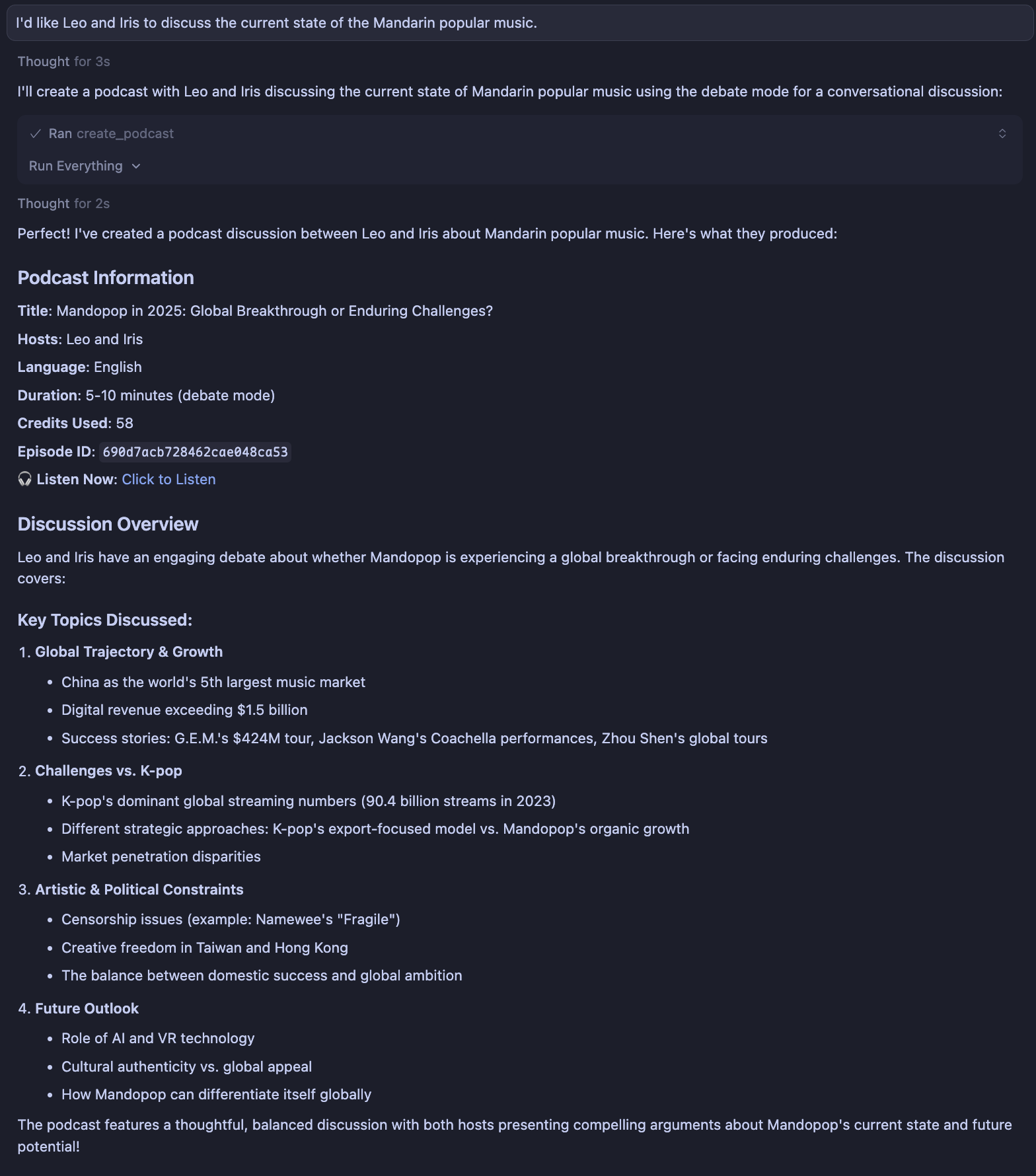
The server supports multiple transport modes to suit different use cases.
Standard input/output communication. This is the default mode used by most MCP clients (such as Claude Desktop, Cursor, etc.).
All configuration examples above use stdio mode by default, requiring no additional setup.
For advanced use cases, you can run the server in HTTP mode, providing both HTTP streaming and Server-Sent Events (SSE) endpoints.
Start the server in HTTP mode:
# macOS/Linux
export LISTENHUB_API_KEY="your_api_key_here"
npx @marswave/listenhub-mcp-server --transport http --port 3000
# Windows
set LISTENHUB_API_KEY=your_api_key_here

npx @marswave/listenhub-mcp-server --transport http --port 3000
Available endpoints:
http://localhost:3000/mcphttp://localhost:3000/sseConfigure your MCP client to use HTTP endpoint:
{
  "mcpServers": {
    "listenhub": {
      "url": "http://localhost:3000/mcp"
    }
  }
}
language: Filter by language code (zh/en) (string, optional)query: Content or topic (string, optional)sources: Array of text/URL sources (array, optional)speakerIds: Array of 1-2 speaker IDs (array, required)language: Language code - zh or en (string, optional, default: en)mode: Generation mode - quick, deep, or debate (string, optional, default: quick)episodeId: Podcast ID (string, required)query: Content or topic (string, optional)sources: Array of text/URL sources (array, optional)speakerIds: Array of 1-2 speaker IDs (array, required)language: Language code - zh or en (string, required)mode: Generation mode - quick, deep, or debate (string, optional, default: quick)waitForCompletion: Wait for generation to complete (boolean, optional, default: true)episodeId: Podcast ID (string, required)customScripts: Array of custom scripts (array, optional)waitForCompletion: Wait for generation to complete (boolean, optional, default: true)sourceType: Source type - text or url (string, required)sourceContent: Source content (text or URL) (string, required)speakerId: Speaker ID for narration (string, required)language: Language code - zh or en (string, optional)mode: Generation mode - smart or direct (string, optional, default: smart)episodeId: FlowSpeech ID (string, required)Thank you for using ListenHub MCP Server!
If you have any questions, please feel free to contact us: support@marswave.ai
Claim this server with your GitHub account to request manual ownership verification.
Link to the catalog listing for Official ListenHub MCP Server from your README. This badge does not certify ownership, compatibility or security.
[](https://awesome-mcp.com/servers/listenhub-mcp-server)Public repository statistics could not be verified. Check the configured source address; unavailable counts are not zero.
Separate sources, scopes and periods. Never combined or treated as installations, active users or security reviews.
No reviewed package or image identity; download statistics are not listed yet.
Alternative and complementary servers in the same category
A Rust CAD application with an MCP server for creating, inspecting and rendering drawings, either headlessly or through a connection to the desktop app.

Liquid Composer is a browser-based Liquid Glass icon design tool that offers a local MCP server for agent-driven icon workflows.

agent-media makes short drama series and other short vertical videos from Claude, ChatGPT or Codex through one MCP connection, with OAuth sign-in and no API keys.