

A directory listing describing a cancellation-letter and mailing-address service. The configured public GitHub repository returned 404 during source verification.
Repository stats unavailable
Developer Tools
An MCP server that lets MCP-capable clients inspect JVM dependencies using live Maven Central data, covering version checks, dependency audits, POM analysis, upgrade planning, and optional documentation lookups.
Maven Tools MCP Server is cataloged as an MCP server attributed to arvindand. An MCP server that lets MCP-capable clients inspect JVM dependencies using live Maven Central data, covering version checks, dependency audits, POM analysis, upgrade planning, and optional documentation lookups. It is categorized under developer tools. See the capability inspector for recorded interfaces and their independent review status; consult upstream documentation for the current interface.
Installation configuration is not reviewed. No executable setup is offered for this entry; inspect the source repository before proceeding.
Catalog license label: MIT. Check the source repository's current license and terms before using, modifying or distributing this software.
Capability definitions are not reviewed. Unreviewed imports are not exposed as trusted interfaces.
No reviewed records to display. This does not establish that upstream lacks this capability.
No reviewed records to display. This does not establish that upstream lacks this capability.
No reviewed records to display. This does not establish that upstream lacks this capability.
Email delivery is not connected. This page does not collect email addresses or create subscriptions.
Browse the registry for current listings instead.
Reviews for Maven Tools MCP Server are not available yet
Review publishing and storage are not connected. This page does not collect or publish ratings or comments, including after sign-in.
No. The server provides dependency analysis and upgrade recommendations; file edits, testing, scheduling, and PR creation require a separate agent or workflow.
Not fully. Uncached metadata queries need access to Maven Central or a configured repository, and vulnerability checks and Context7 documentation also use external services.
No. Those dependencies can be queried by Maven coordinates using the coordinate-based tools, but whole-file analysis accepts Maven POM XML only.
README.md · 54e55c05e6bf · Fetched 2026-11-13 11:42:32 UTC
Original upstream text, without AI rewriting. Scripts, forms and unsafe links are filtered for safety.
Showing the last retrieved documentation snapshot; check the source for current changes.








Maven Tools MCP Server gives MCP-capable clients a practical way to inspect JVM dependencies using live Maven Central data.
It is built for developers and agents that need more than a plain version lookup: stability filtering, upgrade comparisons, dependency health signals, license data, CVE checks, and optional documentation lookups through Context7.
Coordinate-based tools work with Maven, Gradle, SBT, and Mill projects. The POM analysis and upgrade-planning tools take Maven pom.xml files.
Prerequisite: Docker installed and running. No local Java installation is required. For a Docker-free setup, see building and running the JAR.
Add the maven-tools entry to your Claude Desktop config (see config file locations):
{
  "mcpServers": {
    "maven-tools": {
      "command": "docker",
      "args": ["run", "-i", "--rm", "arvindand/maven-tools-mcp:latest"]
    }
  }
}
Add the following server to .vscode/mcp.json in your workspace:
{
  "servers": {
    "maven-tools": {
      "type": "stdio",
      "command": "docker",
      "args": ["run", "-i", "--rm", "arvindand/maven-tools-mcp:latest"]
    }
  }
}
| Tag | Transport | Context7 | Best For |
|---|---|---|---|
:latest | STDIO | Yes | Default desktop MCP usage |
:latest-noc7 | STDIO | No | Networks where Context7 is blocked or not wanted |
:latest-http | HTTP | Yes | Streamable HTTP clients and sidecar workflows |
The current release is v3.2.4. For version-pinned setups, use :3.2.4, :3.2.4-noc7 or :3.2.4-http; each supports Linux AMD64 and ARM64.
CONTEXT7_API_KEY is optional. Most setups can start without it. If your environment requires Context7 auth, or you want to avoid anonymous limits, pass it through Docker with -e CONTEXT7_API_KEY.
For fuller setup guidance, including JAR and native-container usage, Docker Compose, and environment notes, see docs/setup.md.
The default image exposes 11 MCP tools; -noc7 exposes the 9 core tools.
| Tool | What It Does |
|---|---|
get_latest_version | Find the latest version with stability-aware selection |
check_version_exists | Verify a specific version and classify its stability |
check_multiple_dependencies | Bulk lookup for dependency coordinates |
compare_dependency_versions | Compare current versions against available upgrades |
analyze_dependency_age | Classify how old a dependency is |
analyze_release_patterns | Look at release cadence and maintenance signals |
analyze_project_health | Run a broader dependency health audit |
analyze_pom_dependencies | Resolve declared dependency versions, identify their source, and surface BOM conflicts |
recommend_pom_upgrades | Produce actionable POM upgrade recommendations and flag changes needing review |
| Tool | What It Does |
|---|---|
resolve_library_id | Find a documentation library identifier |
query_docs | Fetch docs by Context7 library ID |
For parameters, examples, and tool-by-tool notes, see docs/tools.md.
Both POM tools use Apache Maven Model Builder for parent inheritance, properties, and dependency management, including imported BOMs. They accept raw POM XML and an optional sideloadedPoms bundle for unreleased parents or sibling modules.
analyze_pom_dependencies returns effective versions, classifies declarations as EXPLICIT, MANAGED, or EXPLICIT_OVERRIDE, and identifies managing BOMs and conflicts.recommend_pom_upgrades returns deterministicActions for mechanical edits and needsAttention for major upgrades, BOM conflicts, and explicit overrides. Actions identify the version field or property to edit in the input POM.Recommendations cover editable parent/BOM versions, explicit dependencies, root dependency-management entries, and direct build/plugin dependencies. Declarations without an unambiguous edit location in the input POM are skipped. The server returns recommendations; the client or agent validates and applies them.
Analysis covers declared dependencies, not the full transitive dependency graph. Profile activation is limited to active-by-default profiles. See POM analysis details and limits.
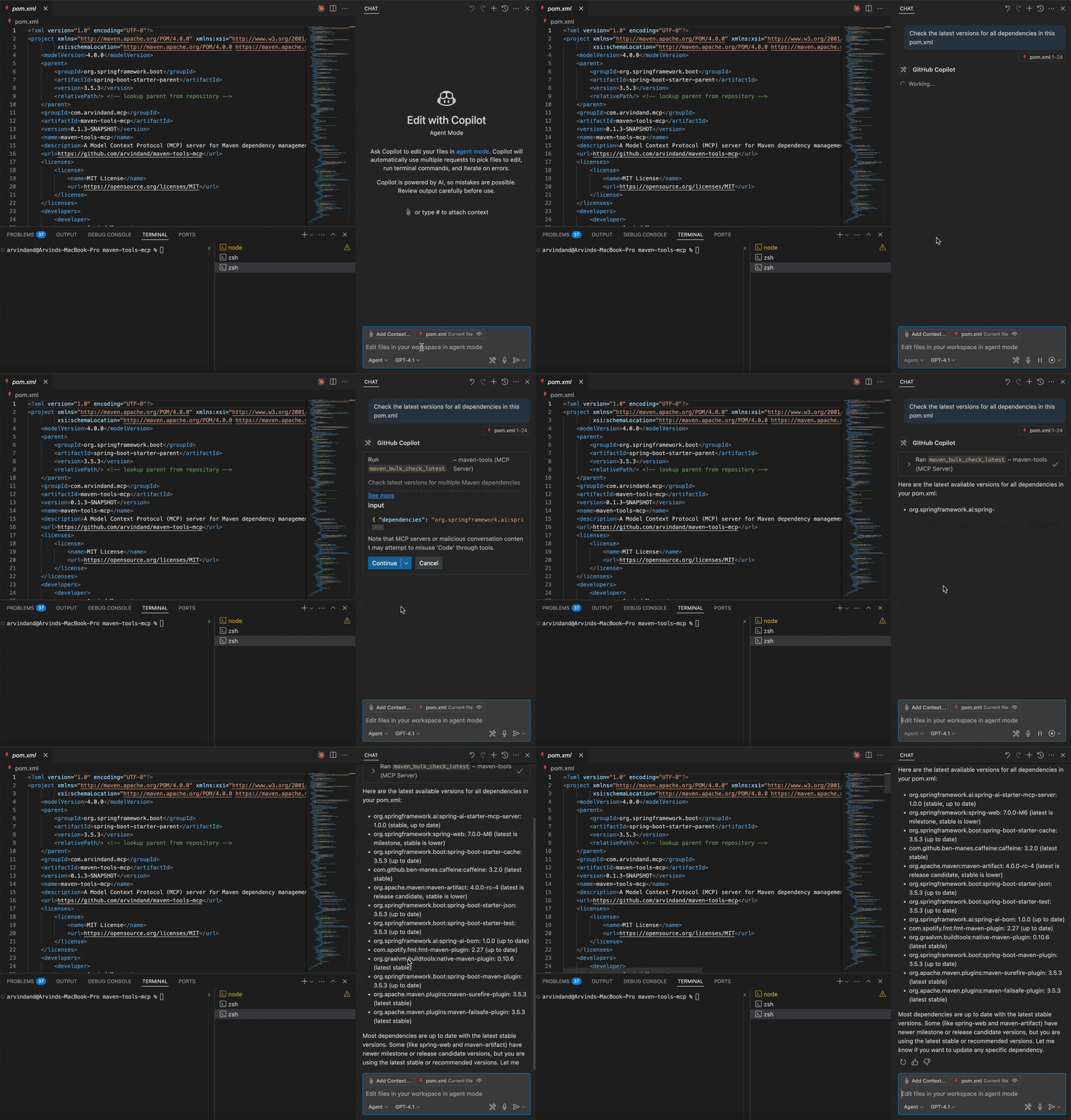
A common prompt in Copilot or Claude is:
Check all latest versions of the dependencies in my
pom.xmland call out anything risky.
The client can combine tool results to report:
For broader questions like "which library should I choose?", combine Maven metadata with Context7 documentation and client-side web search for ecosystem context.
See more prompt examples or the maven-tools agent skill for guidance on choosing and combining tools.
This repository uses its own tools in a weekly dependency-update workflow. A Python agent sends the POM to recommend_pom_upgrades, validates and applies minor/patch actions, and opens a PR for review. Its XML editor checks current versions and preserves formatting. Manual major-upgrade reviews use the GitHub Copilot SDK; routine updates do not require an LLM.
See the dogfooding guide for the agent, GitHub Actions workflow, credentials, and manual triggers.
For a few more usage notes, see the FAQ section in docs/examples.md.
The effective POM resolver under com.arvindand.mcp.maven.pom follows the resolution
shape of maxxq-org/maxxq-maven (MIT,
Guy Chauliac), scoped here to declared-dep resolution. See NOTICE.
docs/setup.md - installation, client configuration, image variants, build-from-source optionsdocs/tools.md - full tool catalog, parameters, and response behaviordocs/examples.md - practical prompts, advanced use cases, reusable commands, and FAQ notesdocs/dogfooding.md - weekly self-update workflow and agent integrationdocs/troubleshooting.md - common environment issues and fixesdocs/architecture.md - design principles, transport/runtime options, and technical notesCORPORATE-CERTIFICATES.md - custom CA certificate support for locked-down networksIf you want to build or test locally, start with docs/setup.md and the helper scripts in build/.
Check out v3.2.4 to build this release from source; main may contain unreleased changes.
Project history and release notes live in CHANGELOG.md.
This project is licensed under the MIT License. See LICENSE.
Arvind Menon
Claim this server with your GitHub account to request manual ownership verification.
Link to the catalog listing for Maven Tools MCP Server from your README. This badge does not certify ownership, compatibility or security.
[](https://awesome-mcp.com/servers/maven-tools-mcp)Public repository statistics could not be verified. Check the configured source address; unavailable counts are not zero.
Separate sources, scopes and periods. Never combined or treated as installations, active users or security reviews.
No reviewed package or image identity; download statistics are not listed yet.
Alternative and complementary servers in the same category
A directory listing describing a cancellation-letter and mailing-address service. The configured public GitHub repository returned 404 during source verification.

A hosted MCP service for browsing and searching through Singapore mobile-network proxies.

A directory listing describing a Markdown-to-PDF service. The configured public GitHub repository returned 404 during source verification.