
A directory listing describing a cancellation-letter and mailing-address service. The configured public GitHub repository returned 404 during source verification.
Repository stats unavailable
Developer Tools
A FastMCP server that bridges MCP clients to Max (Max/MSP) patches, letting LLMs explain, modify, and create Max objects.
Extended MaxMSP MCP server for understanding and generating Max patches is cataloged as an MCP server attributed to ersatzben. A FastMCP server that bridges MCP clients to Max (Max/MSP) patches, letting LLMs explain, modify, and create Max objects. It is categorized under developer tools. See the capability inspector for recorded interfaces and their independent review status; consult upstream documentation for the current interface.
Installation configuration is not reviewed. No executable setup is offered for this entry; inspect the source repository before proceeding.
Catalog license label: MIT License. Check the source repository's current license and terms before using, modifying or distributing this software.
Capability definitions are not reviewed. Unreviewed imports are not exposed as trusted interfaces.
No reviewed records to display. This does not establish that upstream lacks this capability.
No reviewed records to display. This does not establish that upstream lacks this capability.
No reviewed records to display. This does not establish that upstream lacks this capability.
Email delivery is not connected. This page does not collect email addresses or create subscriptions.
Browse the registry for current listings instead.
Reviews for Extended MaxMSP MCP server for understanding and generating Max patches are not available yet
Review publishing and storage are not connected. This page does not collect or publish ratings or comments, including after sign-in.
A Node.js bridge runs inside Max's node.script and communicates with the Python FastMCP server over Socket.IO.
Max 9 or newer, which provides the JavaScript V8 engine.
It adds checks for dangerous signal patterns, invalid objects, argument counts, and parameter ranges.
README.md · ff70f6ab10d0 · Fetched 2026-11-13 09:34:57 UTC
Original upstream text, without AI rewriting. Scripts, forms and unsafe links are filtered for safety.
Showing the last retrieved documentation snapshot; check the source for current changes.
This project uses the Model Context Protocol (MCP) to let LLMs directly understand and generate Max patches.
Fork Notice: This is an extended fork of the original MaxMSP-MCP-Server by Haokun Tian and Shuoyang Zheng. See Acknowledgements for details.
This fork significantly extends the original with new tools, safety features, and Claude Code integration:
| Tool | Description |
|---|---|
create_subpatcher | Create a new p (subpatcher) object |
enter_subpatcher | Navigate into a subpatcher context |
exit_subpatcher | Return to parent patcher |
get_patcher_context | Get current depth and navigation path |
add_subpatcher_io | Add inlet/outlet objects inside subpatchers |
get_object_connections | Query all connections for an object |
recreate_with_args | Change creation-time arguments, preserving connections |
move_object | Reposition an object |
autofit_existing | Apply auto-sizing to existing objects |
check_signal_safety | Analyze patch for dangerous signal patterns |
encapsulate | Encapsulate selected objects into a subpatcher |
+, -, *, /, %, pow, scale) and pack/unpack objects require float arguments. Use STRING args to preserve floats (JSON strips .0): ["0", "127", "0", "25."]. Use int_mode=True to explicitly allow integers. Exception: scale with output range ≤ 2 auto-detects float intent.live.dial (suggests dial with inline attributes); requires @size on dial objects; rejects @size > 255 (unusable UI - use extend=True to bypass)trigger_rtl=True flag to confirm understanding that outlets fire right-to-leftrandom_bang=True flag to confirm understanding that numbers set range but bangs trigger output@embed 1 in args to ensure data persists on savetimes~ → suggests *~)comb~ requires 5 args)dac~*~ not times~, t not trigger)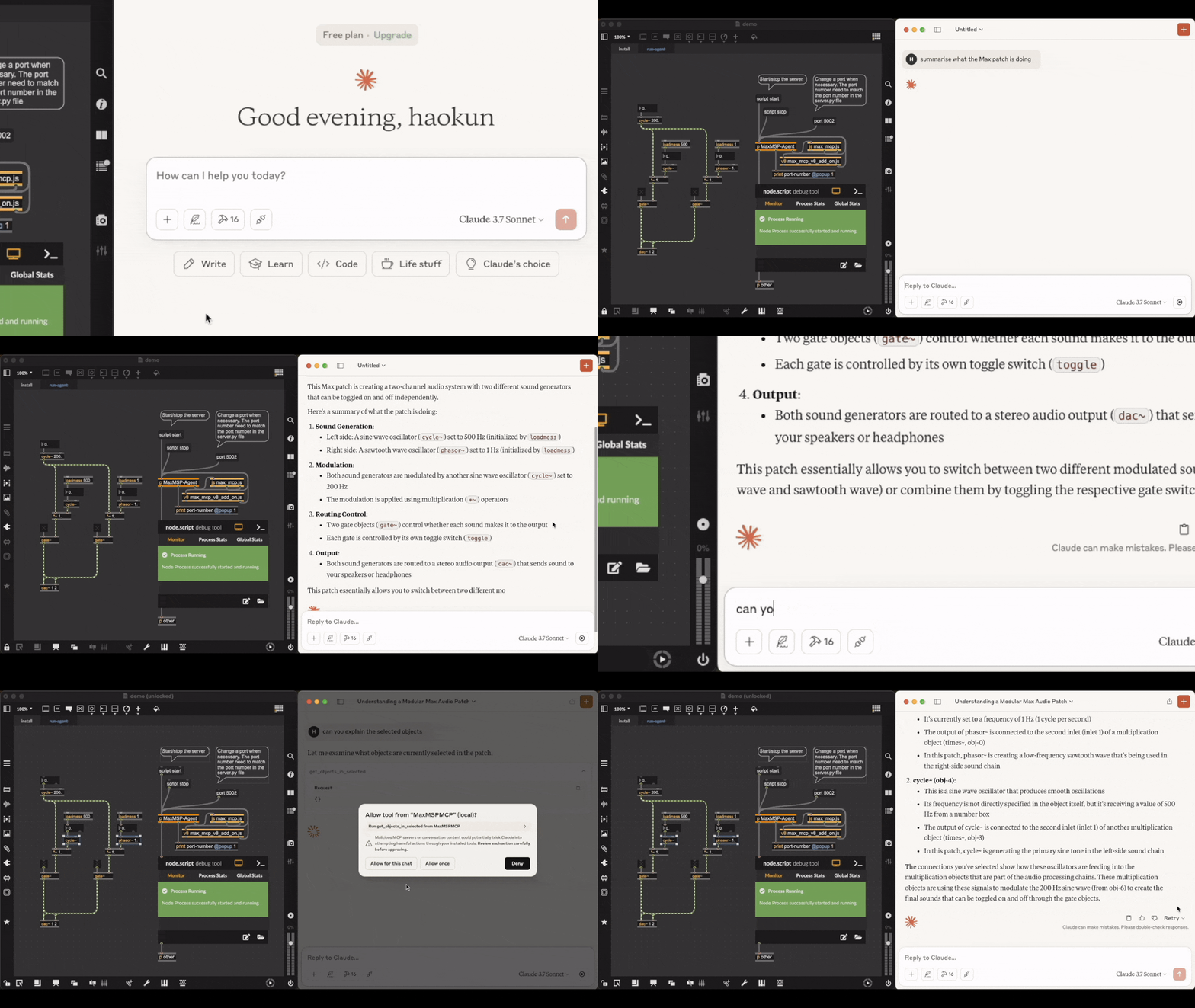
Video link. Acknowledgement: the patch being explained is from MaxMSP_TeachingSketches.

Full video with audio.
# macOS/Linux:
curl -LsSf https://astral.sh/uv/install.sh | sh

# Windows:
powershell -ExecutionPolicy ByPass -c "irm https://astral.sh/uv/install.ps1 | iex"
git clone https://github.com/tiianhk/MaxMSP-MCP-Server.git
cd MaxMSP-MCP-Server
uv venv
source .venv/bin/activate
uv pip install -r requirements.txt
For Claude Code (recommended):
As of Claude Code v2.1.47, MCP servers must be registered via the CLI (the mcpServers key in ~/.claude/settings.json is no longer read). Run:
claude mcp add --scope user maxmsp -- uv --directory /path/to/MaxMSP-MCP-Server run server.py
Verify with /mcp inside a Claude Code session.
Alternatively, for project-scoped configuration, create a .mcp.json at your project root:
{
  "mcpServers": {
    "maxmsp": {
      "command": "uv",
      "args": [
        "--directory",
        "/path/to/MaxMSP-MCP-Server",
        "run",
        "server.py"
      ]
    }
  }
}
For Claude Desktop or Cursor:
python install.py --client claude
# or
python install.py --client cursor
MaxMSP_Agent/demo.maxpat in Max 9script npm version to verify npm is installedscript npm install to install dependenciesscript start to begin communicationOnce connected, the LLM can explain, modify, or create Max objects within the patch.
┌─────────────────┐     Socket.IO      ┌─────────────────┐
│   Claude Code   │ ←───────────────→  │    server.py    │
│  (MCP Client)   │     (port 5002)    │  (FastMCP/Python)│
└─────────────────┘                    └────────┬────────┘
                                                │
                                       ┌────────▼────────┐
                                       │ max_mcp_node.js │
                                       │   (Node.js)     │
                                       └────────┬────────┘
                                                │
                              ┌─────────────────┴─────────────────┐
                              │                                   │
                     ┌────────▼────────┐              ┌───────────▼───────────┐
                     │   max_mcp.js    │              │ max_mcp_v8_add_on.js  │
                     │  (Max js object)│              │   (Max v8 runtime)    │
                     └─────────────────┘              └───────────────────────┘
node.scriptboxtext access for encapsulation| Tool | Description |
|---|---|
add_max_object(position, obj_type, varname, args) | Create an object |
remove_max_object(varname) | Delete an object |
connect_max_objects(src, outlet, dst, inlet) | Connect two objects |
disconnect_max_objects(src, outlet, dst, inlet) | Disconnect objects |
move_object(varname, x, y) | Reposition an object |
recreate_with_args(varname, new_args) | Change creation-time args |
autofit_existing(varname) | Auto-size existing object |
| Tool | Description |
|---|---|
set_object_attribute(varname, attr, value) | Set an attribute |
set_message_text(varname, text_list) | Set message box content |
set_number(varname, num) | Set number box/slider value |
send_bang_to_object(varname) | Send a bang |
send_messages_to_object(varname, message) | Send message list |
| Tool | Description |
|---|---|
get_objects_in_patch() | Get all objects and connections |
get_objects_in_selected() | Get selected objects |
get_object_attributes(varname) | Get object's attributes |
get_object_connections(varname) | Get object's connections |
get_avoid_rect_position() | Get bounding box for placement |
list_all_objects() | List available Max objects |
get_object_doc(name) | Get Max documentation |
| Tool | Description |
|---|---|
create_subpatcher(position, varname, name) | Create a p object |
enter_subpatcher(varname) | Navigate into subpatcher |
exit_subpatcher() | Return to parent |
get_patcher_context() | Get current depth/path |
add_subpatcher_io(position, io_type, varname) | Add inlet/outlet |
| Tool | Description |
|---|---|
check_signal_safety() | Analyze for dangerous patterns |
encapsulate(varnames, name, varname) | Encapsulate objects |
After making code changes:
script stop, then script start)This fork is based on the original MaxMSP-MCP-Server created by Haokun Tian and Shuoyang Zheng.
The original project is licensed under the MIT License. See LICENSE for details.
Original repository: https://github.com/tiianhk/MaxMSP-MCP-Server
This is a third-party implementation and not made by Cycling '74.
Claim this server with your GitHub account to request manual ownership verification.
Link to the catalog listing for Extended MaxMSP MCP server for understanding and generating Max patches from your README. This badge does not certify ownership, compatibility or security.
[](https://awesome-mcp.com/servers/maxmsp-mcp-server)Public repository statistics could not be verified. Check the configured source address; unavailable counts are not zero.
Separate sources, scopes and periods. Never combined or treated as installations, active users or security reviews.
No reviewed package or image identity; download statistics are not listed yet.
Alternative and complementary servers in the same category
A directory listing describing a cancellation-letter and mailing-address service. The configured public GitHub repository returned 404 during source verification.

A hosted MCP service for browsing and searching through Singapore mobile-network proxies.

A directory listing describing a Markdown-to-PDF service. The configured public GitHub repository returned 404 during source verification.