
A Rust CAD application with an MCP server for creating, inspecting and rendering drawings, either headlessly or through a connection to the desktop app.
8K
Media & Design
A Model Context Protocol server that enables AI assistant clients like Claude Desktop to control Autodesk Maya through natural language.
MCP server for controlling Autodesk Maya is cataloged as an MCP server attributed to patrickpalmer. A Model Context Protocol server that enables AI assistant clients like Claude Desktop to control Autodesk Maya through natural language. It is categorized under media design. See the capability inspector for recorded interfaces and their independent review status; consult upstream documentation for the current interface.
Installation configuration is not reviewed. No executable setup is offered for this entry; inspect the source repository before proceeding.
Catalog license label: MIT. Check the source repository's current license and terms before using, modifying or distributing this software.
Capability definitions are not reviewed. Unreviewed imports are not exposed as trusted interfaces.
No reviewed records to display. This does not establish that upstream lacks this capability.
No reviewed records to display. This does not establish that upstream lacks this capability.
No reviewed records to display. This does not establish that upstream lacks this capability.
Email delivery is not connected. This page does not collect email addresses or create subscriptions.
Browse the registry for current listings instead.
Reviews for MCP server for controlling Autodesk Maya are not available yet
Review publishing and storage are not connected. This page does not collect or publish ratings or comments, including after sign-in.
No, the design uses Maya's default command port, so there is nothing to install for Maya.
Yes, you add a single tool command Python file to the mayatools/thirdparty directory without changing existing code.
README.md · 5aa3d7b575fa · Fetched 2026-11-13 09:08:26 UTC
Original upstream text, without AI rewriting. Scripts, forms and unsafe links are filtered for safety.
Showing the last retrieved documentation snapshot; check the source for current changes.
Model Context Protocol (MCP) server implementation for Autodesk Maya
Tested with Maya 2023, 2025.
v0.2.0
This project enables AI assistant clients like Claude Desktop to control Autodesk Maya through natural language using the Model Context Protocol (MCP).
This is early days for Maya MCP server and has a minimal set of functionality. It's really the architecture design and simplicity that has been the initial focus.
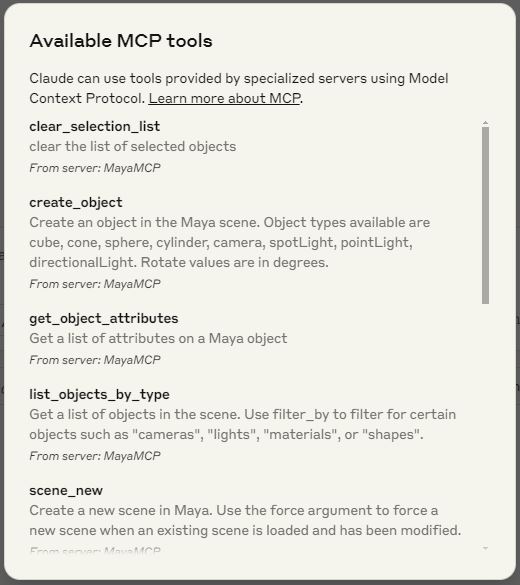
Here is a list of some of the tools registered with Maya MCP.
| Tool | Description |
|---|---|
| list_objects_by_type | Get a list of objects in the scene. Use filter_by to filter for certain objects such as "cameras", "lights", "materials", or "shapes". |
| create_object | Create an object in the Maya scene. Object types available are cube, cone, sphere, cylinder, camera, spotLight, pointLight, directionalLight. |
| get_object_attributes | Get a list of attributes on a Maya object. |
| set_object_attributes | Set an object's attribute with a specific value. |
| scene_new | Create a new scene in Maya. Use the force argument to force a new scene when an existing scene is loaded and has been modified. |
| scene_open | Load in a scene into Maya. |
| scene_save | Save the current scene. If the filename is not specified, it will save it as its current name. |
| select_object | Select an object in the scene. |
| Tool | Description |
|---|---|
| create_advanced_model | Create complex 3D models like cars, trees, buildings, cups, and chairs with detailed parameters. |
| mesh_operations | Perform modeling operations such as extrude, bevel, subdivide, boolean, combine, bridge, and split. |
| create_material | Create and assign materials with various types (lambert, phong, wood, marble, chrome, glass, etc.) |
| create_curve | Generate NURBS curves for various shapes (line, circle, spiral, helix, star, gear, etc.) |
| curve_modeling | Create geometry using curve-based modeling techniques (extrude, loft, revolve, sweep, etc.) |
| organize_objects | Organize objects through grouping, parenting, layout, alignment, and distribution. |
| generate_scene | Generate complete 3D scenes with multiple objects (city, forest, living room, office, park) |
Maya MCP server is designed so there is only an MCP server and doesn't require anything to be installed within Maya. This is helpful since you can easily use different versions of Maya and not have to worry about coordinating version changes. This is done by taking advantage of the default Command Port Maya opens up for MEL scripting.
MCP requires Python 3.10 or greater. Currently using pip as the package requirements are minimal. To install the virtual environment:
python -m venv .venv.venv\Scripts\activate.batsource .venv\bin\activate.shpip install -r requirements.txtAs stated, there is nothing to install for Maya.
Depending on which MCP Client you're using, the configuration file location differs. For Anthopic Claude Desktop, go to File -> Settings -> Developer Tab and press the Edit Config button. This will bring up the file finder in the directory location of the JSON config file.
Next you need to edit the config JSON file by hand using a text editor. Make sure to use full file paths.
{
  "mcpServers": {
    "MayaMCP": {
      "command": "[FULL PATH TO MayaMCP PROJECT]/.venv/Scripts/python.exe",
      "args": [
        "[FULL PATH TO MayaMCP PROJECT]/src/maya_mcp_server.py"
      ]
    }
  }
}
Once the changes have been made, restart Claude Desktop (use Exit menu item instead of just closing the window). In the Developers Tab, you will now see the Maya MCP server listed.
In Claude Desktop, you can verify the Maya MCP tools are available. Press the  button and a detailed popup will appear.
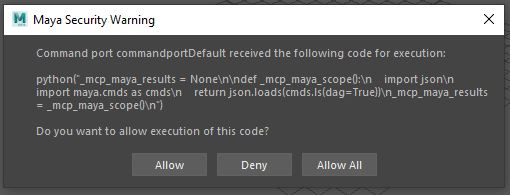
When the Maya MCP server first attempts to communicate with Maya, you will get this popup within Maya. Please click "Allow All" to allow for ongoing communication between the MCP server and Maya. This will need to be done each Maya session.
The Maya MCP Server module was designed to be easily modified in a non-intrusive way. This is done by having the Maya Python code reside in the MCP server and sent to Maya's command port for execution. The results are sent back to the server and processed.
The default Maya command port runs MEL so the Python code is modified to run within MEL function call to the Python interpreter. There is also some limits such as multi-line Python code can't have any returned results. So, each command creates two connections to Maya. First to run the operation and save the results. The second connection then to read back the results.
To help minimize populating the namespace in the Maya global Python interpreter, functions and variables sent to Maya will be scoped to start with mcp_maya*. Each of the Maya tools are scoped into a function named _mcp_maya_scope(). The results are assigned to the variable _mcp_maya_results. This way should significantly reduce the possibility of name collisions.
There is a bit of elegance to this design. You basically can just add the Python file, restart the MCP Client and Maya MCP server and go. You don't need to integrate the operations on both the Maya MCP server and Maya itself. The code you add is only Maya specific Python and doesn't need to add any MCP decorators. This is a much better design to grow and adapt to different installations instead of having a fixed set of tools.
The Maya MCP server was built using the low-level Python MCP module. This was necessary to allow for dynamically defining all of the tools at run time. The tool function signatures are captured dynamically at the start of the server.
It is easy to add new tools to Maya MCP. You don't need to change any of the existing code. All you need to do is add a single tool command Python file to the mayatools/thirdparty directory. The tool itself will run in Maya so it will have access to all of the Maya Python modules. There are a few programmer notes in the design of the tool.
I recommend looking at the existing Maya tools in this project as examples.
Currently Maya MCP has only been tested on Windows. Should work on both Linux and Mac as everything is using standard Python.
It's early days for MCP and there is a lot to improve. Here are some ideas.
MIT
This project was done on my personal time and equipment to learn about MCP. The project is not affiliated with my current employer and does not represent their work or interests.
Claim this server with your GitHub account to request manual ownership verification.
Link to the catalog listing for MCP server for controlling Autodesk Maya from your README. This badge does not certify ownership, compatibility or security.
[](https://awesome-mcp.com/servers/mayamcp)Public repository statistics could not be verified. Check the configured source address; unavailable counts are not zero.
Separate sources, scopes and periods. Never combined or treated as installations, active users or security reviews.
No reviewed package or image identity; download statistics are not listed yet.
Alternative and complementary servers in the same category
A Rust CAD application with an MCP server for creating, inspecting and rendering drawings, either headlessly or through a connection to the desktop app.

Liquid Composer is a browser-based Liquid Glass icon design tool that offers a local MCP server for agent-driven icon workflows.

agent-media makes short drama series and other short vertical videos from Claude, ChatGPT or Codex through one MCP connection, with OAuth sign-in and no API keys.