

Store and retrieve entities, relations and observations in a persistent local knowledge graph.
create_entitiescreate_relationsadd_observations+6 more
92K
AI & Multi-Agent
An MCP server that connects a bot to a Minecraft Java Edition server, letting an AI client move, look around, manage inventory, place and dig blocks, build structures, scan areas, chat and run commands.
MCP server for controlling a Minecraft bot is cataloged as an MCP server attributed to umjammer. An MCP server that connects a bot to a Minecraft Java Edition server, letting an AI client move, look around, manage inventory, place and dig blocks, build structures, scan areas, chat and run commands. It is categorized under ai agents-models. See the capability inspector for recorded interfaces and their independent review status; consult upstream documentation for the current interface.
Installation configuration is not reviewed. No executable setup is offered for this entry; inspect the source repository before proceeding.
Catalog license label: Not specified. Check the source repository's current license and terms before using, modifying or distributing this software.
Capability definitions are not reviewed. Unreviewed imports are not exposed as trusted interfaces.
No reviewed records to display. This does not establish that upstream lacks this capability.
No reviewed records to display. This does not establish that upstream lacks this capability.
No reviewed records to display. This does not establish that upstream lacks this capability.
Email delivery is not connected. This page does not collect email addresses or create subscriptions.
Browse the registry for current listings instead.
Reviews for MCP server for controlling a Minecraft bot are not available yet
Review publishing and storage are not connected. This page does not collect or publish ratings or comments, including after sign-in.
Tools include get-position, move-to-position, look-at, jump, move-in-direction, inventory and equip tools, place-block, dig-block, block and entity lookups, send-chat, build-blocks, fill-region, clear-region and scan-area.
Operator status is only needed if the bot should run commands; otherwise it joins as an offline player and the server must have online-mode disabled.
README.md · 751a3173ff83 · Fetched 2026-11-13 13:09:39 UTC
Original upstream text, without AI rewriting. Scripts, forms and unsafe links are filtered for safety.
Showing the last retrieved documentation snapshot; check the source for current changes.



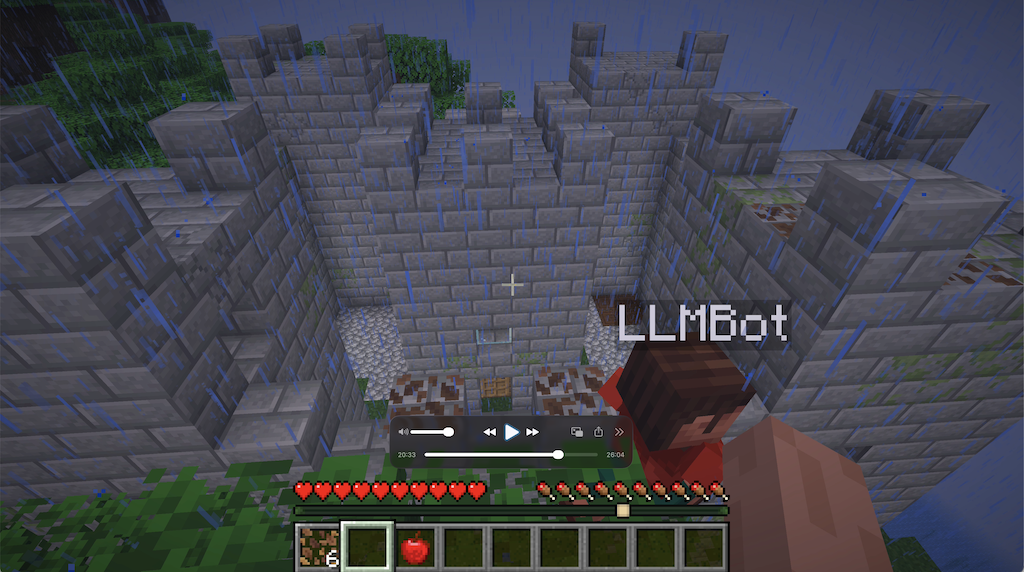 claude opus5.5 build the castle
⛏️ Model Context Protocol server for Minecraft.
the bot joins a minecraft java edition 1.21.7 server as an offline player,
so the server needs online-mode=false. op the bot (/op LLMBot) if you want it to run commands.
java -cp ... vavi.games.minecraft.mcp.MinecraftBotMCP [-host localhost] [-port 25565] [-username LLMBot]
| name | description |
|---|---|
| get-position | position, game mode and health |
| move-to-position | walks to a position with path finding (walk, step up, drop down) |
| look-at | turns the head to a position |
| jump | jumps |
| move-in-direction | walks forward/back/left/right for a duration |
| list-inventory, find-item | inventory contents |
| equip-item | moves an item to the hand, off-hand or an armor slot |
| place-block | places the held block (walks within reach if needed) |
| dig-block | digs a block, takes the vanilla breaking time in survival |
| get-block-info, find-block | reads the bot's copy of the loaded chunks |
| find-entity | the nearest entity by type or player name |
| send-chat | chat, or a command when it starts with /; returns the server's response messages |
| build-blocks | places a list of blocks in one call: equips items, orders placements so each block has support, walks within reach, builds temporary pillars for high positions, resumable |
| fill-region | fills a box (solid, hollow or walls) the same way |
| clear-region | digs a box from the top (optionally only matching blocks, e.g. logs), with the best tool in the inventory |
| scan-area | height map of an area (optionally ignoring trees) for planning |
the bot walks through leaves by digging them, and picks the best tool (axe, pickaxe, shovel, hoe) for digging.
src/main/resources/vavi/games/minecraft/mcp/{blocks.tsv,items.txt} are generated from the vanilla server's data reports
(java -DbundlerMainClass=net.minecraft.data.Main -jar server.jar --reports)
and minecraft-data's block collision shapes.
regenerate them when mcprotocollib's protocol version changes.
Claim this server with your GitHub account to request manual ownership verification.
Link to the catalog listing for MCP server for controlling a Minecraft bot from your README. This badge does not certify ownership, compatibility or security.
[](https://awesome-mcp.com/servers/mc-mcp-server)Public repository statistics could not be verified. Check the configured source address; unavailable counts are not zero.
Separate sources, scopes and periods. Never combined or treated as installations, active users or security reviews.
No reviewed package or image identity; download statistics are not listed yet.
Alternative and complementary servers in the same category
Store and retrieve entities, relations and observations in a persistent local knowledge graph.
Organize problem solving into revisable, branching thought steps through an MCP tool.

Query-aware context compression with an MCP plugin for coding agents, plus Python and HTTP interfaces for reducing the context sent to a language model.