
A directory listing describing a cancellation-letter and mailing-address service. The configured public GitHub repository returned 404 during source verification.
Repository stats unavailable
Developer Tools
An MCP server offering 3D-style cartoon image generation via Gemini AI alongside secure file system read, write, and directory management tools.
MCP Combined Server: 3D Cartoon Generator & File System Tools is cataloged as an MCP server attributed to falahgs. An MCP server offering 3D-style cartoon image generation via Gemini AI alongside secure file system read, write, and directory management tools. It is categorized under developer tools. See the capability inspector for recorded interfaces and their independent review status; consult upstream documentation for the current interface.
Installation configuration is not reviewed. No executable setup is offered for this entry; inspect the source repository before proceeding.
Catalog license label: MIT License. Check the source repository's current license and terms before using, modifying or distributing this software.
Capability definitions are not reviewed. Unreviewed imports are not exposed as trusted interfaces.
No reviewed records to display. This does not establish that upstream lacks this capability.
No reviewed records to display. This does not establish that upstream lacks this capability.
No reviewed records to display. This does not establish that upstream lacks this capability.
Email delivery is not connected. This page does not collect email addresses or create subscriptions.
Browse the registry for current listings instead.
Reviews for MCP Combined Server: 3D Cartoon Generator & File System Tools are not available yet
Review publishing and storage are not connected. This page does not collect or publish ratings or comments, including after sign-in.
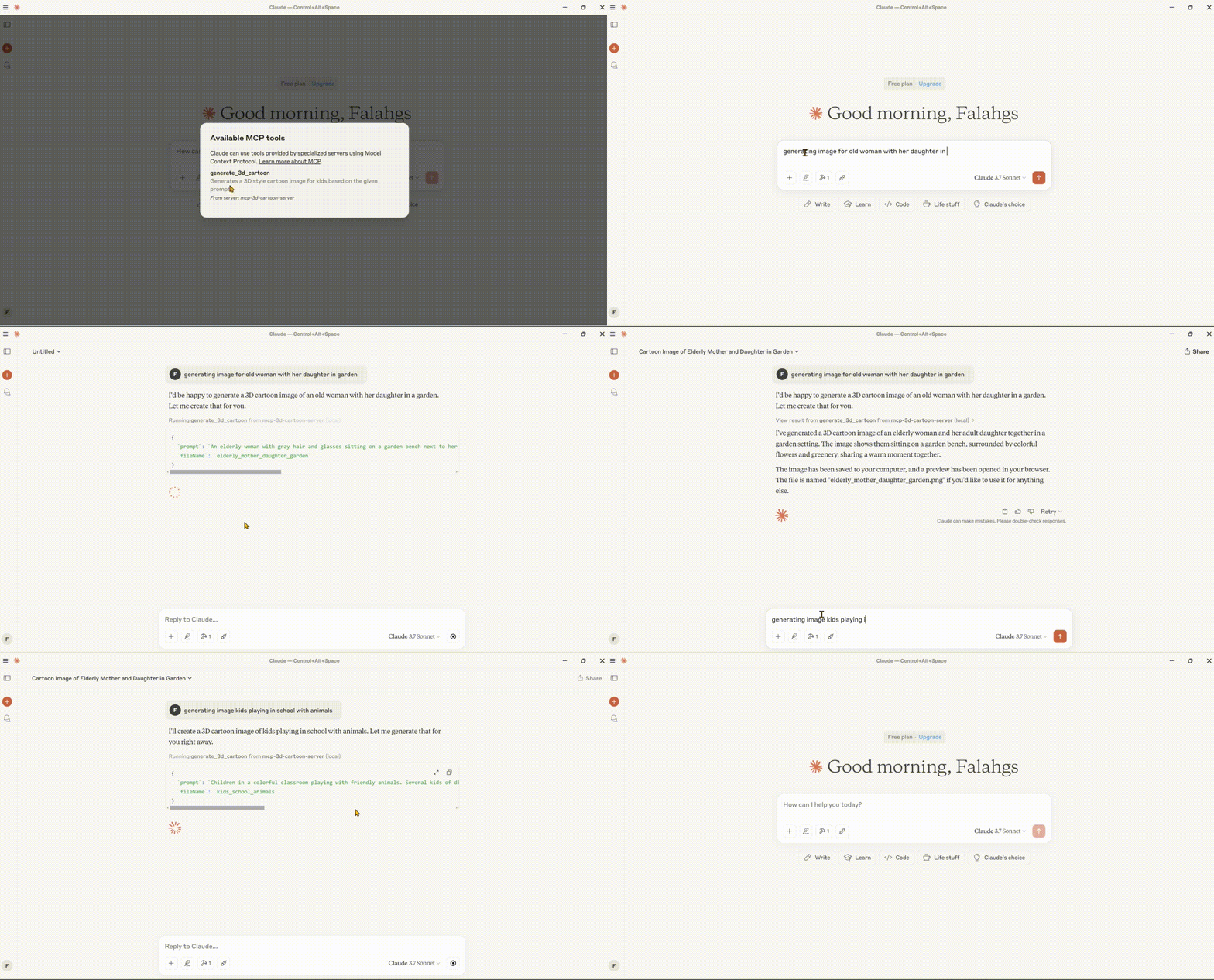
Generated images and previews are saved to an organized output directory, and images can be opened in your default browser or forced to the desktop via configuration.
File access is limited to directories listed in the ALLOWED_DIRECTORIES environment variable, with path validation and symlink protection.
README.md · d13f3898dc3d · Fetched 2026-11-13 11:24:41 UTC
Original upstream text, without AI rewriting. Scripts, forms and unsafe links are filtered for safety.
Showing the last retrieved documentation snapshot; check the source for current changes.
A professional-grade server that provides two major capabilities:
git clone https://github.com/falahgs/mcp-3d-style-cartoon-gen-server.git
cd mcp-3d-style-cartoon-gen-server
npm install
.env file in the root directory:GEMINI_API_KEY=your_api_key_here
ALLOWED_DIRECTORIES=/path/to/allowed/dir1,/path/to/allowed/dir2
npm run build
To integrate this combined server with Claude Desktop:
Locate the Configuration File:
%APPDATA%\Claude\claude_desktop_config.json~/Library/Application Support/Claude/claude_desktop_config.json~/.config/Claude/claude_desktop_config.jsonAdd the following configuration:
{
  "mcpServers": {
    "mcp-3d-cartoon-generator": {
      "command": "node",
      "args": [
        "path/to/your/build/index.js"
      ],
      "env": {
        "GEMINI_API_KEY": "your_gemini_api_key_here",
        "IS_REMOTE": "true",
        "SAVE_TO_DESKTOP": "true",
        "DETECT_OS_PATHS": "true",
        "ALLOWED_DIRECTORIES": "C:\\Users\\YourUsername\\Desktop,C:\\Users\\YourUsername\\Documents",
        "DEBUG": "false"
      }
    }
  }
}
For Windows users, you can use the included fix_claude_config.ps1 script to automatically configure Claude Desktop:
powershell -ExecutionPolicy Bypass -File .\fix_claude_config.ps1
This will create or update the configuration file with proper encoding and settings.
{
  "name": "generate_3d_cartoon",
  "description": "Generates a 3D style cartoon image for kids based on the given prompt",
  "inputSchema": {
    "type": "object",
    "properties": {
      "prompt": {
        "type": "string",
        "description": "The prompt describing the 3D cartoon image to generate"
      },
      "fileName": {
        "type": "string",
        "description": "The name of the output file (without extension)"
      }
    },
    "required": ["prompt", "fileName"]
  }
}
{
  "name": "read_file",
  "description": "Read the contents of a file",
  "inputSchema": {
    "type": "object",
    "properties": {
      "path": {
        "type": "string",
        "description": "Path to the file to read"
      }
    },
    "required": ["path"]
  }
}
{
  "name": "write_file",
  "description": "Write content to a file",
  "inputSchema": {
    "type": "object",
    "properties": {
      "path": {
        "type": "string",
        "description": "Path to the file to write"
      },
      "content": {
        "type": "string",
        "description": "Content to write to the file"
      }
    },
    "required": ["path", "content"]
  }
}
{
  "name": "list_directory",
  "description": "List the contents of a directory",
  "inputSchema": {
    "type": "object",
    "properties": {
      "path": {
        "type": "string",
        "description": "Path to the directory to list"
      }
    },
    "required": ["path"]
  }
}
{
  "name": "create_directory",
  "description": "Create a new directory",
  "inputSchema": {
    "type": "object",
    "properties": {
      "path": {
        "type": "string",
        "description": "Path to the directory to create"
      }
    },
    "required": ["path"]
  }
}
{
  "name": "search_files",
  "description": "Search for files matching a pattern",
  "inputSchema": {
    "type": "object",
    "properties": {
      "path": {
        "type": "string",
        "description": "Base directory to search from"
      },
      "pattern": {
        "type": "string",
        "description": "Search pattern (glob format)"
      },
      "excludePatterns": {
        "type": "array",
        "items": {
          "type": "string"
        },
        "description": "Patterns to exclude from search (glob format)"
      }
    },
    "required": ["path", "pattern"]
  }
}
// Generate a 3D cartoon
{
  "name": "generate_3d_cartoon",
  "arguments": {
    "prompt": "A friendly robot playing with a cat",
    "fileName": "robot_cat_play"
  }
}
// Read a file
{
  "name": "read_file",
  "arguments": {
    "path": "C:/Users/YourUsername/Documents/example.txt"
  }
}

// Write a file
{
  "name": "write_file",
  "arguments": {
    "path": "C:/Users/YourUsername/Documents/new-file.txt",
    "content": "This is the content of the file."
  }
}

// List directory contents
{
  "name": "list_directory",
  "arguments": {
    "path": "C:/Users/YourUsername/Documents"
  }
}

// Create a directory
{
  "name": "create_directory",
  "arguments": {
    "path": "C:/Users/YourUsername/Documents/new-folder"
  }
}

// Search for files
{
  "name": "search_files",
  "arguments": {
    "path": "C:/Users/YourUsername/Documents",
    "pattern": "*.txt",
    "excludePatterns": ["temp*", "*.tmp"]
  }
}
The server implements several security measures:
ALLOWED_DIRECTORIES environment variable can be accessed.| Variable | Description | Default |
|---|---|---|
GEMINI_API_KEY | Google Gemini API key for image generation | (Required) |
ALLOWED_DIRECTORIES | Comma-separated list of allowed file system paths | User's home dir, current dir |
IS_REMOTE | Run in remote mode without browser opening | false |
SAVE_TO_DESKTOP | Force saving to desktop directory | false |
DETECT_OS_PATHS | Enable OS-specific path detection | true |
DEBUG | Enable verbose debug logging | false |
JSON Parsing Errors in Claude:
DEBUG is set to "false" to prevent logs from interfering with JSON communicationFile Access Denied:
ALLOWED_DIRECTORIESImages Not Saving:
SAVE_TO_DESKTOP to "true" to ensure images save to the desktopContributions are welcome! Please feel free to submit a Pull Request.
Claim this server with your GitHub account to request manual ownership verification.
Link to the catalog listing for MCP Combined Server: 3D Cartoon Generator & File System Tools from your README. This badge does not certify ownership, compatibility or security.
[](https://awesome-mcp.com/servers/mcp-3d-style-cartoon-gen-server)Public repository statistics could not be verified. Check the configured source address; unavailable counts are not zero.
Separate sources, scopes and periods. Never combined or treated as installations, active users or security reviews.
No reviewed package or image identity; download statistics are not listed yet.
Alternative and complementary servers in the same category
A directory listing describing a cancellation-letter and mailing-address service. The configured public GitHub repository returned 404 during source verification.

A hosted MCP service for browsing and searching through Singapore mobile-network proxies.

A directory listing describing a Markdown-to-PDF service. The configured public GitHub repository returned 404 during source verification.