
A directory listing describing a cancellation-letter and mailing-address service. The configured public GitHub repository returned 404 during source verification.
Repository stats unavailable
Developer Tools
A Model Context Protocol server that lets AI agents bulk compress, convert, resize, watermark and analyse local images, with results staying on the user's machine.
MCP server for local bulk image compression and optimisation is cataloged as an MCP server attributed to lexusmarchuk. A Model Context Protocol server that lets AI agents bulk compress, convert, resize, watermark and analyse local images, with results staying on the user's machine. It is categorized under developer tools. See the capability inspector for recorded interfaces and their independent review status; consult upstream documentation for the current interface.
Installation configuration is not reviewed. No executable setup is offered for this entry; inspect the source repository before proceeding.
Catalog license label: MIT. Check the source repository's current license and terms before using, modifying or distributing this software.
Capability definitions are not reviewed. Unreviewed imports are not exposed as trusted interfaces.
No reviewed records to display. This does not establish that upstream lacks this capability.
No reviewed records to display. This does not establish that upstream lacks this capability.
No reviewed records to display. This does not establish that upstream lacks this capability.
Email delivery is not connected. This page does not collect email addresses or create subscriptions.
Browse the registry for current listings instead.
Reviews for MCP server for local bulk image compression and optimisation are not available yet
Review publishing and storage are not connected. This page does not collect or publish ratings or comments, including after sign-in.
No; all processing runs locally via Pillow and no image data is uploaded to any server.
Yes; the estimate_savings tool performs a dry-run prediction across a batch without writing files to disk.
README.md · 30774f9027f6 · Fetched 2026-11-13 13:31:15 UTC
Original upstream text, without AI rewriting. Scripts, forms and unsafe links are filtered for safety.
Showing the last retrieved documentation snapshot; check the source for current changes.
Official Model Context Protocol (MCP) server for compressfile.pro.
Give any MCP-compatible AI agent (Claude, Cursor, etc.) the ability to bulk compress, convert, resize, watermark, and analyse images — entirely on your local machine.
/data/**/*.png)Don't need AI integration? compressfile.pro offers the same compression and conversion directly in your browser — no upload, no account, no install required.
| compressfile.pro | mcp-compressfile | |
|---|---|---|
| Works in browser | ✅ | — |
| No install needed | ✅ | — |
| AI agent integration | — | ✅ |
| Bulk via glob patterns | — | ✅ |
| Runs on local files | — | ✅ |
| Images leave your machine | ❌ Never | ❌ Never |
pip install mcp[server] Pillow pillow-avif-plugin imagehash
Clone this repo and point Claude Desktop at server.py (see Configuration).
git clone https://github.com/yourname/mcp-compressfile
cd mcp-compressfile
docker build -t mcp-compressfile .
Open Claude Desktop → Settings → Developer → Edit Config and add one of the blocks below.
{
  "mcpServers": {
    "mcp-compressfile": {
      "command": "python",
      "args": ["/absolute/path/to/server.py"]
    }
  }
}
{
  "mcpServers": {
    "mcp-compressfile": {
      "command": "docker",
      "args": [
        "run", "-i", "--rm",
        "-v", "/your/images/folder:/data",
        "mcp-compressfile"
      ]
    }
  }
}
Windows users: use forward slashes in paths (
C:/Users/You/Pictures).
With Docker, pass/data/...paths to the tools — that is the mount point inside the container.
Restart Claude Desktop after editing the config. A 🔨 hammer icon in the chat input confirms the tools are loaded.
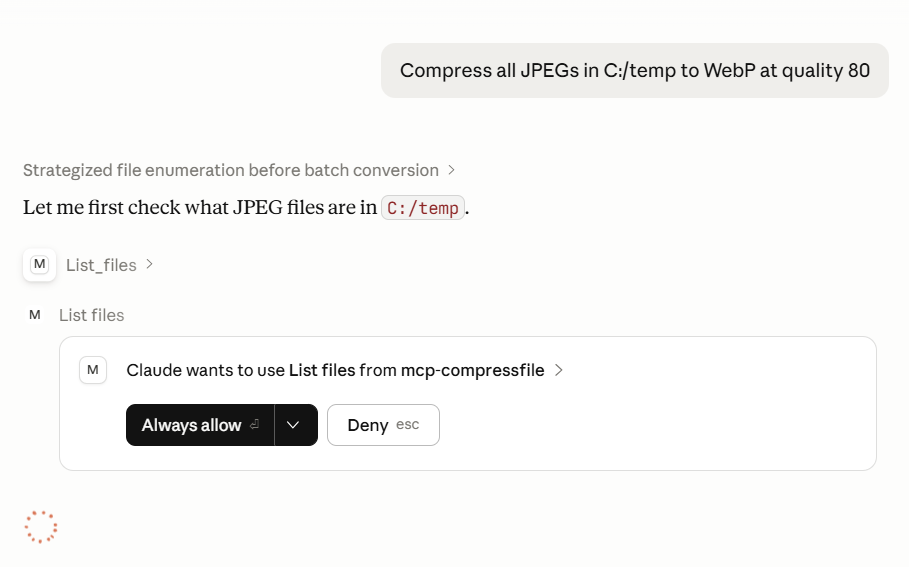
Once configured, just describe what you want in plain English. Claude picks the right tools, chains them automatically, and reports back with a summary.
1. Type a prompt — Claude identifies the files and plans the job
2. Claude executes the batch and returns a full summary
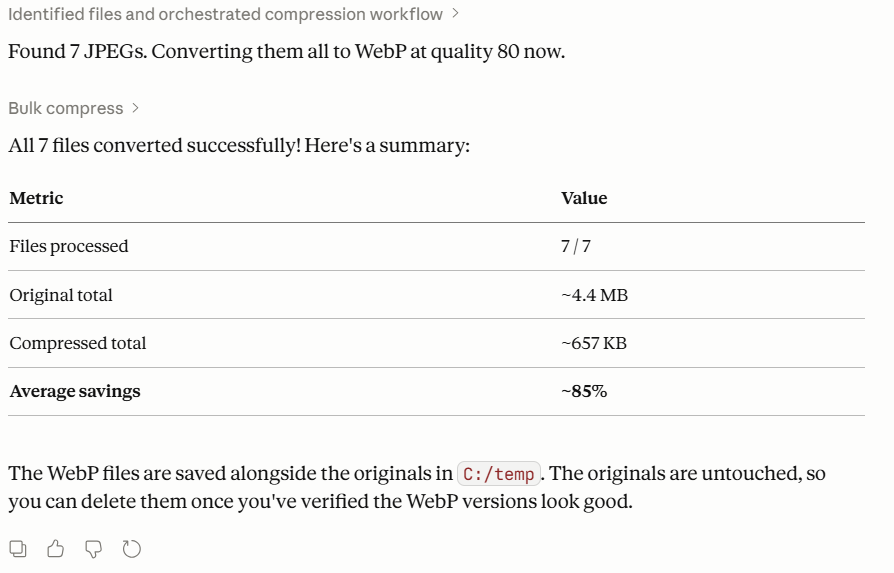
In this example, a single prompt converted 7 JPEGs to WebP at quality 80,
reducing total size from 4.4 MB to 657 KB — an 85% reduction.
| Tool | Description |
|---|---|
list_files | List all supported images in a directory with file sizes |
find_large_images | Find images above a KB threshold — ideal starting point for a compression job |
compare_folders | Diff source vs output to see what's been processed and what's still pending |
undo_last_batch | Delete an output directory to retry with different settings (confirm=True required) |
| Tool | Description |
|---|---|
get_image_info | Full metadata for a single file: dimensions, DPI, mode, and all EXIF fields |
strip_metadata | Remove all EXIF/IPTC/XMP data for privacy before publishing |
find_duplicates | Group near-identical images using perceptual hashing |
| Tool | Description |
|---|---|
bulk_compress | Compress + convert + optional resize; EXIF orientation auto-corrected |
bulk_resize | Resize only, preserving format and aspect ratio |
bulk_crop | Crop a fixed pixel region from a batch; skips files where box exceeds bounds |
bulk_rotate | Rotate by degrees and/or auto-correct EXIF orientation |
bulk_watermark | Stamp text onto images with configurable position, opacity, and font size |
| Tool | Description |
|---|---|
compression_report | Aggregate stats after a job: total MB freed, per-format breakdown, per-file log |
preview_settings | Compress one image at multiple quality levels to find the best trade-off |
suggest_format | Analyse images and recommend the best output format with reasoning |
estimate_savings | Dry-run prediction across a batch — no files written to disk |
List all images in /data and tell me which ones are larger than 1 MB.
Suggest the best format for all files in /data/photos.
Estimate how much space I'd save converting /data/*.jpg to AVIF at quality 80.
Compress everything in /data/photos to WebP at quality 75, max 1920px wide,
and save to /data/output.
Find duplicate images in /data/vacation.
Add a "© compressfile.pro" watermark to all PNGs in /data, bottom-right, 50% opacity.
Show me a compression preview for /data/hero.jpg at quality 60, 75, 85, and 95.
Generate a full compression report comparing /data/originals and /data/output.
| Format | Lossy | Lossless | Transparency | Notes |
|---|---|---|---|---|
| AVIF | ✅ | — | ✅ | Best compression ratio for photos |
| WebP | ✅ | ✅ | ✅ | Best universal format |
| JPEG | ✅ | — | — | Alpha composited onto white background |
| PNG | — | ✅ | ✅ | Best for graphics and flat illustrations |
Supported input types: .png .jpg .jpeg .webp .tiff .bmp .avif
All processing runs locally via Pillow. No image data is uploaded to any server.
This MCP server is a local companion to compressfile.pro, which provides the same functionality in-browser without any server upload.
mcp[server]
Pillow
pillow-avif-plugin
imagehash
Python 3.9 or later.
MIT
Claim this server with your GitHub account to request manual ownership verification.
Link to the catalog listing for MCP server for local bulk image compression and optimisation from your README. This badge does not certify ownership, compatibility or security.
[](https://awesome-mcp.com/servers/mcp-compressfile)Public repository statistics could not be verified. Check the configured source address; unavailable counts are not zero.
Separate sources, scopes and periods. Never combined or treated as installations, active users or security reviews.
No reviewed package or image identity; download statistics are not listed yet.
Alternative and complementary servers in the same category
A directory listing describing a cancellation-letter and mailing-address service. The configured public GitHub repository returned 404 during source verification.

A hosted MCP service for browsing and searching through Singapore mobile-network proxies.

A directory listing describing a Markdown-to-PDF service. The configured public GitHub repository returned 404 during source verification.