
A directory listing describing a cancellation-letter and mailing-address service. The configured public GitHub repository returned 404 during source verification.
Repository stats unavailable
Developer Tools
An MCP server that runs TypeScript, JavaScript, and Python code in a local Deno-based sandbox with explicit permission controls.
Deno Sandbox MCP Server is cataloged as an MCP server attributed to bewt85. An MCP server that runs TypeScript, JavaScript, and Python code in a local Deno-based sandbox with explicit permission controls. It is categorized under developer tools. See the capability inspector for recorded interfaces and their independent review status; consult upstream documentation for the current interface.
Installation configuration is not reviewed. No executable setup is offered for this entry; inspect the source repository before proceeding.
Catalog license label: MIT. Check the source repository's current license and terms before using, modifying or distributing this software.
Capability definitions are not reviewed. Unreviewed imports are not exposed as trusted interfaces.
No reviewed records to display. This does not establish that upstream lacks this capability.
No reviewed records to display. This does not establish that upstream lacks this capability.
No reviewed records to display. This does not establish that upstream lacks this capability.
Email delivery is not connected. This page does not collect email addresses or create subscriptions.
Browse the registry for current listings instead.
Reviews for Deno Sandbox MCP Server are not available yet
Review publishing and storage are not connected. This page does not collect or publish ratings or comments, including after sign-in.
Permissions are passed to the Deno runtime, letting you restrict file reads and writes, deny access to specific files, and limit network access to chosen websites or IP addresses.
The project warns that the sandbox is undermined by blanket FFI or execution permissions and by allowing write access to the file managing server permissions.
Python cannot use open for writing for some reason, though reading works; the tool description includes a workaround using js.fs.writeFileSync.
README.md · 84ec190513e6 · Fetched 2026-11-13 10:06:53 UTC
Original upstream text, without AI rewriting. Scripts, forms and unsafe links are filtered for safety.
Showing the last retrieved documentation snapshot; check the source for current changes.

An MCP server that allows you to run TypeScript, JavaScript, and Python code in a sandbox on your local machine using the Deno® sandbox. This server provides a controlled environment for executing code with explicit permission controls (i.e. which websites it can visit, which files it can read).
Note: This project is not affiliated with Deno Land LLC in any way. I'm just a fan of the Deno® runtime. "Deno" is a registered trademark of Deno Land LLC.
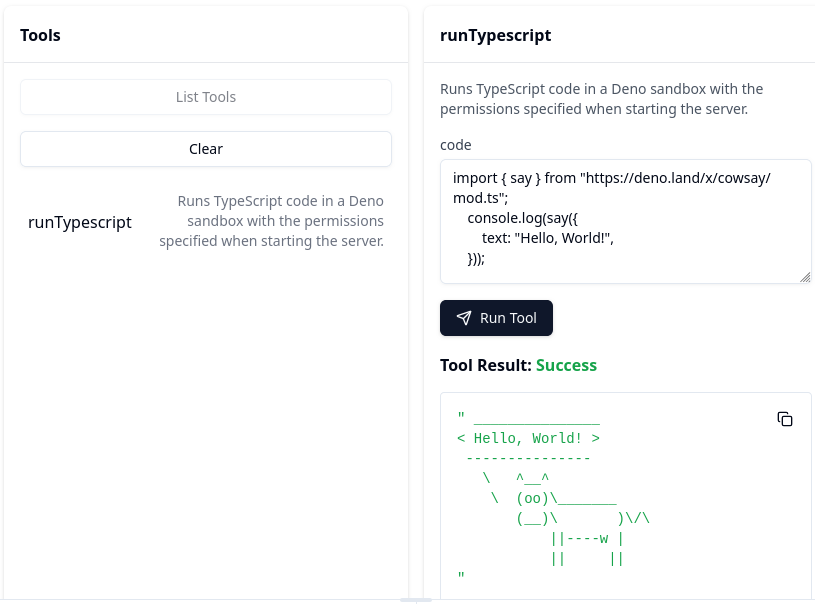
LLMs are great at writing code and it helps if the LLM can run the code itself to test it. The problem is that they cannot be trusted not to do damage, especially if a malicious human can trick the LLM using prompt injection. For example you innocently ask a LLM to summarise an email and someone wrote you an email telling your LLM to run code to delete all your files and send all your bitcoin to them.
A sandbox enforces limitations on what the code written by your LLM can do. For example we might say it can only change files in a specific folder, or contact specific trusted websites.
Each operating system has different ways of creating sandboxes. Some are more secure, some are easier to setup. This project strikes a balance between the two.
Our sandbox uses Deno which in turn uses the same technology Chrome uses to stop malicious websites damaging your computer. This lets you run Typescript and Javascript and relies on very little of my code.
Some hard working people have also made Pyodide which lets you run Python inside a web browser. We use that to let you run Python inside the same Deno environment.
You control permissions by passing arguments which are given directly to the Deno runtime. You can configure which:
I would like to keep this codebase simpler to read than alternatives so people can audit it themselves. Simplicity is an important security feature; the more people who understand it, the more who can spot a bug.
I have also chosen to sacrifice some performance by not reusing pyodide environments. This creates a small overhead but it makes the implementation easier to reason about.
This MCP should work with a range of MCP clients.
You either need Node.js or Deno installed. You don't need both.
To use this MCP server with Claude Desktop, add it to your claude_desktop_config.json in:
~/Library/Application Support/Claude/claude_desktop_config.json%APPDATA%\Claude\claude_desktop_config.jsonIf you have Deno installed
{
  "mcpServers": {
    "denoSandbox": {
      "command": "deno",
      "args": [
        "run",
        "npm:mcp-deno-sandbox",
        "--allow-net=icanhazip.com,example.com",
      ]
    }
  }
}
If you have Node.js installed then Deno will be installed automatically
{
  "mcpServers": {
    "denoSandbox": {
      "command": "npx",
      "args": [
        "mcp-deno-sandbox",
        "--allow-net=icanhazip.com,example.com"
      ]
    }
  }
}
You can help your LLM by encouraging it to use these tools. There is also a resource which defines the permissions available in the sandbox. You can suggest that your LLM checks what permissions it has if it keeps getting permission denied errors.
You need to set the permissions at runtime; if you change them you need to restart the server.
The permissions are the same as the Deno® permissions and are just passed through.
Examples
Network Access
--allow-net
--allow-net=api.github.com,example.com
File System
--allow-read --allow-write
--allow-read=/tmp --allow-write=/tmp
For a complete list of permissions and detailed documentation, see Deno® Security.
This server runs code using the permissions specified when starting the server. These permissions are passed through to the Deno® runtime.
Be careful about what permissions you enable. The sandbox is completely undermined by:
claude_desktop_config.json)You should also think carefully about read permissions to sensitive dotfiles you have (e.g. with credentials for AWS, NPM, OpenAI); especially if you have granted network access.
Remember malicious people can use prompt injection to trick your prefered language model into running bad things on your computer. Maybe they can hide some invisible text in a PDF which you cannot read or in the middle of a long document you ask it to summarise.
Deno® has some additional suggestions if you would like even more isolation for untrusted code.
open(PATH, 'w') to write files for some reason. It works for reading files, I don't know what writing doesn't work. I included a hint how to
get around this in the tool description. You can also point out to your LLM that it can run import js; js.fs.writeFileSync(PATH, CONTENT). This runs in the same Deno sanbox but is a little bit more annoying.-A, -R, or -W permissions, it is hard to tell which files should be mounted into the pyodide environment. For now, I just guess your home
directory and /tmp. You can also specify other directories explicitly and these will be mounted.# Clone the repository
git clone https://github.com/bewt85/mcp-deno-sandbox.git
cd mcp-deno-sandbox
# Install dependencies
npm install
Check the code formatting and types:
npm run checks
Fix some issues automatically:
npm run fix
Test with the MCP Inspector:
npx @modelcontextprotocol/inspector ./node_modules/.bin/ts-node src/index.ts
Try these examples in the inspector:
Basic arithmetic (works without permissions):
console.log(1 + 2);
Network access (requires --allow-net):
fetch('https://icanhazip.com').then(response => response.text()).then(ip => console.log(`Your IP is: ${ip.trim()}`));
File system access (requires --allow-read):
const text = Deno.readTextFileSync('/path/to/file.txt');
console.log(text);
I don't have a lot of spare time so I will not be able to engage with most feature requests / contributions. It is probably better to fork the repository if you would like to add something. Apologies.
When you want to do a release:
package.json to X.Y.ZMIT
Claim this server with your GitHub account to request manual ownership verification.
Link to the catalog listing for Deno Sandbox MCP Server from your README. This badge does not certify ownership, compatibility or security.
[](https://awesome-mcp.com/servers/mcp-deno-sandbox)Public repository statistics could not be verified. Check the configured source address; unavailable counts are not zero.
Separate sources, scopes and periods. Never combined or treated as installations, active users or security reviews.
No reviewed package or image identity; download statistics are not listed yet.
Alternative and complementary servers in the same category
A directory listing describing a cancellation-letter and mailing-address service. The configured public GitHub repository returned 404 during source verification.

A hosted MCP service for browsing and searching through Singapore mobile-network proxies.

A directory listing describing a Markdown-to-PDF service. The configured public GitHub repository returned 404 during source verification.