
A directory listing describing a cancellation-letter and mailing-address service. The configured public GitHub repository returned 404 during source verification.
Repository stats unavailable
Developer Tools
A Model Context Protocol server that lists the MCP services configured in Claude Desktop so their names can be easily discovered and copied.
MCP Easy Copy is cataloged as an MCP server attributed to f-is-h. A Model Context Protocol server that lists the MCP services configured in Claude Desktop so their names can be easily discovered and copied. It is categorized under developer tools. See the capability inspector for recorded interfaces and their independent review status; consult upstream documentation for the current interface.
Installation configuration is not reviewed. No executable setup is offered for this entry; inspect the source repository before proceeding.
Catalog license label: MIT License. Check the source repository's current license and terms before using, modifying or distributing this software.
Capability definitions are not reviewed. Unreviewed imports are not exposed as trusted interfaces.
No reviewed records to display. This does not establish that upstream lacks this capability.
No reviewed records to display. This does not establish that upstream lacks this capability.
No reviewed records to display. This does not establish that upstream lacks this capability.
Email delivery is not connected. This page does not collect email addresses or create subscriptions.
Browse the registry for current listings instead.
Reviews for MCP Easy Copy are not available yet
Review publishing and storage are not connected. This page does not collect or publish ratings or comments, including after sign-in.
Click the hammer icon and select the service at the top of the list, which shows all available services in its description; you can also ask Claude to list all available MCP services.
It uses special name formatting so it always appears first.
README.md · 6c7fb26171da · Fetched 2026-11-13 08:56:58 UTC
Original upstream text, without AI rewriting. Scripts, forms and unsafe links are filtered for safety.
Showing the last retrieved documentation snapshot; check the source for current changes.




A Model Context Protocol server that makes it easy to discover and copy available MCP services in Claude Desktop.
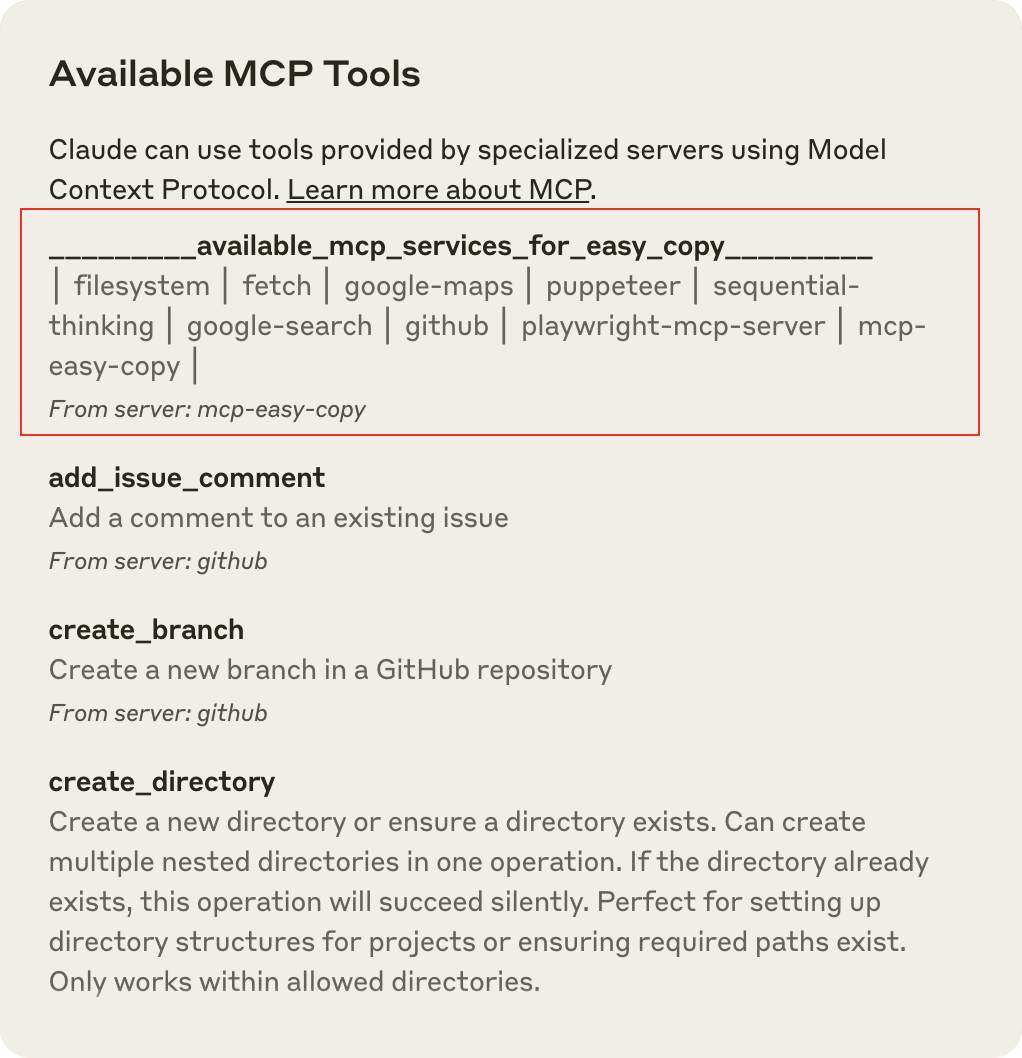
This MCP server is designed to be your first stop when working with Claude Desktop. It solves the problem of having to remember MCP service names or looking them up in configuration files by:
Although Claude can now automatically select the appropriate MCP services in most scenarios, there are still situations where users need to explicitly specify an MCP service name. These situations include:
This tool bridges that gap, making all available services easily accessible without having to search through configuration files.
npm install -g @fishes/mcp-easy-copy
Then add to your Claude Desktop configuration:
{
  "mcpServers": {
    "mcp-easy-copy": {
      "command": "npx",
      "args": [
        "-y",
        "@fishes/mcp-easy-copy"
      ]
    }
  }
}
To install Easy Copy for Claude Desktop automatically via Smithery:
npx -y @smithery/cli install @fisheepx/mcp-easy-copy --client claude
Clone the repository:
git clone https://github.com/f-is-h/mcp-easy-copy.git
cd mcp-easy-copy
Install dependencies and build:
npm install
npm run build
Configure Claude Desktop:
For macOS:
Edit ~/Library/Application Support/Claude/claude_desktop_config.json
For Windows:
Edit %APPDATA%\Claude\claude_desktop_config.json
Add the following configuration:
{
  "mcpServers": {
    "mcp-easy-copy": {
      "command": "node",
      "args": [
         "/ABSOLUTE/PATH/TO/mcp_easy_copy/build/index.js"
      ]
    }
  }
}
Restart Claude Desktop
Once installed, you can use the service in two ways:
Via the tools menu: Click the hammer icon in Claude Desktop and select the service at the top of the list (it will show all available services in its description)
Via a prompt: Ask Claude something like:
Please list all MCP services that are available to you
or
Please use _________mcp-easy-copy_________ to show me all available MCP services
MCP Easy Copy is built with TypeScript and uses the Model Context Protocol SDK.
# Install dependencies
npm install

# Build the project
npm run build

# Test with the MCP Inspector
npm run inspector
If the tool doesn't work as expected:
Check logs: Look at the log files
~/Library/Logs/Claude/mcp-server-mcp-easy-copy.log%APPDATA%\Claude\logs\mcp-server-mcp-easy-copy.logVerify configuration: Make sure your claude_desktop_config.json is valid JSON
Check Node.js: Ensure Node.js is properly installed (node --version)
Restart Claude: Always restart Claude Desktop after making configuration changes
Use the Inspector: Run npm run inspector to debug with the MCP Inspector

While we have no specific knowledge of Anthropic's roadmap, we imagine that future versions of Claude's client could potentially implement features like autocomplete when using the '@' symbol. Such a feature might display a dropdown list of available MCP services, making it much easier for users to explicitly instruct Claude to utilize specific services.
Even if such improvements eventually make this project obsolete, we'd be delighted to see Claude's interface evolve in ways that improve user experience. After all, the goal of this tool is to make MCP services more accessible, and having that functionality built directly into Claude would be the ultimate success.
Claim this server with your GitHub account to request manual ownership verification.
Link to the catalog listing for MCP Easy Copy from your README. This badge does not certify ownership, compatibility or security.
[](https://awesome-mcp.com/servers/mcp-easy-copy)Public repository statistics could not be verified. Check the configured source address; unavailable counts are not zero.
Separate sources, scopes and periods. Never combined or treated as installations, active users or security reviews.
No reviewed package or image identity; download statistics are not listed yet.
Alternative and complementary servers in the same category
A directory listing describing a cancellation-letter and mailing-address service. The configured public GitHub repository returned 404 during source verification.

A hosted MCP service for browsing and searching through Singapore mobile-network proxies.

A directory listing describing a Markdown-to-PDF service. The configured public GitHub repository returned 404 during source verification.