Google Maps for AI agents
Stop rebuilding place search, routing, and location workflows for every AI app.
@cablate/mcp-google-map turns Google Maps Platform into 18 read-only agent tools and three focused Skills. An agent can find real places, verify routes, compare options, build practical itineraries, or audit local search visibility—through MCP or a standalone CLI.
You choose the integration model: Codex or Claude Code Plugin when you want Skills without MCP setup, stdio for desktop MCP clients, or Streamable HTTP for shared and remote deployments.
English · 繁體中文




Why use it?
Giving an agent a raw Maps API is only the beginning. Useful answers often require several dependent calls: resolve a place, preserve its identity, search around it, check opening details, calculate travel time, and explain what was actually verified. This project packages that work into one consistent interface.
- Move from lookup to outcome. Atomic tools handle geocoding, place details, directions, weather, air quality, and maps. Composite tools explore areas, compare candidates, optimize stops, and measure local rankings.
- Use the same capabilities with or without MCP. The standalone
exec CLI works with Agent Skills and automation; the MCP server exposes the same 18 tools over stdio or HTTP.
- Give agents workflow guidance, not just function names. Three Skills cover general map research, evidence-backed travel planning, and local SEO. Codex loads their full instructions only when a request matches.
- Keep deployment and credentials under your control. Run locally or self-host. API keys remain in your environment or request headers, with per-session isolation for HTTP deployments.
- Start narrow and grow later. Register only the tools you need with
GOOGLE_MAPS_ENABLED_TOOLS, or use the full catalog.
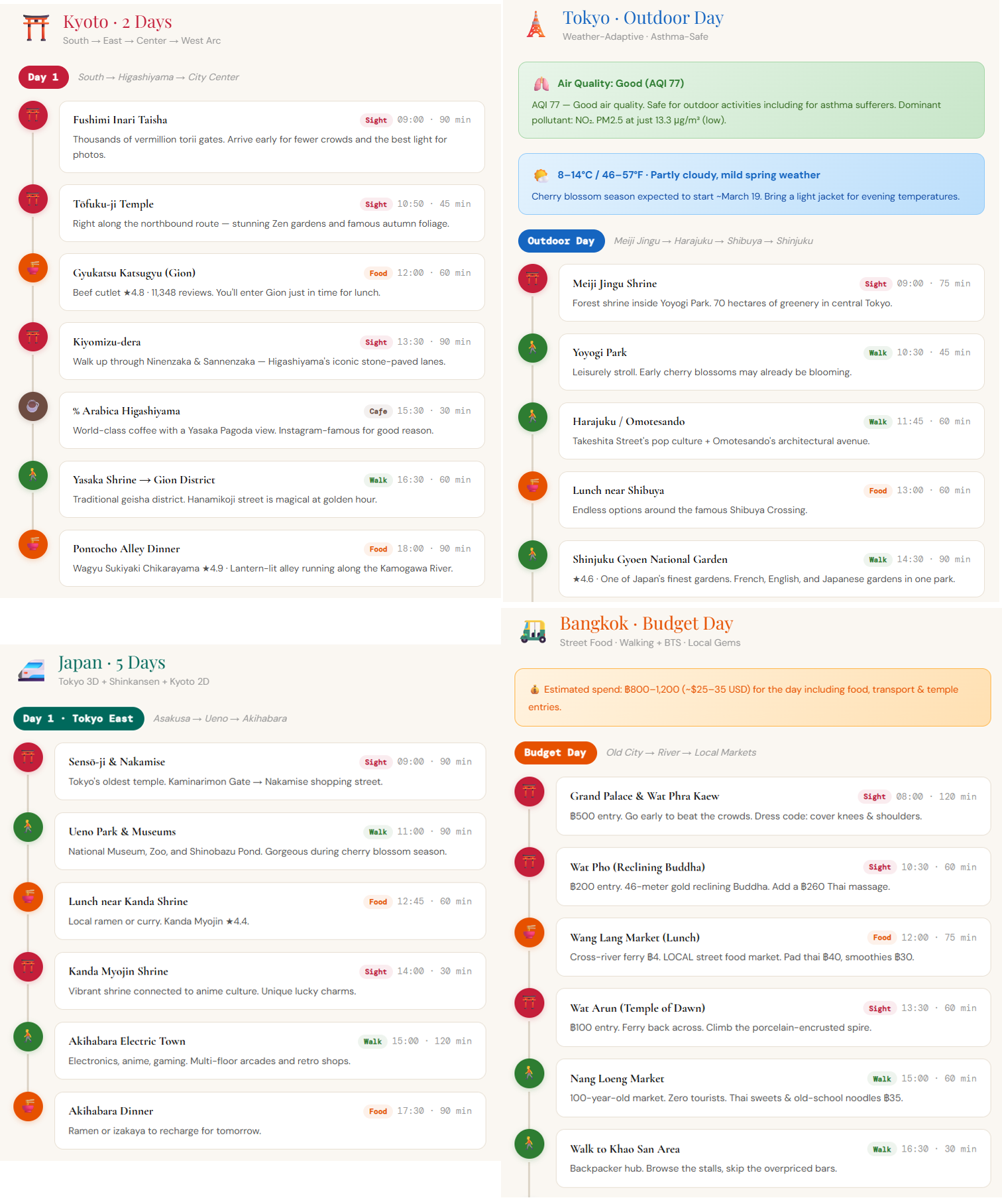
What can an agent do?
These are data and planning tools, not guarantees of safety, accessibility, opening status, or ranking outcomes. Applications displaying Places reviews, photos, or AI summaries must follow the content attribution and storage guidance.
Choose your integration
All options require Node.js 22+ and a Google Maps Platform API key. Live calls may be billable. Enable the APIs needed by your selected tools; common place and route workflows require Places API (New), Routes API, and often Geocoding API.
Start with Codex—no MCP required
codex plugin marketplace add cablate/mcp-google-map --ref main
codex plugin add mcp-google-map@cablate
Set GOOGLE_MAPS_API_KEY in the environment where Codex runs, then start a new conversation. Verify the local setup without making a Google API request:
npx -y @cablate/mcp-google-map doctor
Success means the node, package, and api-key checks pass and live-api is skipped. Use doctor --live only when you intend to send potentially billable checks to Geocoding, Places, and Routes.
Try asking:
Plan a practical two-day Kyoto itinerary. Group nearby places, check travel times, and explain any opening-hour assumptions.
Codex selects google-maps for general location research, google-maps-travel-planning for itineraries, or google-maps-local-seo for business visibility analysis. The plugin does not register or start an MCP server. See the no-MCP walkthrough for a reproducible example.
Install in Claude Code—no MCP required
claude plugin marketplace add cablate/mcp-google-map
claude plugin install mcp-google-map@cablate-maps
Start a new Claude Code session, set GOOGLE_MAPS_API_KEY in its environment, and run the same doctor check shown above. Claude exposes the installed Skills with the plugin namespace, for example /mcp-google-map:google-maps-travel-planning.
Each GitHub release also includes a versioned mcp-google-map-claude-plugin-v*.zip and SHA-256 checksum for direct distribution. The release workflow builds this archive from the same skills/ source and validates it with Claude Code's official strict validator before publishing.
Use the standalone CLI
Every MCP tool also has a short CLI name:
npx -y @cablate/mcp-google-map exec geocode '{"address":"Tokyo Tower"}'
npx -y @cablate/mcp-google-map exec search-places '{"query":"quiet cafes in Kyoto"}'
npx -y @cablate/mcp-google-map exec directions '{"origin":"Tokyo Station","destination":"Tokyo Skytree","mode":"transit"}'
Each call is stateless. Successful calls return { "success": true, "data": ... } on stdout; failures exit nonzero and write structured JSON to stderr.
For bulk address enrichment:
npx @cablate/mcp-google-map batch-geocode -i addresses.txt -o results.json
cat addresses.txt | npx @cablate/mcp-google-map batch-geocode -i -
Connect an MCP client
stdio
{
  "mcpServers": {
    "google-maps": {
      "command": "npx",
      "args": ["-y", "@cablate/mcp-google-map", "--stdio"],
      "env": { "GOOGLE_MAPS_API_KEY": "YOUR_API_KEY" }
    }
  }
}
To reduce tool-list context, add a comma-separated allowlist such as "GOOGLE_MAPS_ENABLED_TOOLS": "maps_geocode,maps_directions,maps_search_places". Omit it or use * to expose all tools.
Streamable HTTP
npx @cablate/mcp-google-map --host 127.0.0.1 --port 3000 --apikey "YOUR_API_KEY"
{
  "mcpServers": {
    "google-maps": {
      "type": "http",
      "url": "http://127.0.0.1:3000/mcp"
    }
  }
}
Bind to 0.0.0.0 only when the server must accept external connections. For multi-tenant deployments, prefer the X-Google-Maps-API-Key request header so keys remain isolated by session.
All 18 tools declare readOnlyHint: true and destructiveHint: false. Exact parameters, response shapes, and workflow recipes live in the tool reference.
API key and Google Cloud setup
The key must belong to a Google Cloud project with billing enabled and restrictions compatible with the runtime. The setup and diagnostics guide maps each capability to its required API and explains common failures.
Credential priority is:
X-Google-Maps-API-Key HTTP request header--apikey command-line optionGOOGLE_MAPS_API_KEY environment variable
Prefer environment variables or request headers. Command-line secrets can appear in shell history and process listings.
Trust and limits
- Place and route facts come from the Google Maps Platform APIs enabled for your project; weather availability has regional limitations.
- A successful API response does not prove accessibility, safety, legal suitability, or real-time availability.
- The package preserves source and disclosure metadata where returned, but your interface remains responsible for compliant attribution and storage.
- HTTP mode supports per-session API-key isolation and DNS rebinding protection.
- This project is MIT licensed and self-hostable. See SECURITY.md for vulnerability reporting and Security Assessment Clarifications for the review checklist.
Development
git clone https://github.com/cablate/mcp-google-map.git
cd mcp-google-map
npm ci
npm run build
npm run test:unit
npm test
Live E2E calls require GOOGLE_MAPS_API_KEY and may be billable: npm run test:e2e.
Contributions are welcome. Read CONTRIBUTING.md before opening a pull request. Release history is in CHANGELOG.md.
Acknowledgements
Thanks to @junyinnnn for helping add Streamable HTTP support.
License
MIT



