Hetzner Cloud MCP Server
A Model Context Protocol (MCP) server for interacting with the Hetzner Cloud API. This server allows language models to manage Hetzner Cloud resources through structured functions.
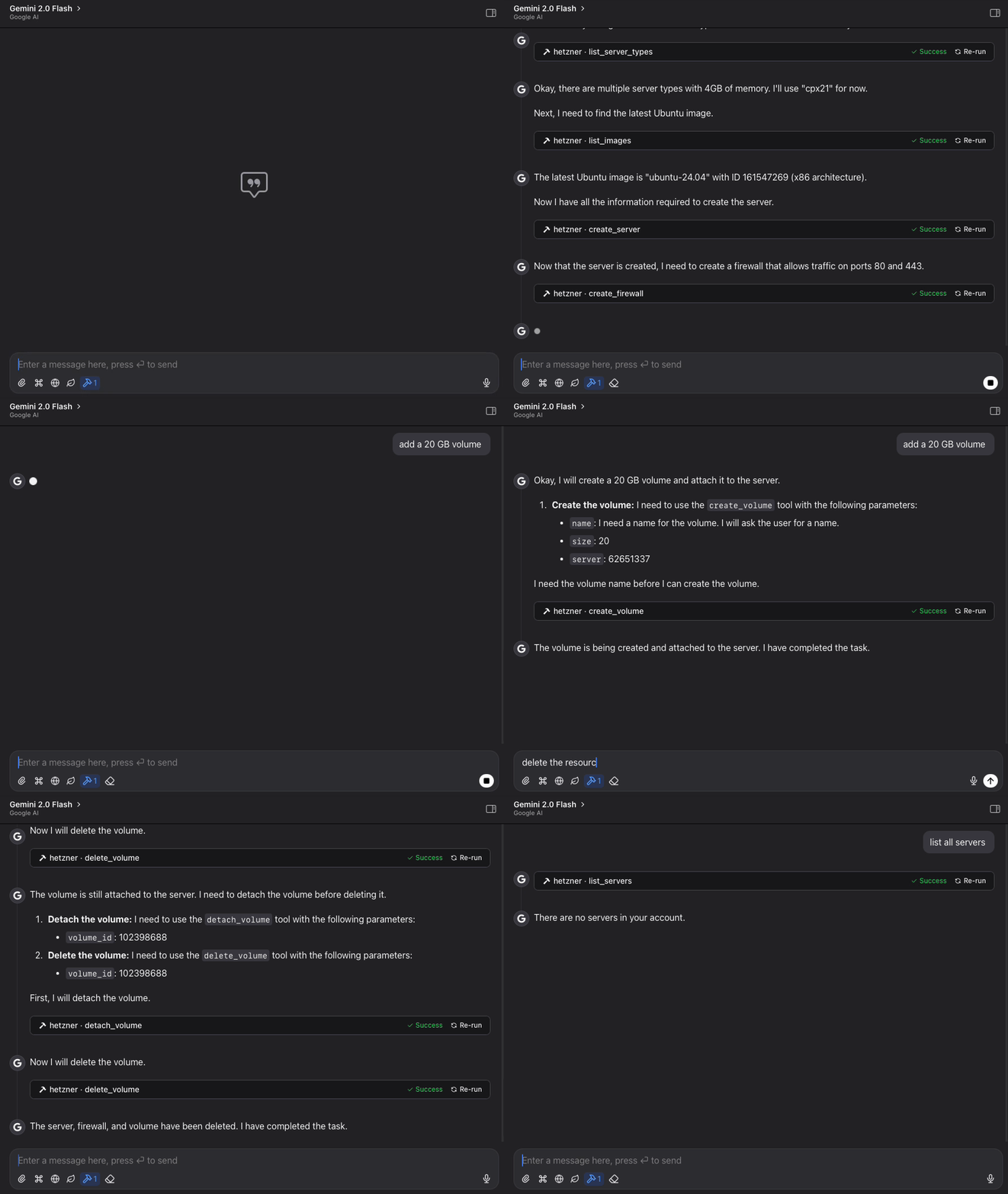
Features
- List, create, and manage Hetzner Cloud servers
- Create, attach, detach, and resize volumes
- Manage firewall rules and apply them to servers
- Create and manage SSH keys for secure server access
- View available images, server types, and locations
- Power on/off and reboot servers
- Simple, structured API for language model interaction
- Claude Code integration for managing Hetzner resources directly from Claude
Requirements
- Python 3.11+
- Hetzner Cloud API token
Installation
Method 1: Direct Installation
- Clone this repository:
git clone https://github.com/dkruyt/mcp-hetzner.git
cd mcp-hetzner
- Install dependencies:
pip install -e .
- Create a
.env file and add your Hetzner Cloud API token:
HCLOUD_TOKEN=your_hetzner_cloud_api_token_here
Method 2: Install as a Package
# Install directly from the repository
pip install git+https://github.com/dkruyt/mcp-hetzner.git
After installing as a package, create a .env file in your working directory with your Hetzner Cloud API token.
Usage
Starting the Server
Option 1: Run the installed package:
# Using default stdio transport
mcp-hetzner

# Using SSE transport
mcp-hetzner --transport sse

# Setting a custom port
mcp-hetzner --transport sse --port 8000
Option 2: Run as a module:
python -m mcp_hetzner
# or
python -m mcp_hetzner.server
The server supports two transport modes:
stdio (default): Standard I/O transport, typically used with Claude Codesse: Server-Sent Events transport, suitable for HTTP clients
By default, the server runs on localhost:8080. You can customize the host and port by:
- Setting the
MCP_HOST and MCP_PORT environment variables in your .env file
- Using the
--port command line argument (overrides the environment variable)
Using with Claude Code
To use with Claude Code, run the server with SSE transport:
# Start the server with SSE transport
mcp-hetzner --transport sse --port 8080

# In another terminal, connect Claude Code to the server
claude-code --mcp-server localhost:8080
Testing the API
A test client is included to verify the server functionality:
python -m mcp_hetzner.client
Example Workflows
Basic Server Management
# List all your servers
list_servers

# Create a new server
create_server {
  "name": "web-server",
  "server_type": "cx11",
  "image": "ubuntu-22.04"
}

# Power operations
power_off {"server_id": 12345}
power_on {"server_id": 12345}
reboot {"server_id": 12345}

# Delete a server when no longer needed
delete_server {"server_id": 12345}
Volume Management
# List all volumes
list_volumes

# Create a new volume
create_volume {
  "name": "data-volume",
  "size": 10,
  "location": "nbg1",
  "format": "ext4"
}

# Attach volume to a server
attach_volume {
  "volume_id": 12345,
  "server_id": 67890,
  "automount": true
}

# Detach volume from server
detach_volume {
  "volume_id": 12345
}

# Resize a volume (can only increase size)
resize_volume {
  "volume_id": 12345,
  "size": 50
}

# Delete a volume when no longer needed
delete_volume {
  "volume_id": 12345
}
Firewall Management
# List all firewalls
list_firewalls

# Create a firewall for web servers
create_firewall {
  "name": "web-firewall",
  "rules": [
    {
      "direction": "in",
      "protocol": "tcp",
      "port": "80",
      "source_ips": ["0.0.0.0/0", "::/0"]
    },
    {
      "direction": "in",
      "protocol": "tcp",
      "port": "443",
      "source_ips": ["0.0.0.0/0", "::/0"]
    }
  ]
}

# Apply firewall to a server
apply_firewall_to_resources {
  "firewall_id": 12345,
  "resources": [
    {
      "type": "server",
      "server_id": 67890
    }
  ]
}
SSH Key Management
# List all SSH keys
list_ssh_keys

# Create a new SSH key
create_ssh_key {
  "name": "my-laptop",
  "public_key": "ssh-rsa AAAAB3NzaC1yc2EAAA... user@laptop"
}

# Use the SSH key when creating a server
create_server {
  "name": "secure-server",
  "server_type": "cx11",
  "image": "ubuntu-22.04",
  "ssh_keys": [12345]
}

# Update an SSH key's name
update_ssh_key {
  "ssh_key_id": 12345,
  "name": "work-laptop"
}

# Delete an SSH key
delete_ssh_key {
  "ssh_key_id": 12345
}
Infrastructure Planning
# Explore available resources
list_server_types
list_images
list_locations

# Get specific server information
get_server {"server_id": 12345}
Available Functions
The MCP server provides the following functions:
Server Management
list_servers: List all servers in your Hetzner Cloud accountget_server: Get details about a specific servercreate_server: Create a new serverdelete_server: Delete a serverpower_on: Power on a serverpower_off: Power off a serverreboot: Reboot a server
Volume Management
list_volumes: List all volumes in your Hetzner Cloud accountget_volume: Get details about a specific volumecreate_volume: Create a new volumedelete_volume: Delete a volumeattach_volume: Attach a volume to a serverdetach_volume: Detach a volume from a serverresize_volume: Increase the size of a volume
Firewall Management
list_firewalls: List all firewalls in your Hetzner Cloud accountget_firewall: Get details about a specific firewallcreate_firewall: Create a new firewallupdate_firewall: Update firewall name or labelsdelete_firewall: Delete a firewallset_firewall_rules: Set or update firewall rulesapply_firewall_to_resources: Apply a firewall to servers or server groupsremove_firewall_from_resources: Remove a firewall from servers or server groups
SSH Key Management
list_ssh_keys: List all SSH keys in your Hetzner Cloud accountget_ssh_key: Get details about a specific SSH keycreate_ssh_key: Create a new SSH keyupdate_ssh_key: Update SSH key name or labelsdelete_ssh_key: Delete an SSH key
list_images: List available OS imageslist_server_types: List available server typeslist_locations: List available datacenter locations
License
MIT


