

A Rust CAD application with an MCP server for creating, inspecting and rendering drawings, either headlessly or through a connection to the desktop app.
8K
Media & Design
A high-performance image processing server implementing MCP tools for format conversion, resizing, compression, rotation, flipping, and post-processing adjustments.
MCP image processing server based on the Model Context Protocol is cataloged as an MCP server attributed to hypervapor. A high-performance image processing server implementing MCP tools for format conversion, resizing, compression, rotation, flipping, and post-processing adjustments. It is categorized under media design. See the capability inspector for recorded interfaces and their independent review status; consult upstream documentation for the current interface.
Installation configuration is not reviewed. No executable setup is offered for this entry; inspect the source repository before proceeding.
Catalog license label: Not specified. Check the source repository's current license and terms before using, modifying or distributing this software.
Capability definitions are not reviewed. Unreviewed imports are not exposed as trusted interfaces.
No reviewed records to display. This does not establish that upstream lacks this capability.
No reviewed records to display. This does not establish that upstream lacks this capability.
No reviewed records to display. This does not establish that upstream lacks this capability.
Email delivery is not connected. This page does not collect email addresses or create subscriptions.
Browse the registry for current listings instead.
Reviews for MCP image processing server based on the Model Context Protocol are not available yet
Review publishing and storage are not connected. This page does not collect or publish ratings or comments, including after sign-in.
It supports conversion among JPEG, PNG, WebP, TIFF, GIF, AVIF, and HEIF.
Yes, the compress and optimize tool includes a stripMetadata option that is enabled by default to remove EXIF and similar metadata.
README.md · c2158cdba068 · Fetched 2026-11-13 10:35:16 UTC
Original upstream text, without AI rewriting. Scripts, forms and unsafe links are filtered for safety.
Showing the last retrieved documentation snapshot; check the source for current changes.

基于 Model Context Protocol (MCP) 的高性能图像处理服务器,提供格式转换、尺寸调整、压缩优化等丰富的图像处理功能。
sharp 原生模块的运行环境git clone https://github.com/HYPERVAPOR/mcp-image-processor.git
cd mcp-image-processor
npm install
如果需要自定义 MCP Server 逻辑,请编辑 src/index.ts,修改完成后执行:
npm run build
以 cline 客户端为例,其他客户端(如 cursor, cherryStudio)配置类似:
{
  "mcpServers": {
    "image-processor": {
      "autoApprove": [],
      "disabled": false,
      "timeout": 60,
      "command": "C:\\Program Files\\nodejs\\node.exe",
      "args": ["C:\\projs\\mcp-image-processor\\dist\\index.js"],
      "transportType": "stdio"
    }
  }
}
注意:请将
command和args替换为你本地的真实路径。
确保 MCP Server 已启用:
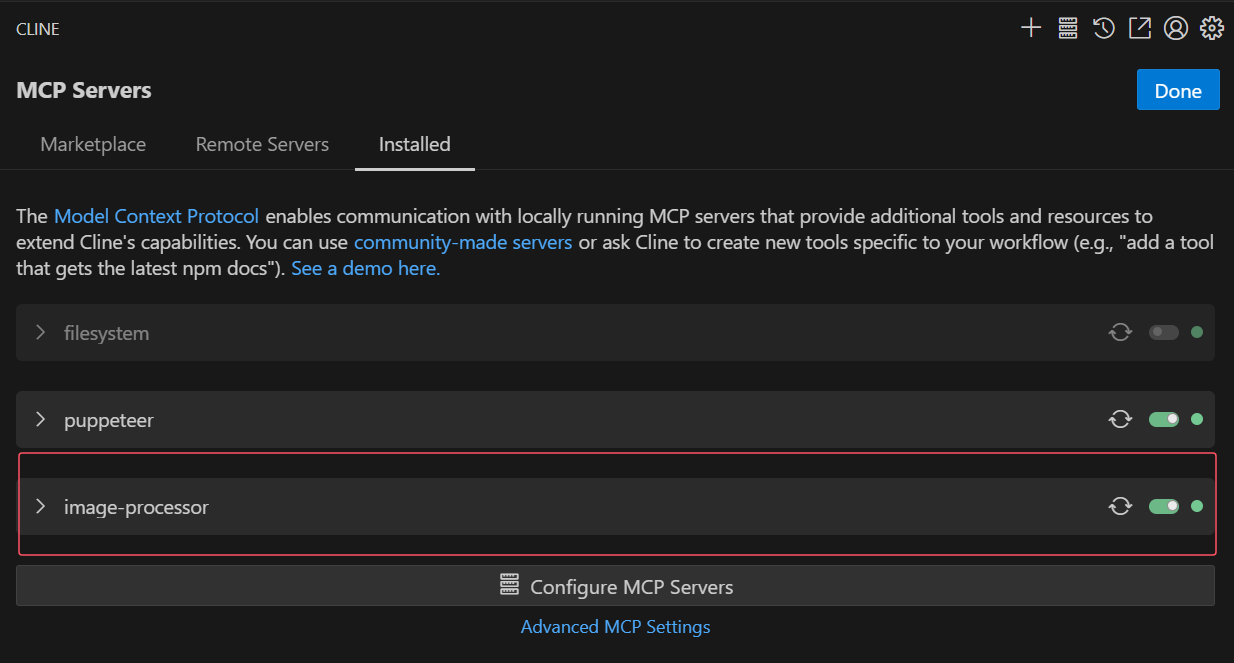
只需向 LLM 描述你想对图片执行的操作,并提供一个或多个图片的绝对路径,例如:
请你将此图片转换为黑白色调,图片位于 "C:\projs\MCP-image-server\assets\test\climbing.png"
效果演示: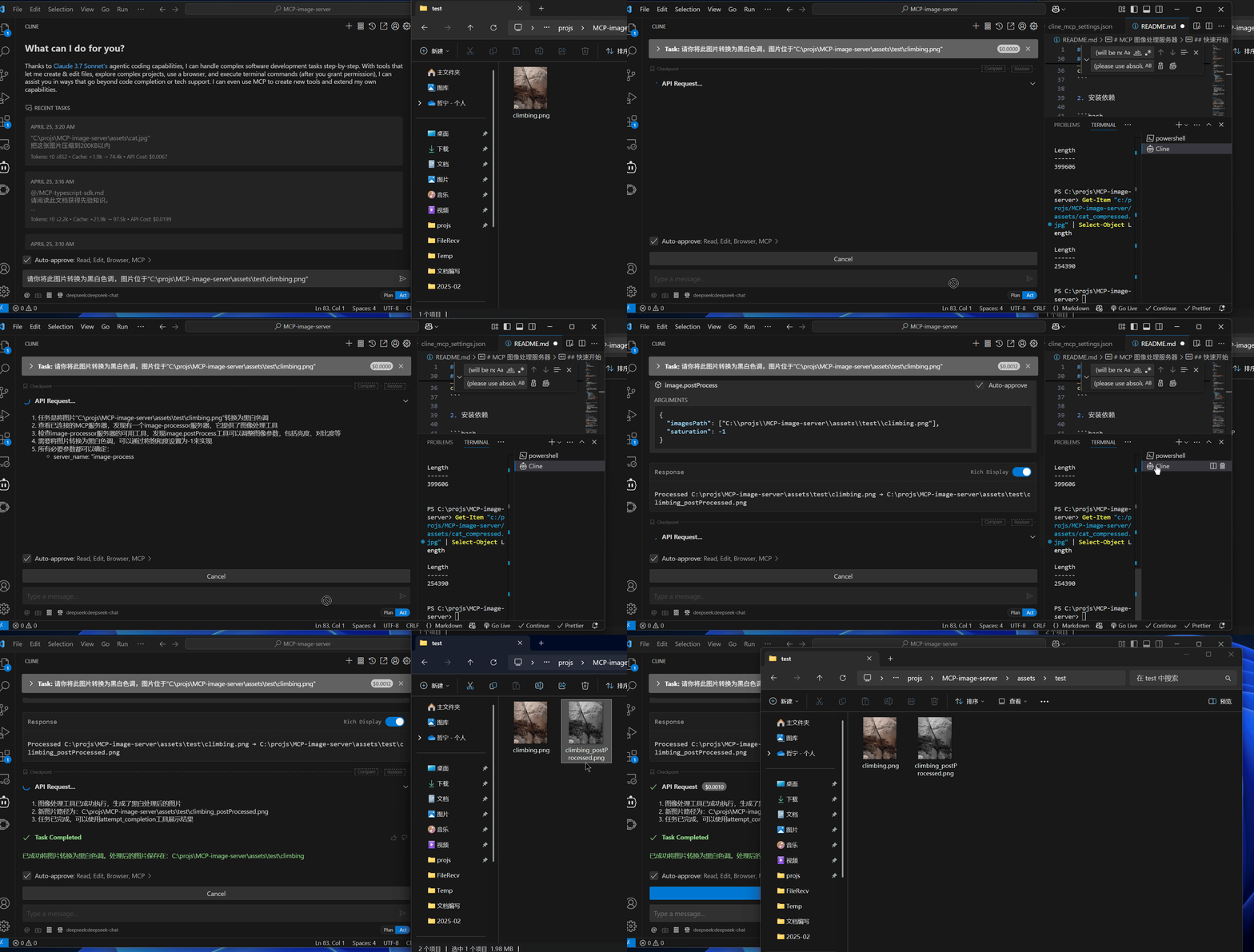
image.convertFormat — 格式转换参数:
imagesPath: 绝对路径数组outputFormat: 目标格式(jpeg、png、webp、tiff、gif、avif、heif)formatParams(可选):
quality: 输出质量(0-100)compressionLevel: 压缩级别(0-9,9 为最高)功能:将图片转换为指定格式,支持质量与压缩级别调整。
image.cropResize — 裁剪与尺寸调整参数:
imagesPath: 绝对路径数组width: 目标宽度(像素,可选)height: 目标高度(像素,可选)resizeMode: 调整模式(contain、cover、fill、inside、outside)maintainRatio: 是否保持宽高比(默认 true)rotate: 旋转角度(-360 到 360 度,可选)flip: 是否垂直翻转(可选)mirror: 是否水平翻转(可选)功能:裁剪、缩放、旋转和翻转图片,支持多种尺寸调整策略。
image.compressOptimize — 压缩与优化参数:
imagesPath: 绝对路径数组quality: 输出质量(0-100,可选)stripMetadata: 是否移除 EXIF 等元数据(默认 true)progressive: 是否启用渐进式渲染(JPEG/PNG,可选)功能:压缩图片,去除元数据,支持渐进式渲染。
image.resize — 图像缩放参数:
imagesPath: 绝对路径数组width: 目标宽度(像素,可选)height: 目标高度(像素,可选)maintainRatio: 是否保持宽高比(默认 true)fitMode: 缩放模式(contain、cover、fill、inside、outside,可选)功能:缩放图片,支持保持比例或指定缩放模式。若开启保持比例且目标宽高比与原图不符,将返回错误。
image.rotateFlip — 旋转与翻转参数:
imagesPath: 绝对路径数组rotateAngle: 旋转角度(-360 到 360 度,可选)flipHorizontal: 是否水平翻转(镜像效果,可选)flipVertical: 是否垂直翻转(可选)功能:旋转及水平/垂直翻转图片。
image.postProcess — 图像后处理参数:
imagesPath: 绝对路径数组brightness: 亮度调整(-1 到 1,可选)contrast: 对比度调整(-1 到 1,可选)saturation: 饱和度调整(-1 到 1,可选)blur: 模糊半径(像素,可选)sharpen: 锐化强度(0-100,可选)功能:调整亮度、对比度、饱和度,支持模糊与锐化处理。
MCP-image-server/
├── src/                # TypeScript 源代码
│   └── index.ts        # 主入口文件
├── dist/               # 编译输出目录
│   └── index.js        # 编译后的主入口文件
├── test/               # 测试脚本目录
├── package.json        # 项目配置及依赖
└── tsconfig.json       # TypeScript 编译配置
MIT © 2025
感谢您使用 MCP 图像处理服务器,欢迎贡献与反馈!
Claim this server with your GitHub account to request manual ownership verification.
Link to the catalog listing for MCP image processing server based on the Model Context Protocol from your README. This badge does not certify ownership, compatibility or security.
[](https://awesome-mcp.com/servers/mcp-image-processor)Public repository statistics could not be verified. Check the configured source address; unavailable counts are not zero.
Separate sources, scopes and periods. Never combined or treated as installations, active users or security reviews.
No reviewed package or image identity; download statistics are not listed yet.
Alternative and complementary servers in the same category
A Rust CAD application with an MCP server for creating, inspecting and rendering drawings, either headlessly or through a connection to the desktop app.

Liquid Composer is a browser-based Liquid Glass icon design tool that offers a local MCP server for agent-driven icon workflows.

agent-media makes short drama series and other short vertical videos from Claude, ChatGPT or Codex through one MCP connection, with OAuth sign-in and no API keys.