IP2WHOIS MCP Server


A Model Context Protocol (MCP) server that provides comprehensive WHOIS lookup capabilities using the IP2WHOIS API. This server allows AI agents to query domain registration details, including expiry dates, registrar information, and registrant data. This server also supports query on hosted domains by IP address.
Features
-
Domain Lookup: Retrieve detailed WHOIS data for any domain name.
-
Hosted Domains Lookup: Retrieve hosted domains data for any IP address.
-
Comprehensive Data: Includes domain age, nameservers, registrar info, and administrative/billing contact details.
-
FastMCP Framework: Built using the high-performance FastMCP Python framework.
Requirement
This MCP server requires an API key to work. You can sign up for a free API key and enjoy up to 500 queries per month.
The local MCP server setup also uses uv, which can be installed by following the guide.
Setup
There are two ways to use this MCP server:
- Cloud-hosted MCP server: Connect directly to the hosted IP2WHOIS MCP server. Nothing needs to be installed locally.
- Local MCP server: Download and run the server on your own machine with
uv.
Option 1: Cloud-hosted MCP server
Use this if you want to connect directly to the hosted server.
Method A: Direct HTTP connection
Use this if your MCP client supports remote servers over HTTP. No uv, Node.js, or npx is needed.
{
  "mcpServers": {
    "ip2whois": {
      "type": "http",
      "url": "https://mcp.ip2whois.com/",
      "headers": {
        "X-API-Key": "<YOUR API key HERE>"
      }
    }
  }
}
If your client is configured from the command line, such as Claude Code, you can add the server with:
claude mcp add --transport http ip2whois https://mcp.ip2whois.com/ --header "X-API-Key: <YOUR API key HERE>"
Method B: Connection through npx
Use this if your MCP client only supports local (stdio) servers. The mcp-remote package runs locally and forwards requests to the hosted server. Node.js is required.
{
  "mcpServers": {
    "ip2whois": {
      "command": "npx",
      "args": [
        "-y",
        "mcp-remote@latest",
        "https://mcp.ip2whois.com/",
        "--header",
        "X-API-Key:<YOUR API key HERE>"
      ]
    }
  }
}
To get your API key, just login to your dashboard and get it from there, then replace <YOUR API key HERE> in the example above with your actual API key.
Restart the Claude Desktop after saving the changes, and you should see it appear in the Search and tools menu.
Option 2: Local MCP server
Follow the steps below to run the MCP server on your own machine:
- Setup the
uv package manager, you can once again refer to the guide to do so.
- Make sure you have installed the Claude Desktop, if you haven't, kindly download from here for Windows and MacOS users, or follow this guide for Linux user.
- Open the
claude_desktop_config.json in your choice of editor, if you do not having one yet, follow this guide to create one.
- Add the following to your
claude_desktop_config.json:
{
  "mcpServers": {
    "ip2whois": {
      "command": "uvx",
      "args": ["mcp-ip2whois"],
      "env": {
        "IP2WHOIS_API_KEY": "<YOUR API key HERE>"
      }
    }
  }
}
- To get your API key, just login to your dashboard and get it from there. Replace the
<YOUR API key HERE> in the example above with your actual API key.
- Restart the Claude Desktop after saving the changes, and you should see it appear in the
Search and tools menu.
Usage
To query the WHOIS information, just enter your query about the domain in a chat in Claude Desktop. Some of the example query will be:
- Who is the registrar of the (domain)?
- Who is the owner of (domain)?
- What is the WHOIS for (domain)?
For instance, below is the result of the domain google.com:
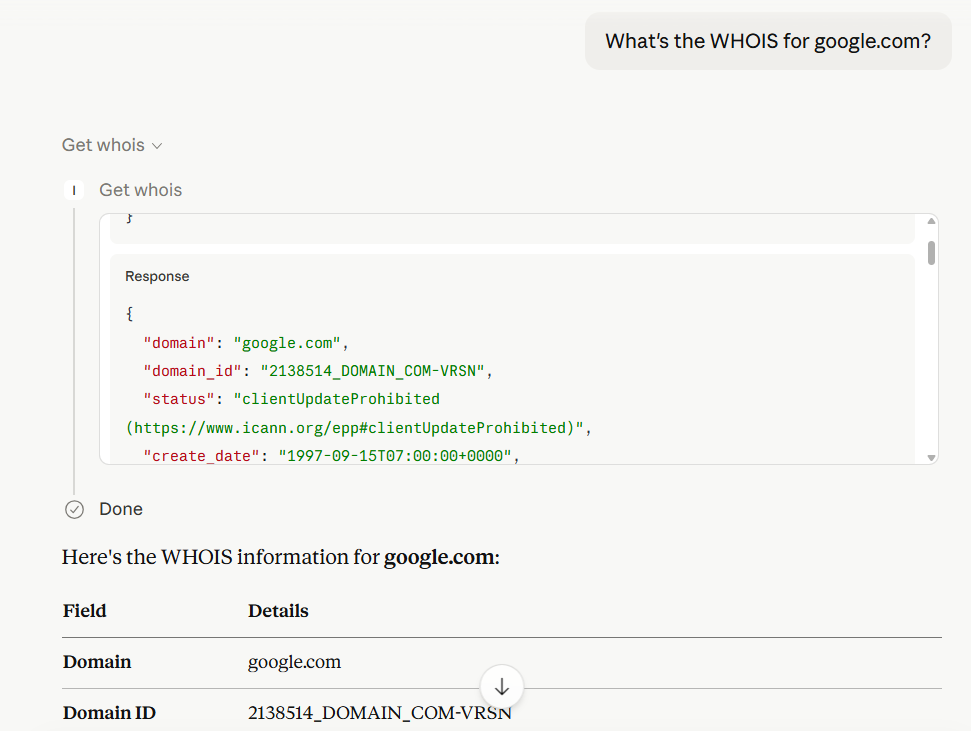
To query for the hosted domains by IP address, just enter your query about the IP in a chat in Claude Desktop. Some of the example query will be:
- What domains did (IP) have?
- What are the domains in (IP)?
- What's the domain owned by (IP)?
In Claude Desktop, the model will automatically generate the output based on the result returned by IP2WHOIS MCP server.
Environment Variable
IP2WHOIS_API_KEY
The IP2WHOIS API key, which allows you to query up to 500 per month for free and more details of the IP address. You can sign up for a free API key, or subscribe to a plan to enjoy more benefits.
get_whois
Look up WHOIS data for a domain name.
get_hosted_domains
Query for the list of hosted domain names by IP address.
License
See the LICENSE file.



