


mcp-k8s-ro
A read-only MCP server that gives Claude access to Kubernetes clusters. Built in Go, it communicates over stdio using the MCP protocol.
Design
- Read-only — only
get, describe, logs, and top style operations. No create, update, or delete. If a mutating operation is needed, the server prints the equivalent kubectl command for you to run manually. Safe to use while on-call at night: Claude can never accidentally mutate your cluster, even under prompt fatigue.
- Secret-safe — secret values are masked before being sent to the model, so your secrets cannot leak due to misconfiguration or prompt injection.
- Token-efficient — responses include only relevant fields (name, status, restarts, etc.) rather than raw Kubernetes API objects, keeping context usage low.
- Cluster-aware — every response includes the active context and cluster name, so Claude always knows which cluster it is talking to.
- Context-pinned — the server locks to the active kubeconfig context at startup. Switching contexts in another terminal has no effect on the running server.
- No extra infra — runs as a local binary or Docker container, connects to whatever kubeconfig context is active at startup.
Redacted fields
Configuration
Usage with Claude
Docker (recommended)
claude mcp add --scope user --transport stdio k8s-ro \
  -- docker run --rm -i -v ~/.kube:/home/nonroot/.kube:ro ghcr.io/your-ko/mcp-k8s-ro:latest
Pinning a specific version (check the latest release ) is recommended for production use:
claude mcp add --scope user --transport stdio k8s-ro \
  -- docker run --rm -i -v ~/.kube:/home/nonroot/.kube:ro ghcr.io/your-ko/mcp-k8s-ro:1.1.0
Binary
Download a pre-built binary from GitHub Releases:
# macOS Apple Silicon — change ARCH for other platforms: darwin-amd64, linux-amd64, linux-arm64
ARCH=darwin-arm64
VERSION=$(curl -fsSL https://api.github.com/repos/your-ko/mcp-k8s-ro/releases/latest | grep tag_name | cut -d'"' -f4)
curl -fsSL "https://github.com/your-ko/mcp-k8s-ro/releases/download/${VERSION}/mcp-k8s-ro-${VERSION}-${ARCH}" -o ~/.local/bin/mcp-k8s-ro
chmod +x ~/.local/bin/mcp-k8s-ro
xattr -d com.apple.quarantine ~/.local/bin/mcp-k8s-ro 2>/dev/null  # macOS only: remove Gatekeeper quarantine
claude mcp add --scope user --transport stdio k8s-ro ~/.local/bin/mcp-k8s-ro
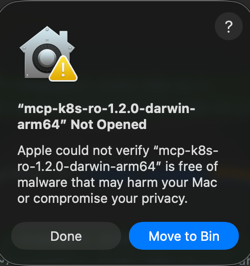
macOS Gatekeeper: The binary is not code-signed, so macOS will block it.
The xattr command above removes the quarantine flag. Alternatively, go to System Settings → Privacy & Security and click "Allow Anyway" after the first blocked attempt.
Or build from source:
make build
claude mcp add --scope user --transport stdio k8s-ro ./bin/mcp-k8s-ro
Custom kubeconfig location
If your kubeconfig is not at ~/.kube/config, set the KUBECONFIG environment variable:
# Binary
claude mcp add --scope user --transport stdio -e KUBECONFIG=/path/to/kubeconfig k8s-ro ~/.local/bin/mcp-k8s-ro

# Docker
claude mcp add --scope user --transport stdio k8s-ro \
  -- docker run --rm -i -e KUBECONFIG=/config/kubeconfig -v /path/to/kubeconfig:/config/kubeconfig:ro ghcr.io/your-ko/mcp-k8s-ro:latest
Single-cluster design
The server intentionally operates on one kubeconfig context and provides no tool to switch clusters at runtime. The reasons are:
- Prompt injection isolation — a malicious value in one cluster's resources (e.g. a pod annotation) cannot instruct Claude to pivot to a different cluster, including production.
- Explicit audit boundary — every tool response includes the context and cluster name, so there is never ambiguity about which cluster was queried.
To point the server at a different cluster, stop the server, switch context, and restart:
kubectl config use-context my-other-cluster
# then restart the MCP server / reload Claude Desktop
To work with multiple clusters simultaneously, register a separate server instance per cluster in your MCP config:
{
  "mcpServers": {
    "k8s-staging": {
      "type": "stdio",
      "command": "/path/to/bin/mcp-k8s-ro",
      "env": { "KUBECONFIG": "/path/to/.kube/config" }
    },
    "k8s-prod": {
      "type": "stdio",
      "command": "/path/to/bin/mcp-k8s-ro",
      "env": { "KUBECONFIG": "/path/to/.kube/config-prod" }
    }
  }
}
Claude will address each server by name and each instance only ever sees its own cluster.
MCP registry
This server is published on registry.modelcontextprotocol.io


