
A directory listing describing a cancellation-letter and mailing-address service. The configured public GitHub repository returned 404 during source verification.
Repository stats unavailable
Developer Tools
A meta-server that aggregates configured MCP servers and exposes lightweight discovery, selective schema loading, semantic tool search, and code-based execution tools.
Meta MCP server that merges multiple MCP servers into one endpoint is cataloged as an MCP server attributed to eliavamar. A meta-server that aggregates configured MCP servers and exposes lightweight discovery, selective schema loading, semantic tool search, and code-based execution tools. It is categorized under developer tools. See the capability inspector for recorded interfaces and their independent review status; consult upstream documentation for the current interface.
Installation configuration is not reviewed. No executable setup is offered for this entry; inspect the source repository before proceeding.
Catalog license label: Not specified. Check the source repository's current license and terms before using, modifying or distributing this software.
Capability definitions are not reviewed. Unreviewed imports are not exposed as trusted interfaces.
No reviewed records to display. This does not establish that upstream lacks this capability.
No reviewed records to display. This does not establish that upstream lacks this capability.
No reviewed records to display. This does not establish that upstream lacks this capability.
Email delivery is not connected. This page does not collect email addresses or create subscriptions.
Browse the registry for current listings instead.
Reviews for Meta MCP server that merges multiple MCP servers into one endpoint are not available yet
Review publishing and storage are not connected. This page does not collect or publish ratings or comments, including after sign-in.
Yes, it automatically analyzes tool output schemas when needed and preserves them across sessions.
Servers are supplied either as inline configuration or via a config file listing each server's name, command, and arguments.
README.md · 854421f58cfc · Fetched 2026-11-13 12:19:19 UTC
Original upstream text, without AI rewriting. Scripts, forms and unsafe links are filtered for safety.
Showing the last retrieved documentation snapshot; check the source for current changes.
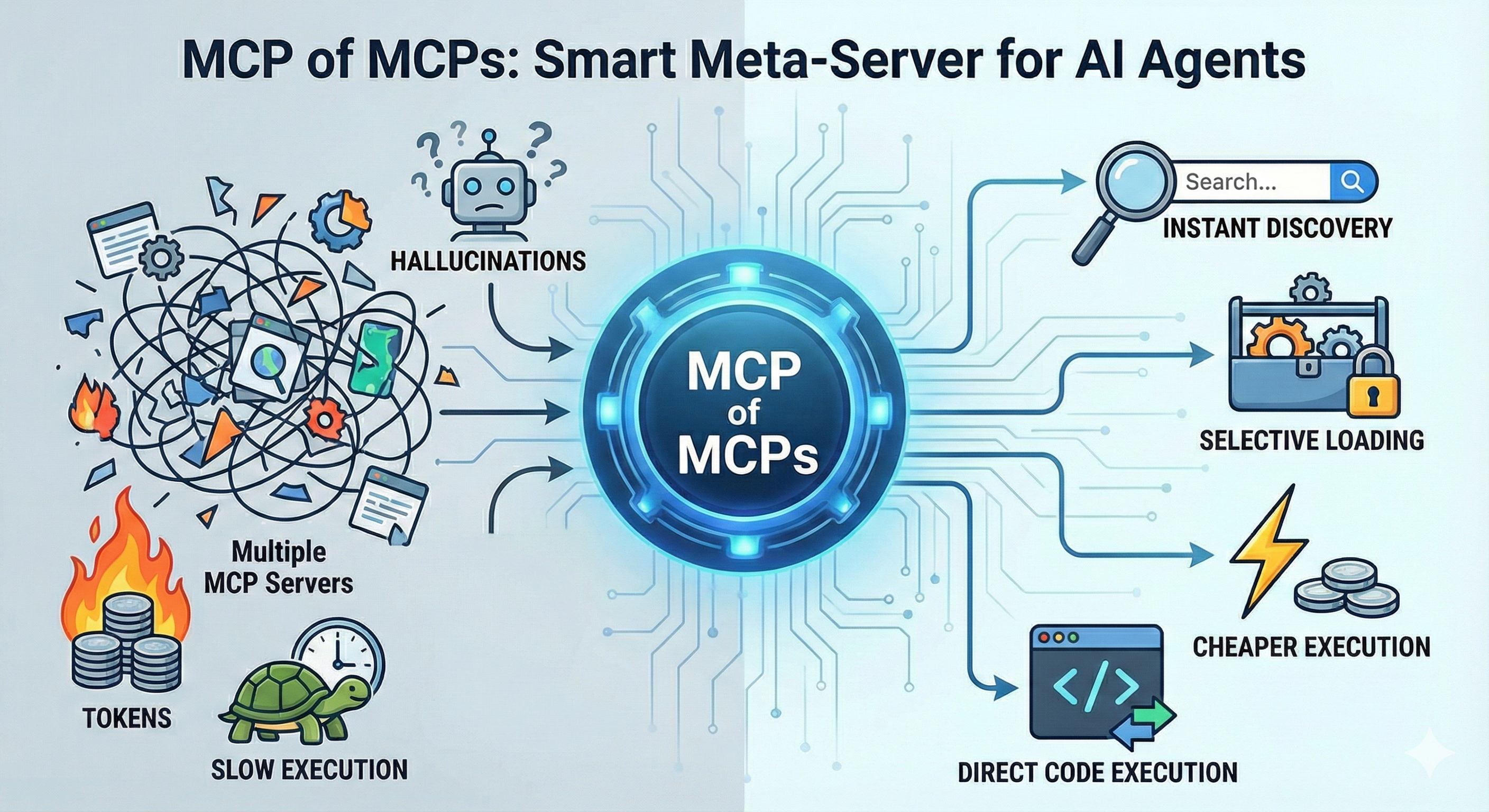
MCP of MCPs is a meta-server that merges all your MCP servers into a single smart endpoint. It gives AI agents instant tool discovery, selective schema loading, and massively cheaper execution, so you stop wasting tokens and time.
With persistent tool metadata, semantic search, and direct code execution between tools, it turns chaotic multi-server setups into a fast, efficient, hallucination-free workflow. It also automatically analyzes the tools output schemas if needed and preserves them across sessions for consistent behavior.
In short:
🚀 Faster automation
🧠 Cleaner reasoning
💰 Drastically fewer tokens
📦 Persistent + analyzed schema metadata
semantic_search_toolsSemantic Discovery Tool - Search tools by describing the task you want to accomplish. Instead of browsing all of tool names—or when tool names don't clearly indicate what they do—just describe your intent in plain English (e.g., "send notifications", "query database", "process images") and get back only the most relevant tools instantly. This provides a fast and lightweight approach to investigate what tools are available across all connected servers without loading any full tool definitions.
// Search by task/intent, not by tool names:
// Input: { query: "send notifications to a channel", limit: 5 }
// Returns only relevant matches (ranked by similarity):
// [
//   {
//     serverName: "slack",
//     toolName: "post_message",
//     description: "Post a message to a Slack channel",
//     similarityScore: 0.94,
//     fullPath: "slack/post_message"
//   },
// ....
//   // Only 5 most relevant tools returned - fast and lightweight!
// ]
Perfect for quick investigation:
get_mcps_servers_overviewDiscovery Tool - This tool returns only tool names without full schemas, giving agents a lightweight overview in seconds instead of loading hundreds of detailed definitions upfront. By showing just what's available without overwhelming details, it prevents confusion and hallucinations while eliminating loading delays.
// Returns:
// google_drive/download_file
// google_drive/upload_file
// slack/send_message
// database/execute_query
// ...
get_tools_overviewIntrospection Tool - Load only the tools you actually need instead of all 30+ tools, saving thousands of tokens through selective loading. This on-demand approach provides faster responses and focused context that reduces confusion and improves accuracy.
// Input: ["google_drive/download_file", "slack/send_message"]
// Returns: Full tool definitions with:
// - Parameter schemas
// - Required vs optional fields
// - Example usage code
run_functions_codeExecution Tool - Data flows directly between tools without round-trips through the model, so a 2MB file transfer uses ~100 tokens instead of 50,000+. The model only sees clean final results instead of noisy intermediate data, executing complex workflows in one shot without processing delays.
// Write code that:
// - Calls multiple tools in sequence or parallel
// - Processes and transforms data
// - Implements complex logic and error handling
// - Returns only final results to the model
When you need to accomplish a task, start by using get_mcps_servers_overview to get a lightweight list of all available tool names across servers—this gives you a quick scan of what's available without loading any schemas. If you can't find the tools you need for your task or if tool names aren't clear, use semantic_search_tools to search by describing your intent in plain English (e.g., "send notifications to a channel"), which uses AI-powered semantic understanding to instantly return only the most relevant tools ranked by similarity. Once you've identified the specific tools you need, use get_tools_overview to load only those tool definitions with their full schemas and parameters—saving thousands of tokens by avoiding irrelevant tools and giving the model focused context. Finally, use run_functions_code to execute your workflow where data flows directly between tools in memory, keeping intermediate results as native objects rather than serializing them into tokens, with only the final result returned to the model. This pattern dramatically cuts token usage, speeds up execution by avoiding unnecessary model processing, and eliminates hallucinations by showing only relevant information at each step.
Traditional Approach:
TOOL CALL: gdrive.getDocument(documentId: "abc123")
  → returns full transcript text (loads into context: 50,000 tokens)

TOOL CALL: salesforce.updateRecord(...)
  → model writes entire transcript again (doubles the tokens: +50,000 tokens)
Total: 100,000+ tokens processed, slow response time
With MCP of MCPs:
const transcript = (await gdrive.getDocument({ documentId: 'abc123' })).content;
await salesforce.updateRecord({
  objectType: 'SalesMeeting',
  data: { Notes: transcript }
});
The code executes in one operation. Data flows directly between tools. Only the final result returns to the model.
Total: 2,000 tokens processed (98.7% reduction) ⚡
✅ Faster Response Time - No need to load all tools upfront
✅ Reduced Hallucinations - Model sees only relevant information
✅ Progressive Disclosure - Load tools on-demand as needed
✅ Code Composition - Orchestrate complex workflows with familiar JavaScript
✅ Persistent Tool Metadata - Automatically preserves tool output schemas across sessions
Add this to your Cline MCP settings file:
Option 1: Using inline configuration
{
  "mcpServers": {
    "mcp-of-mcps": {
      "autoApprove": [],
      "disabled": false,
      "timeout": 60,
      "type": "stdio",
      "command": "npx",
      "args": [
        "-y",
        "@dbestai/mcp-of-mcps",
        "--config",
        "[{\"name\":\"weather\",\"command\":\"npx\",\"args\":[\"-y\",\"@h1deya/mcp-server-weather\"]},{\"name\":\"time\",\"command\":\"uvx\",\"args\":[\"mcp-server-time\"]}]"
      ]
    }
  }
}
Option 2: Using a config file
First, create a config.json file that specifies which MCP servers to connect to:
[
  {
    "name": "weather",
    "command": "npx",
    "args": ["-y", "@h1deya/mcp-server-weather"]
  },
  {
    "name": "time",
    "command": "uvx",
    "args": ["mcp-server-time"]
  }
]
Then reference this file in your Cline settings:
{
  "mcpServers": {
    "mcp-of-mcps": {
      "autoApprove": [],
      "disabled": false,
      "timeout": 60,
      "type": "stdio",
      "command": "npx",
      "args": [
        "-y",
        "@dbestai/mcp-of-mcps",
        "--config-file",
        "/absolute/path/to/your/config.json"
      ]
    }
  }
}
Configuration Options:
autoApprove: Array of tool names that don't require approval (e.g., ["get_mcps_servers_overview"])disabled: Set to false to enable the servertimeout: Timeout in seconds for tool execution (default: 60)type: Connection type, always "stdio" for MCP serversThis implementation follows the patterns described in Anthropic's article on code execution with MCP:
📖 Code execution with MCP: Building more efficient agents
Contributions are welcome! Please feel free to submit a Pull Request.
ISC
Claim this server with your GitHub account to request manual ownership verification.
Link to the catalog listing for Meta MCP server that merges multiple MCP servers into one endpoint from your README. This badge does not certify ownership, compatibility or security.
[](https://awesome-mcp.com/servers/mcp-of-mcps)Public repository statistics could not be verified. Check the configured source address; unavailable counts are not zero.
Separate sources, scopes and periods. Never combined or treated as installations, active users or security reviews.
No reviewed package or image identity; download statistics are not listed yet.
Alternative and complementary servers in the same category
A directory listing describing a cancellation-letter and mailing-address service. The configured public GitHub repository returned 404 during source verification.

A hosted MCP service for browsing and searching through Singapore mobile-network proxies.

A directory listing describing a Markdown-to-PDF service. The configured public GitHub repository returned 404 during source verification.