
This is a Model Context Protocol (MCP) server for interacting with AIStor object stores.
Repository stats unavailable
Databases & Storage
A Python MCP server for interacting with Apache Pinot, enabling metadata inspection and read-only SQL queries on a Pinot cluster.
Pinot MCP Server is cataloged as an MCP server attributed to startreedata. A Python MCP server for interacting with Apache Pinot, enabling metadata inspection and read-only SQL queries on a Pinot cluster. It is categorized under databases storage. See the capability inspector for recorded interfaces and their independent review status; consult upstream documentation for the current interface.
Installation configuration is not reviewed. No executable setup is offered for this entry; inspect the source repository before proceeding.
Catalog license label: Apache 2.0. Check the source repository's current license and terms before using, modifying or distributing this software.
Capability definitions are not reviewed. Unreviewed imports are not exposed as trusted interfaces.
No reviewed records to display. This does not establish that upstream lacks this capability.
No reviewed records to display. This does not establish that upstream lacks this capability.
No reviewed records to display. This does not establish that upstream lacks this capability.
Email delivery is not connected. This page does not collect email addresses or create subscriptions.
Browse the registry for current listings instead.
Reviews for Pinot MCP Server are not available yet
Review publishing and storage are not connected. This page does not collect or publish ratings or comments, including after sign-in.
STDIO is the default transport, recommended for local desktop use; HTTP can be selected via MCP_TRANSPORT.
No; it is described as a convenience feature using best-effort SQL parsing rather than a security boundary.
README.md · be5153a52658 · Fetched 2026-11-13 10:03:10 UTC
Original upstream text, without AI rewriting. Scripts, forms and unsafe links are filtered for safety.
Showing the last retrieved documentation snapshot; check the source for current changes.




This project is a Python-based Model Context Protocol (MCP) server for interacting with Apache Pinot. It is built using the FastMCP framework. It is designed to integrate with Claude Desktop to enable real-time analytics and metadata queries on a Pinot cluster.
It allows you to
dry_run; always preview the exact target and
payload before applying. Applying requires the preview's short-lived, one-time
confirmation_token, including for table-filter reloads. A preview is not a
guarantee that Pinot will accept the later write.get_schema and get_table_config independently.Tool names are case-sensitive and use underscores. Version 4 renamed four tools to make every operation verb-first; clients using the former noun-first names must update their calls.
| Tool | Purpose |
|---|---|
test_connection | Diagnose broker, controller, and query connectivity. |
list_tables | List visible Pinot table names. |
get_schema | Get one table's column schema. |
get_table_config | Get one table's indexing and ingestion configuration. |
get_table_size | Get reported and estimated storage size for one table. |
list_segments | List exact segment names for one table. |
list_segment_metadata | Page through metadata for a table's segments. |
get_segment_index_metadata | Inspect per-column indexes for one exact segment. |
read_query | Run one read-only Pinot SQL query. |
begin_investigation / query_incident | Open and query an opt-in scoped evidence run. |
get_trace / finish_investigation | Fetch recorded span edges and close with citations. |
create_schema / update_schema | Preview or apply schema changes. |
create_table_config / update_table_config | Preview or apply table-config changes. |
reload_table_filters | Preview or apply the configured table-filter YAML. |
For every schema, table-config, or table-filter change, first call the same tool
with dry_run=true, present the preview to the user, and call it with
dry_run=false and the preview's one-time confirmation_token only after
confirmation. Editing a table-filter file after preview invalidates its token.
Pinot performs authoritative validation during table/schema apply calls, so a
write can still fail after a successful preview.
read_query returns the existing page fields plus metadata. For example,
{"query":"SELECT service, count(*) FROM events GROUP BY service","limit":20}
returns metadata.completeness as complete, partial, or unknown, along with
native server counts, query ID, query SHA-256, and bounded execution statistics.
Missing resultTable or required execution flags remains unknown. A partial
server response or group limit remains partial; an empty page is not proof of
healthy telemetry. Native complete describes this bounded SQL execution, not
coverage of the incident window or the entire dataset. row_limit_reached is
separate from execution completeness and paging.
The MCP query path uses pinotdb>=9.2.1 through cursor.execute_native() for
submission and decoding. The SDK exposes full structured query_statistics;
MCP projects bounded counters and safe execution evidence into the tool response.
The path submits once and does not switch transports after an ambiguous failure.
Its unique clientQueryId and applicationName=mcp-pinot support optional
correlation with query history or broker logs when available. Python integrations can
call execute_query_with_metadata(..., timeout_seconds=5) to bound native and
HTTP timeouts without modifying shared configuration. HTTP timeouts are
inactivity limits; late results are rejected, but this is not native cancellation.
Tool results, including tool errors, include timing evidence in the standard
MCP response _meta["io.github.startreedata/mcp-pinot"]. Existing tool data and
output schemas are preserved. For example, this response metadata fragment
requires no log access:
{
  "_meta": {
    "io.github.startreedata/mcp-pinot": {
      "request_id": "38cb1444b20c446a96bc272531f34518",
      "status": "success",
      "admitted": true,
      "queue_wait_ms": 12,
      "execution_ms": 84,
      "duration_ms": 97
    }
  }
}
MCP rate-limit protocol errors preserve their JSON-RPC code and message and carry
the same envelope in error.data._meta["io.github.startreedata/mcp-pinot"].
Other transport/protocol failures or cancellation may not produce a tool result.
With MCP_TRANSPORT=http on the default port 8080, a FastMCP Python client reads
wire _meta through result.meta. call_tool_mcp also returns tool errors:
from fastmcp import Client


async def read_timing():
    async with Client("http://localhost:8080/mcp") as client:
        result = await client.call_tool_mcp("read_query", {"query": "SELECT 1"})
        return result.meta["io.github.startreedata/mcp-pinot"]
Orchestrators should read .meta and forward this evidence to the agent when the
host does not automatically surface protocol metadata.
queue_wait_ms measures only waiting for the MCP concurrency semaphore.
execution_ms measures the admitted MCP tool pipeline, including SDK HTTP work
and validation; admitted=false means that pipeline never started. duration_ms
covers the server's tool invocation, including admission checks, and excludes
model reasoning and client delivery. status is success or error for the MCP
outcome; for read_query, separately inspect metadata.completeness.
An agent can use queue_wait_ms to identify MCP admission delay, then inspect
read_query's metadata.native_stats.timeUsedMs for Pinot's native query duration
when present. Native query time overlaps execution_ms; their different timer
boundaries do not support exact network-overhead subtraction. The shared
request_id also appears in query metadata and native clientQueryId, enabling
optional history/log correlation when more context is needed.
Response timing metadata contains no secrets, principal identifiers, tool
arguments, SQL, or rows. Audit logs record the same timings with hashed principal
identifiers. MCP_MAX_RESPONSE_BYTES limits the tool payload before this bounded
timing envelope is added; it excludes the added observability metadata.
Cancellation is audit-only when no response is returned and does not prove that
Pinot execution stopped.
Incident tools are disabled until the server starts with --incident-profiles.
See the incident evidence guide and
example profile for configuration and a
workflow using begin_investigation, query_incident, optional get_trace, and
finish_investigation. Evidence queries expose the same response _meta timings
and native request IDs when reported; log access is optional. Runs are
owner-bound and budgeted; complete execution still leaves root-cause hypotheses
and dataset coverage unvalidated. This first version uses bounded in-memory state
in one process.
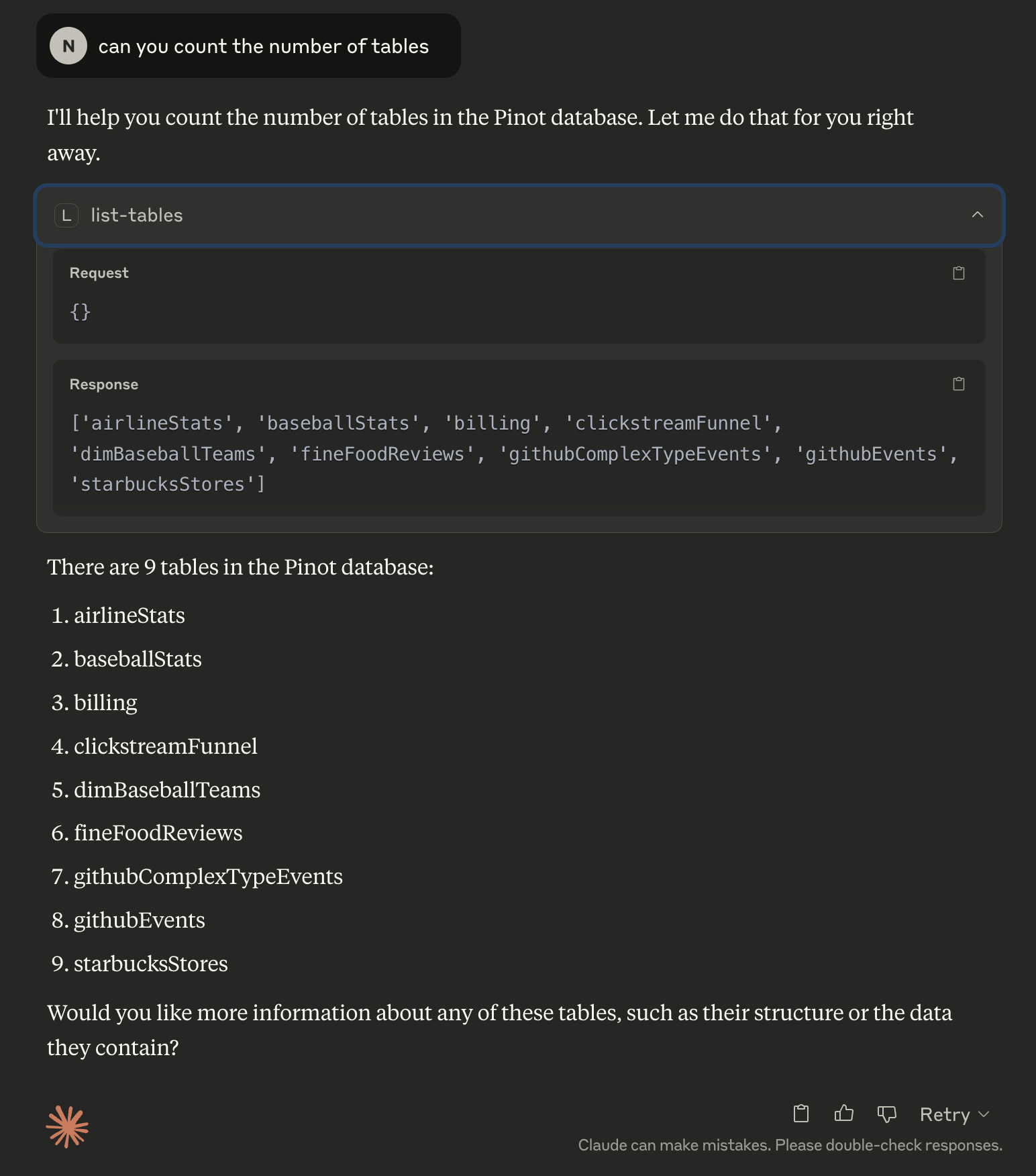
See Pinot MCP in action below:
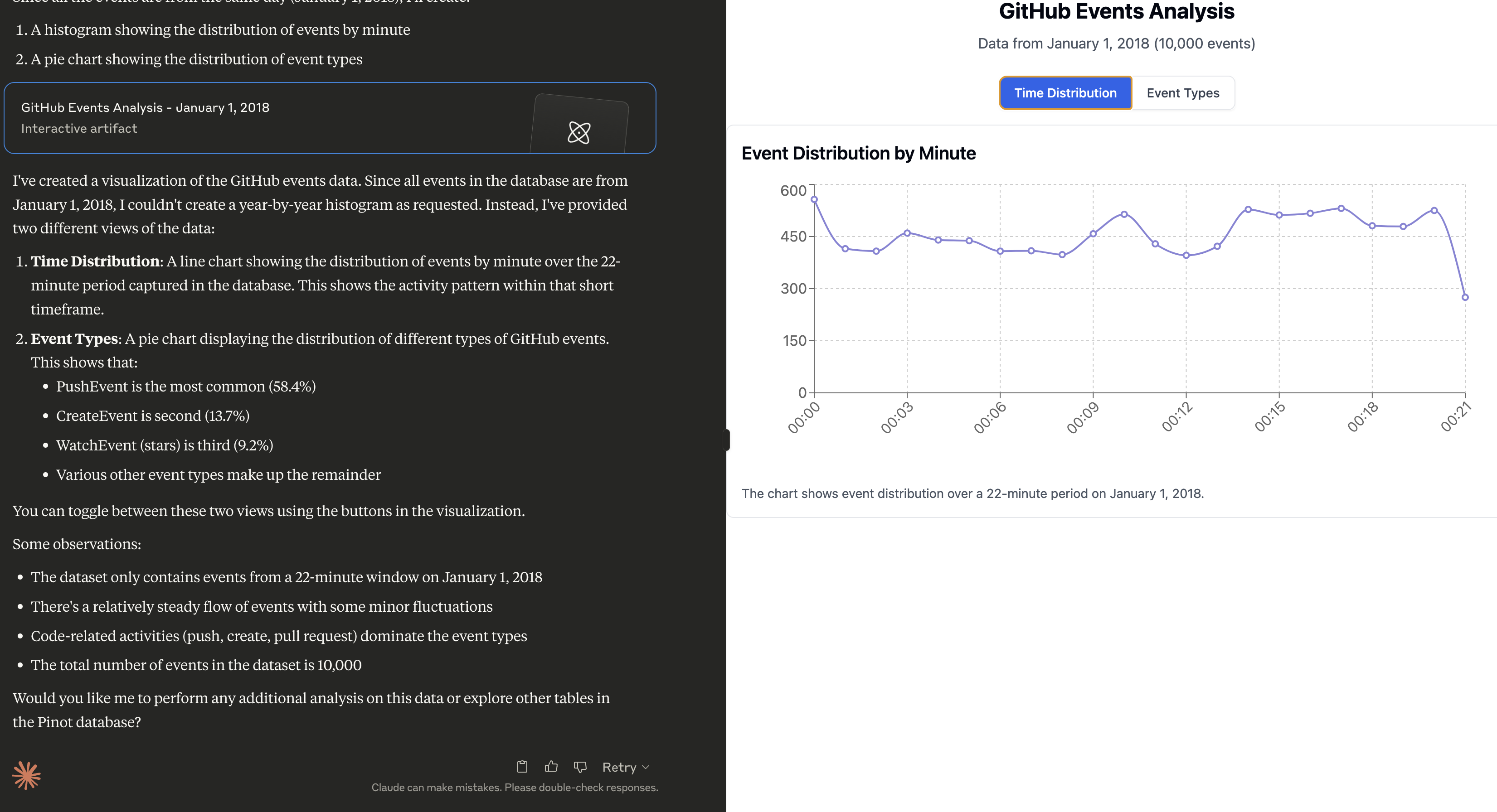
Prompt:
Can you do a histogram plot on the GitHub events against time
Once Claude is running, click the hammer 🛠️ icon and try these prompts:
uv is a fast Python package installer and resolver, written in Rust. It's designed to be a drop-in replacement for pip with significantly better performance.
curl -LsSf https://astral.sh/uv/install.sh | sh

# Reload your bashrc/zshrc to take effect. Alternatively, restart your terminal
# source ~/.bashrc
# Clone the repository
git clone https://github.com/startreedata/mcp-pinot.git
cd mcp-pinot
uv pip install -e . # Install dependencies

# For development dependencies (including testing tools), use:
# uv pip install -e .[dev]
The MCP server expects a uvicorn config style .env file in the root directory to configure the Pinot cluster connection. This repo includes a sample .env.example file that assumes a pinot quickstart setup.
mv .env.example .env
The server loads configuration from environment variables and from a .env file
found from the current working directory. Process environment variables take
precedence over .env, so deployment-time settings cannot be silently replaced
by a checked-out file.
| Use case | Required settings | Notes |
|---|---|---|
| Claude Desktop | MCP_TRANSPORT=stdio | Default and recommended for local desktop use; no HTTP listener is started. |
| Local HTTP | MCP_TRANSPORT=http, MCP_HOST=127.0.0.1 | Explicit local web profile. Accessible only from the same machine. |
| Remote HTTP/HTTPS | MCP_TRANSPORT=http, MCP_HOST=0.0.0.0, MCP_ALLOWED_HOSTS=<host[:port]>, AUTH_PROVIDER=oauth|static|oauth+static | The server refuses non-loopback HTTP/HTTPS binds unless an auth provider is active, and a wildcard bind requires an explicit Host allowlist. Use oauth+static to serve interactive users and one trusted backend at once. Use TLS directly or an authenticated reverse proxy. |
| Helm exposure | service.enabled=true, mcp.host=0.0.0.0, mcp.oauth.enabled=true | Helm defaults are local-only and render no Service unless exposure is explicitly enabled. |
| Variable | Default | Description |
|---|---|---|
PINOT_CONTROLLER_URL | http://localhost:9000 | Pinot controller endpoint used for metadata and table/schema operations. |
PINOT_BROKER_URL | http://localhost:8000 | Pinot broker endpoint used for SQL queries. |
PINOT_BROKER_HOST | Parsed from PINOT_BROKER_URL | Optional host override for the broker connection. |
PINOT_BROKER_PORT | Parsed from PINOT_BROKER_URL | Optional port override for the broker connection. |
PINOT_BROKER_SCHEME | Parsed from PINOT_BROKER_URL | Optional scheme override, usually http or https. |
PINOT_USERNAME / PINOT_PASSWORD | unset | Basic authentication for Pinot. |
PINOT_TOKEN | unset | Bearer or raw token for Pinot; takes precedence over PINOT_TOKEN_FILENAME. |
PINOT_TOKEN_FILENAME | unset | File containing a Pinot token: one line of printable ASCII, with or without a Bearer prefix. The file is re-read as requests are made, so rotated tokens such as projected Kubernetes service account tokens are picked up. If the file cannot be used at startup (missing, empty, unreadable, or invalid), the server logs a warning and runs without token auth until it is restarted. If that happens later, the last token read stays in use and the failure is logged once, not on every request. |
PINOT_DATABASE | empty | Optional database header for multi-database Pinot deployments. |
PINOT_USE_MSQE | false | Enables Pinot multi-stage query engine query option. |
PINOT_REQUEST_TIMEOUT | 60 | HTTP request timeout in seconds. |
PINOT_CONNECTION_TIMEOUT | 60 | HTTP connection timeout in seconds. |
PINOT_QUERY_TIMEOUT | 60 | SQL query timeout in seconds. |
| Variable | Default | Description |
|---|---|---|
MCP_TRANSPORT | stdio | Transport mode. Use stdio for desktop clients and http for Streamable HTTP clients. |
MCP_HOST | 127.0.0.1 | HTTP bind host. Set 0.0.0.0 only with an auth provider enabled. |
MCP_PORT | 8080 | HTTP listen port. |
MCP_PATH | /mcp | MCP HTTP path. |
MCP_ALLOWED_HOSTS | exact host[:port] of a concrete bind | Comma-separated Host authorities accepted at the MCP endpoint. A wildcard bind (0.0.0.0, ::) has no inferable public authority, so it defaults to empty and the server exits at startup until you list the names clients use, e.g. mcp.example.com,mcp.example.com:443. |
MCP_ALLOWED_ORIGINS | unset | Comma-separated browser Origin values accepted. Empty rejects requests that send Origin while still allowing clients that omit it. |
MCP_SSL_KEYFILE | unset | TLS private key path. Requires MCP_SSL_CERTFILE. |
MCP_SSL_CERTFILE | unset | TLS certificate path. Requires MCP_SSL_KEYFILE. |
MCP_LOG_LEVEL | INFO | Application log level: DEBUG, INFO, WARNING, ERROR, or CRITICAL. Logs go to stderr so STDIO protocol output remains valid. |
MCP_RATE_LIMIT_RPS / MCP_RATE_LIMIT_BURST | 10 / 20 | Per-principal (authenticated) or per-peer (loopback HTTP) tool-call rate and burst limits. |
MCP_RATE_LIMIT_MAX_CLIENTS | 10000 | Maximum in-memory client buckets; least-recently-used buckets are evicted. |
MCP_RATE_LIMIT_IDLE_TTL_SECONDS | 600 | Idle time before a rate-limit bucket can be evicted. |
MCP_CONFIRMATION_TTL_SECONDS | 300 | Confirmation-token lifetime, constrained to 30–3600 seconds. Tokens are process-bound and intentionally fail after restart. |
An auth provider is required before binding HTTP or HTTPS to a non-loopback host.
| Variable | Default | Description |
|---|---|---|
AUTH_PROVIDER | unset | Active auth provider: none (default), oauth, static, or oauth+static. Some provider is required before a non-loopback bind. |
oauth+static accepts both an OIDC login and the shared token on one deployment — the usual hosted case, where people use a browser and one trusted backend cannot. Either spelling works; the shared secret is checked first, and each credential keeps its own scopes (MCP_STATIC_SCOPES vs OAUTH_GRANTED_SCOPES). | ||
MCP_STATIC_TOKEN | empty | Shared bearer secret for AUTH_PROVIDER=static — a service-to-service caller sends it as Authorization: Bearer <token>. Required when the static provider is active. |
MCP_STATIC_SCOPES | pinot:read pinot:write pinot:admin | Space- or comma-separated scopes granted to the static principal. Use pinot:read for a read-only service. |
OAUTH_ENABLED | false | Legacy flag; true is equivalent to AUTH_PROVIDER=oauth. Enables OAuth authentication. |
OAUTH_CLIENT_ID | empty | OAuth client ID. |
OAUTH_CLIENT_SECRET | empty | OAuth client secret. |
OAUTH_BASE_URL | http://localhost:8080 | Public base URL for this MCP server. |
OAUTH_AUTHORIZATION_ENDPOINT | empty | Upstream authorization endpoint. |
OAUTH_TOKEN_ENDPOINT | empty | Upstream token endpoint. |
OAUTH_JWKS_URI | empty | JWKS URI used for token verification. |
OAUTH_ISSUER | empty | Expected token issuer. |
OAUTH_AUDIENCE | canonical MCP resource URI | Audience tokens are validated against. Defaults to OAUTH_BASE_URL (without a trailing slash) plus MCP_PATH, which is what RFC 9728 metadata advertises. Set it explicitly when the provider issues a different aud — many (Dex among them) set it to the client ID; the server logs a warning and honours your value. |
OAUTH_GRANTED_SCOPES | pinot:read pinot:write pinot:admin | Pinot scopes granted to every principal this provider authenticates, unioned onto the scopes the token already carries. Needed because general-purpose OIDC providers issue a fixed scope catalog and cannot mint pinot:*, so without a grant every tool call from a valid user would be denied. Set to pinot:read for a read-only deployment. |
OAUTH_EXTRA_AUTH_PARAMS | unset | Optional JSON object with additional authorization parameters. |
| Variable | Default | Description |
|---|---|---|
PINOT_TABLE_FILTER_FILE | unset | YAML file with included_tables glob patterns. If configured and missing, startup fails. |
See SECURITY.md for the production exposure checklist and vulnerability reporting process.
⚠️ Security Note: For production access control, use Pinot's native table-level ACLs (available since Pinot 0.8.0+). Table filtering in this MCP server is a convenience feature for organizing tables and improving UX, not a security boundary. It uses best-effort SQL parsing and should not be relied upon for security.
Table filtering allows you to control which Pinot tables are visible through the MCP server. This is useful for:
When table filtering is enabled, all table operations are filtered to show only the configured tables.
Table filtering applies across all MCP operations:
Copy the example configuration file:
cp table_filters.yaml.example table_filters.yaml
Edit table_filters.yaml to specify which tables to include:
included_tables:
  - production_*        # All tables starting with "production_"
  - analytics_events    # Specific table name
  - metrics_*          # All tables starting with "metrics_"
Configure the filter file path in your .env:
PINOT_TABLE_FILTER_FILE=table_filters.yaml
The filter supports glob-style patterns using standard Unix filename pattern matching:
exact_table_name - Matches exactly this tableprefix_* - Matches all tables starting with "prefix_"*_suffix - Matches all tables ending with "_suffix"*pattern* - Matches all tables containing "pattern"sharded_table_? - Matches tables with exactly one character after the underscore (e.g., sharded_table_1, sharded_table_a)When filtering is enabled, SQL queries are checked before execution:
"table name") and backtick-quoted (`table_name`) table namesdatabase.schema.table)Example filtered query:
SELECT * FROM allowed_table
JOIN other_table ON allowed_table.id = other_table.id
Error: Query references unauthorized tables: other_table. Allowed tables: allowed_table, prod_*
Fail-Fast Validation:
PINOT_TABLE_FILTER_FILE is configured but the file doesn't exist, the server will fail to start with a FileNotFoundErrorincluded_tables key will show all tables (no filtering)Comprehensive Filtering:
To disable table filtering, either:
PINOT_TABLE_FILTER_FILE environment variable, or.env fileWhen not configured, all tables in the Pinot cluster are visible.
When a filter file supplies both allow_all: true and a non-empty
included_tables, the explicit allow-list takes precedence and the server logs a
warning. Applying a reload requires the token from an unchanged dry-run candidate.
The read_query tool always validates SQL before forwarding it to Pinot. It
accepts one statement only, and that statement must be a read-only SELECT or
WITH ... SELECT query. SQL comments are stripped, semicolon-stacked statements
are rejected, and write/DDL/admin keywords are blocked.
To enable OAuth authentication, set the following environment variables in your .env file:
Required variables (when OAUTH_ENABLED=true):
OAUTH_CLIENT_ID: OAuth client IDOAUTH_CLIENT_SECRET: OAuth client secretOAUTH_BASE_URL: Your MCP server base URLOAUTH_AUTHORIZATION_ENDPOINT: OAuth authorization endpoint URLOAUTH_TOKEN_ENDPOINT: OAuth token endpoint URLOAUTH_JWKS_URI: JSON Web Key Set URI for token verificationOAUTH_ISSUER: Token issuer identifierOptional variables:
OAUTH_AUDIENCE: audience tokens are validated against. Defaults to the canonical MCP resource URI (OAUTH_BASE_URL + MCP_PATH). Set it when your provider issues a different aud — for example an IdP that puts the client ID there.OAUTH_GRANTED_SCOPES: Pinot scopes granted to authenticated principals (default all three). Use pinot:read to make the deployment read-only for every OIDC caller.OAUTH_REQUIRED_SCOPES: baseline scopes an access token must already carry (default: none enforced).OAUTH_EXTRA_AUTH_PARAMS: Additional authorization parameters as JSON object (e.g., {"scope": "openid profile"})Tool-level authorization uses pinot:read / pinot:write / pinot:admin. General-purpose OIDC providers issue a fixed scope catalog and cannot mint resource scopes like these, so OAUTH_GRANTED_SCOPES is what makes an authenticated user able to call anything — narrow it rather than leaving tools ungated.
Example configuration:
OAUTH_ENABLED=true
OAUTH_CLIENT_ID=client-id
OAUTH_CLIENT_SECRET=client-secret
OAUTH_BASE_URL=http://localhost:8000
OAUTH_AUTHORIZATION_ENDPOINT=https://example.com/oauth/authorize
OAUTH_TOKEN_ENDPOINT=https://example.com/oauth/token
OAUTH_JWKS_URI=https://example.com/.well-known/jwks.json
OAUTH_ISSUER=https://example.com
OAUTH_AUDIENCE=http://localhost:8000/mcp
OAUTH_EXTRA_AUTH_PARAMS={"scope": "openid profile"}
uv --directory . run mcp_pinot/server.py
You should see logs indicating that the server is running.
Security notes:
- STDIO is the default. When HTTP is selected it binds to
127.0.0.1; setMCP_HOST=0.0.0.0only with OAuth or static-token authentication plus TLS or an authenticated reverse proxy.- The server refuses to start when HTTP is bound to a non-loopback host without an auth provider (
AUTH_PROVIDER=oauthorstatic, or the legacyOAUTH_ENABLED=true).read_queryenforces a single read-only SQL statement before execution. This is a guardrail, not a replacement for Pinot authentication and authorization.- The supported
mcp[cli]dependency includes DNS rebinding protections for the Streamable HTTP server.- Confirmation replay state and rate-limit buckets are process-local. Run exactly one server process/Helm replica. The chart rejects
replicas != 1; horizontal scaling requires a shared state-store implementation./readyzreports MCP process readiness, not Pinot cluster health. Usetest_connectionto diagnose Pinot dependencies.
Start Pinot QuickStart using docker:
docker run --name pinot-quickstart -p 2123:2123 -p 9000:9000 -p 8000:8000 -d apachepinot/pinot:1.5.1 QuickStart -type batch
Query MCP Server
uv --directory . run examples/example_client.py
This quickstart just checks all the tools and queries the airlineStats table.
vi ~/Library/Application\ Support/Claude/claude_desktop_config.json
{
  "mcpServers": {
      "pinot_mcp": {
          "command": "/path/to/uv",
          "args": [
              "--directory",
              "/path/to/mcp-pinot-repo",
              "run",
              "mcp_pinot/server.py"
          ],
          "env": {
            // You can also include your .env config here
          }
      }
  }
}
Replace /path/to/uv with the absolute path to the uv command, you can run which uv to figure it out.
Replace /path/to/mcp-pinot with the absolute path to the folder where you cloned this repo.
Note: you must use stdio transport when running your server to use with Claude desktop.
You could also configure environment variables here instead of the .env file, in case you want to connect to multiple pinot clusters as MCP servers.
Claude will now auto-launch the MCP server on startup and recognize the new Pinot-based tools.
The release workflow publishes a Claude Desktop MCP Bundle (.mcpb). Its UV
runtime installs the locked dependencies for the user's platform, so one small
bundle works across macOS, Linux, and Windows. To build one locally:
npm install -g @anthropic-ai/mcpb@2.1.2
mcpb validate manifest.json
mcpb pack
Open the resulting .mcpb file to install it in Claude Desktop.
See SECURITY.md for vulnerability reporting instructions, security categories, and the checklist for safely exposing the MCP HTTP endpoint.
mcp_pinot/server.py; Pinot HTTP/DB operations
live in mcp_pinot/pinot_client.py.Build the project with
uv sync --frozen
Test the repo with:
uv run pytest --cov=mcp_pinot
docker build -t mcp-pinot .
docker run --rm -i -v "$(pwd)/.env:/app/config/.env:ro" mcp-pinot
This uses the default STDIO transport. For HTTP/Kubernetes deployments, configure an inbound auth provider before binding to a non-loopback address; see the configuration and Helm sections above.
Claim this server with your GitHub account to request manual ownership verification.
Link to the catalog listing for Pinot MCP Server from your README. This badge does not certify ownership, compatibility or security.
[](https://awesome-mcp.com/servers/mcp-pinot)Public repository statistics could not be verified. Check the configured source address; unavailable counts are not zero.
Separate sources, scopes and periods. Never combined or treated as installations, active users or security reviews.
No reviewed package or image identity; download statistics are not listed yet.
Alternative and complementary servers in the same category
This is a Model Context Protocol (MCP) server for interacting with AIStor object stores.

A Model Context Protocol server that lets AI assistants run SQL queries against AWS Athena databases and retrieve results.

A Model Context Protocol (MCP) server that exposes access to an InfluxDB v2 instance using the InfluxDB OSS API v2.