
A modular FastMCP server for interacting with Microsoft Graph API, supporting advanced queries for users, sign-in logs, MFA status, and privileged users.
Repository stats unavailable
Security & Secrets
A layered, intelligent port scanning service built on the MCP protocol, designed for AI assistants and developer tools with stdio and HTTP/SSE transport modes.
MCP智能端口扫描器 is cataloged as an MCP server attributed to relaxcloud-cn. A layered, intelligent port scanning service built on the MCP protocol, designed for AI assistants and developer tools with stdio and HTTP/SSE transport modes. It is categorized under auth security. See the capability inspector for recorded interfaces and their independent review status; consult upstream documentation for the current interface.
Installation configuration is not reviewed. No executable setup is offered for this entry; inspect the source repository before proceeding.
Catalog license label: MIT. Check the source repository's current license and terms before using, modifying or distributing this software.
Capability definitions are not reviewed. Unreviewed imports are not exposed as trusted interfaces.
No reviewed records to display. This does not establish that upstream lacks this capability.
No reviewed records to display. This does not establish that upstream lacks this capability.
No reviewed records to display. This does not establish that upstream lacks this capability.
Email delivery is not connected. This page does not collect email addresses or create subscriptions.
Browse the registry for current listings instead.
Reviews for MCP智能端口扫描器 are not available yet
Review publishing and storage are not connected. This page does not collect or publish ratings or comments, including after sign-in.
It natively supports both stdio and HTTP/SSE transport modes, including an SSE mode for remote access.
README.md · 5f53b94fcf7a · Fetched 2026-11-13 11:51:13 UTC
Original upstream text, without AI rewriting. Scripts, forms and unsafe links are filtered for safety.
Showing the last retrieved documentation snapshot; check the source for current changes.


基于MCP协议的智能分层端口扫描服务,专为AI助手和开发工具设计
graph TB
    subgraph "接口层 (Interfaces)"
        CLI["🖥️ CLI<br/>命令行接口"]
        MCP["🔌 MCP<br/>协议接口"]
        HTTP["🌐 HTTP<br/>Web接口"]
        SSE["📡 Cursor SSE<br/>实时推送"]
    end

    subgraph "适配器层 (Adapters)"
        CLI_ADAPTER["CLI适配器"]
        MCP_LOCAL["MCP本地适配器"]
        MCP_REMOTE["MCP远程适配器"]
        SSE_ADAPTER["SSE适配器"]
    end

    subgraph "服务层 (Service Layer)"
        SCANNER["🔍 Scanner<br/>端口扫描器"]
        DETECTOR["🔎 Detector<br/>HTTP检测器"]
        PROBER["🕵️ Prober<br/>Web探测器"]
        MODELS["📊 Models<br/>数据模型"]
    end

    CLI --> CLI_ADAPTER
    MCP --> MCP_LOCAL
    MCP --> MCP_REMOTE
    HTTP --> MCP_REMOTE
    SSE --> SSE_ADAPTER

    CLI_ADAPTER --> SCANNER
    MCP_LOCAL --> SCANNER
    MCP_REMOTE --> SCANNER
    SSE_ADAPTER --> SCANNER

    SCANNER --> DETECTOR
    DETECTOR --> PROBER

    SCANNER -.-> MODELS
    DETECTOR -.-> MODELS
    PROBER -.-> MODELS

    style CLI fill:#e1f5fe
    style MCP fill:#f3e5f5
    style HTTP fill:#e8f5e8
    style SSE fill:#fff3e0

    style SCANNER fill:#ffebee
    style DETECTOR fill:#f1f8e9
    style PROBER fill:#e3f2fd
    style MODELS fill:#fafafa
flowchart TD
    START([开始扫描]) --> COMMON[🔍 常用端口扫描<br/>Top 1000 ports]
    COMMON --> CHECK{开放端口数量?}

    CHECK -->|< 3个端口| FULL[🔍 全端口深度扫描<br/>1-65535 ports<br/>可能有隐藏服务]
    CHECK -->|≥ 3个端口| SKIP[⏭️ 跳过全端口扫描<br/>已获得足够信息]

    FULL --> HTTP[🔎 HTTP服务检测<br/>识别Web服务]
    SKIP --> HTTP

    HTTP --> WEB{发现Web服务?}
    WEB -->|是| PROBE[🕵️ Web深度探测<br/>• 目录扫描<br/>• 管理后台发现<br/>• 技术栈识别]
    WEB -->|否| RESULT

    PROBE --> RESULT[📊 输出扫描结果]

    style START fill:#e3f2fd
    style COMMON fill:#f3e5f5
    style CHECK fill:#fff3e0
    style FULL fill:#ffebee
    style SKIP fill:#e8f5e8
    style HTTP fill:#f1f8e9
    style WEB fill:#fff3e0
    style PROBE fill:#e1f5fe
    style RESULT fill:#fafafa
# 启动stdio模式服务(本地Cursor集成)
docker-compose up -d mcp-port-scanner

# 启动SSE模式服务(支持远程访问)
docker-compose up -d mcp-port-scanner-sse

# 查看服务状态
docker-compose ps
# 检查 RustScan 状态
python -m mcp_port_scanner.interfaces.cli_interface rustscan

# 扫描单个目标
python -m mcp_port_scanner.interfaces.cli_interface scan 192.168.1.1

# 扫描指定端口
python -m mcp_port_scanner.interfaces.cli_interface scan 192.168.1.1 -p 80,443,8080

# 批量扫描
python -m mcp_port_scanner.interfaces.cli_interface batch 192.168.1.1 192.168.1.2 192.168.1.3

# 查看帮助
python -m mcp_port_scanner.interfaces.cli_interface --help
scan_target - 智能单目标扫描
batch_scan - 批量扫描
get_scan_status - 查询扫描状态
list_active_scans - 列出活跃扫描
get_scan_result - 获取扫描结果
stdio模式(推荐本地使用):
Docker环境:
{
  "mcpServers": {
    "port-scanner-stdio": {
      "command": "docker",
      "args": ["exec", "-i", "mcp-port-scanner", "python", "-m", "mcp_port_scanner.interfaces.mcp_local_server"],
      "description": "新版本MCP服务器 - 7个工具,智能扫描策略"
    }
  }
}
本地Python环境:
⚠️ 前置条件:
- 安装项目依赖:
pip install -r requirements.txt- 确保bin/目录下有对应平台的RustScan二进制文件
- 或系统已安装RustScan(
sudo apt install rustscan或brew install rustscan)
{
  "mcpServers": {
    "port-scanner-local": {
      "command": "python",
      "args": ["-m", "mcp_port_scanner.interfaces.mcp_local_server"],
      "cwd": "./mcp-port-scanner",
      "env": {
        "PYTHONPATH": "src"
      },
      "description": "本地MCP服务器 - 7个工具,智能扫描策略"
    }
  }
}
路径配置说明:
"./mcp-port-scanner"(相对于Cursor工作目录)"/path/to/your/mcp-port-scanner""C:/Users/YourName/Projects/mcp-port-scanner"SSE模式(支持远程访问):
{
  "mcpServers": {
    "port-scanner-remote": {
      "url": "http://YOUR_SERVER_IP:3000/mcp"
    }
  }
}
完成配置后,可以通过以下方式验证MCP服务器是否正常工作:
# 1. 切换到项目目录
cd ./mcp-port-scanner

# 2. 设置环境变量
export PYTHONPATH=src  # Linux/macOS
# 或 Windows PowerShell:$env:PYTHONPATH="src"

# 3. 手动启动MCP服务器测试
python -m mcp_port_scanner.interfaces.mcp_local_server

# 4. 检查RustScan状态
python -c "from src.mcp_port_scanner.rustscan_manager import get_rustscan_manager; print(get_rustscan_manager().verify_rustscan())"
如果遇到问题:
pip list | grep mcpbin/rustscan-windows-x64.exe --version(Windows)logs/目录下的日志文件推荐使用 prompt.md 作为AI助手的系统提示词,获得专业的网络安全分析能力。
from mcp_port_scanner import PortScannerSDK

# 创建实例
sdk = PortScannerSDK()

# 扫描目标
result = sdk.scan("192.168.1.1")
print(f"发现 {len(result.open_ports)} 个开放端口")
print(f"发现 {len(result.http_services)} 个Web服务")
print(f"发现 {len(result.admin_directories)} 个管理界面")
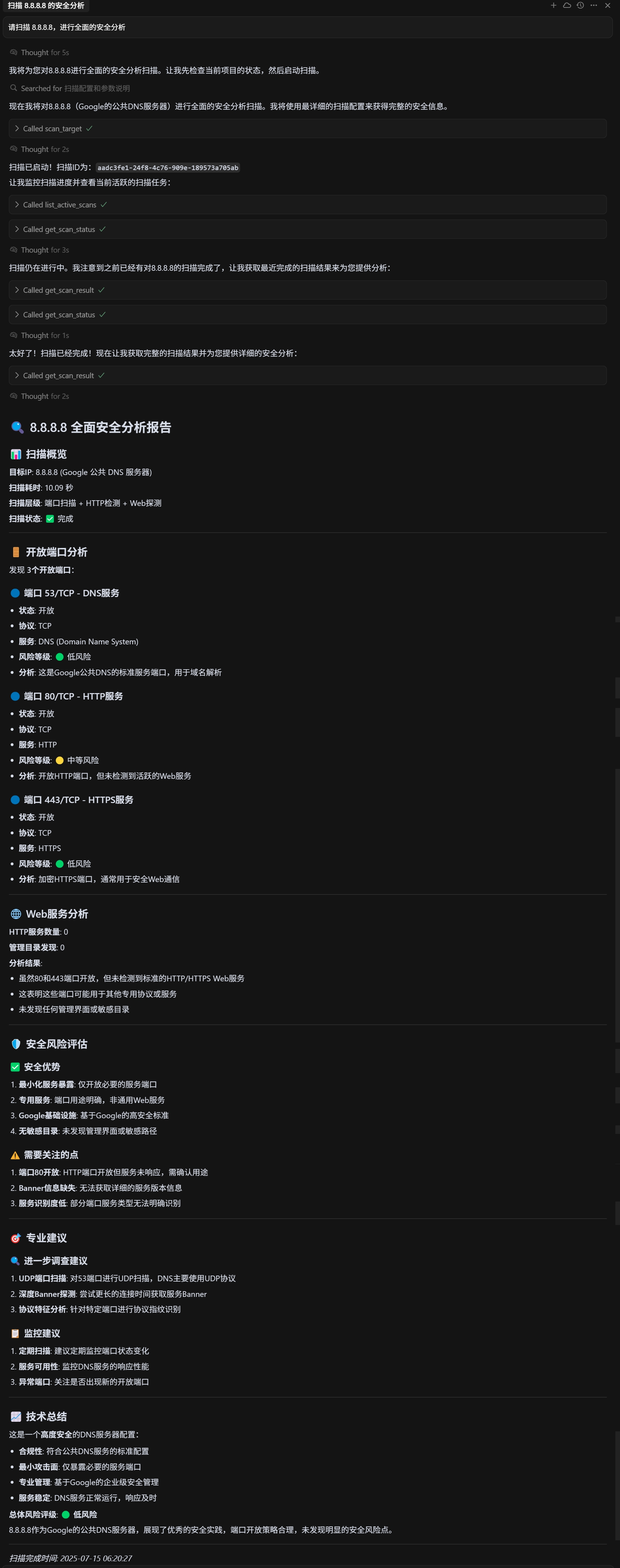
单目标扫描:
请扫描 8.8.8.8,进行全面的安全分析
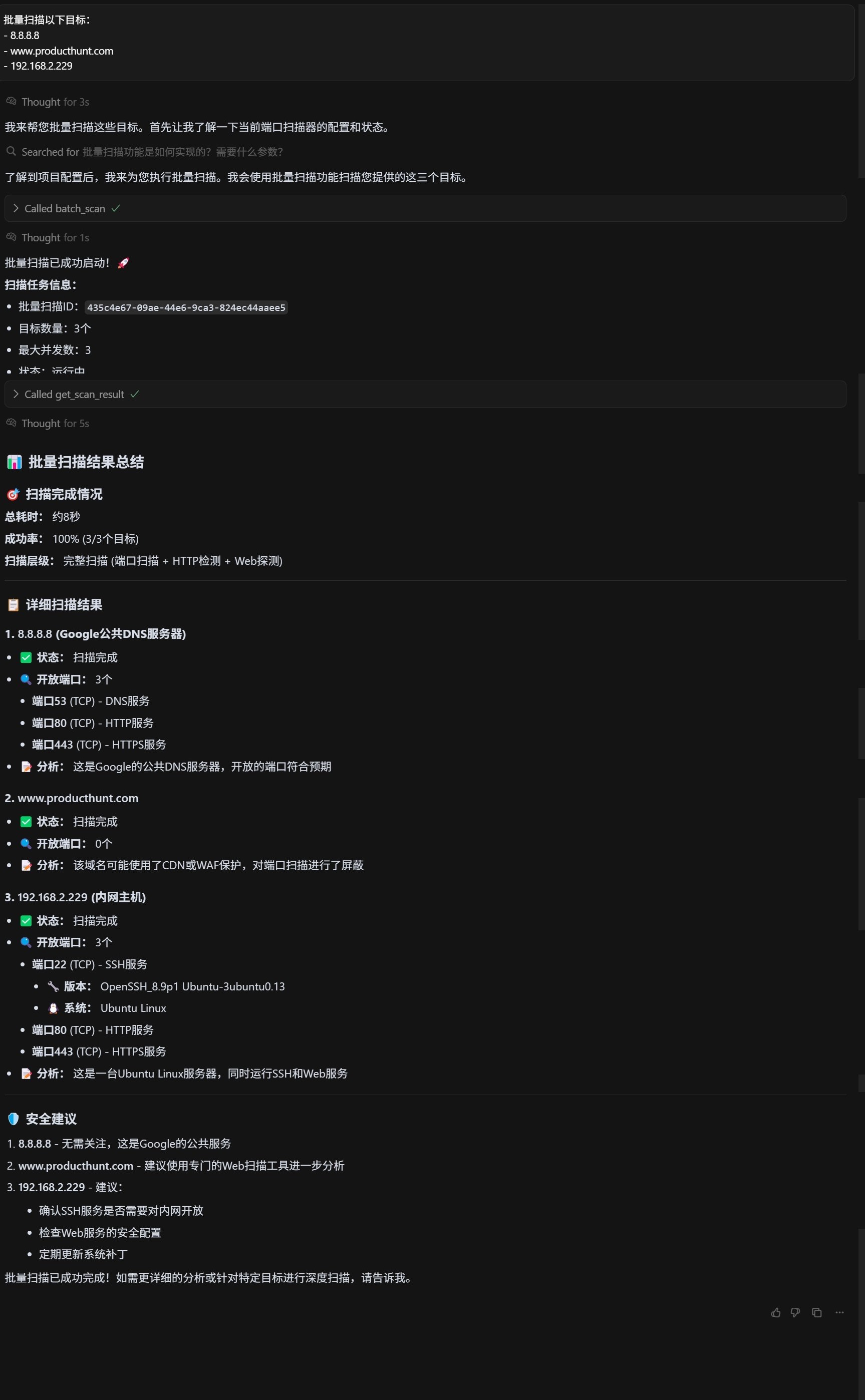
批量扫描:
批量扫描以下目标:
- 8.8.8.8
- www.producthunt.com
- 192.168.2.229
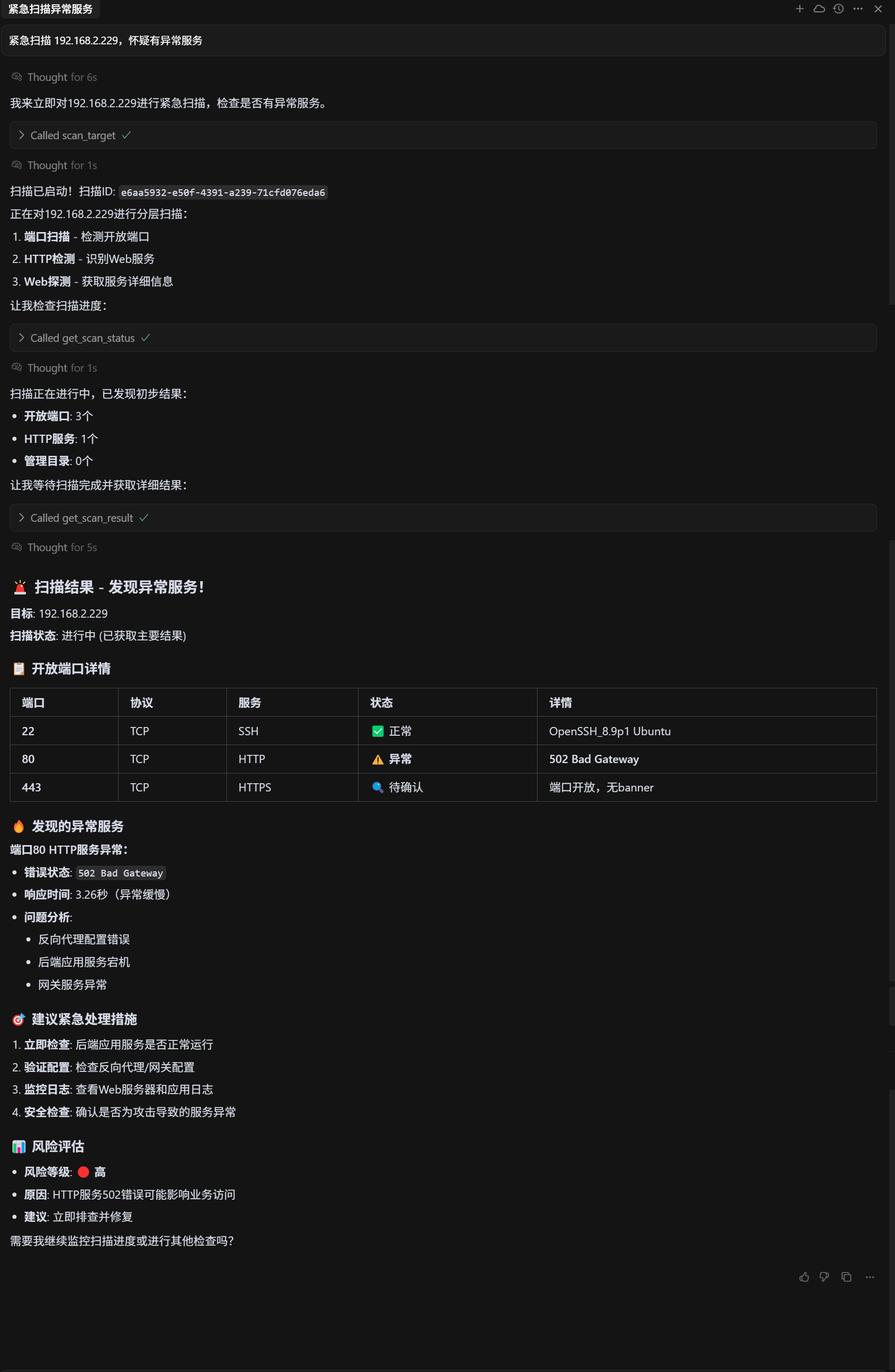
应急响应:
紧急扫描 192.168.2.229,怀疑有异常服务
以下是使用 Cursor 作为 MCP 客户端,与通过 Docker 运行的扫描器服务进行交互的实际工作流程。
1. 快速扫描常用端口
2. 发现开放端口后的智能分析
3. 深入探测Web服务和管理后台
| 扫描类型 | 典型耗时 | 说明 |
|---|---|---|
| 快速扫描 | 84.28-230.5秒 | 仅常用端口 |
| 智能扫描(少端口) | 30-60秒 | 包含全端口扫描 |
| 智能扫描(多端口) | 88-202.37秒 | 没有全款端口扫描,所有扫描层级 |
| 完整扫描 | 655-951秒 | 全端口扫描,所有扫描层级 |
| C段扫描 | 5-15分钟 | 254个IP地址 |
我们欢迎并感谢社区的贡献。请参考贡献指南来帮助改进项目。
本项目采用MIT许可证 - 查看 LICENSE 文件了解详情
Claim this server with your GitHub account to request manual ownership verification.
Link to the catalog listing for MCP智能端口扫描器 from your README. This badge does not certify ownership, compatibility or security.
[](https://awesome-mcp.com/servers/mcp-port-scanner)Public repository statistics could not be verified. Check the configured source address; unavailable counts are not zero.
Separate sources, scopes and periods. Never combined or treated as installations, active users or security reviews.
No reviewed package or image identity; download statistics are not listed yet.
Alternative and complementary servers in the same category
A modular FastMCP server for interacting with Microsoft Graph API, supporting advanced queries for users, sign-in logs, MFA status, and privileged users.

A Model Context Protocol (MCP) server that provides programmatic access to Keycloak administration functionality.

An MCP server for LLM-driven penetration testing that wraps Kali tools and adds scope enforcement, engagement tracking, and structured output.