
A directory listing describing a cancellation-letter and mailing-address service. The configured public GitHub repository returned 404 during source verification.
Repository stats unavailable
Developer Tools
An MCP server that exposes HTTP reconnaissance and ASN lookup tools so AI assistants can perform web domain reconnaissance through natural language.
mcp-recon is cataloged as an MCP server attributed to nickpending. An MCP server that exposes HTTP reconnaissance and ASN lookup tools so AI assistants can perform web domain reconnaissance through natural language. It is categorized under developer tools. See the capability inspector for recorded interfaces and their independent review status; consult upstream documentation for the current interface.
Installation configuration is not reviewed. No executable setup is offered for this entry; inspect the source repository before proceeding.
Catalog license label: MIT License. Check the source repository's current license and terms before using, modifying or distributing this software.
Capability definitions are not reviewed. Unreviewed imports are not exposed as trusted interfaces.
No reviewed records to display. This does not establish that upstream lacks this capability.
No reviewed records to display. This does not establish that upstream lacks this capability.
No reviewed records to display. This does not establish that upstream lacks this capability.
Email delivery is not connected. This page does not collect email addresses or create subscriptions.
Browse the registry for current listings instead.
Reviews for mcp-recon are not available yet
Review publishing and storage are not connected. This page does not collect or publish ratings or comments, including after sign-in.
Yes, it provides both a lightweight quick scan and a full reconnaissance mode with more comprehensive metadata collection.
It is designed to run as a Docker container used with Claude Desktop via the MCP protocol.
README.md · 3eb5a9e21cc0 · Fetched 2026-11-13 09:47:24 UTC
Original upstream text, without AI rewriting. Scripts, forms and unsafe links are filtered for safety.
Showing the last retrieved documentation snapshot; check the source for current changes.
mcp-recon (formerly Tellix) is a conversational reconnaissance interface and MCP server powered by
httpxandasnmap. Just ask.
mcp-recon bridges the gap between natural language and HTTP infrastructure analysis. It exposes reconnaissance tools through the Model Context Protocol (MCP), allowing you to perform web domain reconnaissance via any compatible AI interface, such as Claude Desktop.
httpx: Utilizes ProjectDiscovery's robust reconnaissance toolshttpx's stdin/stdout leakage issuehttp_lite_scan and katana_command_generator for streamlined operationsThe Model Context Protocol (MCP) is an open standard developed by Anthropic that enables AI assistants to interact with external tools, systems, and data sources. MCP provides a standardized interface for AI models to access and execute functions, retrieve resources, and utilize prompts, facilitating seamless integration between AI applications and various software environments.
In MCP, a prompt is a predefined template that guides AI assistants in performing specific tasks. Prompts can accept dynamic arguments, include context from resources, and chain multiple interactions, enabling structured and efficient workflows.
mcp-recon includes the following prompts:
http_lite_scan: Initiates a quick HTTP scan for basic information about specified targets.katana_command_generator: Generates optimized Katana crawl commands based on reconnaissance goals and desired thoroughness.mcp-recon provides three main reconnaissance tools:
http_lite_recon)Fast, lightweight HTTP fingerprinting that provides essential information with minimal overhead.
Example:
User: "Using quick http recon, what's the status code for example.com?"

AI: "I checked example.com and it's currently returning a 200 OK status code, indicating the site is up and functioning normally. It's being served from an Nginx web server on IP 93.184.216.34."
http_full_recon)Comprehensive metadata collection including page previews, headers, certificates, and technology detection.
Example:
User: "Using full http recon, what certificates is www.google.com using?"

AI: "Based on my analysis, www.google.com is using a TLS 1.3 certificate issued by Google Trust Services. The certificate was issued on March 20, 2025, and is valid until June 12, 2025. It was specifically issued for 'www.google.com' and uses the TLS_AES_128_GCM_SHA256 cipher suite."
asn_lookup)Standalone lookup of IPs, ASNs, or organization names using ProjectDiscovery's asnmap library.
Example:
User: "Who owns ASN 14421?"

AI: "ASN 14421 is operated by 'PPLINKNET' in the US."
# Clone the repository
git clone https://github.com/nickpending/mcp-recon.git
cd mcp-recon

# Build the Docker image
docker build -t mcp/recon -f Dockerfile .
mcp-recon is designed to run as a Docker container to be used with Claude Desktop via the MCP protocol.
mcp-recon runs as a standalone MCP server. Add it to your MCP configuration like so:
"mcp-recon": {
  "command": "docker",
  "args": [
    "run",
    "--rm",
    "-i",
    "mcp/recon"
  ]
}
Using an .env file:
"mcp-recon": {
  "command": "docker",
  "args": [
    "run",
    "--rm",
    "-i",
    "--env-file", "/Users/yourname/.config/mcp-recon.env",
    "mcp/recon"
  ]
}
Your .env should contain:
PDCP_API_KEY=your_projectdiscovery_api_key
No Results Returned:
http_lite_recon, http_full_recon, asn_lookup)Performance Issues:
http_lite_recon for faster resultshttpx library attempts to read stdin even when used as a library. mcp-recon shields os.Stdin to prevent interference with MCP.Asn = true, httpx may fail to enrich IPs. mcp-recon includes a fallback using the official asnmap Go library.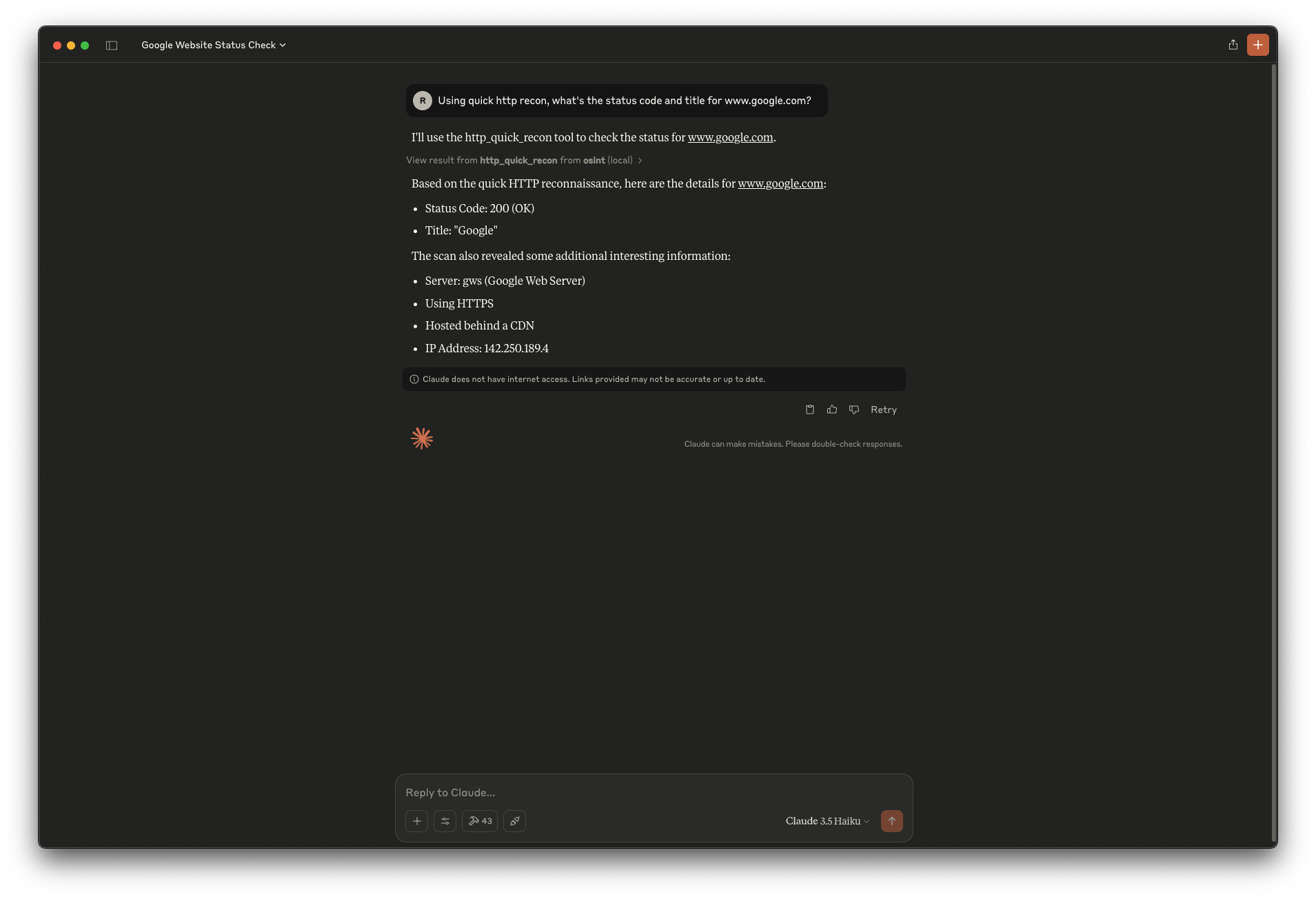
This example shows a quick recon request on
www.google.com, returning status code, title, server details, and IP address — all from a natural language query.
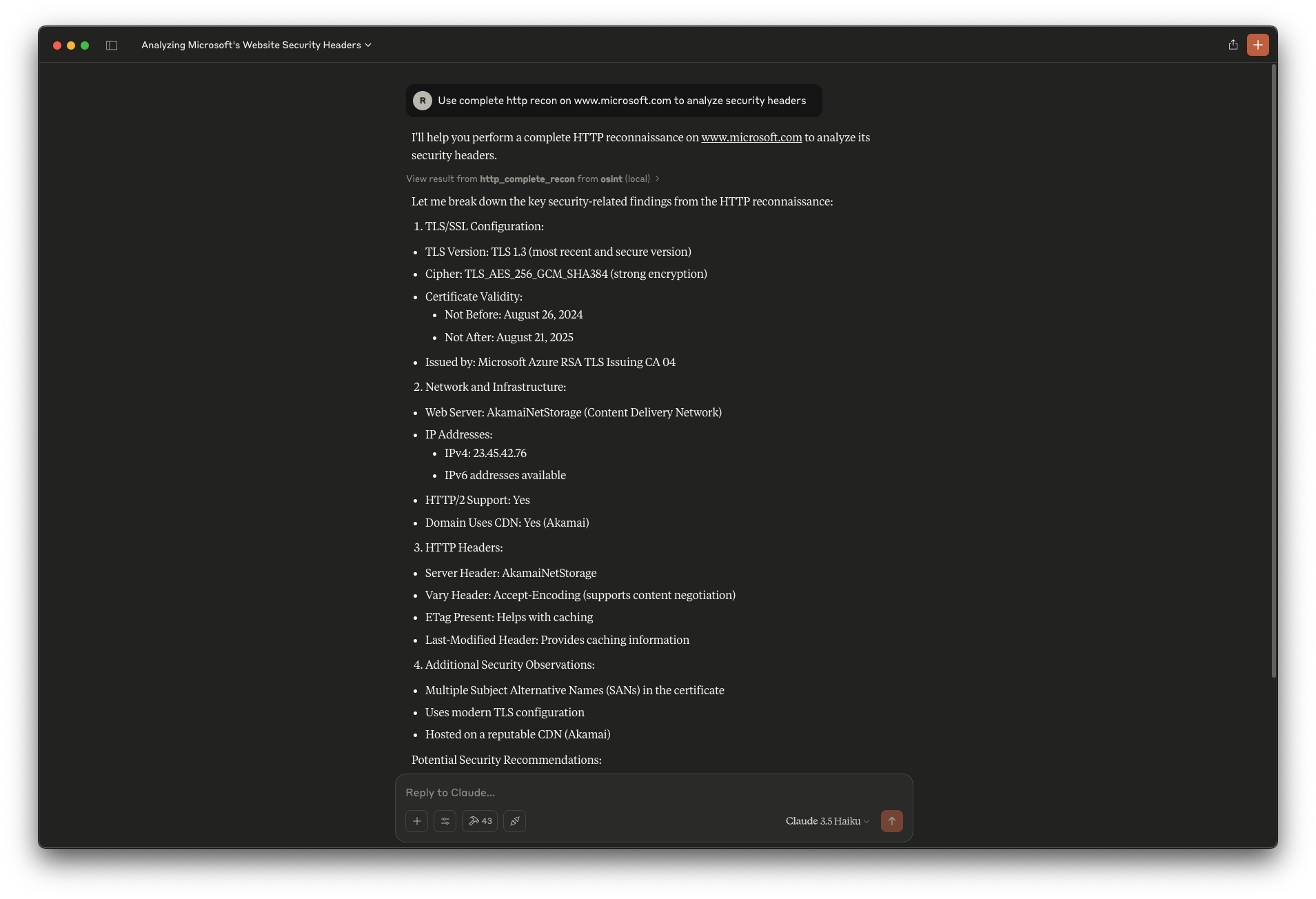
This example demonstrates a complete recon on
www.microsoft.com, including TLS config, headers, CDN, and security observations.
This project was formerly known as Tellix. It has been renamed to mcp-recon to better align with the Model Context Protocol (MCP) naming convention used in security tools. All links to the previous repository name will be redirected to the new name, but you should update your references when possible.
MIT License. See LICENSE file for full details.
Claim this server with your GitHub account to request manual ownership verification.
Link to the catalog listing for mcp-recon from your README. This badge does not certify ownership, compatibility or security.
[](https://awesome-mcp.com/servers/mcp-recon)Public repository statistics could not be verified. Check the configured source address; unavailable counts are not zero.
Separate sources, scopes and periods. Never combined or treated as installations, active users or security reviews.
No reviewed package or image identity; download statistics are not listed yet.
Alternative and complementary servers in the same category
A directory listing describing a cancellation-letter and mailing-address service. The configured public GitHub repository returned 404 during source verification.

A hosted MCP service for browsing and searching through Singapore mobile-network proxies.

A directory listing describing a Markdown-to-PDF service. The configured public GitHub repository returned 404 during source verification.