
A Rust CAD application with an MCP server for creating, inspecting and rendering drawings, either headlessly or through a connection to the desktop app.
8K
Media & Design
A Spring AI based MCP server that generates official and personal seal images and returns stored image URLs.
Seal Generator MCP Server is cataloged as an MCP server attributed to lilei0303. A Spring AI based MCP server that generates official and personal seal images and returns stored image URLs. It is categorized under media design. See the capability inspector for recorded interfaces and their independent review status; consult upstream documentation for the current interface.
Installation configuration is not reviewed. No executable setup is offered for this entry; inspect the source repository before proceeding.
Catalog license label: Not specified. Check the source repository's current license and terms before using, modifying or distributing this software.
Capability definitions are not reviewed. Unreviewed imports are not exposed as trusted interfaces.
No reviewed records to display. This does not establish that upstream lacks this capability.
No reviewed records to display. This does not establish that upstream lacks this capability.
No reviewed records to display. This does not establish that upstream lacks this capability.
Email delivery is not connected. This page does not collect email addresses or create subscriptions.
Browse the registry for current listings instead.
Reviews for Seal Generator MCP Server are not available yet
Review publishing and storage are not connected. This page does not collect or publish ratings or comments, including after sign-in.
It supports Stdio for command-line and desktop integration and SSE for web applications needing real-time updates.
README.md · 167f7f823256 · Fetched 2026-11-13 11:04:13 UTC
Original upstream text, without AI rewriting. Scripts, forms and unsafe links are filtered for safety.
Showing the last retrieved documentation snapshot; check the source for current changes.
该项目是一款基于Spring AI开发的MCP服务,支持通过MCP协议生成公章和私章图片,生成的图片通过MinIO对象存储服务保存到本地,工具返回的是图片地址。服务已上传到MCP 服务平台MCP.so。
关于MCP协议,详见MCP官方文档。
任意支持MCP协议的智能体助手(如Claude、Cursor以及千帆AppBuilder等)都可以快速接入。
服务提供以下主要功能:
generateOfficialSeal公章描述链接+提示generatePersonalSeal私章描述链接+提示使用公/私章生成MCP Server可以通过Stdio 或 SSE 的形式
java 17 及以上版本
<!-- MCP Server 核心依赖 -->
<dependencies>
   <dependency>
      <groupId>org.springframework.ai</groupId>
      <artifactId>spring-ai-mcp-server-webflux-spring-boot-starter</artifactId>
      <version>1.0.0-M6</version>
   </dependency>
   <!-- minio本地存储服务依赖 -->
   <dependency>
      <groupId>io.minio</groupId>
      <artifactId>minio</artifactId>
      <version>8.5.12</version>
   </dependency>
</dependencies>
在application.yml中配置MCP Server的相关参数:可选择使用SSE模式或stdio模式。
spring:
  application:
    name: mcp-seal-generate-server
  profiles:
    active: sse # 使用 SSE 模式

server:
  port: 8888

minio:
  endpoint: http://127.0.0.1:9000 #Minio服务所在地址
  bucketName: seal-down #存储桶名称
  accessKey: adminadmin #访问的key
  secretKey: adminadmin #访问的秘钥
application-sse.yml配置示例:
spring:
  ai:
    mcp:
      server:
        enabled: true                # 启用/禁用 MCP 服务
        stdio: false                 # 启用/禁用 stdio 传输
        name: my-mcp-server          # 服务名称
        version: 0.0.1               # 服务版本
        type: SYNC                   # 服务类型(SYNC/ASYNC)
        sse: true                   # 启用 SSE 传输
        resource-change-notification: true  # 启用资源变更通知
        prompt-change-notification: true    # 启用提示词变更通知
        tool-change-notification: true      # 启用工具变更通知
#        sse-endpoint: /sse              # SSE 端点路径
application-stdio.yml配置示例:
spring:
   ai:
      mcp:
         server:
            name: mcp-seal-generate-server
            version: 0.0.1
            type: SYNC
            # stdio
            stdio: true
   # stdio
   main:
      web-application-type: none # 禁用Web应用类型
      banner-mode: off # 禁用Banner
@Service
public class SealGenerationService {

    @McpTool(name = "generateOfficialSeal", description = "生成公章")
    public String generateOfficialSeal(@ToolParam(description = "参数详细描述", required = false) String param) {
        // 调用生成公章逻辑
        return "url";
    }

    @McpTool(name = "generatePersonalSeal", description = "生成私章")
    public Mono<McpToolResponse> generatePersonalSeal(@ToolParam(description = "参数详细描述", required = true) String param) {
        // 调用生成私章逻辑
        return "url";
    }
}
@Configuration
public class McpServerConfig {
   @Bean
   public ToolCallbackProvider sealGenerationTool(SealGenerationService sealGenerationService) {
      // 返回一个 ToolCallbackProvider 实例,用于处理印章生成工具的回调
      return MethodToolCallbackProvider.builder()
              .toolObjects(sealGenerationService)
              .build();
   }
}
Minio是一个开源的对象存储服务,可以用于存储生成的公章和私章图片。本项目中用于上传生成的印章图片。 通过docker快速部署MinIO服务,docker-compose.yml配置示例:
services:
  minio:
    image: bitnami/minio:latest
    ports:
      - 9000:9000 # api 端口
      - 9001:9001 # 服务器 端口
    environment:
      - MINIO_ROOT_USER=adminadmin
      - MINIO_ROOT_PASSWORD=adminadmin # 管理后台密码,最小8个字符
运行:已安装docker
docker-compose up -d需要java 17及以上版本 首先需要引入客户端依赖:
<dependency>
   <groupId>org.springframework.ai</groupId>
   <artifactId>spring-ai-mcp-client-spring-boot-starter</artifactId>
   <version>1.0.0-M6</version>
</dependency>
其次配置文件需要配置MCP服务器的一些参数:sse模式配置如下:
spring:
   ai:
      mcp:
         client:
            enabled: true
            name: my-mcp-client
            version: 0.0.1
            request-timeout: 60000
            type: SYNC  # or ASYNC for reactive applications
            sse:
               connections:
                  server1:
                    url: http://localhost:8888
需要在代码中配置MCP服务器的工具回调提供者,会根据工具的定义自动生成对应的回调提供者。
public class ModelService {
    @Resource
    ToolCallbackProvider toolCallbackProvider;
    // ...
}
注入后,ai模型会根据对话情况考虑收调用工具服务
public class ModelService {
   private SelfModelChatClient selfModelChatClient;
   public String doChatWithMcp(String message, String chatId) {
      ChatResponse chatResponse = selfModelChatClient.prompt().user("请帮我生成一枚公章,内容是: " + message)
              // 使用 MCP 工具
              .tools(toolCallbackProvider)
              .call()
              .chatResponse();
      String text = chatResponse.getResult().getOutput().getText();
      log.info("Chat response with MCP: {}", text);
      return text;
   }
}
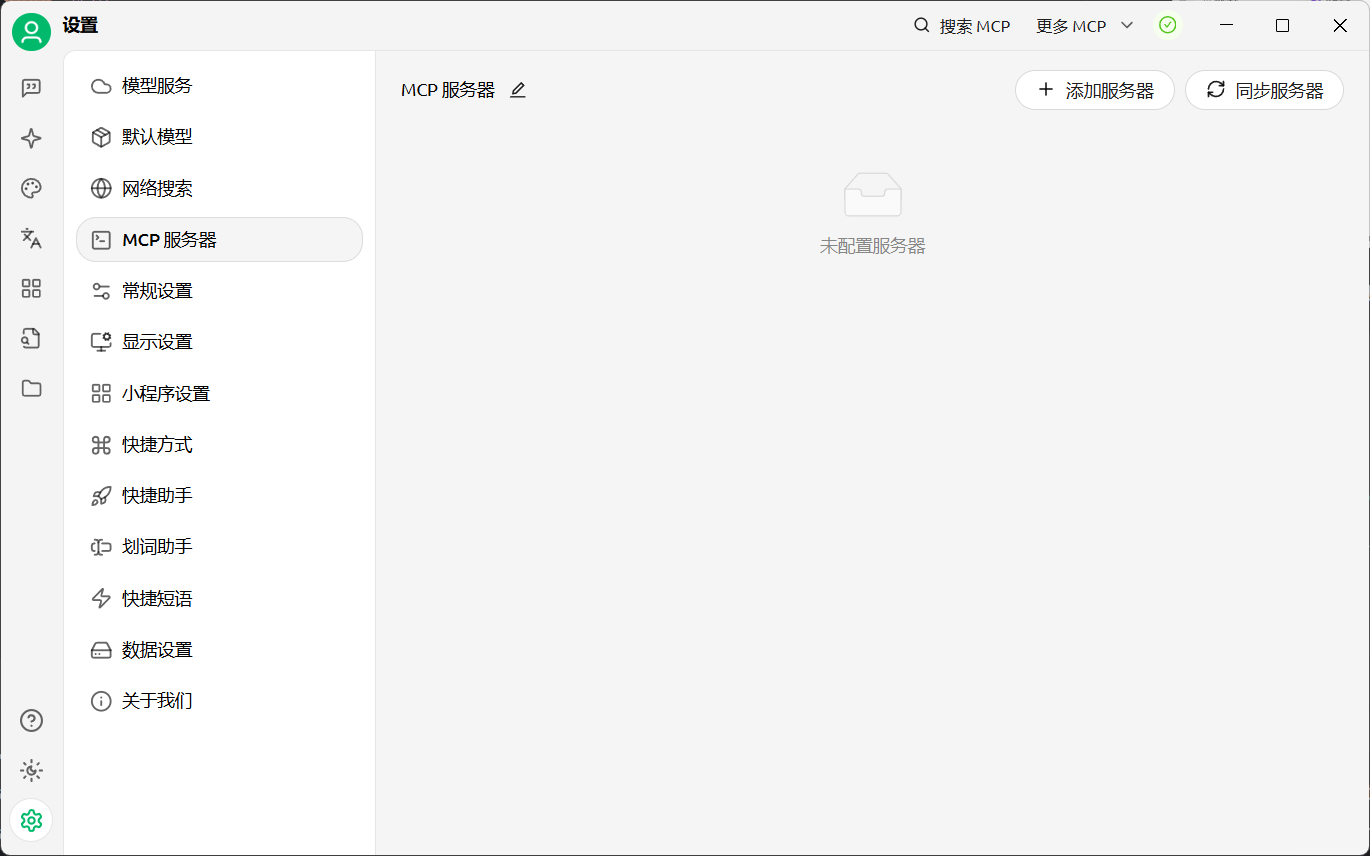
Cherry Studio的设置,点击MCP 服务器。
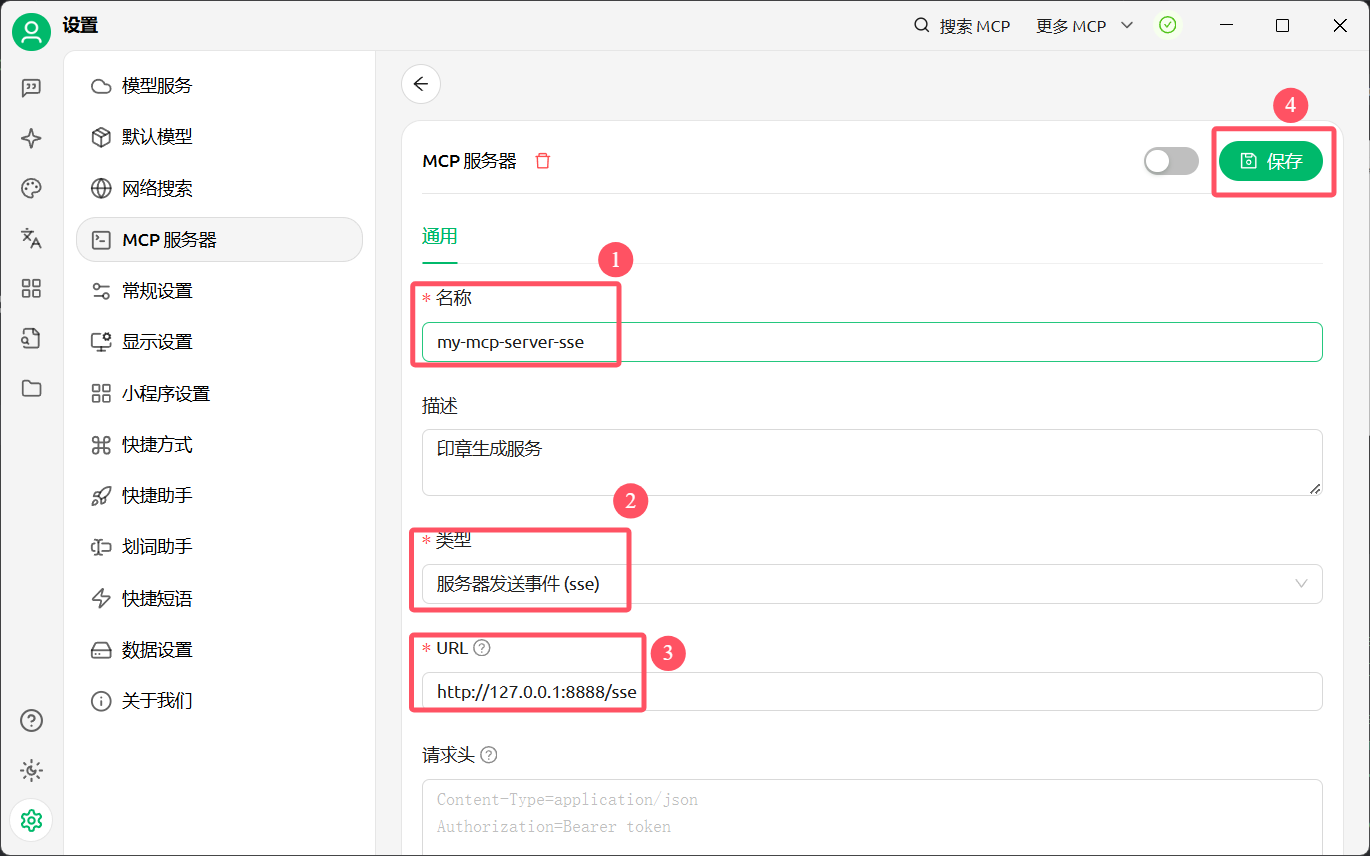
添加服务器,选择快速创建按下列顺序进行配置。
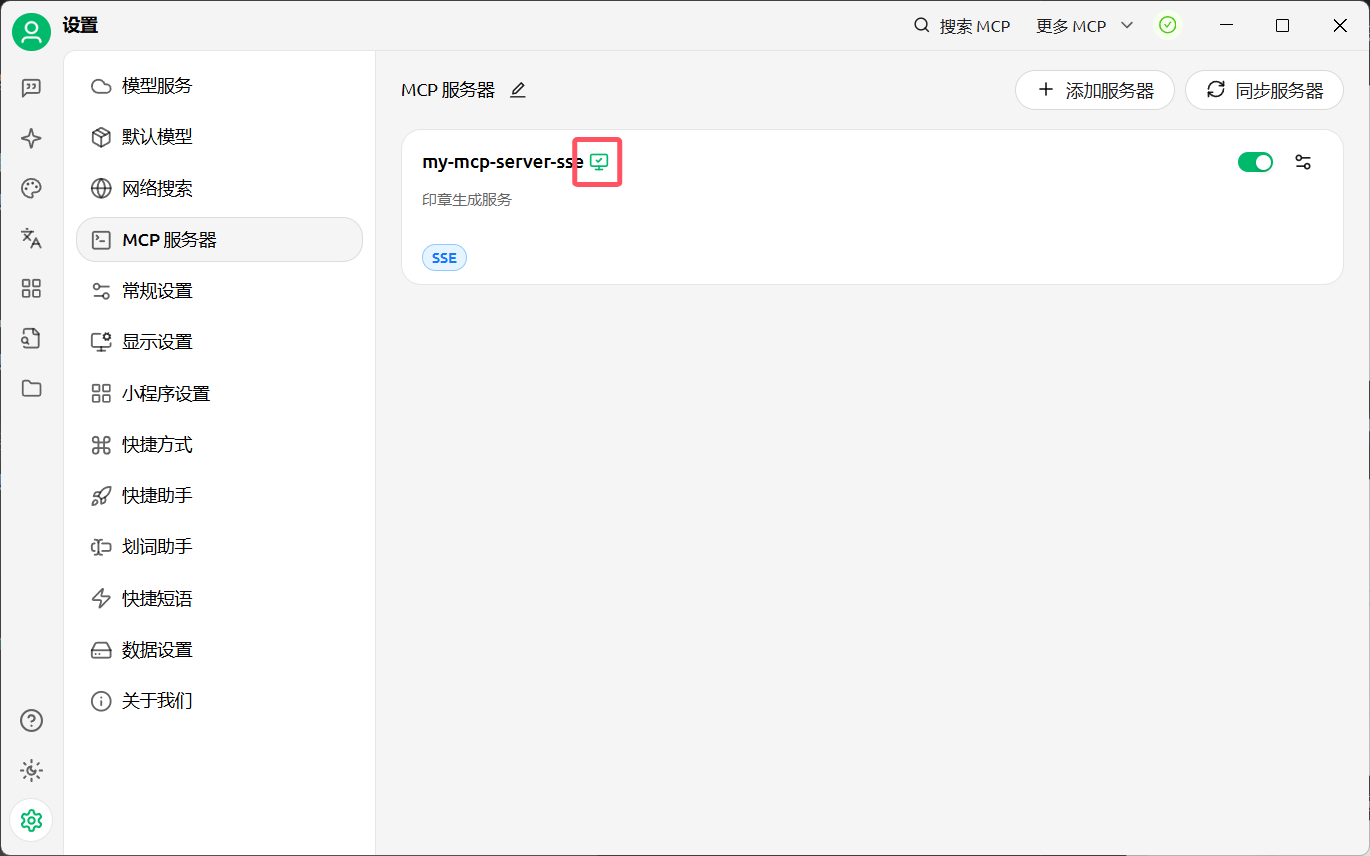
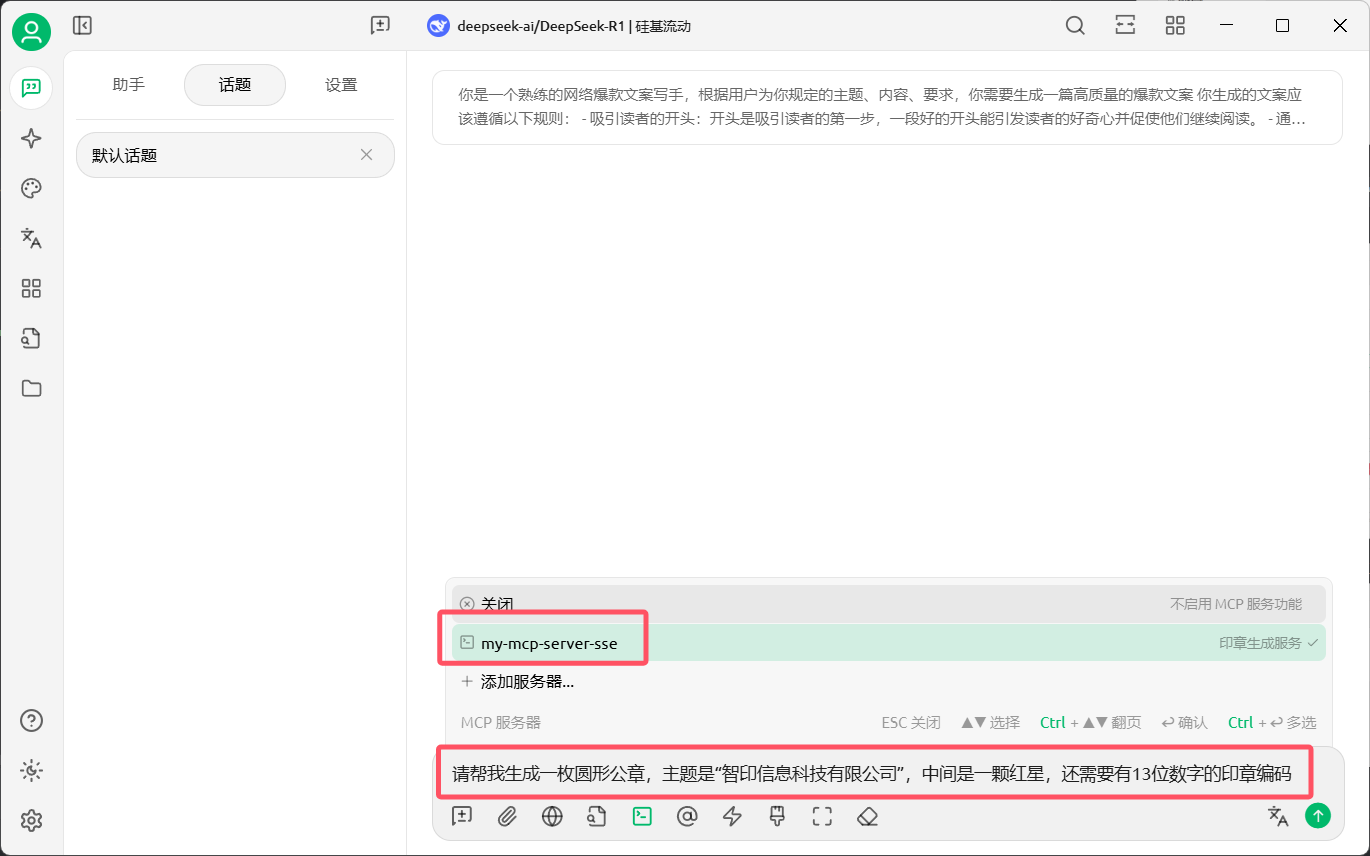
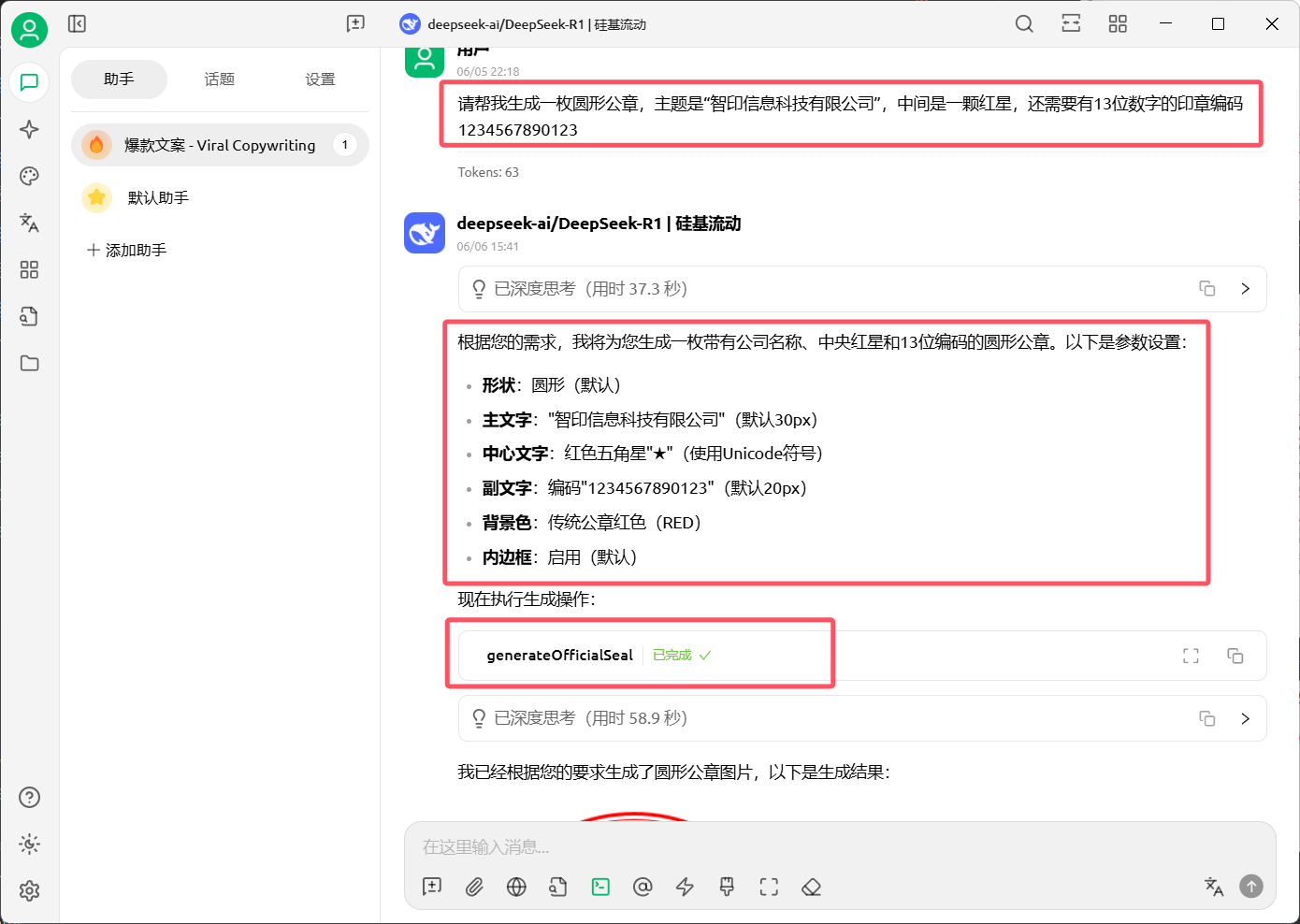
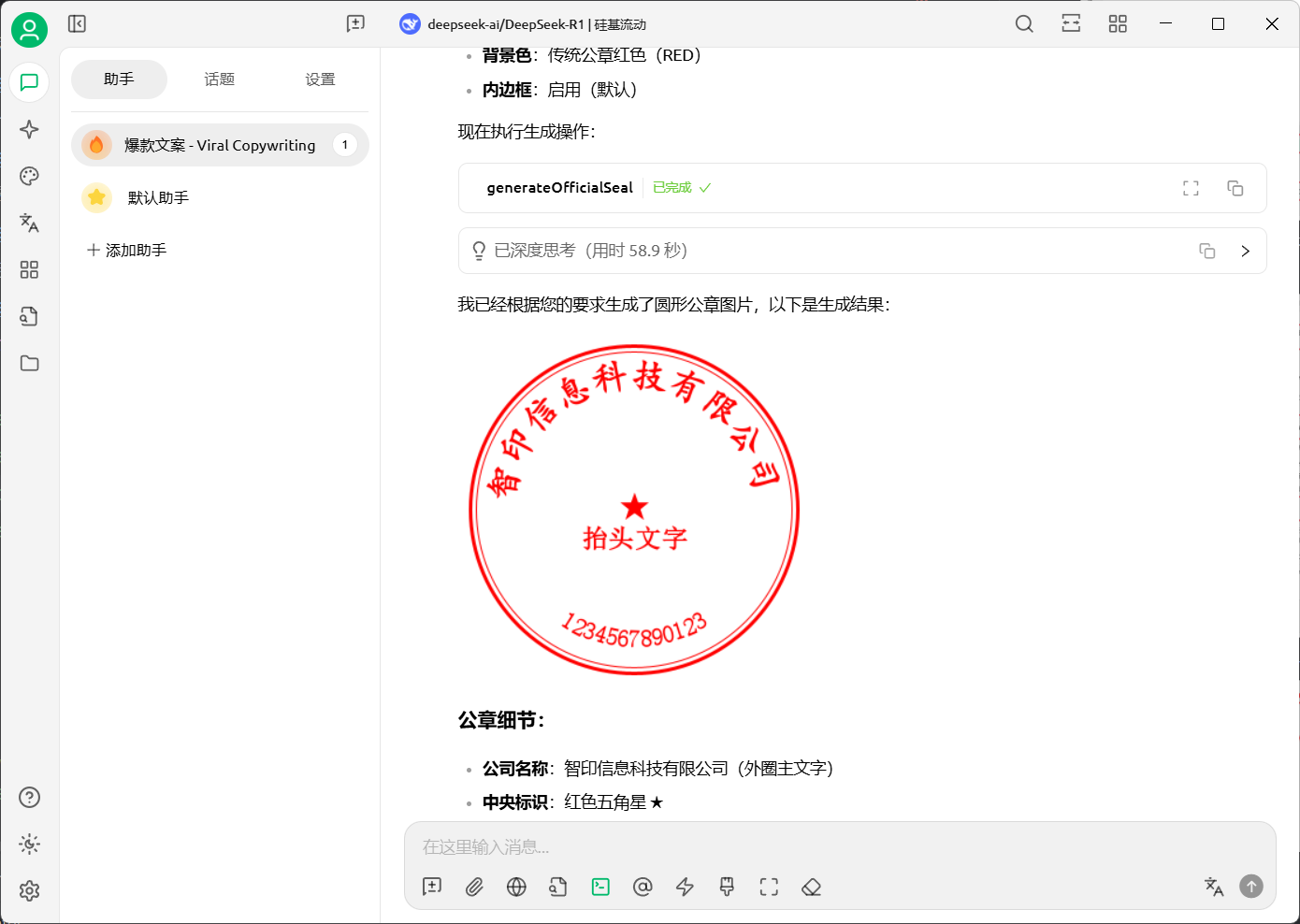
印章MCP服务,输入语句 “请帮我生成一枚圆形公章,主题是“智印信息科技有限公司”,中间是一颗红星,还需要有13位数字的印章编码”。和AI进行对话。
其余配置和使用方式和SSE模式相同,只需修改配置文件即可,配置文件如下:
spring:
   ai:
      mcp:
         client:
            enabled: true
            name: my-mcp-client
            version: 0.0.1
            request-timeout: 60000
            type: SYNC  # or ASYNC for reactive applications
            stdio:
              servers-configuration: classpath:mcp-server.json # MCP服务器配置文件路径
注意:使用stdio方式时,需要在classpath下创建一个
mcp-server.json文件(名称可自定义),内容如下:
{
  "mcpServers": {
    "mcp-seal-generate-server": {
      "command": "java",
      "args": [
        "-Dspring.ai.mcp.server.stdio=true",
        "-Dspring.main.web-application-type=none",
        "-Dlogging.pattern.console=",
        "-jar",
        "/yours_path/mcp-seal-generate-server-0.0.1-SNAPSHOT.jar"
      ],
      "env": {}
    }
  }
}
其中
/yours_path/mcp-seal-generate-server-0.0.1-SNAPSHOT.jar需要替换为实际的MCP Server的jar包路径。
Cherry Studio的设置,点击MCP 服务器。添加服务器,选择从JSON导入粘贴上述mcp-server.json中的内容。注意:在软件客户端通过stdio模式配置时相当于是在本地启动一个MCP Server,使用标准输入输出方式与客户端进行交互,用的是本地java环境。所以 如果Mcp Server开发环境是Java 17,那么需要确保本地环境也是Java 17及以上版本。如果开发时用的Java 21,那么本地环境也需要是Java 21。
Claim this server with your GitHub account to request manual ownership verification.
Link to the catalog listing for Seal Generator MCP Server from your README. This badge does not certify ownership, compatibility or security.
[](https://awesome-mcp.com/servers/mcp-seal-generator-server)Public repository statistics could not be verified. Check the configured source address; unavailable counts are not zero.
Separate sources, scopes and periods. Never combined or treated as installations, active users or security reviews.
No reviewed package or image identity; download statistics are not listed yet.
Alternative and complementary servers in the same category
A Rust CAD application with an MCP server for creating, inspecting and rendering drawings, either headlessly or through a connection to the desktop app.

Liquid Composer is a browser-based Liquid Glass icon design tool that offers a local MCP server for agent-driven icon workflows.

agent-media makes short drama series and other short vertical videos from Claude, ChatGPT or Codex through one MCP connection, with OAuth sign-in and no API keys.