
Store and retrieve entities, relations and observations in a persistent local knowledge graph.
create_entitiescreate_relationsadd_observations+6 more
92K
AI & Multi-Agent
An MCP server that connects to Microsoft Copilot Studio agents through the DirectLine API, exposing agent queries to any MCP-compatible client.
MCP server for Copilot Studio agents is cataloged as an MCP server attributed to crewaakash. An MCP server that connects to Microsoft Copilot Studio agents through the DirectLine API, exposing agent queries to any MCP-compatible client. It is categorized under ai agents-models. See the capability inspector for recorded interfaces and their independent review status; consult upstream documentation for the current interface.
Installation configuration is not reviewed. No executable setup is offered for this entry; inspect the source repository before proceeding.
Catalog license label: Not specified. Check the source repository's current license and terms before using, modifying or distributing this software.
Capability definitions are not reviewed. Unreviewed imports are not exposed as trusted interfaces.
No reviewed records to display. This does not establish that upstream lacks this capability.
No reviewed records to display. This does not establish that upstream lacks this capability.
No reviewed records to display. This does not establish that upstream lacks this capability.
Email delivery is not connected. This page does not collect email addresses or create subscriptions.
Browse the registry for current listings instead.
Reviews for MCP server for Copilot Studio agents are not available yet
Review publishing and storage are not connected. This page does not collect or publish ratings or comments, including after sign-in.
Yes, it connects to Copilot Studio agents through the DirectLine API.
Yes, it follows the MCP protocol specification and can be used with any MCP-compatible client.
README.md · b0830a0133f5 · Fetched 2026-11-13 13:56:10 UTC
Original upstream text, without AI rewriting. Scripts, forms and unsafe links are filtered for safety.
Showing the last retrieved documentation snapshot; check the source for current changes.
An MCP (Model Context Protocol) server implementation that connects to Microsoft Copilot Studio agents, allowing seamless integration of Copilot Studio agents with any MCP-compatible client.
https://github.com/user-attachments/assets/19fdd17b-2837-4797-8653-fe9439de355f
This MCP server exposes the following tools:
query_agent: Send queries to a Copilot Studio agent and receive responses
agent_definitions in the src/main.py file to include your agent's details.agent_definitions should include the following fields:
name: The name of the agentdescription: A brief description of the agent for the MCP client to identify the responsibility of the agent.The server requires the following environment variables:
DIRECTLINE_ENDPOINT: The DirectLine API endpoint for your Copilot Studio agentCOPILOT_AGENT_SECRET: Bot key for authenticating with the Copilot Studio agent via the DirectLine APIYou can set these variables in a .env file in the project root directory or configure them through your system's environment variables.
uv package manager (recommended) or pip# Setup environment with uv
uv venv
.venv\Scripts\activate # On Windows
source .venv/bin/activate # On macOS/Linux
# Install dependencies
uv sync
If you prefer using pip:
# Create a virtual environment
python -m venv .venv
.venv\Scripts\activate  # On Windows
source .venv/bin/activate  # On macOS/Linux

# Install dependencies
pip install -e .
Once you activate your environment, you can run the MCP server locally using MCP Inspector.
mcp dev src/main.py
You will be prompted to install the @modelcontextprotocol/inspector package. Choose y to install it.
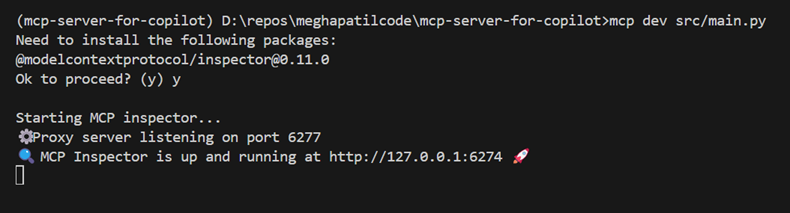
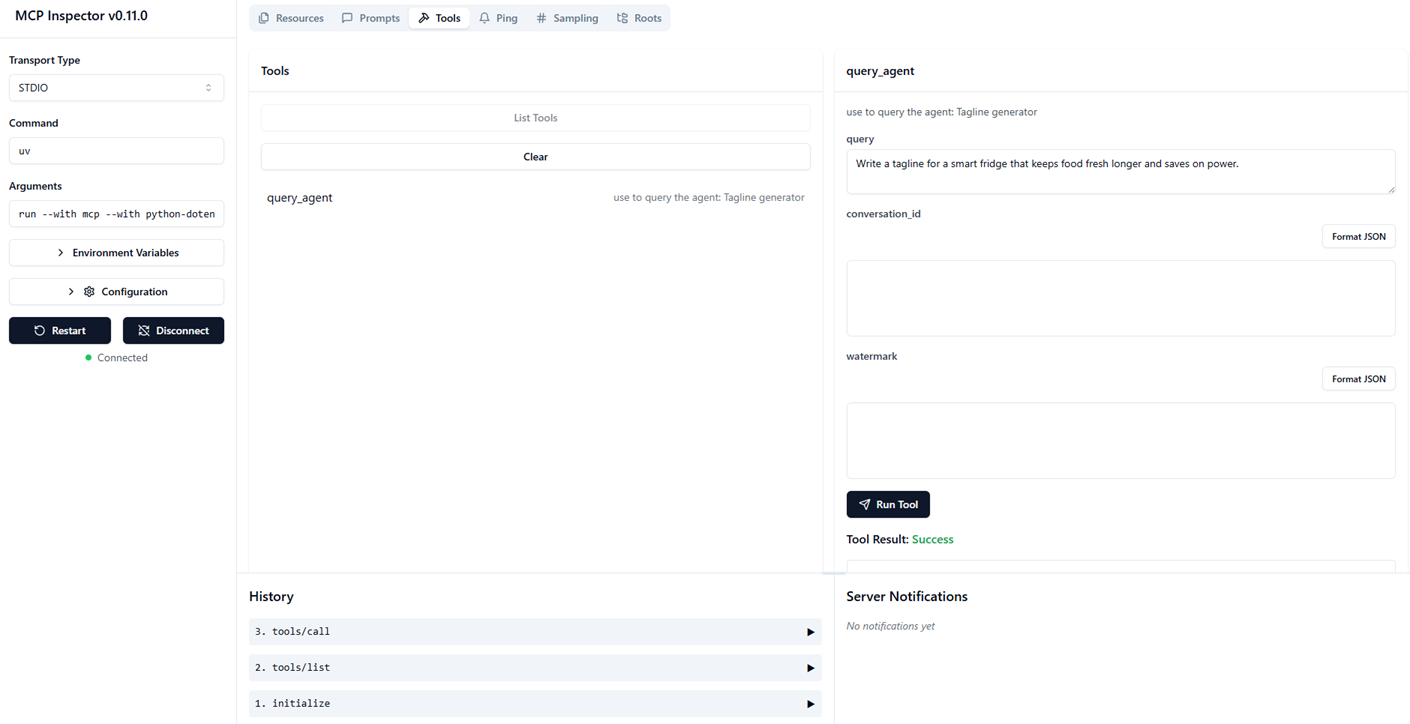
Launch the MCP Inspector and connect to the MCP server.
Navigate to Tools and click List Tools to view all the available tools in the MCP server.
Select the query_agent tool to send queries to your Copilot Studio agent.
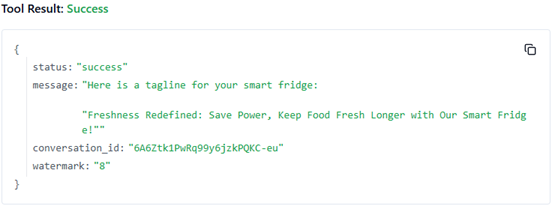
To use with Claude Desktop, add the following to your configuration file:
File > Settings > Developer > Edit Config.claude_desktop_config.json file and add the following configurations to the mcpServers section. You can use either uv, python, or docker to run the server.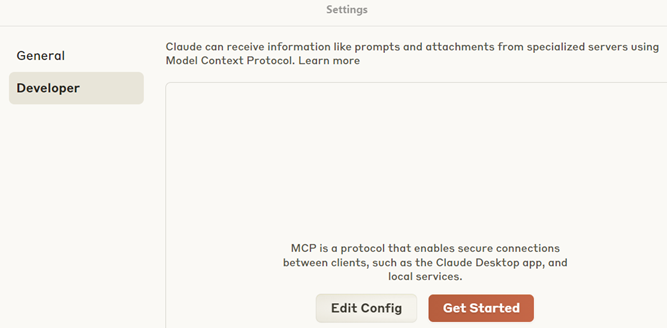
uv{
"mcpServers": {
"agent-name": {
"command": "uv", // you might need to use the full path to uv if it's not in your PATH. use `which uv` to find the path.
"args": [
"--directory",
"<PATH_TO_THE_PARENT_FOLDER>",
"run",
"mcp",
"run",
"<PATH_TO_THE_PARENT_FOLDER>/src/main.py"
],
"env": {
"DIRECTLINE_ENDPOINT": "endpoint-url",
"COPILOT_AGENT_SECRET": "secret-key"
}
}
}
}
pythonPost setup of virtual environment and installing the necessary packages, you can run the server using the following command:
{
  "mcpServers": {
    "agent-name": {
      "command": "<PATH_TO_VENV>/bin/python",
      "args": [
        "<PATH_TO_THE_PARENT_FOLDER>/src/main.py"
      ],
      "env": {
        "DIRECTLINE_ENDPOINT": "endpoint-url",
        "COPILOT_AGENT_SECRET": "secret-key"
      }
    }
  }
}
Alternatively you can install the server to Claude Desktop by running the following command (inside the virtual environment):
mcp install src/main.py -f .env
dockerYou can run the MCP server as a container using Docker. Ensure you have Docker installed and running on your machine.
Build the Docker image:
docker build -t mcp-server-copilot-agent .
Add the following to your Claude Desktop configuration file:
{
  "mcpServers": {
    "agent-name": {
      "command": "docker",
      "args": [
        "run",
        "-i",
        "--rm",
        "-p", "8000:8000",
        "--env-file", "<PATH_TO_THE_PARENT_FOLDER>/.env",
        "mcp-server-copilot-agent"
      ]
    }
  }
}
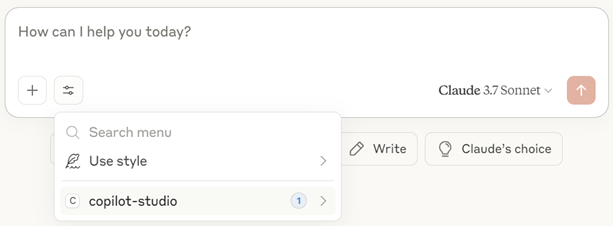
Once you have configured Claude Desktop with the
This server follows the MCP protocol specification and can be used with any MCP-compatible client. Refer to your client's documentation for specific instructions on how to connect to external MCP servers.
To contribute to this project, set up a development environment:
# Install development dependencies
uv sync -e dev
The project uses Ruff for linting:
# Run linter
ruff check .
Claim this server with your GitHub account to request manual ownership verification.
Link to the catalog listing for MCP server for Copilot Studio agents from your README. This badge does not certify ownership, compatibility or security.
[](https://awesome-mcp.com/servers/mcp-server-for-copilot)Public repository statistics could not be verified. Check the configured source address; unavailable counts are not zero.
Separate sources, scopes and periods. Never combined or treated as installations, active users or security reviews.
No reviewed package or image identity; download statistics are not listed yet.
Alternative and complementary servers in the same category
Store and retrieve entities, relations and observations in a persistent local knowledge graph.
Organize problem solving into revisable, branching thought steps through an MCP tool.

Query-aware context compression with an MCP plugin for coding agents, plus Python and HTTP interfaces for reducing the context sent to a language model.