
A directory listing describing a cancellation-letter and mailing-address service. The configured public GitHub repository returned 404 during source verification.
Repository stats unavailable
Developer Tools
A VSCode/Cursor extension that turns the editor into an MCP server, letting AI agents search Java types and fetch class source code via the Java Language Server.
MCP Server For Java is cataloged as an MCP server attributed to saikanya. A VSCode/Cursor extension that turns the editor into an MCP server, letting AI agents search Java types and fetch class source code via the Java Language Server. It is categorized under developer tools. See the capability inspector for recorded interfaces and their independent review status; consult upstream documentation for the current interface.
Installation configuration is not reviewed. No executable setup is offered for this entry; inspect the source repository before proceeding.
Catalog license label: Not specified. Check the source repository's current license and terms before using, modifying or distributing this software.
Capability definitions are not reviewed. Unreviewed imports are not exposed as trusted interfaces.
No reviewed records to display. This does not establish that upstream lacks this capability.
No reviewed records to display. This does not establish that upstream lacks this capability.
No reviewed records to display. This does not establish that upstream lacks this capability.
Email delivery is not connected. This page does not collect email addresses or create subscriptions.
Browse the registry for current listings instead.
Reviews for MCP Server For Java are not available yet
Review publishing and storage are not connected. This page does not collect or publish ratings or comments, including after sign-in.
Yes. The mcpServer.maxOutputLength parameter, defaulting to 70000, sets the maximum number of characters for Java source code output; an error is reported when source code exceeds this limit.
Yes. From v0.0.3 it supports connecting to multiple workspaces simultaneously, and the AI agent automatically selects the workspace of the currently active window unless the user specifies otherwise.
README.md · 5e7adf547af4 · Fetched 2026-11-13 11:47:00 UTC
Original upstream text, without AI rewriting. Scripts, forms and unsafe links are filtered for safety.
Showing the last retrieved documentation snapshot; check the source for current changes.
⚠️ v0.0.3 重要更新
MCP 客户端配置需要从:
{
  "command": "npx",
  "args": ["vscode-as-mcp-server"]
}
或
{
  "url": "http://localhost:60100"
}
修改为:
{
  "command": "npx",
  "args": ["vscode-to-mcp-server"]
}
如果不修改配置,将无法自动在多工作区间切换,只能获取第一个打开的工作区的类。
Cursor、Github Copilot、Windsurf 等基于 VSCode 开发的 AI Code Agent 在编写 Java 项目时,可以访问项目本身的源代码,但无法获取项目依赖的类定义与源码。
本插件将 VSCode/Cursor 转变为 MCP 服务器,让 AI Agent 能够:
searchJavaTypesgetSourceCodeByFQN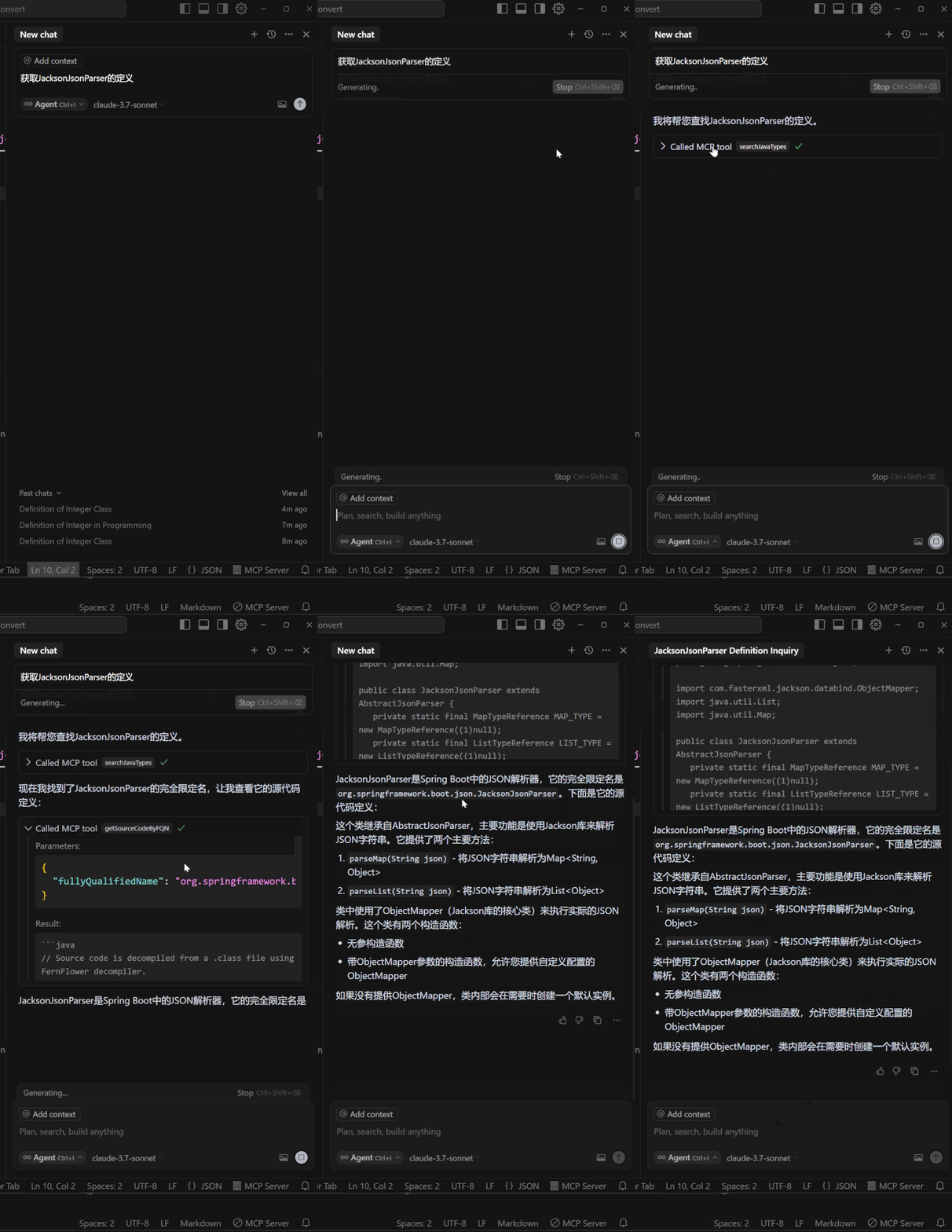
安装以下任意一种 Java Language Server 插件,并确保它可以正常运行 Java 项目(建议只启用一种,以免语言功能冲突):
下载安装本插件。
配置您的MCP客户端,重启并确认mcp工具加载完成:
claude_desktop_config.json)中:{
"mcpServers": {
"vscode-java": {
"command": "npx",
"args": [
"vscode-to-mcp-server"
]
}
}
}
打开一个 Java 项目,等待项目导入、依赖解析和索引完成,并确认 Java Language Server 已就绪:
使用 Extension Pack for Java 时,状态栏中的 Java 项目加载状态应显示为已完成:

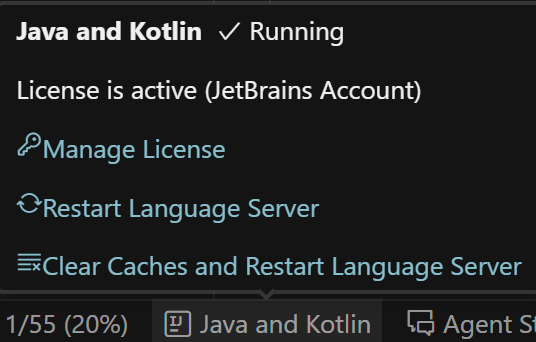
使用 Java and Kotlin by IntelliJ IDEA 时,点击状态栏中的 Java and Kotlin,状态菜单应显示 Running;正式版还应显示许可证已激活:
为了让 AI Agent 更主动地调用本插件提供的工具,建议在系统提示词中添加以下内容(如果你没有更好或者更适合自己应用场景的提示词):
通过项目源代码找不到的类或类的定义或方法具体实现,且有类名或者部分类名时,可以使用工具 searchJavaTypes 与 getSourceCodeByFQN 判断其是否存在,或获取其源代码
💡 以 Cursor 为例,可以在 Settings → General → Rules for AI → User Rules 中添加
| 参数 | 类型 | 默认值 | 说明 |
|---|---|---|---|
mcpServer.maxOutputLength | number | 70000 | 最大输出 Java 源代码字符数。当要获取的类的源代码超过此限制时会报错。不建议设置过大,过大会导致模型 input token 过大无法请求模型,或无法将类的源代码放入上下文中。 |
mcpServer.enableRelayVersionCheck | boolean | true | 是否启用 relay 版本更新检查和通知。设置为 false 可禁用版本更新提醒。 |
非常欢迎大家对插件的问题,bug或新功能建议进行反馈! 🙇
┌─────────────────────────────────────────────────────────────────────────────┐
│                              MCP 客户端                                      │
│                  (Claude Desktop / Cursor / Windsurf 等)                     │
└─────────────────────────────────────────────────────────────────────────────┘
                                    │
                                    │ stdio (JSON-RPC)
                                    ▼
┌─────────────────────────────────────────────────────────────────────────────┐
│                          Relay (vscode-to-mcp-server)                        │
│  ┌─────────────────────────────────────────────────────────────────────┐    │
│  │  - 接收 MCP 客户端请求                                                │    │
│  │  - 读取路由表,查找目标 Extension                                      │    │
│  │  - 通过 Socket 转发请求到 Extension                                   │    │
│  │  - 返回响应给 MCP 客户端                                              │    │
│  └─────────────────────────────────────────────────────────────────────┘    │
└─────────────────────────────────────────────────────────────────────────────┘
                                    │
                   ┌────────────────┼────────────────┐
                   │                │                │
                   ▼                ▼                ▼
          ┌──────────────┐  ┌──────────────┐  ┌──────────────┐
          │   Named Pipe │  │   Named Pipe │  │   Named Pipe │
          │  (Windows)   │  │  (Windows)   │  │  (Windows)   │
          │    或        │  │    或        │  │    或        │
          │ Unix Socket  │  │ Unix Socket  │  │ Unix Socket  │
          │   (其他)     │  │   (其他)     │  │   (其他)     │
          └──────────────┘  └──────────────┘  └──────────────┘
                   │                │                │
                   ▼                ▼                ▼
┌─────────────────────────────────────────────────────────────────────────────┐
│                      VSCode/Cursor Extension 实例                            │
│  ┌─────────────┐   ┌─────────────┐   ┌─────────────┐                        │
│  │ 工作区 A    │   │ 工作区 B    │   │ 工作区 C    │   ...                  │
│  │ PID: 12345  │   │ PID: 23456  │   │ PID: 34567  │                        │
│  └─────────────┘   └─────────────┘   └─────────────┘                        │
│         │                │                │                                  │
│         ▼                ▼                ▼                                  │
│  ┌─────────────────────────────────────────────────────────────────────┐    │
│  │                    Java Language Server (JDT.LS)                     │    │
│  │            搜索类型 / 获取源代码 / 解析 Java 项目                      │    │
│  └─────────────────────────────────────────────────────────────────────┘    │
└─────────────────────────────────────────────────────────────────────────────┘
| 组件 | 包名 | 说明 |
|---|---|---|
| Extension | packages/extension | VSCode/Cursor 插件,提供 MCP 服务器功能 |
| Relay | packages/relay | 命令行中继程序,桥接 MCP 客户端与 Extension |
| 平台 | 通信方式 | 路径格式 |
|---|---|---|
| Windows | Named Pipe (命名管道) | \\.\pipe\vscode-mcp-{pid} |
| macOS/Linux | Unix Domain Socket | ~/.vscode-mcp-sockets/{pid}.sock |
路由表文件存储在用户主目录:~/.vscode-mcp-router-v2.json
{
  "entries": [
    {
      "workspaces": ["d:\\project\\workspace-a"],
      "pid": 12345,
      "lastUpdated": 1700000000000
    }
  ]
}
\n| Header | 说明 |
|---|---|
X-Relay-Version | Relay 版本号,用于兼容性检查 |
X-MCP-Client | MCP 客户端标识 |
1. MCP 客户端调用工具 (如 searchJavaTypes)
                    │
                    ▼
2. Relay 接收 stdio 请求
                    │
                    ▼
3. Relay 读取路由表,根据 workspacePaths 查找目标 PID
                    │
                    ▼
4. Relay 通过 Socket 发送 JSON-RPC 请求到 Extension
                    │
                    ▼
5. Extension 调用 Java Language Server 执行操作
                    │
                    ▼
6. Extension 返回结果给 Relay
                    │
                    ▼
7. Relay 返回结果给 MCP 客户端
| 文件 | 说明 |
|---|---|
extension/src/extension.ts | 插件入口,初始化 MCP 服务器 |
extension/src/mcp-server.ts | MCP 服务器实现,注册工具 |
extension/src/sock-transport.ts | Socket 服务端传输层 |
extension/src/utils/router-table.ts | 路由表管理(读写) |
relay/src/index.ts | Relay 入口,请求转发 |
relay/src/socket-client.ts | Socket 客户端 |
relay/src/router-table.ts | 路由表读取(只读) |
⚠️ v0.0.3 Important Update
MCP client configuration needs to be changed from:
{
  "command": "npx",
  "args": ["vscode-as-mcp-server"]
}
or
{
  "url": "http://localhost:60100"
}
to:
{
  "command": "npx",
  "args": ["vscode-to-mcp-server"]
}
Without updating the configuration, automatic multi-workspace switching will not work, and only classes from the first opened workspace will be accessible.
AI Code Agents based on VSCode (such as Cursor, Github Copilot, Windsurf) can access a Java project's own source code, but cannot retrieve class definitions and source code from project dependencies.
This extension turns VSCode/Cursor into an MCP server, enabling AI Agents to:
searchJavaTypesgetSourceCodeByFQN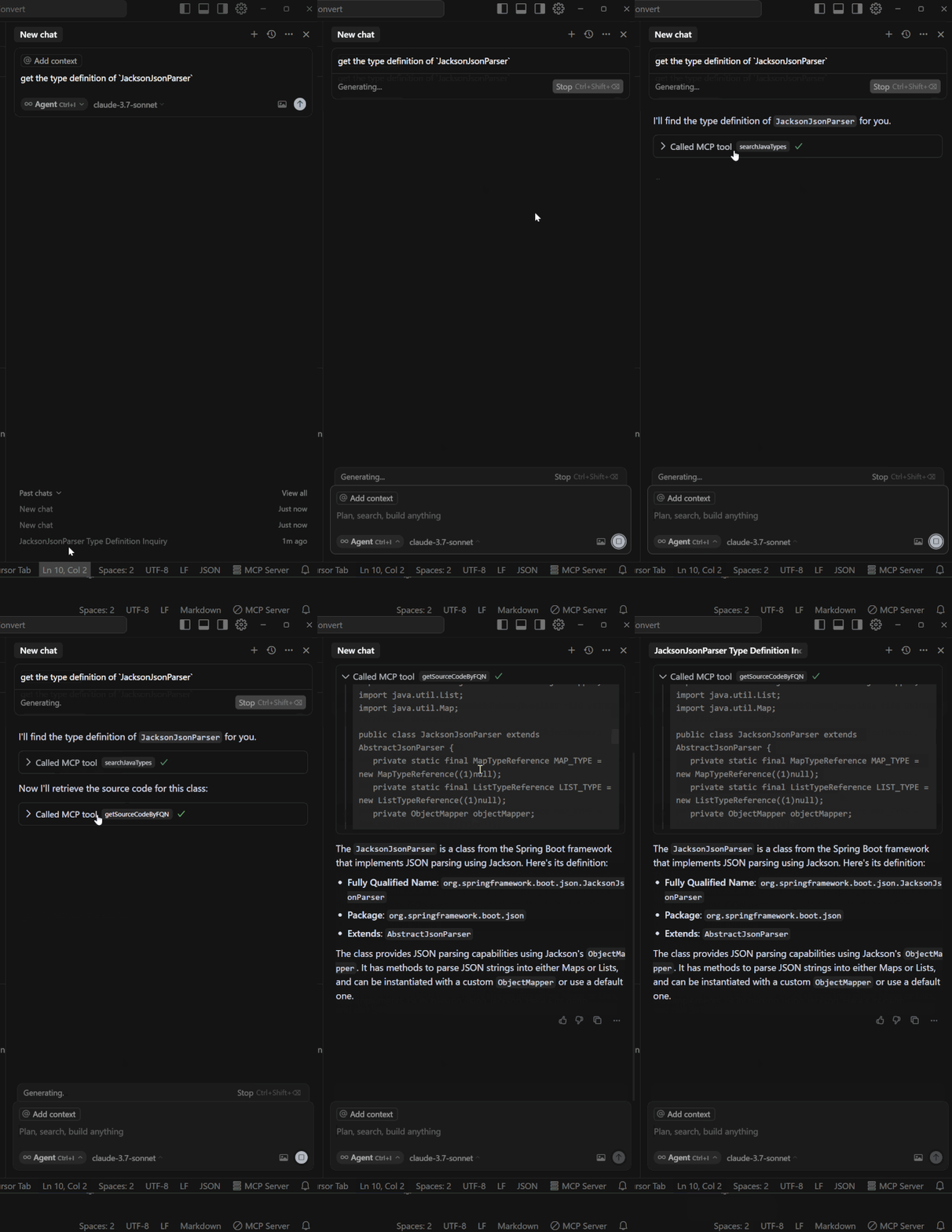
Install either of the following Java Language Server extensions and make sure it can run Java projects normally (enable only one to avoid conflicting language features):
Extension Pack for Java: VS Marketplace / Open VSXJava and Kotlin by IntelliJ IDEA: VS Marketplace / Open VSXDownload and install this extension.
Configure your MCP client, restart and confirm MCP tools are loaded:
claude_desktop_config.json):{
"mcpServers": {
"vscode-java": {
"command": "npx",
"args": [
"vscode-to-mcp-server"
]
}
}
}
Open a Java project, wait for project import, dependency resolution, and indexing to finish, and verify that the Java Language Server is ready:
With Extension Pack for Java, the Java project loading status in the status bar should show that loading is complete:
With Java and Kotlin by IntelliJ IDEA, click Java and Kotlin in the status bar and verify that its status menu displays Running. Stable releases should also show an active license:
To help AI Agents invoke the tools provided by this extension more proactively, it is recommended to add the following content to your system prompt (if you don't have a better or more suitable prompt for your use case):
When you cannot find the class, class definition, or specific implementation of methods through the project source code, and you have the class name or partial class name, you can use the tools searchJavaTypes and getSourceCodeByFQN to check if it exists or get its source code
💡 For example, in Cursor, you can add this in Settings → General → Rules for AI → User Rules
| Parameter | Type | Default | Description |
|---|---|---|---|
mcpServer.maxOutputLength | number | 70000 | Maximum number of characters for Java source code output. An error will be reported when the source code exceeds this limit. It is not recommended to set it too large, as excessive values may cause the model's input token to be too large or make it impossible to place the class source code in the context. |
mcpServer.enableRelayVersionCheck | boolean | true | Whether to enable relay version update check and notification. Set to false to disable version update warnings. |
Feedback on issues, bugs, or suggestions for new features is highly welcomed! 🙇
┌─────────────────────────────────────────────────────────────────────────────┐
│                              MCP Client                                      │
│                  (Claude Desktop / Cursor / Windsurf, etc.)                  │
└─────────────────────────────────────────────────────────────────────────────┘
                                    │
                                    │ stdio (JSON-RPC)
                                    ▼
┌─────────────────────────────────────────────────────────────────────────────┐
│                          Relay (vscode-to-mcp-server)                        │
│  ┌─────────────────────────────────────────────────────────────────────┐    │
│  │  - Receives MCP client requests                                      │    │
│  │  - Reads router table to find target Extension                       │    │
│  │  - Forwards requests to Extension via Socket                         │    │
│  │  - Returns responses to MCP client                                   │    │
│  └─────────────────────────────────────────────────────────────────────┘    │
└─────────────────────────────────────────────────────────────────────────────┘
                                    │
                   ┌────────────────┼────────────────┐
                   │                │                │
                   ▼                ▼                ▼
          ┌──────────────┐  ┌──────────────┐  ┌──────────────┐
          │   Named Pipe │  │   Named Pipe │  │   Named Pipe │
          │  (Windows)   │  │  (Windows)   │  │  (Windows)   │
          │     or       │  │     or       │  │     or       │
          │ Unix Socket  │  │ Unix Socket  │  │ Unix Socket  │
          │   (Others)   │  │   (Others)   │  │   (Others)   │
          └──────────────┘  └──────────────┘  └──────────────┘
                   │                │                │
                   ▼                ▼                ▼
┌─────────────────────────────────────────────────────────────────────────────┐
│                      VSCode/Cursor Extension Instances                       │
│  ┌─────────────┐   ┌─────────────┐   ┌─────────────┐                        │
│  │ Workspace A │   │ Workspace B │   │ Workspace C │   ...                  │
│  │ PID: 12345  │   │ PID: 23456  │   │ PID: 34567  │                        │
│  └─────────────┘   └─────────────┘   └─────────────┘                        │
│         │                │                │                                  │
│         ▼                ▼                ▼                                  │
│  ┌─────────────────────────────────────────────────────────────────────┐    │
│  │                    Java Language Server (JDT.LS)                     │    │
│  │          Search types / Get source code / Parse Java projects        │    │
│  └─────────────────────────────────────────────────────────────────────┘    │
└─────────────────────────────────────────────────────────────────────────────┘
| Component | Package | Description |
|---|---|---|
| Extension | packages/extension | VSCode/Cursor extension providing MCP server functionality |
| Relay | packages/relay | CLI relay program bridging MCP client and Extension |
| Platform | Method | Path Format |
|---|---|---|
| Windows | Named Pipe | \\.\pipe\vscode-mcp-{pid} |
| macOS/Linux | Unix Domain Socket | ~/.vscode-mcp-sockets/{pid}.sock |
Router table file is stored in user home directory: ~/.vscode-mcp-router-v2.json
{
  "entries": [
    {
      "workspaces": ["d:\\project\\workspace-a"],
      "pid": 12345,
      "lastUpdated": 1700000000000
    }
  ]
}
\n| Header | Description |
|---|---|
X-Relay-Version | Relay version for compatibility check |
X-MCP-Client | MCP client identifier |
1. MCP client calls a tool (e.g., searchJavaTypes)
                    │
                    ▼
2. Relay receives stdio request
                    │
                    ▼
3. Relay reads router table, finds target PID by workspacePaths
                    │
                    ▼
4. Relay sends JSON-RPC request to Extension via Socket
                    │
                    ▼
5. Extension calls Java Language Server to execute operation
                    │
                    ▼
6. Extension returns result to Relay
                    │
                    ▼
7. Relay returns result to MCP client
| File | Description |
|---|---|
extension/src/extension.ts | Extension entry point, initializes MCP server |
extension/src/mcp-server.ts | MCP server implementation, registers tools |
extension/src/sock-transport.ts | Socket server transport layer |
extension/src/utils/router-table.ts | Router table management (read/write) |
relay/src/index.ts | Relay entry point, request forwarding |
relay/src/socket-client.ts | Socket client |
relay/src/router-table.ts | Router table reading (read-only) |
Claim this server with your GitHub account to request manual ownership verification.
Link to the catalog listing for MCP Server For Java from your README. This badge does not certify ownership, compatibility or security.
[](https://awesome-mcp.com/servers/mcp-server-for-java)Public repository statistics could not be verified. Check the configured source address; unavailable counts are not zero.
Separate sources, scopes and periods. Never combined or treated as installations, active users or security reviews.
No reviewed package or image identity; download statistics are not listed yet.
Alternative and complementary servers in the same category
A directory listing describing a cancellation-letter and mailing-address service. The configured public GitHub repository returned 404 during source verification.

A hosted MCP service for browsing and searching through Singapore mobile-network proxies.

A directory listing describing a Markdown-to-PDF service. The configured public GitHub repository returned 404 during source verification.