@hostsmith/mcp-server





Official Model Context Protocol server for the Hostsmith hosting platform.
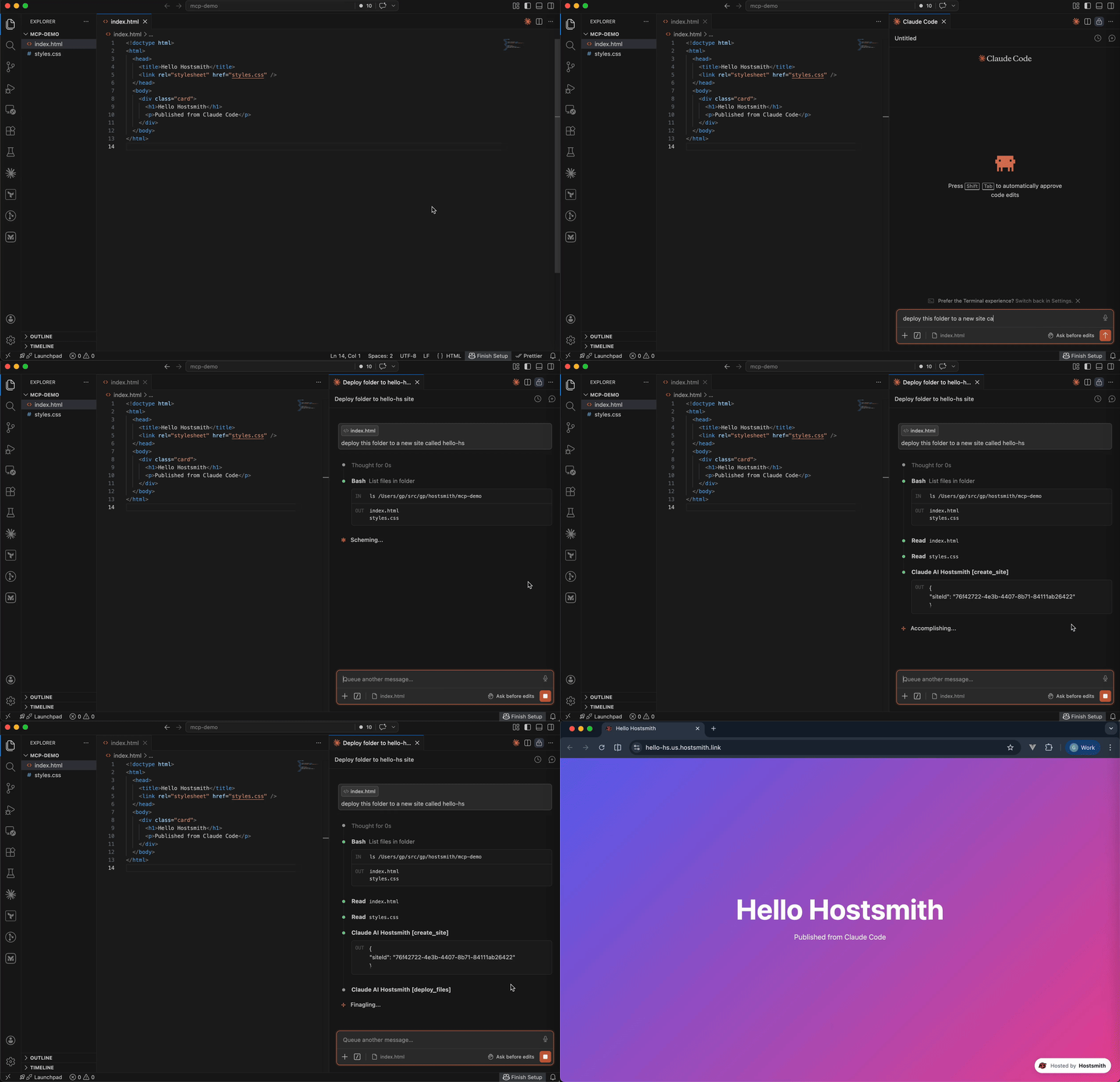
Static hosting for agents - give it a file, get a live URL. Claude Code shipping an HTML report. Cursor previewing a generated demo. Claude publishing a one-pager from claude.ai or Desktop. One MCP call → public HTTPS URL in seconds. No repo, no CI, no build step. Custom domains, private sites, EU or US data residency.
Why Hostsmith
- Artifact-first. No repo, no build config - drop a file (or have the agent generate one), get a URL.
- Built for agents. MCP-native, OAuth-scoped, structured tool descriptions agents can chain.
- EU or US data residency. Pick where the user's data lives, architecturally - not via a checkbox.
Redirects apply only on your organization's own custom domains. User rules, kept on the hostname and changed through these tools, are checked before the live deploy's _redirects.
To forward a hostname with no content of its own, such as a retired domain or a campaign link, create a redirect host: create_site with kind: "redirect", then add its rules. A redirect host serves only its rules and takes no deploys. It doesn't count toward your plan's site limit; an organization can have up to 50.
Usage
Authentication is via OAuth 2.0. Static access tokens are not supported.
Claude (claude.ai, Desktop, Cowork, mobile)
Add Hostsmith once as a custom connector and it works in every Claude app on your account.
-
In Claude, open Customize > Connectors, click + Add, then Add custom connector.
-
Enter Hostsmith as the name and paste the MCP server URL:
https://mcp.hostsmith.net/mcp
-
Click Continue, finish adding the connector, then connect it. Claude opens Hostsmith in your browser to authorize the connector against your Hostsmith account.
Free Claude plans allow one custom connector. On Team and Enterprise plans, an owner adds the connector under Organization settings > Connectors, and each member then clicks Connect next to Hostsmith under Customize > Connectors to sign in with their own Hostsmith account.
Claude asks for your approval before each tool call. To change that, open Hostsmith under Customize > Connectors and set its Tool permissions.
To revoke, open Hostsmith under Customize > Connectors, click ⋯, then Remove (Team and Enterprise owners: Organization settings > Connectors). To force a re-auth, click Disconnect, then Connect.
Stdio (Claude Code, Cursor, Cline, Windsurf, Zed)
Add this entry to your MCP client's config:
{
  "mcpServers": {
    "hostsmith": {
      "command": "npx",
      "args": ["-y", "@hostsmith/mcp-server"]
    }
  }
}
The first tool call triggers an OAuth flow in your browser to authorize the server against your Hostsmith account.
Remote URL (other clients)
Any MCP client that supports remote Streamable HTTP transport can point directly at the hosted server:
{
  "mcpServers": {
    "hostsmith": {
      "url": "https://mcp.hostsmith.net/mcp"
    }
  }
}
The client handles the OAuth flow automatically - you'll be redirected to Hostsmith to authorize access.
Claude Code can use the hosted server directly too:
claude mcp add --transport http hostsmith https://mcp.hostsmith.net/mcp
Cursor (one-click install)

Click the badge to add the remote Hostsmith server (https://mcp.hostsmith.net/mcp) to Cursor. The first tool call triggers OAuth in your browser.
Local HTTP (self-hosted)
Run the server in HTTP mode and have your MCP client perform OAuth against it:
npx @hostsmith/mcp-server http
{
  "mcpServers": {
    "hostsmith": {
      "url": "http://localhost:3100/mcp"
    }
  }
}
Embedding the HTTP handler
createFetchHandler returns a Web-Standard (req: Request) => Promise<Response> handler, for hosting the server in your own runtime (a Lambda, an edge worker, a Node server). It reads no environment variables; pass the configuration:
import { createFetchHandler } from "@hostsmith/mcp-server";

const handler = createFetchHandler({
  hostsmithUrl: "https://hostsmith.net",
  mcpBaseUrl: "https://mcp.example.com",
  // Optional: called for every authenticated MCP request with that
  // request's new McpServer and the access token's decoded claims,
  // before the server handles the request.
  onServer: async (server, { claims }) => {
    // e.g. attach your own instrumentation to `server`
  },
});
onServer is awaited. If it throws, the error is logged and the request is handled as if there were no hook. The claims are decoded, not verified; the Hostsmith API verifies the token on every tool call. Hostsmith's hosted server at mcp.hostsmith.net uses this hook for its usage analytics. The package itself contains no analytics client and sends no telemetry, and the CLI passes no hook.
Environment variables
Network access
The MCP transport and OAuth flow run in your client's app process and need no agent-sandbox configuration - if your MCP client connected, those paths are working.
The one place sandboxed agents commonly fail is the upload PUT during deploy_create_upload + deploy_finalize: the bytes go from the agent's shell to the partition API host. From the agent terminal, allow outbound HTTPS (port 443) to:
us.api.hostsmith.net (for sites in the us partition)eu.api.hostsmith.net (for sites in the eu partition)
Sandbox-specific snippets (Cursor sandbox.json, Claude Code settings.json, Codex config.toml, generic firewall guidance) live in the Network access docs.
The server's own calls to the Hostsmith API identify themselves with User-Agent: hostsmith-mcp-server/<version> hostsmith-js-sdk/<version>.
Troubleshooting
- Tool calls return 401: the OAuth session expired. Reconnect from your MCP client to re-authorize.
- OAuth redirect loops: confirm
MCP_BASE_URL matches the URL your MCP client uses to reach the server.
- Wrong partition: tool calls accept an explicit
partition arg; if you omit it, the partition is inferred from your access token.
- Upload PUT fails (DNS, refused, proxy, timeout): the agent's shell can't reach the partition API host. See Network access.
- Inspect the install:
npx @modelcontextprotocol/inspector npx -y @hostsmith/mcp-server http to browse tools interactively.
Documentation
Deeper material lives at hostsmith.net/docs/mcp.
Contributing
See CONTRIBUTING.md (including the Releases section for the version-stamping flow). Security issues: see SECURITY.md.
License
MIT


