
A directory listing describing a cancellation-letter and mailing-address service. The configured public GitHub repository returned 404 during source verification.
Repository stats unavailable
Developer Tools
An MCP server for controlling iOS simulators, with tools to boot and shut down simulators, install and launch apps, take screenshots, and tap coordinates.
MCP Server for iOS Simulator is cataloged as an MCP server attributed to atom2ueki. An MCP server for controlling iOS simulators, with tools to boot and shut down simulators, install and launch apps, take screenshots, and tap coordinates. It is categorized under developer tools. See the capability inspector for recorded interfaces and their independent review status; consult upstream documentation for the current interface.
Installation configuration is not reviewed. No executable setup is offered for this entry; inspect the source repository before proceeding.
Catalog license label: MIT License. Check the source repository's current license and terms before using, modifying or distributing this software.
Capability definitions are not reviewed. Unreviewed imports are not exposed as trusted interfaces.
No reviewed records to display. This does not establish that upstream lacks this capability.
No reviewed records to display. This does not establish that upstream lacks this capability.
No reviewed records to display. This does not establish that upstream lacks this capability.
Email delivery is not connected. This page does not collect email addresses or create subscriptions.
Browse the registry for current listings instead.
Reviews for MCP Server for iOS Simulator are not available yet
Review publishing and storage are not connected. This page does not collect or publish ratings or comments, including after sign-in.
It can list, boot, and shut down simulators; install, launch, and terminate apps; take screenshots; and tap coordinates.
Yes, macOS is required for iOS simulators.
Yes, the README lists support for multiple concurrent simulator sessions.
README.md · c151d873598a · Fetched 2026-11-13 06:59:54 UTC
Original upstream text, without AI rewriting. Scripts, forms and unsafe links are filtered for safety.
Showing the last retrieved documentation snapshot; check the source for current changes.
A server that implements the Model Context Protocol (MCP) for iOS simulators, built on top of appium-ios-simulator and utilizing the MCP TypeScript SDK.
This project provides a bridge between iOS simulators and the Model Context Protocol, allowing for standardized communication with iOS simulator instances. It enables programmatic control of iOS simulators while leveraging the MCP protocol for consistent interfaces across different environments. The server utilizes stdio as its transport mechanism, making it ideal for integration with Claude Desktop and other MCP-compatible clients.
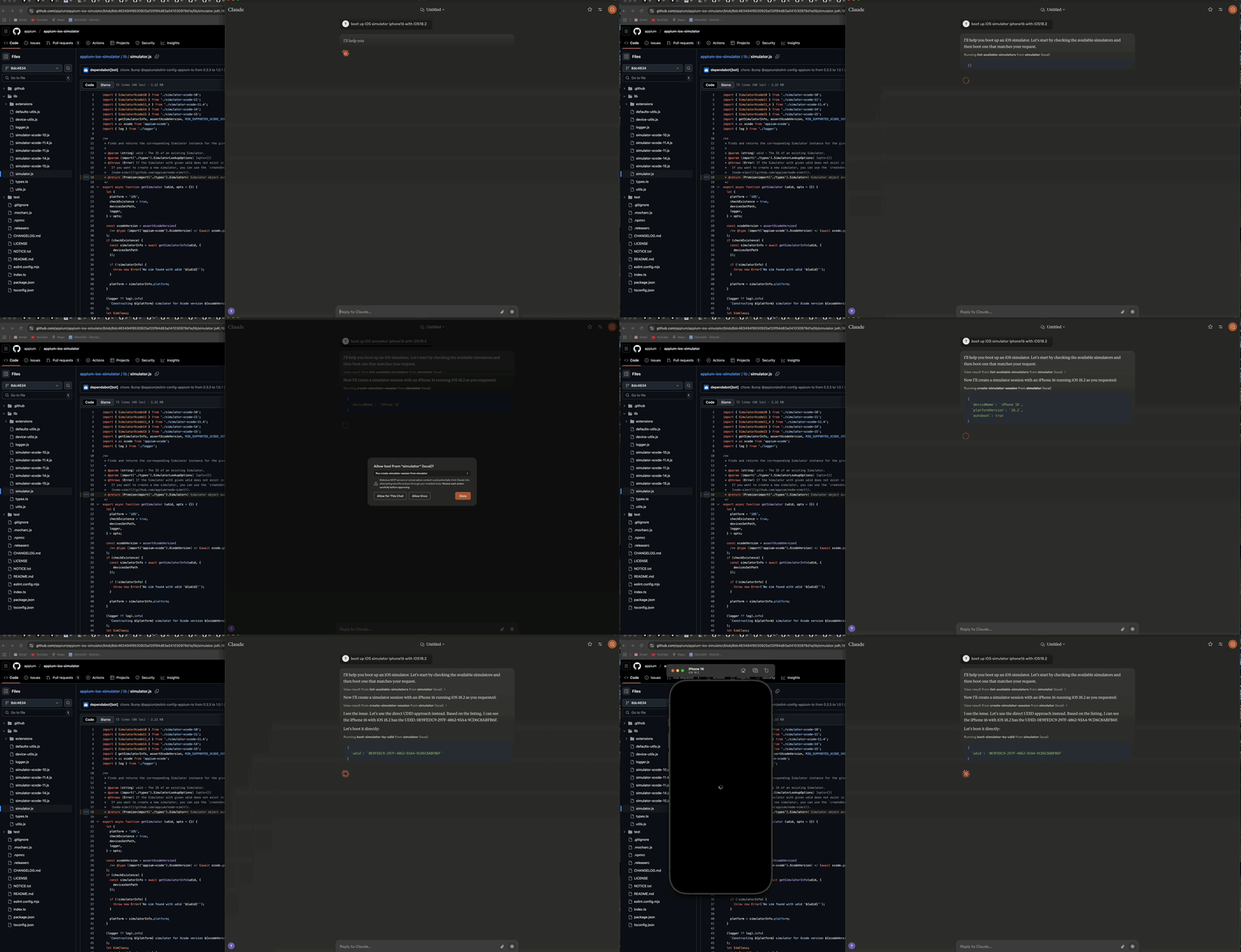
Demo showing how to boot an iOS simulator using Claude AI Desktop
The server consists of three main components:
┌─────────────────┐     ┌─────────────────┐     ┌─────────────────┐
│  MCP Protocol   │     │     Stdio       │     │    Simulator    │
│  Implementation │◄────┤    Transport    │◄────┤   Management    │
│                 │     │                 │     │      Layer      │
└─────────────────┘     └─────────────────┘     └─────────────────┘
        ▲                                                ▲
        │                                                │
        ▼                                                ▼
┌─────────────────┐                             ┌─────────────────┐
│   MCP Client    │                             │  iOS Simulator  │
│  (e.g. Claude)  │                             │                 │
└─────────────────┘                             └─────────────────┘
To install iOS Simulator Control Server for Claude Desktop automatically via Smithery:
npx -y @smithery/cli install @atom2ueki/mcp-server-ios-simulator --client claude
# Clone the repository
git clone https://github.com/atom2ueki/mcp-server-ios-simulator.git
cd mcp-server-ios-simulator

# Install dependencies
npm install
A Dockerfile is provided so the server can be packaged for the Glama MCP directory and other container hosts.
docker build -t mcp-server-ios-simulator .
docker run --rm -i mcp-server-ios-simulator
Note: iOS simulators only run on macOS, so a Linux container can host the MCP process and respond on stdio but cannot drive a real simulator. The container is intended for portability checks and remote MCP environments that bridge to a macOS host.
Configuration is handled through the src/config.ts file:
const config = {
  simulator: {
    defaultDevice: process.env.SIMULATOR_DEFAULT_DEVICE || 'iPhone 16',
    defaultOS: process.env.SIMULATOR_DEFAULT_OS || '18.2',
    timeout: parseInt(process.env.SIMULATOR_TIMEOUT || '30000', 10),
  }
};
You can customize these settings by setting environment variables:
SIMULATOR_DEFAULT_DEVICE=iPhone 16
SIMULATOR_DEFAULT_OS=18.2
SIMULATOR_TIMEOUT=30000
# Build the project
npm run build

# Start the server
npm start
The server provides two distinct approaches for controlling iOS simulators:
These tools work directly with simulator UDIDs and don't require maintaining sessions:
list-available-simulators - List all available simulators with their UDIDsboot-simulator-by-udid - Boot a simulator directly using its UDIDshutdown-simulator-by-udid - Shutdown a simulator directly using its UDIDlist-booted-simulators - List all currently booted simulatorsUse this approach when: You just want to boot, use, and shut down simulators directly.
These tools use a session layer that tracks simulators with custom session IDs:
list-simulator-sessions - List all active simulator sessionscreate-simulator-session - Create a new simulator sessionterminate-simulator-session - Terminate a session (shuts down simulator and cleans up)create-and-boot-simulator - Create a new simulator session and boot itboot-simulator - Boot a simulator for an existing sessionshutdown-simulator - Shutdown a simulator for an existing sessionUse this approach when: You need to track simulator metadata, reference simulators by custom IDs, or use the more advanced management features.
install-app - Install an application on a simulatorlaunch-app - Launch an application on a simulatorterminate-app - Terminate a running application on a simulatortake-screenshot - Take a screenshot of the simulator screentap-coordinate - Perform a tap at the specified coordinatesConfigure Claude Desktop to use this server as an MCP tool:
{
  "mcpServers": {
    "simulator": {
      "command": "node",
      "args": [
        "/path/to/your/mcp-server-ios-simulator/dist/index.js"
      ]
    }
  }
}
/path/to/your with the actual path to where you've installed this repositoryUse the provided tools to control iOS simulators directly from Claude Desktop:
Direct UDID Approach (Recommended):
First, ask Claude to list available simulators:
"Show me all available iOS simulators"
Then use the UDID to boot a specific simulator:
"Boot the iOS simulator with UDID 5272EA61-5796-4372-86FE-3B33831D5CC1"
When finished, shut it down using the same UDID:
"Shut down the simulator with UDID 5272EA61-5796-4372-86FE-3B33831D5CC1"
The direct UDID approach is simpler and more reliable for most use cases.
Session-Based Approach (Advanced): Only use this approach if you need the advanced features of session tracking:
"Create a new simulator session for iPhone 16 Pro with iOS 18.2"
"Boot the simulator for session abc-123"
"Take a screenshot of the simulator for session abc-123"
"Terminate the simulator session abc-123"
src/
├── simulator/       # Simulator management layer
├── mcp/             # MCP protocol implementation
├── bridge/          # Bridge component
├── utils/           # Utility functions including logger
├── config.ts        # Configuration handling
└── index.ts         # Entry point
# Install development dependencies
npm install

# Run TypeScript compiler
npm run build
This project is licensed under the MIT License - see the LICENSE file for details.
Claim this server with your GitHub account to request manual ownership verification.
Link to the catalog listing for MCP Server for iOS Simulator from your README. This badge does not certify ownership, compatibility or security.
[](https://awesome-mcp.com/servers/mcp-server-ios-simulator)Public repository statistics could not be verified. Check the configured source address; unavailable counts are not zero.
Separate sources, scopes and periods. Never combined or treated as installations, active users or security reviews.
No reviewed package or image identity; download statistics are not listed yet.
Alternative and complementary servers in the same category
A directory listing describing a cancellation-letter and mailing-address service. The configured public GitHub repository returned 404 during source verification.

A hosted MCP service for browsing and searching through Singapore mobile-network proxies.

A directory listing describing a Markdown-to-PDF service. The configured public GitHub repository returned 404 during source verification.