
This is a Model Context Protocol (MCP) server for interacting with AIStor object stores.
Repository stats unavailable
Databases & Storage
An MCP server that exposes Milvus vector database operations to LLM applications as tools.
Model Context Protocol server for Milvus is cataloged as an MCP server attributed to zilliztech. An MCP server that exposes Milvus vector database operations to LLM applications as tools. It is categorized under databases storage. See the capability inspector for recorded interfaces and their independent review status; consult upstream documentation for the current interface.
Installation configuration is not reviewed. No executable setup is offered for this entry; inspect the source repository before proceeding.
Catalog license label: Not specified. Check the source repository's current license and terms before using, modifying or distributing this software.
Capability definitions are not reviewed. Unreviewed imports are not exposed as trusted interfaces.
No reviewed records to display. This does not establish that upstream lacks this capability.
No reviewed records to display. This does not establish that upstream lacks this capability.
No reviewed records to display. This does not establish that upstream lacks this capability.
Email delivery is not connected. This page does not collect email addresses or create subscriptions.
Browse the registry for current listings instead.
Reviews for Model Context Protocol server for Milvus are not available yet
Review publishing and storage are not connected. This page does not collect or publish ratings or comments, including after sign-in.
The milvus_text_similarity_search tool is only supported in Milvus 2.6.0 and above, and requires an embedding function set at the Milvus server.
Connection can be set via the milvus-uri command line argument or the MILVUS_URI environment variable, with optional MILVUS_TOKEN and MILVUS_DB variables.
README.md · 6a2bff91fa62 · Fetched 2026-11-13 09:34:44 UTC
Original upstream text, without AI rewriting. Scripts, forms and unsafe links are filtered for safety.
Showing the last retrieved documentation snapshot; check the source for current changes.
The Model Context Protocol (MCP) is an open protocol that enables seamless integration between LLM applications and external data sources and tools. Whether you're building an AI-powered IDE, enhancing a chat interface, or creating custom AI workflows, MCP provides a standardized way to connect LLMs with the context they need.
This repository contains a MCP server that provides access to Milvus vector database functionality.
Before using this MCP server, ensure you have:
The recommended way to use this MCP server is to run it directly with uv without installation. This is how both Claude Desktop and Cursor are configured to use it in the examples below.
If you want to clone the repository:
git clone https://github.com/zilliztech/mcp-server-milvus.git
cd mcp-server-milvus
Then you can run the server directly:
uv run src/mcp_server_milvus/server.py --milvus-uri http://localhost:19530
Alternatively you can change the .env file in the src/mcp_server_milvus/ directory to set the environment variables and run the server with the following command:
uv run src/mcp_server_milvus/server.py
The server supports two running modes: stdio (default) and SSE (Server-Sent Events).
Description: Communicates with the client via standard input/output. This is the default mode if no mode is specified.
Usage:
uv run src/mcp_server_milvus/server.py --milvus-uri http://localhost:19530
Description: Uses HTTP Server-Sent Events for communication. This mode allows multiple clients to connect via HTTP and is suitable for web-based applications.
Usage:
uv run src/mcp_server_milvus/server.py --sse --milvus-uri http://localhost:19530 --port 8000
--sse: Enables SSE mode.--port: Specifies the port for the SSE server (default: 8000).Debugging in SSE Mode:
If you want to debug in SSE mode, after starting the SSE service, enter the following command:
mcp dev src/mcp_server_milvus/server.py
The output will be similar to:
% mcp dev src/mcp_server_milvus/merged_server.py
Starting MCP inspector...
⚙️ Proxy server listening on port 6277
🔍 MCP Inspector is up and running at http://127.0.0.1:6274 🚀
You can then access the MCP Inspector at http://127.0.0.1:6274 for testing.
Description: Uses HTTP with streaming support for communication. This is the recommended transport for production deployments and supports both stateful and stateless operation.
Usage:
uv run src/mcp_server_milvus/server.py --streamable-http --milvus-uri http://localhost:19530 --port 8000
--streamable-http: Enables Streamable HTTP mode.--port: Specifies the port for the server (default: 8000).--stateless: Optional flag for stateless mode (no session persistence).Stateless Mode:
uv run src/mcp_server_milvus/server.py --streamable-http --stateless --milvus-uri http://localhost:19530 --port 8000
This MCP server can be used with various LLM applications that support the Model Context Protocol:
Follow these steps to configure Claude Desktop for SSE mode:
~/Library/Application Support/Claude/claude_desktop_config.json{
"mcpServers": {
"milvus-sse": {
"url": "http://your_sse_host:port/sse",
"disabled": false,
"autoApprove": []
}
}
}
{
"mcpServers": {
"milvus-streamable-http": {
"url": "http://your_host:port/mcp",
"disabled": false,
"autoApprove": []
}
}
}
For stdio mode, follow these steps:
~/Library/Application Support/Claude/claude_desktop_config.json{
"mcpServers": {
"milvus": {
"command": "/PATH/TO/uv",
"args": [
"--directory",
"/path/to/mcp-server-milvus/src/mcp_server_milvus",
"run",
"server.py",
"--milvus-uri",
"http://localhost:19530"
]
}
}
}
Cursor also supports MCP tools. You can integrate your Milvus MCP server with Cursor by following these steps:
Cursor Settings > MCPAdd new global MCP servermcp.json file, which will be created if it doesn’t existmcp.json FileOverwrite the mcp.json file with the following content:
{
"mcpServers": {
"milvus": {
"command": "/PATH/TO/uv",
"args": [
"--directory",
"/path/to/mcp-server-milvus/src/mcp_server_milvus",
"run",
"server.py",
"--milvus-uri",
"http://127.0.0.1:19530"
]
}
}
}
Start the service by running the following command:
uv run src/mcp_server_milvus/server.py --sse --milvus-uri http://your_sse_host --port port
Note: Replace
http://your_sse_hostwith your actual SSE host address andportwith the specific port number you’re using.
Once the service is up and running, overwrite the mcp.json file with the following content:
{
  "mcpServers": {
    "milvus-sse": {
      "url": "http://your_sse_host:port/sse",
      "disabled": false,
      "autoApprove": []
    }
  }
}
Start the service:
uv run src/mcp_server_milvus/server.py --streamable-http --milvus-uri http://your_host --port port
Update mcp.json:
{
  "mcpServers": {
    "milvus-streamable-http": {
      "url": "http://your_host:port/mcp",
      "disabled": false,
      "autoApprove": []
    }
  }
}
After completing the above steps, restart Cursor or reload the window to ensure the configuration takes effect.
To verify that Cursor has successfully integrated with your Milvus MCP server:
Cursor Settings > MCPThe server provides the following tools:
milvus_text_search: Search for documents using full text search
collection_name: Name of collection to searchquery_text: Text to search forlimit: The maximum number of results to return (default: 5)output_fields: Fields to include in resultsdrop_ratio: Proportion of low-frequency terms to ignore (0.0-1.0) (default: 0.2)milvus_vector_search: Perform vector similarity search on a collection
collection_name: Name of collection to searchvector: Query vectorvector_field: Field name for vector search (default: "vector")limit: The maximum number of results to return (default: 5)output_fields: Fields to include in resultsfilter_expr: Filter expressionmetric_type: Distance metric (COSINE, L2, IP) (default: "COSINE")radius: Optional lower bound for range search (default: None)range_filter: Optional upper bound for range search (default: None)milvus_hybrid_search: Perform hybrid search on a collection
collection_name: Name of collection to searchquery_text: Text query for searchtext_field: Field name for text searchvector: Vector of the text queryvector_field: Field name for vector searchlimit: The maximum number of results to return (default: 5)output_fields: Fields to include in resultsfilter_expr: Filter expressionsparse_radius: Optional lower bound for sparse range search (default: None)sparse_range_filter: Optional upper bound for sparse range search (default: None)dense_radius: Optional lower bound for dense range search (default: None)dense_range_filter: Optional upper bound for dense range search (default: None)milvus_text_similarity_search: Perform text similarity search on a collection
Note: This tool is only supported in Milvus 2.6.0 and above. And you need to set the embedding function at the Milvus server. See Embedding Function for more details.
collection_name: Name of collection to searchquery_text: Text query for similarity searchanns_field: Field name for text searchlimit: The maximum number of results to return (default: 5)output_fields: Fields to include in resultsmetric_type: Distance metric (COSINE, L2, IP) (default: "COSINE")filter_expr: Optional filter expressionradius: Optional lower bound for range search (default: None)range_filter: Optional upper bound for range search (default: None)milvus_query: Query collection using filter expressions
collection_name: Name of collection to queryfilter_expr: Filter expression (e.g. 'age > 20')output_fields: Fields to include in resultslimit: The maximum number of results to return (default: 10)milvus_list_collections: List all collections in the database
milvus_create_collection: Create a new collection with quick setup or customized schema
collection_name: Name for the new collectionauto_id: whether to auto generate id, default to Truedimension: vector dimension, default to 768; for quick setup and will be ignored if field_schema is providedprimary_field_name: name of the primary field, default to "id"; for quick setup and will be ignored if field_schema is providedvector_field_name: name of the vector field, default to "vector"; for quick setup and will be ignored if field_schema is providedmetric_type: metric type, default to "COSINE"; for quick setup and will be ignored if field_schema is providedfield_schema: List of field schema, each element is a dictionary with the following keys:
name: name of the fieldtype: type of the fieldindex_params: Optional list of index parameters, each element is a dictionary with the following keys:
field_name: name of the field to indexindex_type: index type**kwargs: other optional index parametersother_kwargs: Additional keyword arguments for the collection creationmilvus_load_collection: Load a collection into memory for search and query
collection_name: Name of collection to loadreplica_number: Number of replicas (default: 1)milvus_release_collection: Release a collection from memory
collection_name: Name of collection to releasemilvus_get_collection_info: Lists detailed information like schema, properties, collection ID, and other metadata of a specific collection.
collection_name: Name of the collection to get detailed information aboutmilvus_insert_data: Insert data into a collection
collection_name: Name of collectiondata: Dictionary mapping field names to lists of valuesmilvus_delete_entities: Delete entities from a collection based on filter expression
collection_name: Name of collectionfilter_expr: Filter expression to select entities to deleteMILVUS_URI: Milvus server URI (can be set instead of --milvus-uri)MILVUS_TOKEN: Optional authentication tokenMILVUS_DB: Database name (defaults to "default")To run the server directly:
uv run server.py --milvus-uri http://localhost:19530
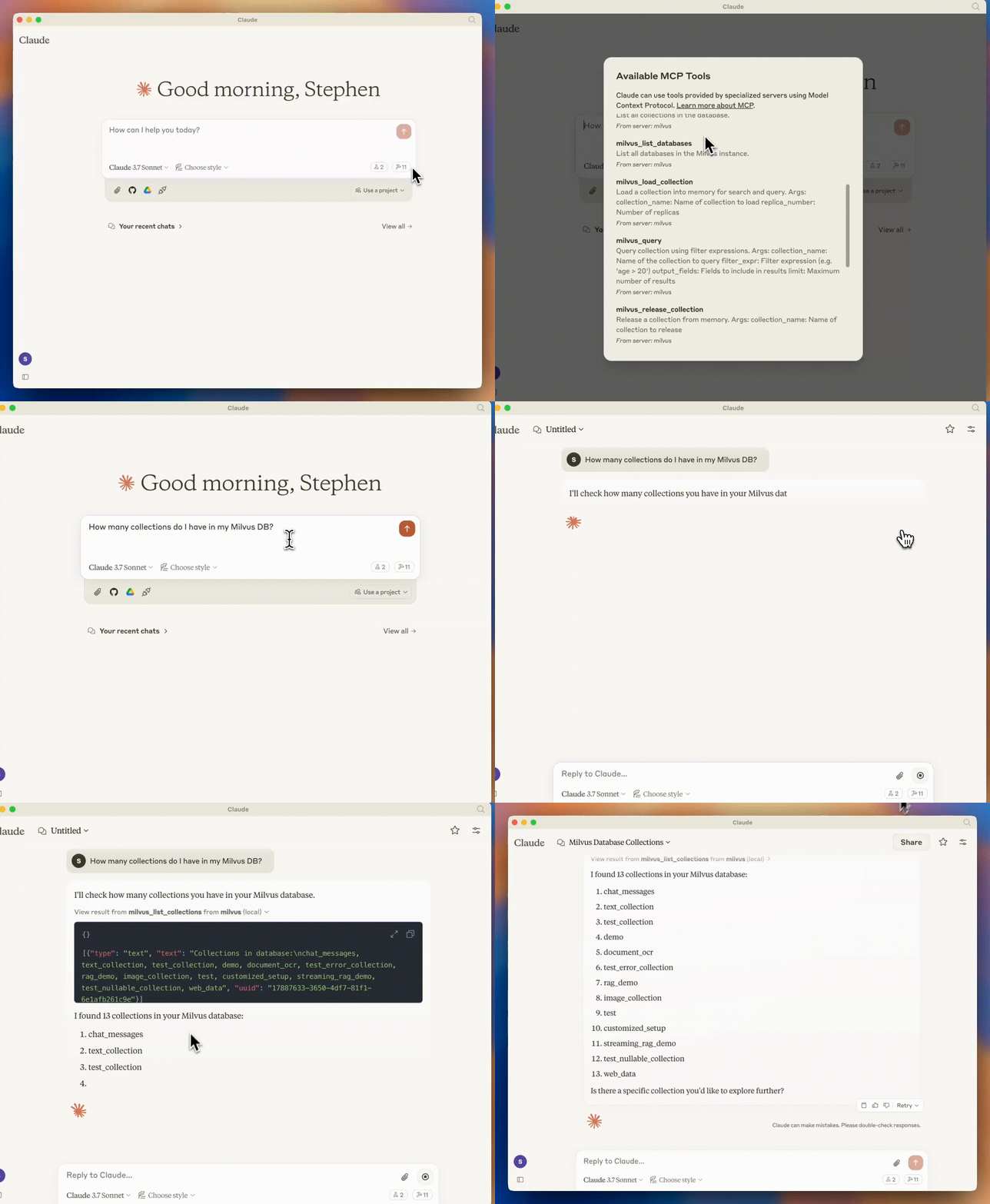
What are the collections I have in my Milvus DB?
Claude will then use MCP to check this information on your Milvus DB.
I'll check what collections are available in your Milvus database.

Here are the collections in your Milvus database:

1. rag_demo
2. test
3. chat_messages
4. text_collection
5. image_collection
6. customized_setup
7. streaming_rag_demo
Find documents in my text_collection that mention "machine learning"
Claude will use the full-text search capabilities of Milvus to find relevant documents:
I'll search for documents about machine learning in your text_collection.

> View result from milvus-text-search from milvus (local)

Here are the documents I found that mention machine learning:
[Results will appear here based on your actual data]
In Cursor, you can ask:
Create a new collection called 'articles' in Milvus with fields for title (string), content (string), and a vector field (128 dimensions)
Cursor will use the MCP server to execute this operation:
I'll create a new collection called 'articles' with the specified fields.

Collection 'articles' has been created successfully with the following schema:
- title: string
- content: string
- vector: float vector[128]
If you see errors like "Failed to connect to Milvus server":
docker ps (if using Docker)127.0.0.1 instead of localhost in the URIIf you see authentication errors:
MILVUS_TOKEN is correctIf the MCP tools don't appear in Claude Desktop or Cursor:
If you continue to experience issues:
Claim this server with your GitHub account to request manual ownership verification.
Link to the catalog listing for Model Context Protocol server for Milvus from your README. This badge does not certify ownership, compatibility or security.
[](https://awesome-mcp.com/servers/mcp-server-milvus)Public repository statistics could not be verified. Check the configured source address; unavailable counts are not zero.
Separate sources, scopes and periods. Never combined or treated as installations, active users or security reviews.
No reviewed package or image identity; download statistics are not listed yet.
Alternative and complementary servers in the same category
This is a Model Context Protocol (MCP) server for interacting with AIStor object stores.

A Model Context Protocol server that lets AI assistants run SQL queries against AWS Athena databases and retrieve results.

A Model Context Protocol (MCP) server that exposes access to an InfluxDB v2 instance using the InfluxDB OSS API v2.