
A directory listing describing a cancellation-letter and mailing-address service. The configured public GitHub repository returned 404 during source verification.
Repository stats unavailable
Developer Tools
A middleware MCP server that runs multiple isolated instances of the same MCP server type with unique namespaces and configurations.
Multiverse MCP Server is cataloged as an MCP server attributed to lamemind. A middleware MCP server that runs multiple isolated instances of the same MCP server type with unique namespaces and configurations. It is categorized under developer tools. See the capability inspector for recorded interfaces and their independent review status; consult upstream documentation for the current interface.
Installation configuration is not reviewed. No executable setup is offered for this entry; inspect the source repository before proceeding.
Catalog license label: MIT. Check the source repository's current license and terms before using, modifying or distributing this software.
Capability definitions are not reviewed. Unreviewed imports are not exposed as trusted interfaces.
No reviewed records to display. This does not establish that upstream lacks this capability.
No reviewed records to display. This does not establish that upstream lacks this capability.
No reviewed records to display. This does not establish that upstream lacks this capability.
Email delivery is not connected. This page does not collect email addresses or create subscriptions.
Browse the registry for current listings instead.
Reviews for Multiverse MCP Server are not available yet
Review publishing and storage are not connected. This page does not collect or publish ratings or comments, including after sign-in.
Yes. Setting the enabled flag to false disables a server in the JSON configuration so it won't be started.
A hidden function is not registered with the main MCP server, is unavailable to the client, and does not appear in the available function list.
README.md · 0bb3cfab4579 · Fetched 2026-11-13 09:06:36 UTC
Original upstream text, without AI rewriting. Scripts, forms and unsafe links are filtered for safety.
Showing the last retrieved documentation snapshot; check the source for current changes.
A middleware server that enables multiple isolated instances of the same MCP servers to coexist independently with unique namespaces and configurations.
The Multiverse MCP Server creates isolated operational spaces where identical MCP servers can run simultaneously without conflicts. Each "universe" maintains its own configuration, filesystem access, and function naming, enabling developers to run multiple instances of the same server type while maintaining complete separation between different contexts or projects.
Run multiple instances of the same MCP server type independently and simultaneously. Each instance operates in its own isolated universe with separate configurations. This enables scenarios like:
mcp-server-mysql pointing to different databasesmcp-server-git with different Personal Access Tokensmcp-server-filesystem accessing different root pathsRegister your MCP server with file watching capability during development. When enabled, the server automatically detects changes in the specified directory and performs a graceful restart, making development and testing seamless.
Define your multiverse setup using a simple and flexible JSON configuration format. Each server instance can be configured with its own:
A hosted deployment is available on Fronteir AI.
First, ensure you've downloaded and installed the Claude Desktop app and you have npm installed.
Next, add this entry to your claude_desktop_config.json
~/Library/Application\ Support/Claude/claude_desktop_config.jsonC:\Users\<username>\AppData\Roaming\Claude\claude_desktop_config.jsonNow add how many multiverse servers you want to run. For example, if you want to run two instances of mcp-server-multiverse, one for your job and one for your side project, you can add the following configuration:
{
  "mcpServers": {
    "job-multiverse": {
      "command": "npx",
      "args": [
        "-y",
        "@lamemind/mcp-server-multiverse@latest",
        "/path/to/your/job-multiverse.json"
      ]
    },
    "side-project-multiverse": {
      "command": "npx",
      "args": [
        "-y",
        "@lamemind/mcp-server-multiverse@latest",
        "/path/to/your/side-project-multiverse.json"
      ]
    }
  }
}
This config allows Claude Desktop to automatically start the mcp-server-multiverse instances when you start the app.
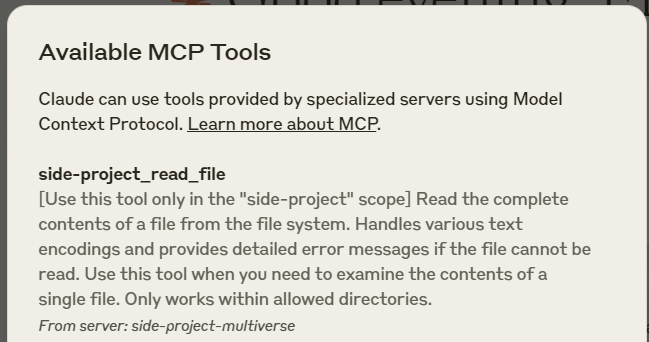
mcp-server-mysql with different databasesYour job-multiverse.json file
{
  "serverName": "JobMultiverse",
  "functionsPrefix": "job",
  "servers": [
    {
      "command": "npx",
      "args": [
        "-y",
        "@benborla29/mcp-server-mysql"
      ],
      "env": {
        "MYSQL_HOST": "127.0.0.1",
        "MYSQL_PORT": "3306",
        "MYSQL_USER": "root",
        "MYSQL_PASS": "",
        "MYSQL_DB": "my-job-db"
      }
    }
  ]
}
Your side-project-multiverse.json file
{
  "serverName": "SideProjectMultiverse",
  "functionsPrefix": "side-project",
  "servers": [
    {
      "command": "npx",
      "args": [
        "-y",
        "@benborla29/mcp-server-mysql"
      ],
      "env": {
        "MYSQL_HOST": "127.0.0.1",
        "MYSQL_PORT": "3306",
        "MYSQL_USER": "root",
        "MYSQL_PASS": "",
        "MYSQL_DB": "side-project-db"
      }
    }
  ]
}
mcp-server-filesystemmcp-server-filesystem's functions will be exposed with side-project prefix, e.g. side-project_read_file, side-project_write_file.pathResolution configuration.Note that pathResolution is optional and is only needed if you want to hide the root path from the client.
Your multiverse.json file
{
  "serverName": "MySideProject",
  "functionsPrefix": "side-project",
  "servers": [
    {
      "command": "npx",
      "args": [
        "-y",
        "@modelcontextprotocol/server-filesystem@latest",
        "/full/path/to/side-project"
      ],
      "pathResolution": {
        "root": "/full/path/to/side-project",
        "applyTo": [
          "path",
          "paths"
        ]
      }
    }
  ]
}
fileWatchYour multiverse.json file
{
  "serverName": "MySideProject",
  "functionsPrefix": "side-project",
  "servers": [
    {
      "command": "node",
      "args": [
        "/my-own/mcp-server/i-m-working-on/build/index.js"
      ],
      "fileWatch": {
        "enabled": true,
        "path": "/my-own/mcp-server/i-m-working-on/build/"
      }
    }
  ]
}
hideFunctions optionYou can selectively hide specific functions from wrapped servers using the hideFunctions array. This is useful when you want to use a server but restrict access to certain potentially dangerous or unnecessary functions.
The hideFunctions array accepts a list of function names that should be hidden from the wrapped server. When a function is hidden:
This feature is particularly useful for:
delete_repository in GitHub){
"serverName": "GitHubWithRestrictions",
"functionsPrefix": "github",
"servers": [
{
"command": "npx",
"args": [
"-y",
"@modelcontextprotocol/server-github@latest"
],
"env": {
"GITHUB_PERSONAL_ACCESS_TOKEN": "<your-personal-access-token>"
},
"hideFunctions": [
"create_repository",
"delete_repository",
"create_issue"
]
}
]
}
In this example, the GitHub server will start normally, but the functions create_repository, delete_repository, and create_issue will be hidden and unavailable to the client.
enabled flagYou can selectively disable specific servers in your configuration without removing them from the JSON file by setting the enabled flag to false. This is useful for temporarily disabling servers during development or testing.
{
  "serverName": "MySideProject",
  "functionsPrefix": "side-project",
  "servers": [
    {
      "command": "npx",
      "args": [
        "-y",
        "@modelcontextprotocol/server-filesystem@latest",
        "/full/path/to/side-project"
      ],
      "hideFunctions": [ "write_file" ]
    },
    {
      "enabled": false,
      "command": "npx",
      "args": [
        "-y",
        "@modelcontextprotocol/server-github@latest"
      ]
    }
  ]
}
In this example, the first server (filesystem) will start but the function write_file has been hidden, the second server (GitHub) is disabled and won't be started.
multiverse.json fileThis example demonstrates how to create a multiverse server with multiple instances of different server types.
Note that pathResolution is optional and is only needed if you want to hide the root path from the client.
{
  "serverName": "HugeProjectWithALotOfResources",
  "functionsPrefix": "huge-project",
  "servers": [
    {
      "command": "node",
      "args": [
        "/my-own/mcp-server/i-m-working-on/build/index.js"
      ],
      "fileWatch": {
        "enabled": true,
        "path": "/my-own/mcp-server/i-m-working-on/build/"
      }
    },
    {
      "command": "npx",
      "args": [
        "-y",
        "@modelcontextprotocol/server-filesystem@latest",
        "/full/path/to/huge-project"
      ],
      "pathResolution": {
        "root": "/full/path/to/huge-project",
        "applyTo": [
          "path",
          "paths"
        ]
      }
    },
    {
      "command": "npx",
      "args": [
        "-y",
        "@modelcontextprotocol/server-github@latest"
      ],
      "env": {
        "GITHUB_PERSONAL_ACCESS_TOKEN": "<your-personal-access-token>"
      }
    },
    {
      "command": "uvx",
      "args": [
        "mcp-server-git",
        "--repository",
        "/full/path/to/huge-project"
      ],
      "pathResolution": {
        "root": "/full/path/to/huge-project",
        "applyTo": [
          "repo_path"
        ]
      }
    }
  ]
}
PromptsResourcesMIT
Claim this server with your GitHub account to request manual ownership verification.
Link to the catalog listing for Multiverse MCP Server from your README. This badge does not certify ownership, compatibility or security.
[](https://awesome-mcp.com/servers/mcp-server-multiverse)Public repository statistics could not be verified. Check the configured source address; unavailable counts are not zero.
Separate sources, scopes and periods. Never combined or treated as installations, active users or security reviews.
No reviewed package or image identity; download statistics are not listed yet.
Alternative and complementary servers in the same category
A directory listing describing a cancellation-letter and mailing-address service. The configured public GitHub repository returned 404 during source verification.

A hosted MCP service for browsing and searching through Singapore mobile-network proxies.

A directory listing describing a Markdown-to-PDF service. The configured public GitHub repository returned 404 during source verification.