

A directory listing describing a cancellation-letter and mailing-address service. The configured public GitHub repository returned 404 during source verification.
Repository stats unavailable
Developer Tools
A Model Context Protocol server for Polarion ALM that lets AI assistants read, write, and reorganize documents, work items, test runs, and traceability links with safe writes.
mcp-server-polarion is cataloged as an MCP server attributed to devemberx. A Model Context Protocol server for Polarion ALM that lets AI assistants read, write, and reorganize documents, work items, test runs, and traceability links with safe writes. It is categorized under developer tools. See the capability inspector for recorded interfaces and their independent review status; consult upstream documentation for the current interface.
Installation configuration is not reviewed. No executable setup is offered for this entry; inspect the source repository before proceeding.
Catalog license label: MIT. Check the source repository's current license and terms before using, modifying or distributing this software.
Capability definitions are not reviewed. Unreviewed imports are not exposed as trusted interfaces.
No reviewed records to display. This does not establish that upstream lacks this capability.
No reviewed records to display. This does not establish that upstream lacks this capability.
No reviewed records to display. This does not establish that upstream lacks this capability.
Email delivery is not connected. This page does not collect email addresses or create subscriptions.
Browse the registry for current listings instead.
Reviews for mcp-server-polarion are not available yet
Review publishing and storage are not connected. This page does not collect or publish ratings or comments, including after sign-in.
README.md · e4ad56b9f777 · Fetched 2026-11-13 12:04:21 UTC
Original upstream text, without AI rewriting. Scripts, forms and unsafe links are filtered for safety.
Showing the last retrieved documentation snapshot; check the source for current changes.

Talk to your Polarion — AI reads, writes, and reorganizes documents, work items, test runs, and traceability links.
Features · Quickstart · Tools · Example Prompts · Setup


A Model Context Protocol (MCP) server for Polarion ALM, built for real-world instances: every write supports dry_run, guards validate fields and enum values before anything is committed, and requests are paced to a rate cap you configure for your instance — so an AI assistant can work on production data without surprises.
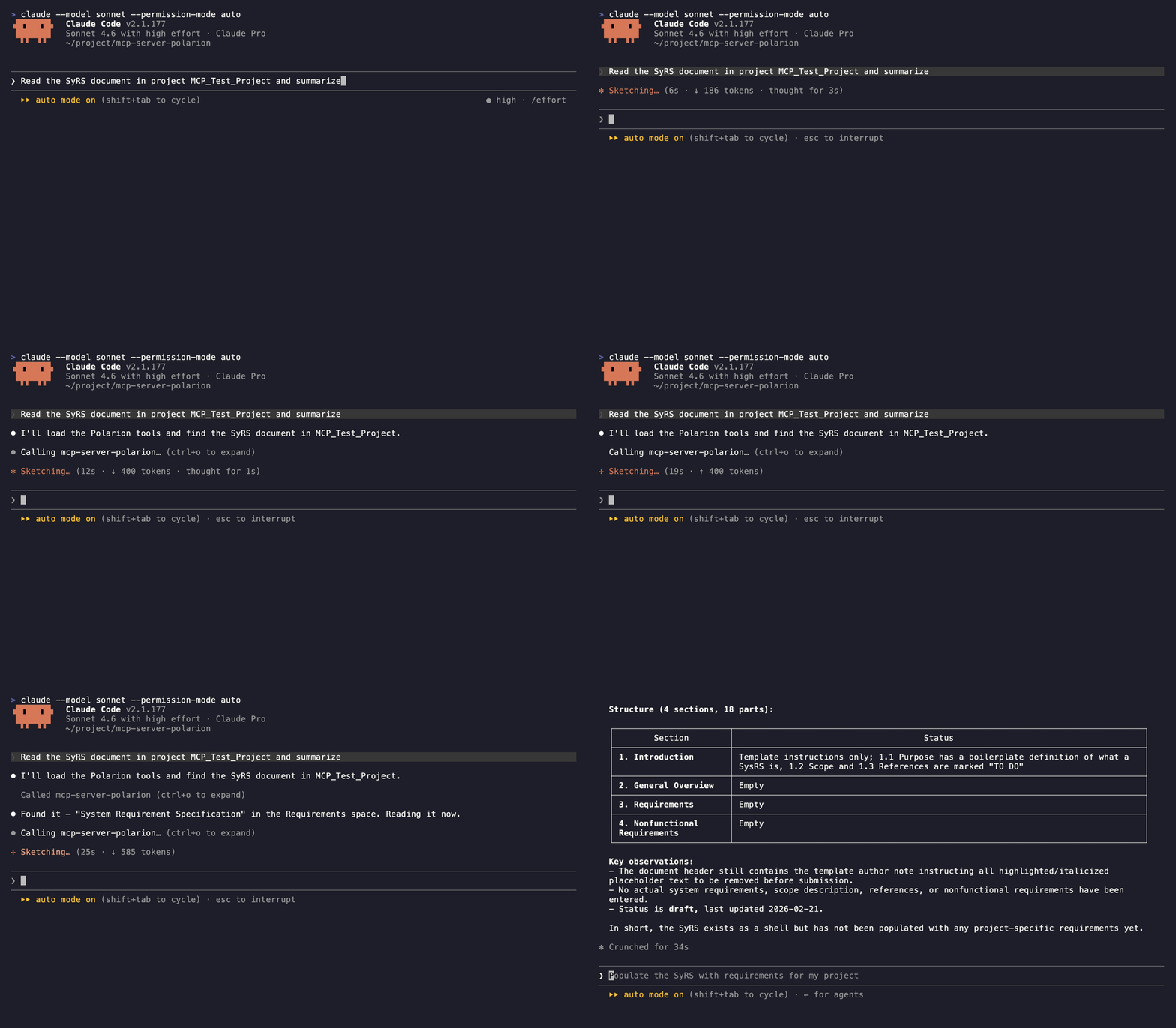
dry_run, and pre-write guards validate fields, enum values, and link targets before hitting Polarion.Requires Polarion 2506+ and uv — see Prerequisites. Fastest path — Claude Code:
claude mcp add mcp-server-polarion \
  -e POLARION_URL=https://polarion.example.com \
  -e POLARION_TOKEN=your-personal-access-token \
  -- uvx mcp-server-polarion
Other clients (VS Code, Claude Desktop, Cursor) — see Client Configuration.
| Tool | Description |
|---|---|
list_projects | List accessible projects |
list_documents | List documents in a project |
list_work_items | List work items in a project (Lucene/SQL query) |
list_test_runs | List test runs in a project (Lucene query, templates filter) |
get_test_run | Get test run details, optionally with the raw HTML report body |
list_test_records | List a test run's execution records, one per test case iteration |
get_test_record | Get one test record's execution comment and test-case revision |
get_sql_query_recipes | Fetch copy-paste SQL recipes for advanced queries |
get_html_recipes | Fetch copy-paste Polarion HTML templates for raw-HTML body edits |
get_document | Get document metadata, optionally with the raw body HTML |
read_document | Render a document end-to-end as Markdown |
read_document_parts | List a document's structural parts with embedded work item metadata |
get_work_item | Get work item details with the body as raw HTML |
read_work_item | Get work item details with the body as Markdown |
list_work_item_links | List a work item's outgoing or incoming links |
list_document_attachments | List a document's attachments with file name, size, and author |
get_document_attachment_content | Fetch an image attachment for viewing (bitmap as image, SVG as text) |
list_work_item_attachments | List a work item's attachments with file name, size, and author |
get_work_item_attachment_content | Fetch a work item image attachment for viewing (bitmap as image, SVG as text) |
list_test_record_attachments | List a test record's attachments with file name, size, and author |
get_test_record_attachment_content | Fetch a test record image attachment for viewing (bitmap as image, SVG as text) |
list_document_comments | List a document's comments with thread relationships |
list_work_item_comments | List a work item's comments with thread relationships |
list_document_enum_options | Resolve valid enum ids for a document field |
list_work_item_enum_options | Resolve valid enum ids for a work item field |
All list tools support pagination via page_size (1–100) and page_number parameters.
| Tool | Description |
|---|---|
create_work_items | Create one or more work items in a single request |
update_work_items | Update fields, body, or workflow status on one or more work items |
create_document | Create a new document |
update_document | Update document metadata, body, or workflow status |
copy_document | Copy a document to a new name, space, or project |
create_test_runs | Create one or more test runs, optionally from a template |
create_test_records | Record test-case execution results on a test run |
update_test_runs | Update title, status, group, or custom fields on one or more test runs |
update_test_records | Update result, comment, or defect link on one or more test records of a test run |
create_work_item_links | Create one or more outgoing links from a source work item |
update_work_item_link | Update suspect / revision on one outgoing link |
delete_work_item_links | Delete one or more outgoing links from a source work item |
move_work_item_to_document | Attach a work item to a document at a chosen position |
move_work_item_from_document | Detach a work item from its document |
create_document_attachments | Upload one or more local files as document attachments |
create_work_item_attachments | Upload one or more local files as work item attachments |
create_test_record_attachments | Upload one or more local files as test record attachments |
create_document_comments | Add one or more comments or replies to a document |
create_work_item_comments | Add one or more comments or replies to a work item |
update_document_comment | Resolve or re-open a document comment |
update_work_item_comment | Resolve or re-open a work item comment |
"List the projects I can access, then show the documents in project MCPT with their types."
"List the documents in space 'Specifications' of project MCPT."
"Find every approved requirement in project MCPT whose title starts with 'Auth' and show me their owning document."
"Search project MCPT for work items where the custom field 'verification_method' is 'Test' — grab the SQL recipes first if you need a join."
"Find all work items in the SRS module of project MCPT that were changed in the last sprint."
"Read the SRS document of project MCPT and summarize each open requirement."
"Show me the structural outline of the SRS document — headings and the work items under each."
"Read work item MCPT-042 as Markdown and explain what it asks for."
"Show the outgoing and incoming links for MCPT-042 and flag any child task that is still open."
"Which requirements in the SRS document have no 'verifies' back link from a test case?"
"List the open comment threads on the SRS document and who started each."
"Create a task in project MCPT titled 'Refactor authentication module' and link it to MCPT-042 as 'relates_to'."
"Create three test-case work items in project MCPT from this checklist and link each one to MCPT-042 as 'verifies'."
"Add a new requirement under section 3.2 of the SRS document with the body I just drafted."
"Update the description of MCPT-042 with the revised text I'll paste, keeping the existing formatting."
"Add a comment on the SRS document asking the owner to clarify section 4, then reply to thread T-12 marking it resolved."
"Create a test run REG-SPRINT-7 in project MCPT from the 'Regression' template with status 'open'."
"List the valid status values for a defect in project MCPT, then move MCPT-077 to 'in_review'."
"Bump MCPT-042's priority to 90, set severity to 'major', and approve the workflow."
"Change MCPT-201 from a task to a requirement and re-apply its previous status."
"Move MCPT-201 into the SRS document right after MCPT-150."
"Detach MCPT-077 from its document so I can rework it as a standalone task."
"Mark the 'blocks' link from MCPT-042 to MCPT-099 as suspect, then delete the stale 'relates_to' link to MCPT-010."
Polarion 2506 or higher is required. Earlier versions lack REST API endpoints this server depends on.
This server is distributed as a Python package and requires uv to run.
Install uv (if not already installed):
# macOS / Linux
curl -LsSf https://astral.sh/uv/install.sh | sh

# Windows
powershell -ExecutionPolicy ByPass -c "irm https://astral.sh/uv/install.ps1 | iex"
Or via pip:
pip install uv
No other installation is needed — uvx mcp-server-polarion downloads and runs the server automatically.
| Variable | Description | Example |
|---|---|---|
POLARION_URL | Base URL of your Polarion instance | https://polarion.example.com |
POLARION_TOKEN | Personal Access Token for authentication | your-personal-access-token |
POLARION_MAX_REQUESTS_PER_SECOND | Optional. Client-side request rate cap — raise it to match your deployment's throttle, or set 0 to disable pacing. Writes keep a fixed extra pause regardless (default: 1) | 1 |
To generate a Personal Access Token, open Polarion, click your user name, and go to My Account → Personal Access Tokens.
Add to .vscode/mcp.json:
{
  "servers": {
    "mcp-server-polarion": {
      "type": "stdio",
      "command": "uvx",
      "args": ["mcp-server-polarion"],
      "env": {
        "POLARION_URL": "https://polarion.example.com",
        "POLARION_TOKEN": "your-personal-access-token"
      }
    }
  }
}
Add to claude_desktop_config.json:
{
  "mcpServers": {
    "mcp-server-polarion": {
      "command": "uvx",
      "args": ["mcp-server-polarion"],
      "env": {
        "POLARION_URL": "https://polarion.example.com",
        "POLARION_TOKEN": "your-personal-access-token"
      }
    }
  }
}
Add to Cursor MCP settings:
{
  "mcpServers": {
    "mcp-server-polarion": {
      "command": "uvx",
      "args": ["mcp-server-polarion"],
      "env": {
        "POLARION_URL": "https://polarion.example.com",
        "POLARION_TOKEN": "your-personal-access-token"
      }
    }
  }
}
Register via the claude mcp add command:
claude mcp add mcp-server-polarion \
  -e POLARION_URL=https://polarion.example.com \
  -e POLARION_TOKEN=your-personal-access-token \
  -- uvx mcp-server-polarion
Bug reports and pull requests are welcome — see CONTRIBUTING.md for branch, commit, and review conventions.
Claim this server with your GitHub account to request manual ownership verification.
Link to the catalog listing for mcp-server-polarion from your README. This badge does not certify ownership, compatibility or security.
[](https://awesome-mcp.com/servers/mcp-server-polarion)Public repository statistics could not be verified. Check the configured source address; unavailable counts are not zero.
Separate sources, scopes and periods. Never combined or treated as installations, active users or security reviews.
No reviewed package or image identity; download statistics are not listed yet.
Alternative and complementary servers in the same category
A directory listing describing a cancellation-letter and mailing-address service. The configured public GitHub repository returned 404 during source verification.

A hosted MCP service for browsing and searching through Singapore mobile-network proxies.

A directory listing describing a Markdown-to-PDF service. The configured public GitHub repository returned 404 during source verification.