mcp-server-webcrawl

mcp-server-webcrawl

mcp-server-webcrawl•bypragmar

mcp-server-webcrawl is an MCP server for advanced search and retrieval of web crawler data, allowing an AI client to filter and analyze web content.

License: Not specified•Runtime: Awaiting documentation review•Category: search web

WHAT IT DOES

  • •Provides a fulltext search interface with boolean support and resource filtering by type, HTTP status, and more.
  • •Supports field-specific searches over id, url, type, size, status, headers, and content.
  • •Works with crawler and archive formats including ArchiveBox, HTTrack, InterroBot, Katana, SiteOne, WARC, and wget.
  • •Provides an extras parameter for additional processing options such as Markdown, snippets, regex, XPath, or thumbnails.

BEST FOR

  • •Technical SEO analysis of crawled websites.
  • •Broken link detection and pattern analysis, with suggested fixes.
  • •Website speed and optimization analysis.

ABOUT MCP-SERVER-WEBCRAWL

mcp-server-webcrawl is cataloged as an MCP server attributed to pragmar. mcp-server-webcrawl is an MCP server for advanced search and retrieval of web crawler data, allowing an AI client to filter and analyze web content. It is categorized under search web. See the capability inspector for recorded interfaces and their independent review status; consult upstream documentation for the current interface.

HOW TO INSTALL

Installation configuration is not reviewed. No executable setup is offered for this entry; inspect the source repository before proceeding.

LICENSE

Catalog license label: Not specified. Check the source repository's current license and terms before using, modifying or distributing this software.

Capability inspector

Capability definitions are not reviewed. Unreviewed imports are not exposed as trusted interfaces.

Tools (0)

No reviewed records to display. This does not establish that upstream lacks this capability.

Resources (0)

No reviewed records to display. This does not establish that upstream lacks this capability.

Prompts (0)

No reviewed records to display. This does not establish that upstream lacks this capability.

NEWSLETTER - COMING LATER

Newsletter subscriptions are not open yet

Email delivery is not connected. This page does not collect email addresses or create subscriptions.

Browse the registry for current listings instead.

Community Reviews

Coming later

Reviews for mcp-server-webcrawl are not available yet

Review publishing and storage are not connected. This page does not collect or publish ratings or comments, including after sign-in.

FREQUENTLY ASKED QUESTIONS

Can mcp-server-webcrawl be used without AI?

It can double as a terminal search for web archives, providing classic Boolean search without AI.

What is the extras parameter used for?

It provides additional processing options, transforming HTTP data into markdown, snippets, regex, or XPath, or connecting the LLM to external data such as thumbnails.

Upstream README

View this exact version on GitHub

README.md · 714bbac84512 · Fetched 2026-11-13 07:06:56 UTC

Original upstream text, without AI rewriting. Scripts, forms and unsafe links are filtered for safety.

Showing the last retrieved documentation snapshot; check the source for current changes.

MCP Server Webcrawl

Website | GitHub | Docs | PyPi

mcp-server-webcrawl

Advanced search and retrieval for web crawler data. With mcp-server-webcrawl, your AI client filters and analyzes web content under your direction or autonomously. The server includes a fulltext search interface with boolean support, and resource filtering by type, HTTP status, and more.

mcp-server-webcrawl provides the LLM a complete menu with which to search, and works with a variety of web crawlers:

Crawler/FormatDescriptionPlatformsSetup Guide
ArchiveBoxWeb archiving toolmacOS/LinuxSetup Guide
HTTrackGUI mirroring toolmacOS/Windows/LinuxSetup Guide
InterroBotGUI crawler and analyzermacOS/Windows/LinuxSetup Guide
KatanaCLI security-focused crawlermacOS/Windows/LinuxSetup Guide
SiteOneGUI crawler and analyzermacOS/Windows/LinuxSetup Guide
WARCStandard web archive formatvaries by clientSetup Guide
wgetCLI website mirroring toolmacOS/LinuxSetup Guide

mcp-server-webcrawl is free and open source, and requires Claude Desktop and Python (>=3.10). It is installed on the command line, via pip install:

pip install mcp-server-webcrawl

For step-by-step MCP server setup, refer to the Setup Guides.

Features

  • Claude Desktop ready
  • Multi-crawler compatible
  • Filter by type, status, and more
  • Boolean search support
  • Support for Markdown and snippets
  • Roll your own website knowledgebase

Prompt Routines

mcp-server-webcrawl provides the toolkit necessary to search web crawl data freestyle, figuring it out as you go, reacting to each query. This is what it was designed for.

It is also capable of running routines (as prompts). You can write these yourself, or use the ones provided. These prompts are copy and paste, and used as raw Markdown. They are enabled by the advanced search provided to the LLM; queries and logic can be embedded in a procedural set of instructions, or even an input loop as is the case with Gopher Service.

PromptDownloadCategoryDescription
🔍 SEO Auditauditseo.mdauditTechnical SEO (search engine optimization) analysis. Covers the basics, with options to dive deeper.
🔗 404 Auditaudit404.mdauditBroken link detection and pattern analysis. Not only finds issues, but suggests fixes.
⚡ Performance Auditauditperf.mdauditWebsite speed and optimization analysis. Real talk.
📁 File Auditauditfiles.mdauditFile organization and asset analysis. Discover the composition of your website.
🌐 Gopher Interfacegopher.mdinterfaceAn old-fashioned search interface inspired by the Gopher clients of yesteryear.
⚙️ Search Testtestsearch.mdself-testA battery of tests to check for Boolean logical inconsistencies in the search query parser and subsequent FTS5 conversion.

If you want to shortcut the site selection (one less query), paste the markdown and in the same request, type "run pasted for [site name or URL]." It will figure it out. When pasted without additional context, you should be prompted to select from a list of crawled sites.

Boolean Search Syntax

The query engine supports field-specific (field: value) searches and complex boolean expressions. Fulltext is supported as a combination of the url, content, and headers fields.

While the API interface is designed to be consumed by the LLM directly, it can be helpful to familiarize yourself with the search syntax. Searches generated by the LLM are inspectable, but generally collapsed in the UI. If you need to see the query, expand the MCP collapsible.

Example Queries

Query ExampleDescription
privacyfulltext single keyword match
"privacy policy"fulltext match exact phrase
boundar*fulltext wildcard matches results starting with boundar (boundary, boundaries)
id: 12345id field matches a specific resource by ID
url: example.com/somedirurl field matches results with URL containing example.com/somedir
type: htmltype field matches for HTML pages only
status: 200status field matches specific HTTP status codes (equal to 200)
status: >=400status field matches specific HTTP status code (greater than or equal to 400)
content: h1content field matches content (HTTP response body, often, but not always HTML)
headers: text/xmlheaders field matches HTTP response headers
privacy AND policyfulltext matches both
privacy OR policyfulltext matches either
policy NOT privacyfulltext matches policies not containing privacy
(login OR signin) AND formfulltext matches fulltext login or signin with form
type: html AND status: 200fulltext matches only HTML pages with HTTP success

Field Search Definitions

Field search provides search precision, allowing you to specify which columns of the search index to filter. Rather than searching the entire content, you can restrict your query to specific attributes like URLs, headers, or content body. This approach improves efficiency when looking for specific attributes or patterns within crawl data.

FieldDescription
iddatabase ID
urlresource URL
typeenumerated list of types (see types table)
sizefile size in bytes
statusHTTP response codes
headersHTTP response headers
contentHTTP body—HTML, CSS, JS, and more

Field Content

A subset of fields can be independently requested with results, while core fields are always on. Use of headers and content can consume tokens quickly. Use judiciously, or use extras to crunch more results into the context window. Fields are a top level argument, independent of any field searching taking place in the query.

FieldDescription
idalways available
urlalways available
typealways available
statusalways available
createdon request
modifiedon request
sizeon request
headerson request
contenton request

Content Types

Crawls contain resource types beyond HTML pages. The type: field search allows filtering by broad content type groups, particularly useful when filtering images without complex extension queries. For example, you might search for type: html NOT content: login to find pages without "login," or type: img to analyze image resources. The table below lists all supported content types in the search system.

TypeDescription
htmlwebpages
iframeiframes
imgweb images
audioweb audio files
videoweb video files
fontweb font files
styleCSS stylesheets
scriptJavaScript files
rssRSS syndication feeds
textplain text content
pdfPDF files
docMS Word documents
otheruncategorized

Extras

The extras parameter provides additional processing options, transforming HTTP data (markdown, snippets, regex, xpath), or connecting the LLM to external data (thumbnails). These options can be combined as needed to achieve the desired result format.

ExtraDescription
thumbnailsGenerates base64 encoded images to be viewed and analyzed by AI models. Enables image description, content analysis, and visual understanding while keeping token output minimal. Works with images, which can be filtered using type: img in queries. SVG is not supported.
markdownProvides the HTML content field as concise Markdown, reducing token usage and improving readability for LLMs. Works with HTML, which can be filtered using type: html in queries.
regexExtracts regular expression matches from crawled files such as HTML, CSS, JavaScript, etc. Not as precise a tool as XPath for HTML, but supports any text file as a data source. One or more regex patterns can be requested, using the extrasRegex argument.
snippetsMatches fulltext queries to contextual keyword usage within the content. When used without requesting the content field (or markdown extra), it can provide an efficient means of refining a search without pulling down the complete page contents. Also great for rendering old school hit-highlighted results as a list, like Google search in 1999. Works with HTML, CSS, JS, or any text-based, crawled file.
xpathExtracts XPath selector data, used in scraping HTML content. Use XPath's text() selector for text-only, element selectors return outerHTML. Only supported with type: html, other types will be ignored. One or more XPath selectors (//h1, count(//h1), etc.) can be requested, using the extrasXpath argument.

Extras provide a means of producing token-efficient HTTP content responses. Markdown produces roughly 1/3 the bytes of the source HTML, snippets are generally 500 or so bytes per result, and XPath can be as specific or broad as you choose. The more focused your requests, the more results you can fit into your LLM session.

The idea, of course, is that the LLM takes care of this for you. If you notice your LLM developing an affinity to the "content" field (full HTML), a nudge in chat to budget tokens using the extras feature should be all that is needed.

Interactive Mode

No AI, just classic Boolean search of your web-archives in a terminal.

mcp-server-webcrawl can double as a terminal search for your web archives. You can run it against your local archives, but it gets more interesting when you realize you can ssh into any remote host and view archives sitting on that host. No downloads, syncs, multifactor logins, or other common drudgery required. With interactive mode, you can be in and searching a crawl sitting on a remote server in no time at all.

Launch with --crawler and --datasrc to search immediately, or setup datasrc and crawler in-app.

mcp-server-webcrawl --crawler wget --datasrc /path/to/datasrc --interactive
# or manually enter crawler and datasrc in the UI
mcp-server-webcrawl --interactive

Interactive mode is a way to search through tranches of crawled data, whenever, whereever... in a terminal.
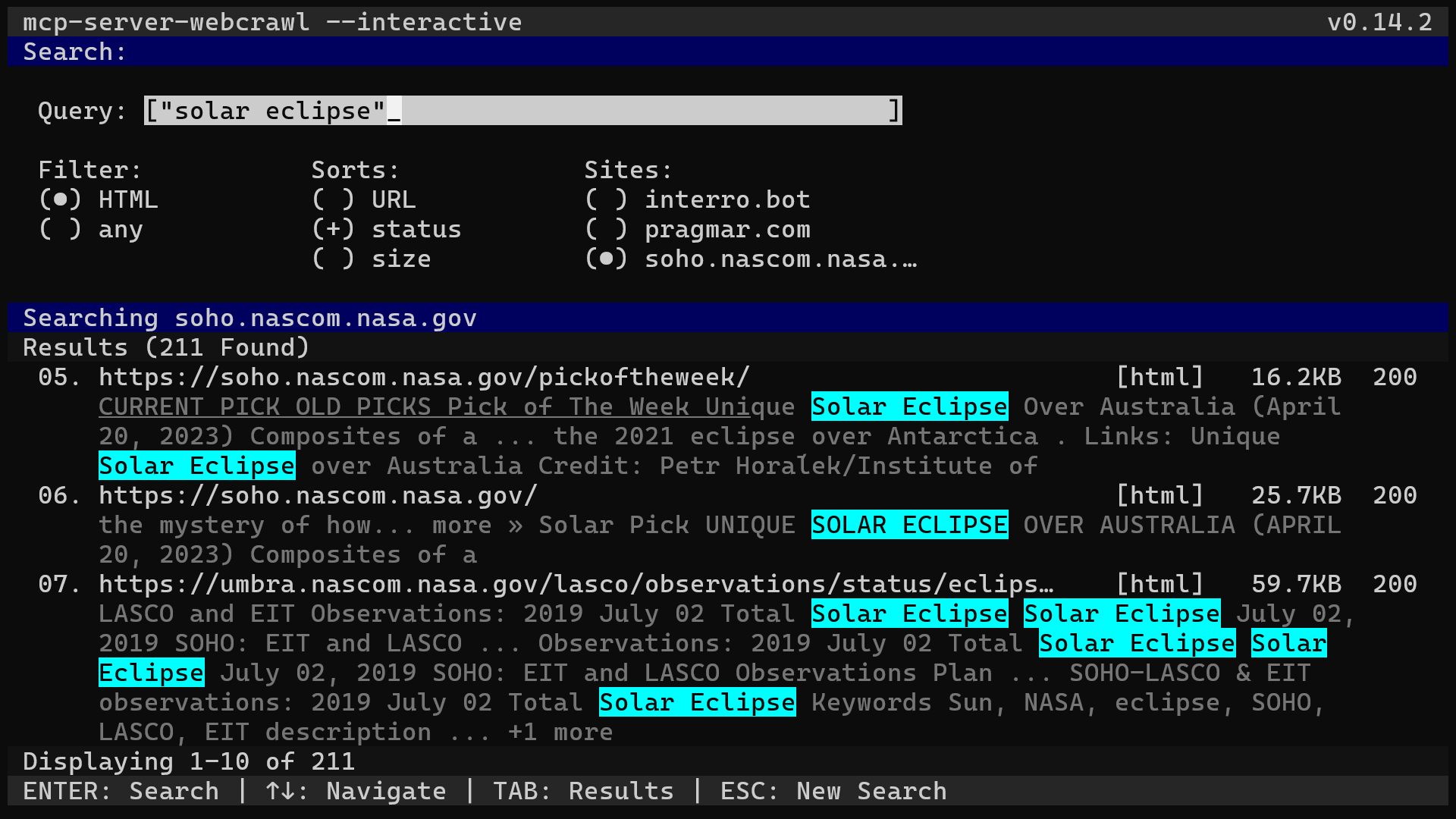
Interactive search interface

Install configuration

Are you the maintainer?

Claim this server with your GitHub account to request manual ownership verification.

README Embed Badge
Markdown

Link to the catalog listing for mcp-server-webcrawl from your README. This badge does not certify ownership, compatibility or security.

[![MCP catalog listing](https://img.shields.io/badge/MCP-awesome--mcp-orange?style=flat-square)](https://awesome-mcp.com/servers/mcp-server-webcrawl)

REPOSITORY STATS

GitHub StarsUnavailable
ForksUnavailable

Public repository statistics could not be verified. Check the configured source address; unavailable counts are not zero.

Downloads and pulls

Separate sources, scopes and periods. Never combined or treated as installations, active users or security reviews.

No reviewed package or image identity; download statistics are not listed yet.

Related search web MCP Servers

Alternative and complementary servers in the same category

View all in search web →

An MCP server that merges Google Search Console history with a live first-party crawl of your site to produce a prioritised, evidence-backed technical SEO audit inside Claude, complete with paste-ready fixes.

Repository stats unavailable
Search & Web Research

An MCP server that offers intelligent web search using OpenAI reasoning models, with support for fast iterations and deep research.

94
Search & Web Research

