Perplexity Ask MCP Server

Perplexity Ask MCP Server

mcp-servers-rascal-3•byrascal-3

An MCP server that integrates the Sonar API so Claude can perform real-time, web-wide research through a conversational tool.

License: MIT License•Runtime: Awaiting documentation review•Category: search web

WHAT IT DOES

  • •Exposes a perplexity_ask tool that engages the Sonar API for live web searches using an array of conversation messages with role and content fields.
  • •Requires a Sonar API key set as an environment variable to operate.
  • •Uses default search parameters that can be modified in the index.ts script.

BEST FOR

  • •Enabling Claude to ask Perplexity live web search questions during conversations.
  • •Research tasks requiring real-time, web-wide information retrieval.

ABOUT MCP-SERVERS-RASCAL-3

Perplexity Ask MCP Server is cataloged as an MCP server attributed to rascal-3. An MCP server that integrates the Sonar API so Claude can perform real-time, web-wide research through a conversational tool. It is categorized under search web. See the capability inspector for recorded interfaces and their independent review status; consult upstream documentation for the current interface.

HOW TO INSTALL

Installation configuration is not reviewed. No executable setup is offered for this entry; inspect the source repository before proceeding.

LICENSE

Catalog license label: MIT License. Check the source repository's current license and terms before using, modifying or distributing this software.

Capability inspector

Capability definitions are not reviewed. Unreviewed imports are not exposed as trusted interfaces.

Tools (0)

No reviewed records to display. This does not establish that upstream lacks this capability.

Resources (0)

No reviewed records to display. This does not establish that upstream lacks this capability.

Prompts (0)

No reviewed records to display. This does not establish that upstream lacks this capability.

NEWSLETTER - COMING LATER

Newsletter subscriptions are not open yet

Email delivery is not connected. This page does not collect email addresses or create subscriptions.

Browse the registry for current listings instead.

Community Reviews

Coming later

Reviews for Perplexity Ask MCP Server are not available yet

Review publishing and storage are not connected. This page does not collect or publish ratings or comments, including after sign-in.

FREQUENTLY ASKED QUESTIONS

What tool does the Perplexity Ask server expose?

It exposes the perplexity_ask tool, which engages in conversation with the Sonar API for live web searches.

How is the Sonar API key provided?

The API key is set in the environment as PERPLEXITY_API_KEY.

Upstream README

View this exact version on GitHub

README.md · 014bfe715f10 · Fetched 2026-11-13 12:36:06 UTC

Original upstream text, without AI rewriting. Scripts, forms and unsafe links are filtered for safety.

Showing the last retrieved documentation snapshot; check the source for current changes.

MCP-servers

This is "a" version focued on enabling to web browsing from Claude app of model context procol projects. It's derived from Model Context Protocol and Anthropic's original MCP project. You can see the instructions and their LICENSEs on those READMEs to use this app.

Perplexity Ask MCP Server

An MCP server implementation that integrates the Sonar API to provide Claude with unparalleled real-time, web-wide research.
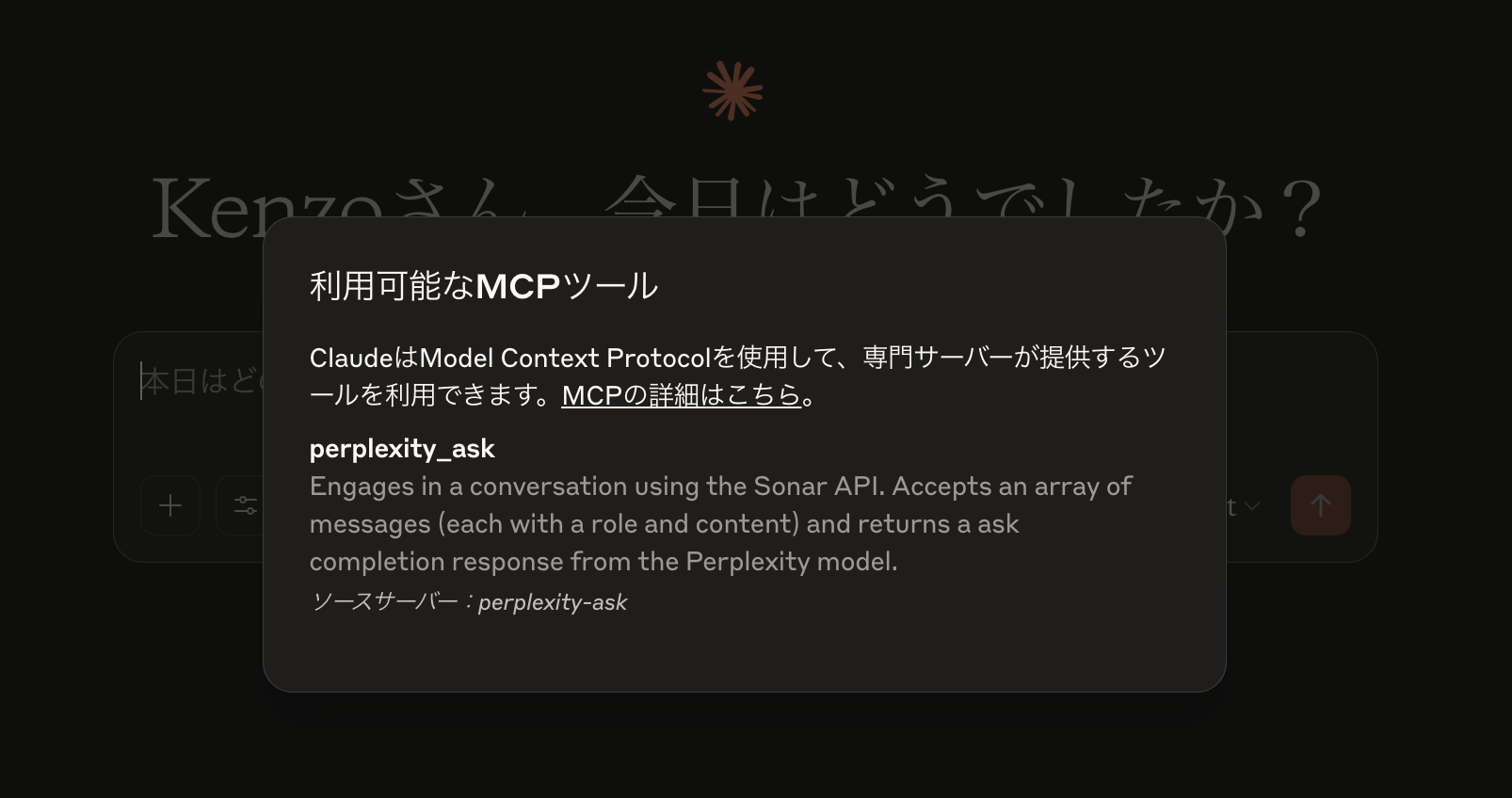
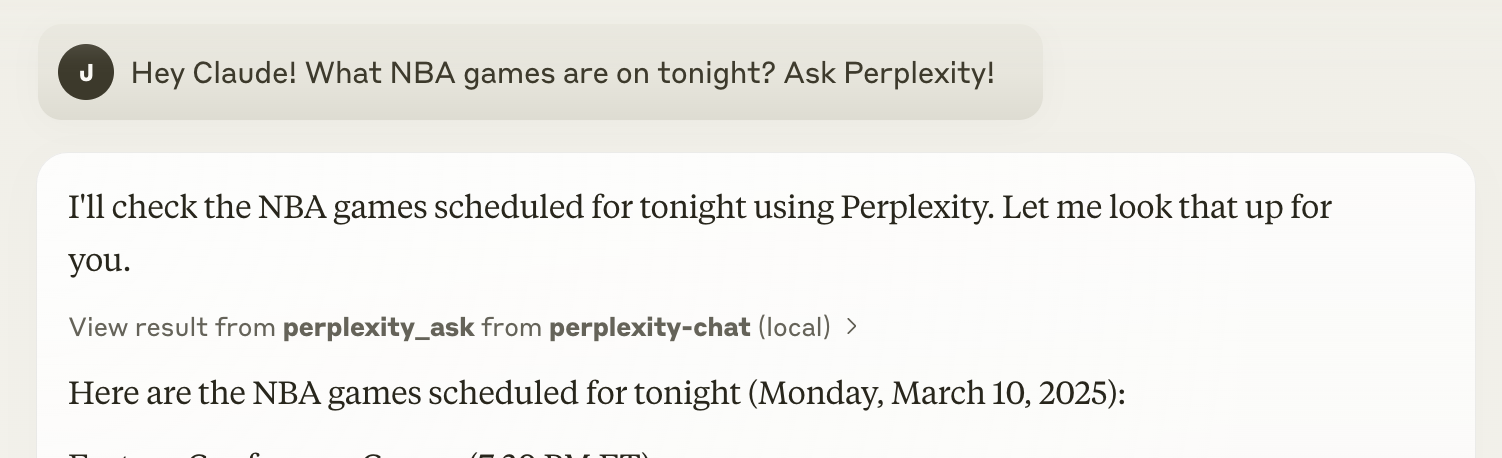
Demo

Demo

Tools

  • perplexity_ask
    • Engage in a conversation with the Sonar API for live web searches.
    • Inputs:
      • messages (array): An array of conversation messages.
        • Each message must include:
          • role (string): The role of the message (e.g., system, user, assistant).
          • content (string): The content of the message.

Configuration

Step 1:

Clone this repository:

git clone git@github.com:rascal-3/MCP-servers.git

Navigate to the perplexity-ask directory and install the necessary dependencies:

cd servers/src/perplexity-ask && npm install

Step 2: Get a Sonar API Key

  1. Sign up for a Sonar API account.
  2. Follow the account setup instructions and generate your API key from the developer dashboard.
  3. Set the API key in your environment as PERPLEXITY_API_KEY.

Step 3: Configure Claude Desktop

  1. Download Claude desktop here.

  2. Add this to your claude_desktop_config.json:

{
  "mcpServers": {
    "perplexity-ask": {
      "command": "docker",
      "args": [
        "run",
        "-i",
        "--rm",
        "-e",
        "PERPLEXITY_API_KEY",
        "mcp/perplexity-ask"
      ],
      "env": {
        "PERPLEXITY_API_KEY": "YOUR_API_KEY_HERE"
      }
    }
  }
}

NPX

{
  "mcpServers": {
    "perplexity-ask": {
      "command": "npx",
      "args": ["-y", "server-perplexity-ask"],
      "env": {
        "PERPLEXITY_API_KEY": "YOUR_API_KEY_HERE"
      }
    }
  }
}

You can access the file using:

vim ~/Library/Application\ Support/Claude/claude_desktop_config.json

Step 4: Build the Docker Image

Docker build:

docker build -t [your-docker-hub-account]/perplexity-ask:latest -f Dockerfile .

Step 5: Testing

Docker run:

docker image ls
docker run -it [your-container-image-id]

Demo

Let's make sure Claude for Desktop is picking up the two tools we've exposed in our perplexity-ask server. You can do this by looking for the hammer icon:

Claude Visual Tools

After clicking on the hammer icon, you should see the tools that come with the Filesystem MCP Server:

Available Integration

If you see both of these this means that the integration is active. Congratulations! This means Claude can now ask Perplexity. You can then simply use it as you would use the Perplexity web app.

Step 6: Advanced parameters

Currently, the search parameters used are the default ones. You can modify any search parameter in the API call directly in the index.ts script. For this, please refer to the official API documentation.

Troubleshooting

The Claude documentation provides an excellent troubleshooting guide you can refer to. However, you can still reach out to us at api@perplexity.ai for any additional support or file a bug.

License

This MCP server is licensed under the MIT License. This means you are free to use, modify, and distribute the software, subject to the terms and conditions of the MIT License. For more details, please see the LICENSE file in the project repository.


Install configuration

Are you the maintainer?

Claim this server with your GitHub account to request manual ownership verification.

README Embed Badge
Markdown

Link to the catalog listing for Perplexity Ask MCP Server from your README. This badge does not certify ownership, compatibility or security.

[![MCP catalog listing](https://img.shields.io/badge/MCP-awesome--mcp-orange?style=flat-square)](https://awesome-mcp.com/servers/mcp-servers-rascal-3)

REPOSITORY STATS

GitHub StarsUnavailable
ForksUnavailable

Public repository statistics could not be verified. Check the configured source address; unavailable counts are not zero.

Downloads and pulls

Separate sources, scopes and periods. Never combined or treated as installations, active users or security reviews.

No reviewed package or image identity; download statistics are not listed yet.

Related search web MCP Servers

Alternative and complementary servers in the same category

View all in search web →

An MCP server that merges Google Search Console history with a live first-party crawl of your site to produce a prioritised, evidence-backed technical SEO audit inside Claude, complete with paste-ready fixes.

Repository stats unavailable
Search & Web Research

An MCP server that offers intelligent web search using OpenAI reasoning models, with support for fast iterations and deep research.

94
Search & Web Research
