
A directory listing describing a cancellation-letter and mailing-address service. The configured public GitHub repository returned 404 during source verification.
Repository stats unavailable
Developer Tools
Sourcebot is a self-hosted code context layer that indexes your repositories and offers an MCP server for agents to search and navigate indexed code.
Sourcebot is cataloged as an MCP server attributed to sourcebot-dev. Sourcebot is a self-hosted code context layer that indexes your repositories and offers an MCP server for agents to search and navigate indexed code. It is categorized under developer tools. See the capability inspector for recorded interfaces and their independent review status; consult upstream documentation for the current interface.
Installation configuration is not reviewed. No executable setup is offered for this entry; inspect the source repository before proceeding.
Catalog license label: Not specified. Check the source repository's current license and terms before using, modifying or distributing this software.
Capability definitions are not reviewed. Unreviewed imports are not exposed as trusted interfaces.
No reviewed records to display. This does not establish that upstream lacks this capability.
No reviewed records to display. This does not establish that upstream lacks this capability.
No reviewed records to display. This does not establish that upstream lacks this capability.
Email delivery is not connected. This page does not collect email addresses or create subscriptions.
Browse the registry for current listings instead.
Reviews for Sourcebot are not available yet
Review publishing and storage are not connected. This page does not collect or publish ratings or comments, including after sign-in.
Open Settings → MCP in Sourcebot to connect an MCP client such as Claude Code, Codex, or Cursor; the MCP docs cover setup and authentication for each client.
README.md · 2914eb23aa62 · Fetched 2026-11-13 11:49:09 UTC
Original upstream text, without AI rewriting. Scripts, forms and unsafe links are filtered for safety.
Showing the last retrieved documentation snapshot; check the source for current changes.

Website · Docs · Public demo · Changelog


Sourcebot is a self-hosted code context layer for humans and AI agents. Index all your repos in one place so you and your agents can search and navigate them.
Run the setup wizard:
npx setup-sourcebot
You'll need Node.js (24 LTS recommended), Docker, and Docker Compose.
This wizard walks you through indexing your repos, optionally configuring a language model provider (for Ask Sourcebot), and then creates the config files for you and starts up Sourcebot.
For manual setup, use Docker Compose or the Helm chart. Check out our docs for more info on how to configure Sourcebot.
Your agent can use Sourcebot MCP to search repos you haven't checked out locally. For example, it can find callers of an API in other services or read the implementation for dependencies that you don't have checked out locally.

The MCP server exposes code search, file reading, and symbol definitions and references for the repos you've indexed. Open Settings → MCP in Sourcebot to connect Claude Code, Codex, Cursor, or another MCP client. The MCP docs cover setup and authentication for each client.
Connect repos from GitHub, GitLab, Bitbucket, Azure DevOps, or local Git directories using the connection guides. Permission syncing controls access based on your code host's repository permissions.
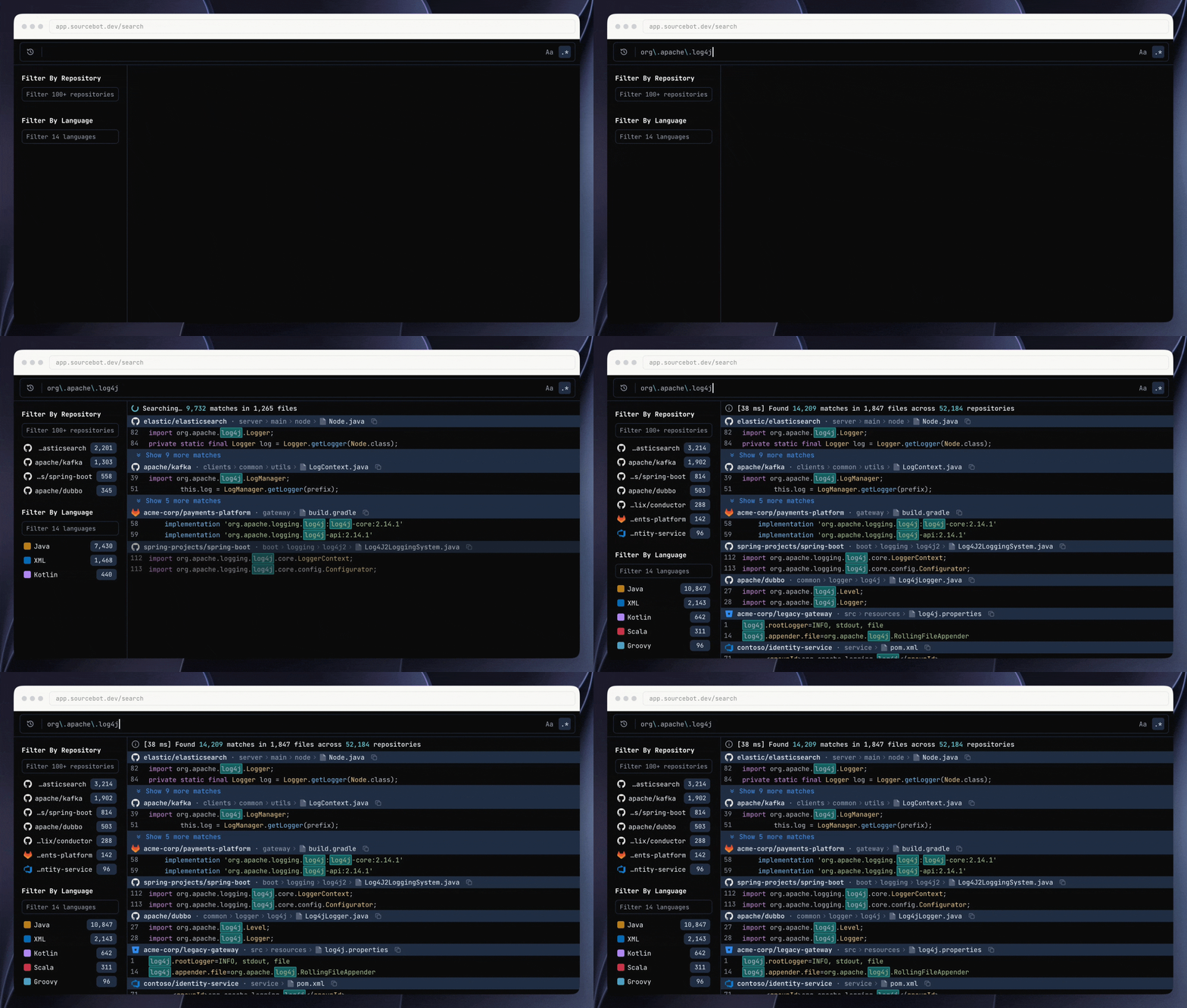
Code Search lets you search across all your indexed repos and branches in one place. Find uses of a dependency, track down a function, or look for a pattern across services without cloning each repo.
Use regular expressions and boolean queries, then narrow the results by repo, file, language, or symbol definition. Results include syntax-highlighted code, with repo and language filters alongside them.
Try it: example search in the public demo.
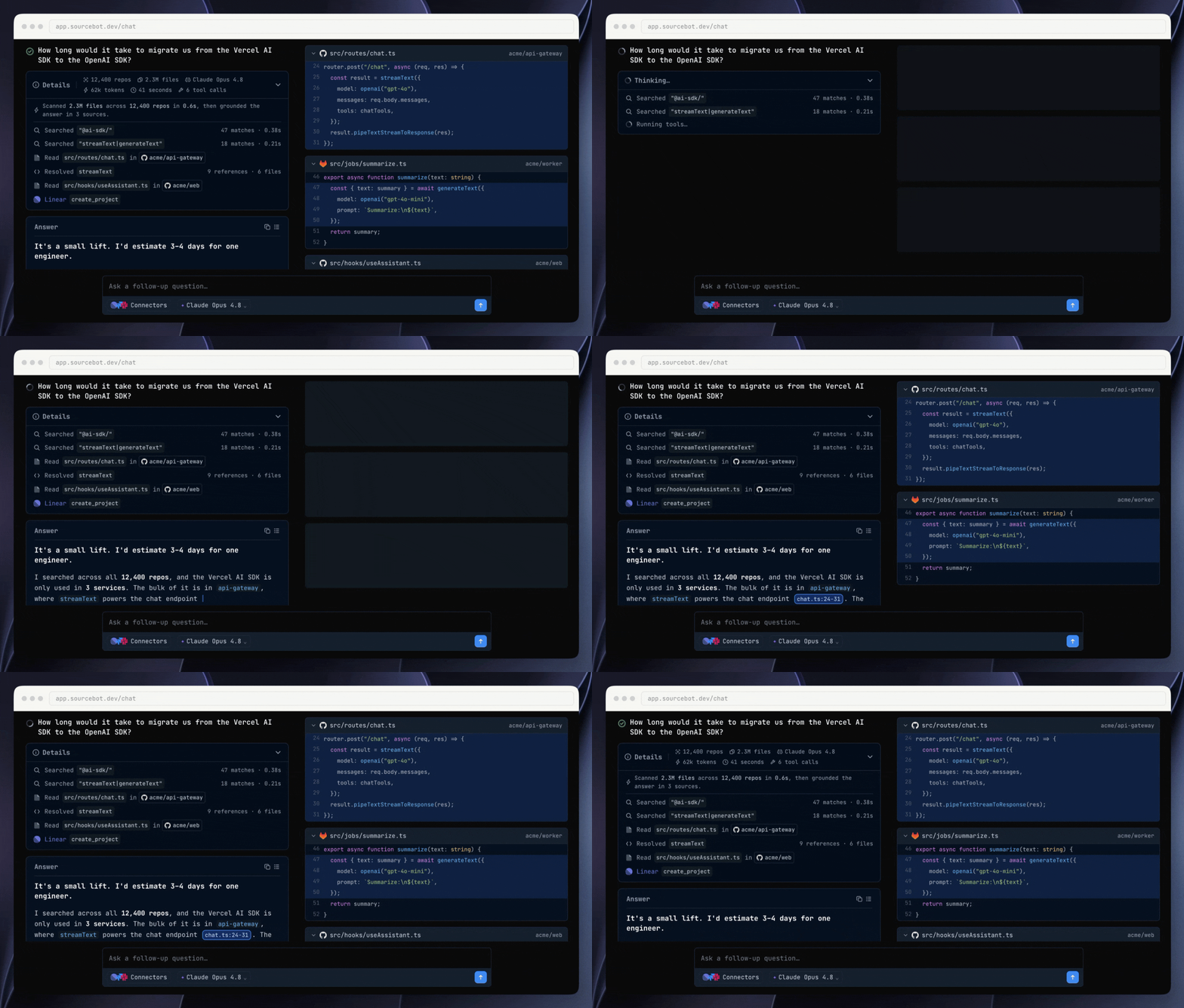
Ask Sourcebot answers questions about your codebase, including repos you haven't checked out locally. Ask how a feature works or what a migration would involve. Connectors let Ask access your apps and services with your permissions, so it can pull in context and take actions like creating a Linear or Jira issue with its findings. It searches your code and follows references using the same tools as the MCP server.
Open cited code alongside the answer, explore generated diagrams, and share the conversation with your team. Ask runs on a language model provider you configure (Bring Your Own Key), so you control where your code is sent.
Try it: explore an example Ask Sourcebot conversation in the public demo.
Try both in the public demo. See pricing for plan details.
Claim this server with your GitHub account to request manual ownership verification.
Link to the catalog listing for Sourcebot from your README. This badge does not certify ownership, compatibility or security.
[](https://awesome-mcp.com/servers/mcp-sourcebot-dev)Public repository statistics could not be verified. Check the configured source address; unavailable counts are not zero.
Separate sources, scopes and periods. Never combined or treated as installations, active users or security reviews.
No reviewed package or image identity; download statistics are not listed yet.
Alternative and complementary servers in the same category
A directory listing describing a cancellation-letter and mailing-address service. The configured public GitHub repository returned 404 during source verification.

A hosted MCP service for browsing and searching through Singapore mobile-network proxies.

A directory listing describing a Markdown-to-PDF service. The configured public GitHub repository returned 404 during source verification.