System Resource Monitor MCP Server

System Resource Monitor MCP Server

mcp-system-resource-monitor•byabhinav7895

An MCP server that gives Claude real-time system monitoring capabilities covering CPU, memory, disk, network, battery, and internet speed metrics.

License: MIT License•Runtime: Awaiting documentation review•Category: cloud devops

WHAT IT DOES

  • •Reports current CPU load as a percentage, including overall and per-core usage.
  • •Reports total, used, and free memory in GB along with percentage used.
  • •Shows real-time network RX/TX rates and total data since boot.
  • •Measures internet speed using multiple download sources and upload tests, returning median speeds in Mbps.

BEST FOR

  • •Asking Claude about current CPU usage or internet speed directly.
  • •Monitoring disk space, battery status, and system health through Claude Desktop.

ABOUT MCP-SYSTEM-RESOURCE-MONITOR

System Resource Monitor MCP Server is cataloged as an MCP server attributed to abhinav7895. An MCP server that gives Claude real-time system monitoring capabilities covering CPU, memory, disk, network, battery, and internet speed metrics. It is categorized under cloud devops. See the capability inspector for recorded interfaces and their independent review status; consult upstream documentation for the current interface.

HOW TO INSTALL

Installation configuration is not reviewed. No executable setup is offered for this entry; inspect the source repository before proceeding.

LICENSE

Catalog license label: MIT License. Check the source repository's current license and terms before using, modifying or distributing this software.

Capability inspector

Capability definitions are not reviewed. Unreviewed imports are not exposed as trusted interfaces.

Tools (0)

No reviewed records to display. This does not establish that upstream lacks this capability.

Resources (0)

No reviewed records to display. This does not establish that upstream lacks this capability.

Prompts (0)

No reviewed records to display. This does not establish that upstream lacks this capability.

NEWSLETTER - COMING LATER

Newsletter subscriptions are not open yet

Email delivery is not connected. This page does not collect email addresses or create subscriptions.

Browse the registry for current listings instead.

Community Reviews

Coming later

Reviews for System Resource Monitor MCP Server are not available yet

Review publishing and storage are not connected. This page does not collect or publish ratings or comments, including after sign-in.

FREQUENTLY ASKED QUESTIONS

Can the internet speed test be customized?

Yes, `testUrls` in `index.ts` can be modified to use different download sources, and `uploadSizeBytes` (default 80KB) can be adjusted for upload tests.

Upstream README

View this exact version on GitHub

README.md · 15e1f9971bdf · Fetched 2026-11-13 13:46:57 UTC

Original upstream text, without AI rewriting. Scripts, forms and unsafe links are filtered for safety.

Showing the last retrieved documentation snapshot; check the source for current changes.

System Resource Monitor MCP Server

An MCP server that provides Claude with real-time system monitoring capabilities, including CPU, memory, disk, network, battery, and internet speed metrics using systeminformation and multi-source speed tests.
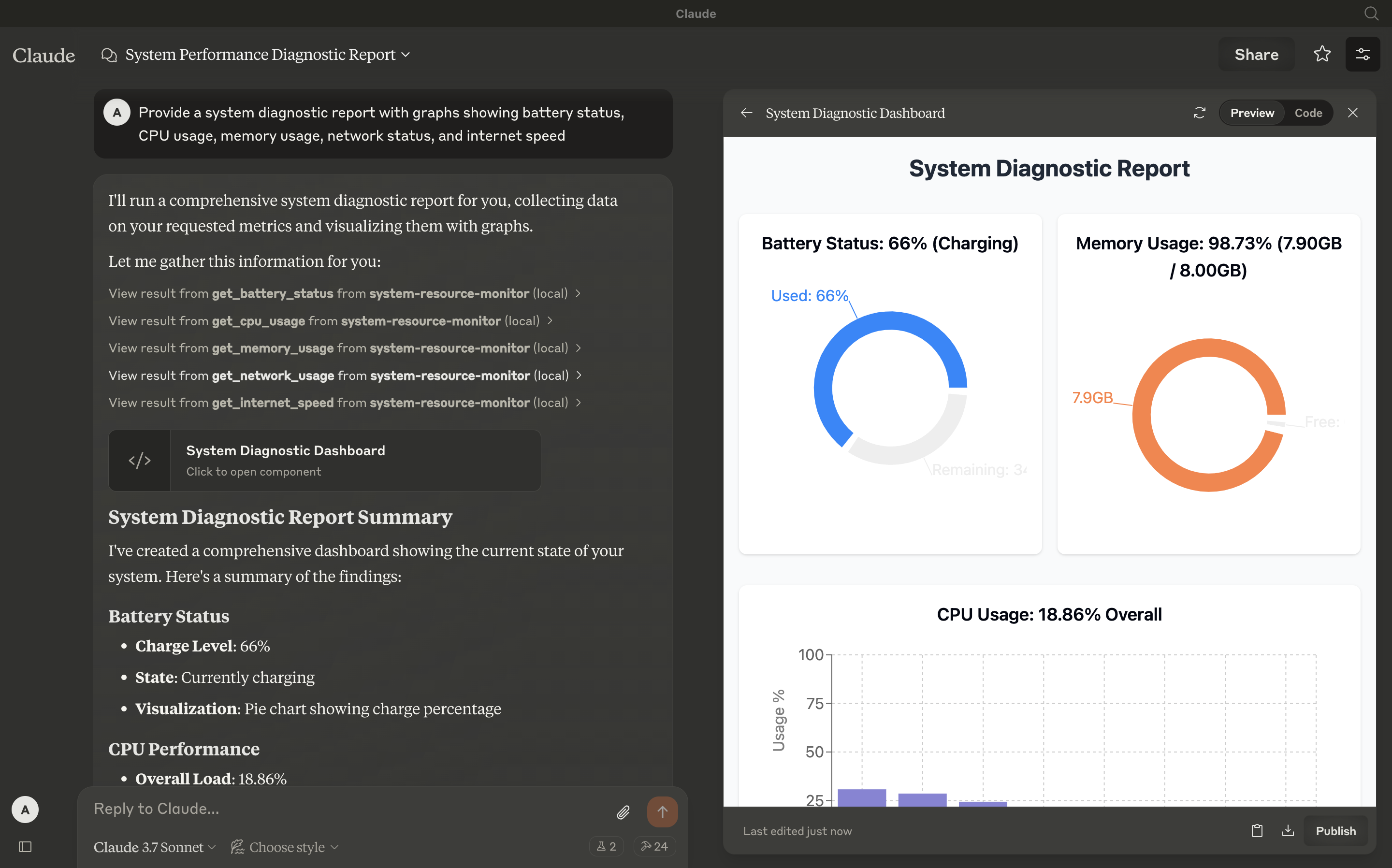
Demo

Tools

  • get_cpu_usage

    • Retrieves the current CPU load as a percentage, including overall and per-core usage.
    • Inputs: None
    • Output: Text (e.g., CPU Load: 12.34% (Cores: 10.50, 15.20, 8.90, 14.60%))
  • get_memory_usage

    • Reports total, used, and free memory in GB, plus percentage used.
    • Inputs: None
    • Output: Text (e.g., Memory: 65.43% used (7.82GB / 16.00GB))
  • get_disk_space

    • Shows disk usage for the largest drive in GB and percentage.
    • Inputs: None
    • Output: Text (e.g., Disk (/): 78.90% used (189.50GB / 250.00GB))
  • get_network_usage

    • Returns real-time network RX/TX rates (KB/s) and total data since boot (MB).
    • Inputs: None
    • Output: Text (e.g., Network (eth0): RX: 25.50KB/s, TX: 10.20KB/s (Total: RX 150.34MB, TX 75.89MB))
  • get_battery_status

    • Provides battery charge percentage, charging status, and time remaining (if applicable).
    • Inputs: None
    • Output: Text (e.g., Battery: 85% (charging), 120 min remaining or No battery detected)
  • get_internet_speed

    • Measures internet speed using multiple download sources (including a user-uploaded file) and upload tests, returning median speeds in Mbps.
    • Inputs: None
    • Output: Text (e.g., Internet Speed: Download 45.67Mbps, Upload 8.45Mbps)

Configuration

Step 1: Clone and Install

Clone this repository:

git clone git@github.com:abhinav7895/system-mcp.git

Navigate to the directory and install dependencies:

cd system-resource-monitor && npm install

Step 2: Build the Project

Compile the TypeScript code:

npm run build

This generates the dist/index.js file, ready to run as an MCP server.

Step 3: Configure Claude Desktop

  1. Download Claude Desktop here.
  2. Add this to your claude_desktop_config.json:
{
  "mcpServers": {
    "system-resource-monitor": {
      "command": "node",
      "args": ["/absolute/path/to/dist/index.js"]
    }
  }
}

Access the config file:

vim ~/Library/Application\ Support/Claude/claude_desktop_config.json

(Adjust the path to dist/index.js based on your project location.)

Step 4: Testing

Ensure Claude Desktop recognizes the tools by checking for the hammer icon:

Claude Visual Tools

Click the hammer icon to see available tools:
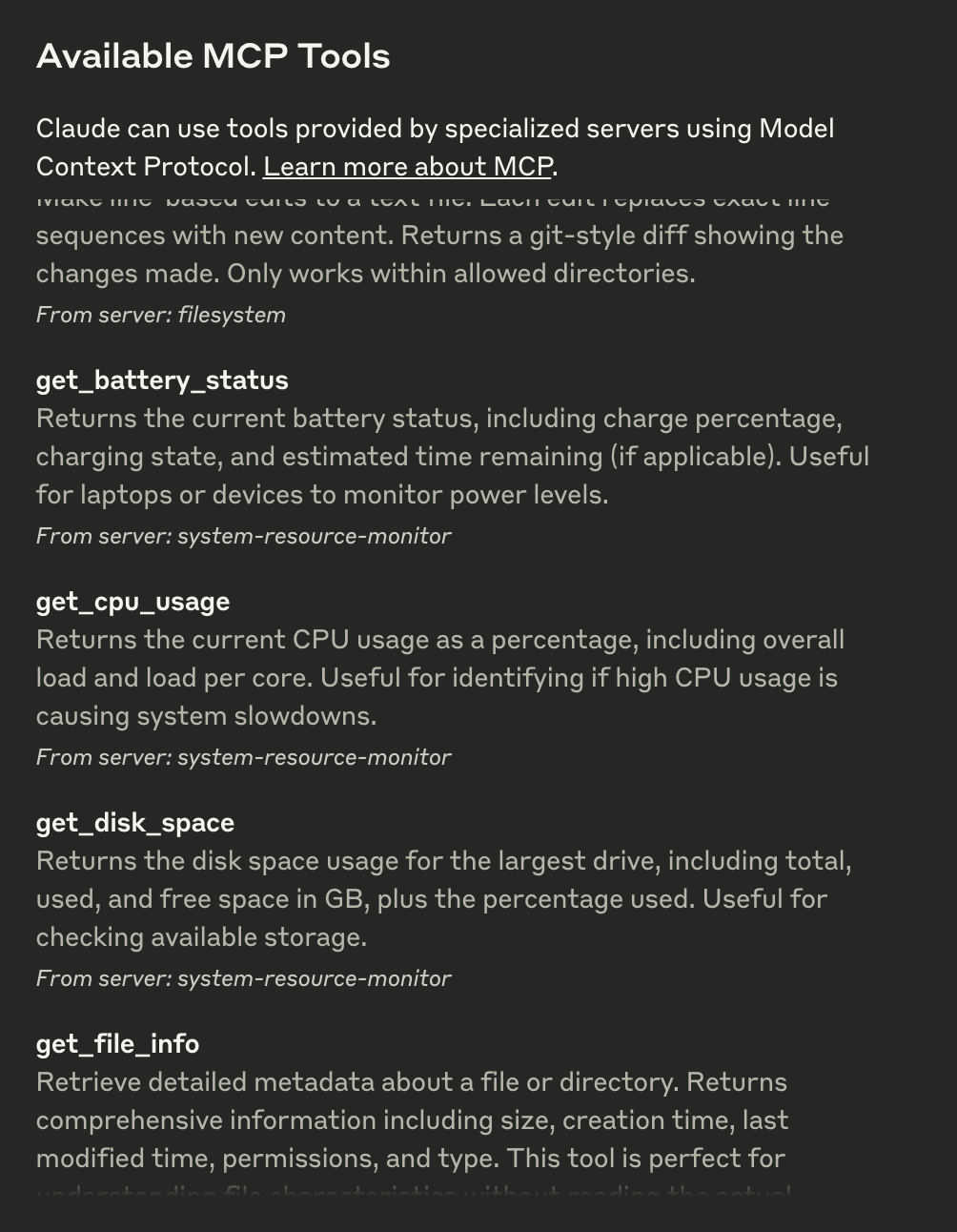
Available Integration

If all six tools (get_cpu_usage, get_memory_usage, etc.) appear, the integration is active. You can now ask questions like:

  • "What’s my CPU usage?"
  • "How fast is my internet?"

Step 5: Advanced Customization

  • Internet Speed Test: Modify testUrls in index.ts to use different download sources or adjust uploadSizeBytes (default 80KB) for upload tests.
  • Logging: Console logs provide detailed test output; disable them in production by removing console.log statements.

Troubleshooting

  • Tool Not Showing: Verify the server is running (node dist/index.js) and the config path is correct.
  • Internet Speed Errors: Ensure network connectivity and test URLs are accessible. Check console logs for specific failures.
  • Refer to the MCP troubleshooting guide

License

This MCP server is licensed under the MIT License. You are free to use, modify, and distribute the software under the terms of the MIT License. See the LICENSE file for details.

Install configuration

Are you the maintainer?

Claim this server with your GitHub account to request manual ownership verification.

README Embed Badge
Markdown

Link to the catalog listing for System Resource Monitor MCP Server from your README. This badge does not certify ownership, compatibility or security.

[![MCP catalog listing](https://img.shields.io/badge/MCP-awesome--mcp-orange?style=flat-square)](https://awesome-mcp.com/servers/mcp-system-resource-monitor)

REPOSITORY STATS

GitHub StarsUnavailable
ForksUnavailable

Public repository statistics could not be verified. Check the configured source address; unavailable counts are not zero.

Downloads and pulls

Separate sources, scopes and periods. Never combined or treated as installations, active users or security reviews.

No reviewed package or image identity; download statistics are not listed yet.

Related cloud devops MCP Servers

Alternative and complementary servers in the same category

View all in cloud devops →
Huawei MCP Server
mcp-server-huaweiclouddeveloper•huaweiclouddeveloper

A Model Context Protocol server built on Huawei Cloud services that enables AI assistants to operate Huawei Cloud resources within conversational workflows, supporting ECS, OBS, GaussDB, and other cloud products.

Repository stats unavailable
Cloud & DevOps
Coolify MCP Server
coolify-mcp-server•wrediam

An MCP server that exposes the Coolify v4.3.1 REST API so AI clients can manage applications, databases, services, servers, deployments, and more.

Repository stats unavailable
Cloud & DevOps

A deprecated Model Context Protocol server for interacting with Kong Konnect APIs, enabling AI assistants to query and analyze Kong Gateway configurations, traffic, and analytics.

Repository stats unavailable
Cloud & DevOps