
A directory listing describing a cancellation-letter and mailing-address service. The configured public GitHub repository returned 404 during source verification.
Repository stats unavailable
Developer Tools
A single-binary MCP server that lets AI agents take screenshots, read text via OCR, control the mouse and keyboard, and inspect UI Automation trees on Windows for testing and automation.
MCP server for automated Windows desktop UI testing is cataloged as an MCP server attributed to jeenyjai. A single-binary MCP server that lets AI agents take screenshots, read text via OCR, control the mouse and keyboard, and inspect UI Automation trees on Windows for testing and automation. It is categorized under developer tools. See the capability inspector for recorded interfaces and their independent review status; consult upstream documentation for the current interface.
Installation configuration is not reviewed. No executable setup is offered for this entry; inspect the source repository before proceeding.
Catalog license label: Not specified. Check the source repository's current license and terms before using, modifying or distributing this software.
Capability definitions are not reviewed. Unreviewed imports are not exposed as trusted interfaces.
No reviewed records to display. This does not establish that upstream lacks this capability.
No reviewed records to display. This does not establish that upstream lacks this capability.
No reviewed records to display. This does not establish that upstream lacks this capability.
Email delivery is not connected. This page does not collect email addresses or create subscriptions.
Browse the registry for current listings instead.
Reviews for MCP server for automated Windows desktop UI testing are not available yet
Review publishing and storage are not connected. This page does not collect or publish ratings or comments, including after sign-in.
README.md · 10459aab0fa0 · Fetched 2026-11-13 14:11:13 UTC
Original upstream text, without AI rewriting. Scripts, forms and unsafe links are filtered for safety.
Showing the last retrieved documentation snapshot; check the source for current changes.


MCP server for automated desktop UI testing. A single binary — no runtime, no dependencies, no installer.
Windows x64 only. There are no macOS or Linux builds yet. If you need one, write to JeenyJAI@gmail.com: requests decide what comes next.
Gives AI agents eyes and hands: screenshots, window management, mouse, keyboard, UI Automation, OCR, file search. Replays saved scenarios as regression runs — after every build, without an agent. Records what you do into a draft scenario, checks accessibility, watches the resources of the application under test.
AI agents can trigger actions in applications but can't see the screen. This server bridges that gap:
Agent triggers action → takes screenshot → sees the result →
switches window → clicks a button → verifies → writes report
Fully autonomous, no user involvement required.
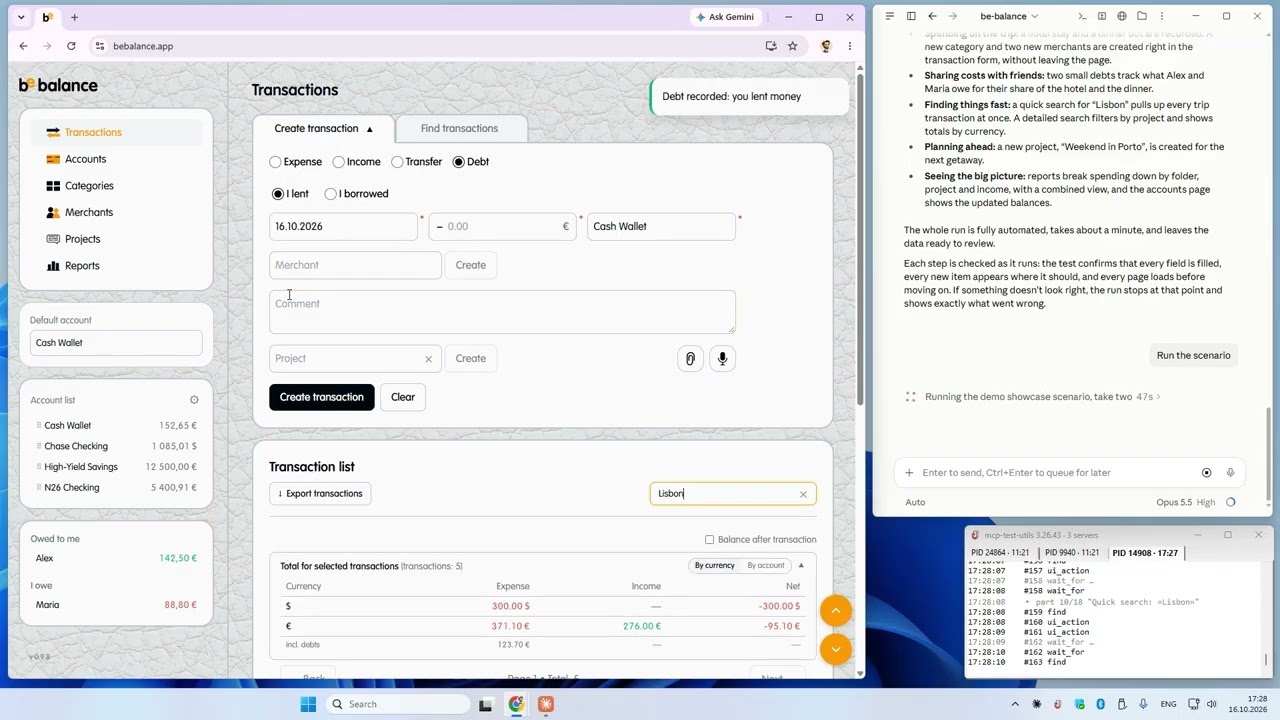
3.26 — Scenario run Claude replays a saved test: 232 steps, one call, 66 s |
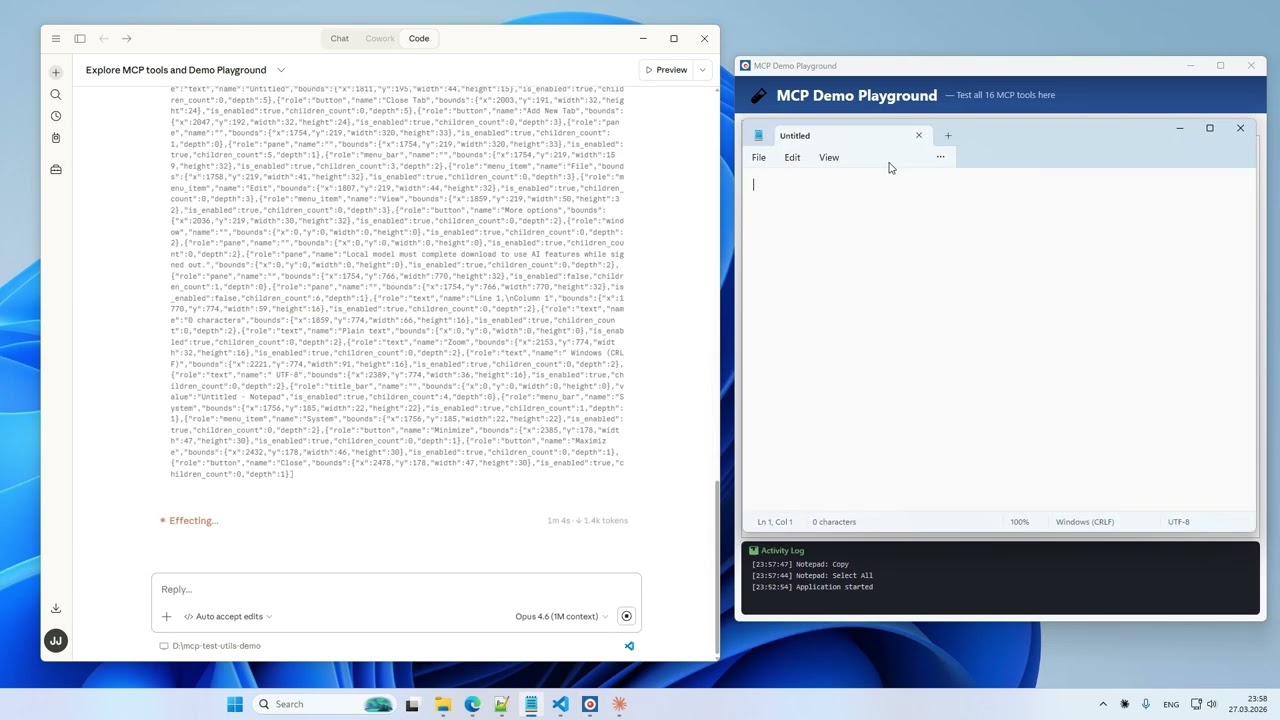
Installation and setup Setting up the server and the basic tools |
mcp-test-utils.exe from Releases (the .sig
file next to it is for the built-in updater — you do not need it).Claude Desktop: %APPDATA%\Claude\claude_desktop_config.json
{
  "mcpServers": {
    "test-utils": {
      "command": "D:\\path\\to\\mcp-test-utils.exe"
    }
  }
}
Claude Code:
claude mcp add test-utils -- "D:\path\to\mcp-test-utils.exe"
For other clients, see their documentation.
Optional settings (logging, file search, starting programs) go into env — see
Environment variables:
{
  "mcpServers": {
    "test-utils": {
      "command": "D:\\path\\to\\mcp-test-utils.exe",
      "env": {
        "MCP_LOG_DIR": "D:\\path\\to\\logs",
        "MCP_SEARCH_DIRS": "D:\\Projects\\app1;D:\\Projects\\app2",
        "MCP_LAUNCH_APPS": "C:\\Program Files\\MyApp\\myapp.exe"
      }
    }
  }
}
Four of them appear only when configured: search_in_files and find_files with MCP_SEARCH_DIRS,
enable_logging and disable_logging with MCP_LOG_DIR — by default the server lists 27 tools.
| Tool | Description |
|---|---|
take_screenshot | Screenshot of the entire desktop; quality presets from full to minimal (fewer tokens) |
take_window_screenshot | Screenshot of a specific window |
read_screen_text | OCR the entire screen (Windows OCR) |
read_region_text | OCR a screen region with precise word coordinates |
| Tool | Description |
|---|---|
list_windows | List windows with id, title, app, process id, position, size, state |
focus_window | Bring a window to the front and restore it if minimized; optionally set its position and size |
launch_app | Start a program from the allowlist of the server config (MCP_LAUNCH_APPS) and wait for its window |
close_window | Close a window as its X button would and wait until it is gone; reports a "Save changes?" prompt |
| Tool | Description |
|---|---|
mouse_click | Click an element by id or at coordinates (left / right / middle, double); can wait for the expected effect and retry |
mouse_move | Move the cursor to a point or to a UI element |
mouse_drag | Drag between elements or points at a human pace (HTML5 drag-and-drop works) |
mouse_scroll | Scroll the mouse wheel over an element and wait until the scrolling stops |
keyboard_type | Type text (full Unicode — Latin, Cyrillic, CJK, emoji) and check that the field shows what was typed |
keyboard_press | Press a key (Enter, Tab, F1–F12, arrows, etc.), optionally several times |
keyboard_shortcut | Press a key combination (Ctrl+S, Alt+F4, Ctrl+Shift+P, etc.) |
| Tool | Description |
|---|---|
list_ui_elements | UI Automation tree — buttons, fields, menus with ids, values, states and exact coordinates; filters by name, value, class |
get_focused_element | Which element has keyboard focus now, and in which window |
read_text | Full text of a document or field through UI Automation (up to 100 000 characters per call), no OCR |
ui_action | Act on an element without mouse or keyboard: invoke, toggle, expand, select an option, set a value, scroll into view |
check_accessibility | Accessibility defects: unnamed controls, controls the Tab key cannot reach, duplicate ids, zero-size controls |
| Tool | Description |
|---|---|
process_info | Memory, handles, GDI objects, threads and CPU of the app under test — call it repeatedly to spot leaks |
| Tool | Description |
|---|---|
wait_for | Wait for a window, an element or its state instead of sleeping |
batch | Run up to 20 tool calls in one request, with find and assert steps |
run_scenario | Replay a saved scenario, a suite or data rows and get a pass/fail report (see Regression runs) |
record_scenario | Record what you do in one window into a draft scenario (see Recording) |
| Tool | Description |
|---|---|
search_in_files | Search text or regex in files within allowed directories (like VS Code Find in Files) |
find_files | Find files and directories by name pattern (glob), like "Go to File" |
| Tool | Description |
|---|---|
get_usage_guide | Usage guide for agents: core rules + sections on request |
prepare_feedback | Prepare a suggestions file for the author (personal data masked; you review it and send it by email — nothing is sent automatically) |
| Tool | Description |
|---|---|
enable_logging | Start recording tool calls to JSONL + screenshots (opt-in) |
disable_logging | Stop recording, get session stats |
An agent finds a path through your application once and saves it as a scenario — a JSON file. After that the scenario replays without an agent: fast, the same way every time, no tokens spent.
mcp-test-utils --check order-form.json     # validate the file, touch nothing
mcp-test-utils --run order-form.json       # run: report in the console and in order-form.report.json
0 — passed, 1 — a step failed, 2 — did not run. Ready for a CI job after each build.run_scenario(path) and learns the format from get_usage_guide(section: "scenarios").--suite runs several scenario files in order with one summary; --data rows.csv runs
a scenario once per row (columns become variables); --junit report.xml adds JUnit XML for CI.
mcp-test-utils --suite regress.suite.json --junit regress.xml
Do the steps yourself and get a draft scenario instead of describing them to an agent:
mcp-test-utils --record order-form.json --app myapp
Only that window and its dialogs are recorded, with a notice on screen; Ctrl+Alt+Shift+R (or Enter in the
console) stops the recording. Password fields are never read; text typed into a terminal is recorded only with --keys-text. An
agent can start the same recording with record_scenario.
| Variable | Description | Default |
|---|---|---|
MCP_LOG_DIR | Path for log sessions. Without it, logging tools are hidden | — |
MCP_LOG_MAX_MB | Session size limit (warning when exceeded) | 500 |
MCP_LOG_RETAIN_DAYS | Auto-delete sessions older than N days. 0 to disable | 30 |
MCP_SEARCH_DIRS | Allowed directories for search_in_files and find_files (separated by ;). Without it, both are hidden | — |
MCP_LAUNCH_APPS | Programs (.exe files or folders, separated by ;) that launch_app may start. Shells, script hosts and interpreters are refused even when listed. Without it, launch_app starts nothing | — |
MCP_NOTIFY | off hides the tray icon and the live call log window | — |
MCP_INPUT_LOCK | off disables the keyboard and mouse lock while the server sends input | — |
MCP_INPUT_LOCK_STALL_MS | Server silence (ms) after which the lock releases your input | 60000 |
MCP_NOTIFY=off hides it.MCP_INPUT_LOCK=off turns the lock off.If an agent hits a gap in the tools, it offers to prepare a short suggestions file (prepare_feedback). The file
goes to Documents\mcp-test-utils feedback\, with personal data masked and no screenshots; review it and email it
to JeenyJAI@gmail.com. Nothing is sent automatically.
check_accessibility finds unnamed controls, controls the Tab key cannot reach, duplicate idsprocess_info shows handles and GDI objects growing across repeated calls%LOCALAPPDATA%\mcp-test-utils\ and an update you
installbatch or scenario run that sends input — Esc
releases them at onceMCP_LAUNCH_APPS (never shells or interpreters); a forced
close_window terminates only a program it startedMCP_SEARCH_DIRS are accessibleMCP Test Utils is an MCP server over stdin/stdout: your MCP client starts the exe and calls its tools. It uses native Windows APIs (UI Automation, Win32 input, Windows OCR) — no PowerShell, no helper tools, no network access except the update check you start. Tested with Claude Desktop and Claude Code.
All tools are free. A license key only lifts the 50-step limit of scenario runs.
For now, keys are issued through early access: the first 30 users get a free one-year key in exchange for short
feedback after the first month — write to JeenyJAI@gmail.com with your email and the
machine code of your computer. A key is bound to that computer. Your agent sees the code in the second line of
get_usage_guide, or print it yourself:
mcp-test-utils --machine-id
Register the key once on that computer:
mcp-test-utils --set-license <email> <key>
Reinstalling Windows or replacing the motherboard alone keeps the key valid; a new computer needs a new key — just write again.
A sealed scenario runs anywhere without the limit — that file only, exactly as sealed. On the licensed computer
mcp-test-utils --seal order-form.json writes a seal into the file; a CI agent or a colleague without a key then
runs it in full. Any change to its steps (or to the files it includes) breaks the seal — seal it again on the
licensed computer.
If you find it useful — jeenyjai.github.io
Copyright 2026 JeenyJAI. All rights reserved.
🚀 Created with Claude
Claim this server with your GitHub account to request manual ownership verification.
Link to the catalog listing for MCP server for automated Windows desktop UI testing from your README. This badge does not certify ownership, compatibility or security.
[](https://awesome-mcp.com/servers/mcp-test-utils)Public repository statistics could not be verified. Check the configured source address; unavailable counts are not zero.
Separate sources, scopes and periods. Never combined or treated as installations, active users or security reviews.
No reviewed package or image identity; download statistics are not listed yet.
Alternative and complementary servers in the same category
A directory listing describing a cancellation-letter and mailing-address service. The configured public GitHub repository returned 404 during source verification.

A hosted MCP service for browsing and searching through Singapore mobile-network proxies.

A directory listing describing a Markdown-to-PDF service. The configured public GitHub repository returned 404 during source verification.