SSE-based MCP weather server

SSE-based MCP weather server

mcp-weather-erhwenkuo•byerhwenkuo

An MCP server example that provides US state weather alerts and forecasts to AI agents over SSE.

License: Not specified•Runtime: Awaiting documentation review•Category: search web

WHAT IT DOES

  • •Exposes a get_alerts tool that returns weather alerts for a US state.
  • •Exposes a get_forecast tool that returns a weather forecast for a latitude and longitude.
  • •Runs as an SSE-based MCP server listening by default on 0.0.0.0:5488, with configurable host and port.

BEST FOR

  • •AI agents that need US weather alerts and forecasts through an MCP tool interface.
  • •Cloud-native deployments where an agent connects to a remotely running MCP server over SSE.

ABOUT MCP-WEATHER-ERHWENKUO

SSE-based MCP weather server is cataloged as an MCP server attributed to erhwenkuo. An MCP server example that provides US state weather alerts and forecasts to AI agents over SSE. It is categorized under search web. See the capability inspector for recorded interfaces and their independent review status; consult upstream documentation for the current interface.

HOW TO INSTALL

Installation configuration is not reviewed. No executable setup is offered for this entry; inspect the source repository before proceeding.

LICENSE

Catalog license label: Not specified. Check the source repository's current license and terms before using, modifying or distributing this software.

Capability inspector

Capability definitions are not reviewed. Unreviewed imports are not exposed as trusted interfaces.

Tools (0)

No reviewed records to display. This does not establish that upstream lacks this capability.

Resources (0)

No reviewed records to display. This does not establish that upstream lacks this capability.

Prompts (0)

No reviewed records to display. This does not establish that upstream lacks this capability.

NEWSLETTER - COMING LATER

Newsletter subscriptions are not open yet

Email delivery is not connected. This page does not collect email addresses or create subscriptions.

Browse the registry for current listings instead.

Community Reviews

Coming later

Reviews for SSE-based MCP weather server are not available yet

Review publishing and storage are not connected. This page does not collect or publish ratings or comments, including after sign-in.

FREQUENTLY ASKED QUESTIONS

Why does this server use SSE instead of STDIO?

The README states that an SSE-based server can run as a decoupled remote process and is better suited to cloud-native use cases than STDIO mode.

What tools does the server expose?

It exposes two tools: get_alerts and get_forecast.

Upstream README

View this exact version on GitHub

README.md · b955e9d12b4b · Fetched 2026-11-13 13:49:01 UTC

Original upstream text, without AI rewriting. Scripts, forms and unsafe links are filtered for safety.

Showing the last retrieved documentation snapshot; check the source for current changes.

mcp-weather

一個給 AI Agent 使用的 MCP Server 範例,用來取得美國各州的天氣預報與警示資訊。

目的

這個 mcp server 示範了基於 SSE 的 MCP 伺服器和使用其中工具的獨立 MCP 用戶端的工作模式。

運行環境

本專案使用 uv 來管理相關的依賴與 python 的運行環境, 如果尚未安裝 uv 可依照官網的安裝指示來安裝。

接下來的相關命令都是在 Ubuntu 24.04 的環境下執行的, 其它作業系統的操作請自行修改:

$ curl -LsSf https://astral.sh/uv/install.sh | sh

下載源碼:

$ git clone https://github.com/erhwenkuo/mcp-weather.git

$ cd mcp-weather

$ uv sync

運行服務

使用 uv 來啟動:

$ uv run server

INFO:     Started server process [15784]
INFO:     Waiting for application startup.
INFO:     Application startup complete.
INFO:     Uvicorn running on http://0.0.0.0:8080 (Press CTRL+C to quit)

使用 Docker 來啟動

首先構建 Docker image:

$ docker build -t mcp-weather .

啟動 mcp-weather:

$ docker run -d -p 5488:5488 mcp-weather

驗證結果

首先安裝 nodejs:

# Download and install nvm:
curl -o- https://raw.githubusercontent.com/nvm-sh/nvm/v0.40.2/install.sh | bash

# in lieu of restarting the shell
\. "$HOME/.nvm/nvm.sh"

# Download and install Node.js:
nvm install 22

# Verify the Node.js version:
node -v # Should print "v22.14.0".
nvm current # Should print "v22.14.0".

# Verify npm version:
npm -v # Should print "10.9.2".

接著啟動 mcp inspector:

$ npx @modelcontextprotocol/inspector

Starting MCP inspector...
Proxy server listening on port 3000

🔍 MCP Inspector is up and running at http://localhost:5173 🚀

使用瀏覽器打開 http://localhost:5173, 然後進行下列的動作:

  1. 在 Transport Type 選擇 SSE
  2. 在 URL 鍵入 mcp server 的位址與端口, http://localhost:5488/sse
  3. 點擊 Connect, 如果有看到狀態是 "Connected" 代表己經成功連線到 mcp-weather 服務了
  4. 點擊上方的 "Tools" Tab
  5. 點擊 "List Tools" 按鈕之後會看到有兩個工具:
    • get_alerts
    • get_forecast
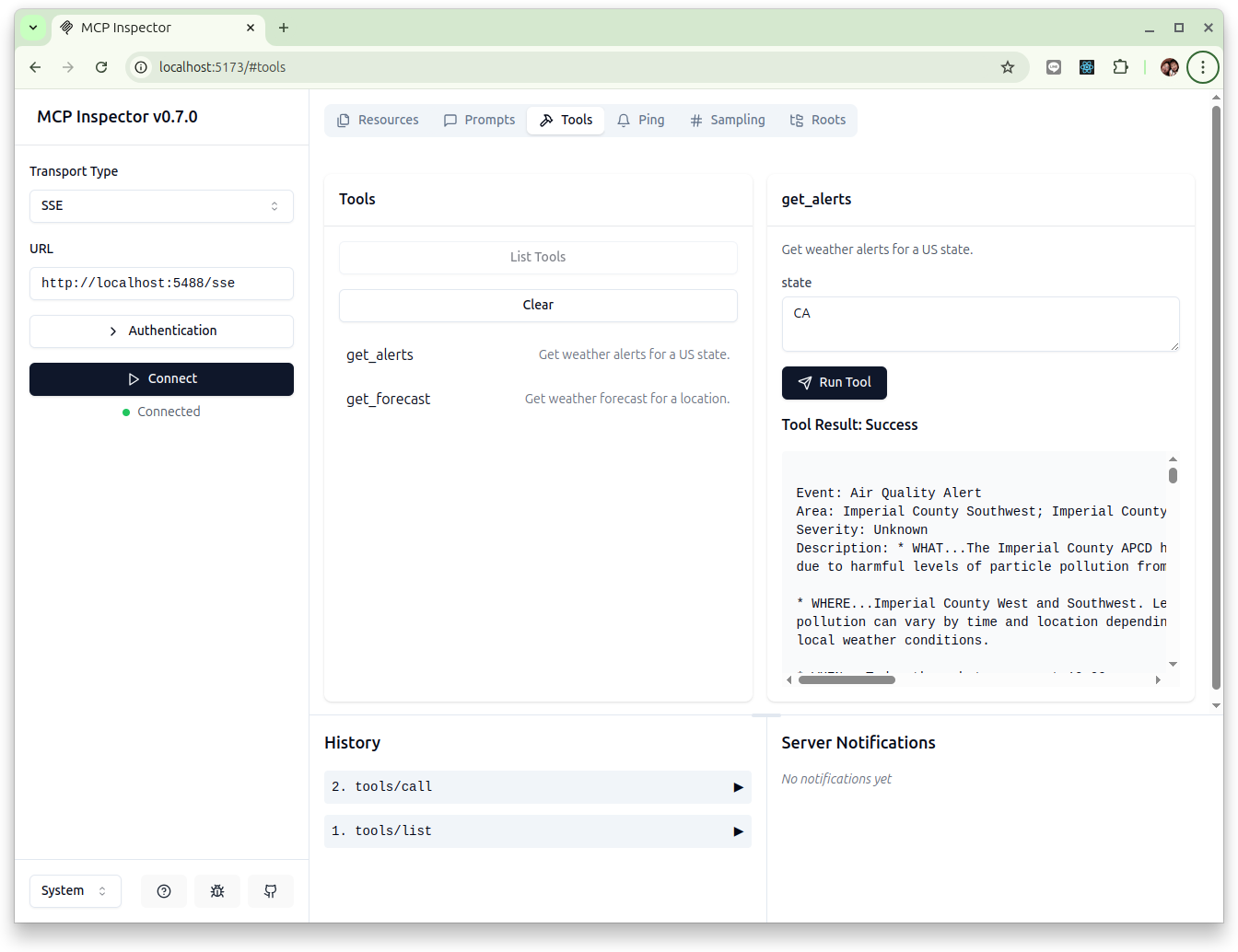
  6. 點擊 get_alerts 之後在右側會出現這個工具的說明與參數, 在 state 的輸入欄中鍵入 "CA" (或是美國其它的州名), 然後點擊 "Run Tool" 按鈕

效果如下圖所示:
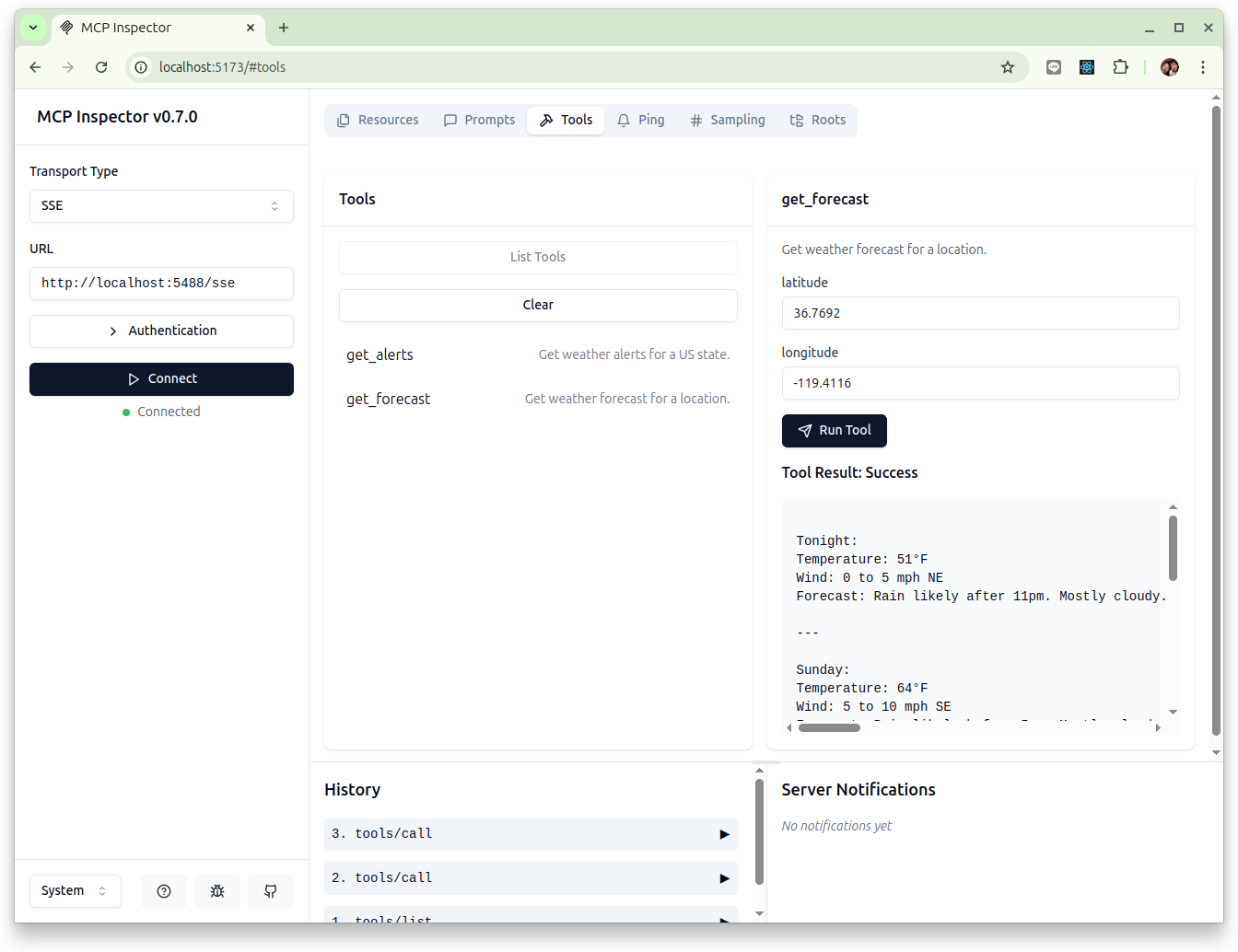
測試 get_forecast:

  • latitude: 36.7692
  • longitude: -119.4116

為什麼使用 SSE

這意味著 MCP 伺服器可以是某個運行在遠端的進程服務,AI Agent(客戶端)可以隨時隨地連接、使用和斷開連接。換句話說,基於 SSE 的伺服器和客戶端可以是解耦的進程(甚至可能在解耦的節點上)。

與客戶端本身將伺服器作為子進程生成的基於 STDIO 的模式相比,這是不同的,並且更適合「雲端原生」用例。

MCP Server

server.py 是 SSE-based MCP server, 預設情況下,伺服器運行在 0.0.0.0:5488 上運行,但可以使用命令列參數進行配置,例如:

uv run server.py --host <your host> --port <your port>

Install configuration

Are you the maintainer?

Claim this server with your GitHub account to request manual ownership verification.

README Embed Badge
Markdown

Link to the catalog listing for SSE-based MCP weather server from your README. This badge does not certify ownership, compatibility or security.

[![MCP catalog listing](https://img.shields.io/badge/MCP-awesome--mcp-orange?style=flat-square)](https://awesome-mcp.com/servers/mcp-weather-erhwenkuo)

REPOSITORY STATS

GitHub StarsUnavailable
ForksUnavailable

Public repository statistics could not be verified. Check the configured source address; unavailable counts are not zero.

Downloads and pulls

Separate sources, scopes and periods. Never combined or treated as installations, active users or security reviews.

No reviewed package or image identity; download statistics are not listed yet.

Related search web MCP Servers

Alternative and complementary servers in the same category

View all in search web →

An MCP server that merges Google Search Console history with a live first-party crawl of your site to produce a prioritised, evidence-backed technical SEO audit inside Claude, complete with paste-ready fixes.

Repository stats unavailable
Search & Web Research

An MCP server that offers intelligent web search using OpenAI reasoning models, with support for fast iterations and deep research.

94
Search & Web Research