MCP Website Downloader

MCP Website Downloader

mcp-windows-website-downloader•byangrysky56

A simple MCP server for downloading documentation websites and preparing them for RAG indexing.

License: MIT License•Runtime: Awaiting documentation review•Category: file systems-docs

WHAT IT DOES

  • •Downloads documentation websites and organizes their assets by type.
  • •Maintains original site structure and creates a RAG index file for the downloaded site.
  • •Exposes downloading through an MCP tool interface usable from MCP clients.

BEST FOR

  • •Preparing documentation websites for RAG indexing.
  • •Downloading a documentation site's pages and assets into an organized library.

ABOUT MCP-WINDOWS-WEBSITE-DOWNLOADER

MCP Website Downloader is cataloged as an MCP server attributed to angrysky56. A simple MCP server for downloading documentation websites and preparing them for RAG indexing. It is categorized under file systems-docs. See the capability inspector for recorded interfaces and their independent review status; consult upstream documentation for the current interface.

HOW TO INSTALL

Installation configuration is not reviewed. No executable setup is offered for this entry; inspect the source repository before proceeding.

LICENSE

Catalog license label: MIT License. Check the source repository's current license and terms before using, modifying or distributing this software.

Capability inspector

Capability definitions are not reviewed. Unreviewed imports are not exposed as trusted interfaces.

Tools (0)

No reviewed records to display. This does not establish that upstream lacks this capability.

Resources (0)

No reviewed records to display. This does not establish that upstream lacks this capability.

Prompts (0)

No reviewed records to display. This does not establish that upstream lacks this capability.

NEWSLETTER - COMING LATER

Newsletter subscriptions are not open yet

Email delivery is not connected. This page does not collect email addresses or create subscriptions.

Browse the registry for current listings instead.

Community Reviews

Coming later

Reviews for MCP Website Downloader are not available yet

Review publishing and storage are not connected. This page does not collect or publish ratings or comments, including after sign-in.

FREQUENTLY ASKED QUESTIONS

What output does the downloader produce for a site?

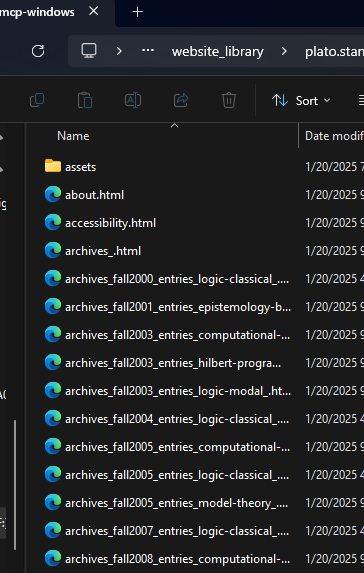
It organizes downloads under a domain folder with HTML pages, an assets folder by type, and a rag_index.json file.

What information does the RAG index contain?

The rag_index.json contains the site URL, domain, page count, and path.

Upstream README

View this exact version on GitHub

README.md · fdaff4349f50 · Fetched 2026-11-13 10:31:27 UTC

Original upstream text, without AI rewriting. Scripts, forms and unsafe links are filtered for safety.

Showing the last retrieved documentation snapshot; check the source for current changes.

MseeP.ai Security Assessment Badge

MCP Website Downloader

Simple MCP server for downloading documentation websites and preparing them for RAG indexing.

Features

  • Downloads complete documentation sites, well big chunks anyway.
  • Maintains link structure and navigation, not really. lol
  • Downloads and organizes assets (CSS, JS, images), but isn't really AI friendly and it all probably needs some kind of parsing or vectorizing into a db or something.
  • Creates clean index for RAG systems, currently seems to make an index in each folder, not even looked at it.
  • Simple single-purpose MCP interface, yup.

Installation

Fork and download, cd to the repository.

uv venv
./venv/Scripts/activate
pip install -e .

Put this in your claude_desktop_config.json with your own paths:

   "mcp-windows-website-downloader": {
     "command": "uv",
     "args": [
       "--directory",
       "F:/GithubRepos/mcp-windows-website-downloader",
       "run",
       "mcp-windows-website-downloader",
       "--library",
       "F:/GithubRepos/mcp-windows-website-downloader/website_library"
     ]
   },
alt text

Other Usage you don't need to worry about and may be hallucinatory lol:

  1. Start the server:
python -m mcp_windows_website_downloader.server --library docs_library
  1. Use through Claude Desktop or other MCP clients:
result = await server.call_tool("download", {
    "url": "https://docs.example.com"
})

Output Structure

docs_library/
  domain_name/
    index.html
    about.html
    docs/
      getting-started.html
      ...
    assets/
      css/
      js/
      images/
      fonts/
    rag_index.json

Development

The server follows standard MCP architecture:

src/
  mcp_windows_website_downloader/
    __init__.py
    server.py    # MCP server implementation
    core.py      # Core downloader functionality
    utils.py     # Helper utilities

Components

  • server.py: Main MCP server implementation that handles tool registration and requests
  • core.py: Core website downloading functionality with proper asset handling
  • utils.py: Helper utilities for file handling and URL processing

Design Principles

  1. Single Responsibility

    • Each module has one clear purpose
    • Server handles MCP interface
    • Core handles downloading
    • Utils handles common operations
  2. Clean Structure

    • Maintains original site structure
    • Organizes assets by type
    • Creates clear index for RAG systems
  3. Robust Operation

    • Proper error handling
    • Reasonable depth limits
    • Asset download verification
    • Clean URL/path processing

RAG Index

The rag_index.json file contains:

{
  "url": "https://docs.example.com",
  "domain": "docs.example.com", 
  "pages": 42,
  "path": "/path/to/site"
}

Contributing

  1. Fork the repository
  2. Create a feature branch
  3. Make your changes
  4. Submit a pull request

License

MIT License - See LICENSE file

Error Handling

The server handles common issues:

  • Invalid URLs
  • Network errors
  • Asset download failures
  • Malformed HTML
  • Deep recursion
  • File system errors

Error responses follow the format:

{
  "status": "error",
  "error": "Detailed error message"
}

Success responses:

{
  "status": "success",
  "path": "/path/to/downloaded/site",
  "pages": 42
}

Install configuration

Are you the maintainer?

Claim this server with your GitHub account to request manual ownership verification.

README Embed Badge
Markdown

Link to the catalog listing for MCP Website Downloader from your README. This badge does not certify ownership, compatibility or security.

[![MCP catalog listing](https://img.shields.io/badge/MCP-awesome--mcp-orange?style=flat-square)](https://awesome-mcp.com/servers/mcp-windows-website-downloader)

REPOSITORY STATS

GitHub StarsUnavailable
ForksUnavailable

Public repository statistics could not be verified. Check the configured source address; unavailable counts are not zero.

Downloads and pulls

Separate sources, scopes and periods. Never combined or treated as installations, active users or security reviews.

No reviewed package or image identity; download statistics are not listed yet.

Related file systems-docs MCP Servers

Alternative and complementary servers in the same category

View all in file systems-docs →

A Model Context Protocol server for global law with read-only tools to find and read provisions by date, trace the law behind each word, search text and changes, and check cases or briefs against law in force.

Repository stats unavailable
Files & Documentation
LoreKeeper MCP server
lorekeeper-rpg-lorekeeper-com•lore-keeper

Hosted MCP server for tabletop RPG worlds that organizes messy notes and documents into a private store and lets MCP apps search lore, read documents, find characters, and optionally generate character or world pictures.

Repository stats unavailable
Files & Documentation

An MCP server that gives AI assistants scoped file system operations inside a project directory, with read-only reference projects plus git and GitHub tools.

Repository stats unavailable
Files & Documentation