
A directory listing describing a cancellation-letter and mailing-address service. The configured public GitHub repository returned 404 during source verification.
Repository stats unavailable
Developer Tools
Community-maintained MCP server that gives AI assistants direct access to packet captures for summarizing pcaps, following streams, filtering protocols, and capturing live traffic.
mcp-wireshark is cataloged as an MCP server attributed to khuynh22. Community-maintained MCP server that gives AI assistants direct access to packet captures for summarizing pcaps, following streams, filtering protocols, and capturing live traffic. It is categorized under developer tools. See the capability inspector for recorded interfaces and their independent review status; consult upstream documentation for the current interface.
Installation configuration is not reviewed. No executable setup is offered for this entry; inspect the source repository before proceeding.
Catalog license label: MIT. Check the source repository's current license and terms before using, modifying or distributing this software.
Capability definitions are not reviewed. Unreviewed imports are not exposed as trusted interfaces.
No reviewed records to display. This does not establish that upstream lacks this capability.
No reviewed records to display. This does not establish that upstream lacks this capability.
No reviewed records to display. This does not establish that upstream lacks this capability.
Email delivery is not connected. This page does not collect email addresses or create subscriptions.
Browse the registry for current listings instead.
Reviews for mcp-wireshark are not available yet
Review publishing and storage are not connected. This page does not collect or publish ratings or comments, including after sign-in.
Yes. It can capture live traffic from an interface.
Yes. It provides health triage for GOOSE/SV/MMS captures, including per-source status and checks for gaps, TTL violations, discontinuities, lost sync, and MMS errors.
It reads `.pcap` and `.pcapng` packet capture files and provides a preview.
README.md · 3694fceaa2d3 · Fetched 2026-11-13 07:45:30 UTC
Original upstream text, without AI rewriting. Scripts, forms and unsafe links are filtered for safety.
Showing the last retrieved documentation snapshot; check the source for current changes.
Community-maintained MCP server for Wireshark /
tshark. Not affiliated with Wireshark or Anthropic. Give your AI assistant direct access to packet captures. Ask Claude to summarize a.pcap, follow a TCP stream, filter for a specific protocol, or capture live traffic — all without leaving the chat.




pip install mcp-wireshark
claude mcp add --transport stdio --scope user mcp-wireshark -- mcp-wireshark
That's it. Open Claude Code and try:
"Summarize ./capture.pcap and tell me which IPs talked the most."
--scope user makes the server available across every Claude Code project. Drop the flag to install it for the current project only. See claude mcp docs for more.
claude mcp list
You should see mcp-wireshark listed. Inside Claude Code, ask:
"Run check_installation."
If tshark is on your PATH, it returns the version. If not, see troubleshooting.
The server exposes 14 tools, split cleanly between read tools (safe, no side effects) and write tools (capture traffic or write files). Both groups are annotated with the standard MCP readOnlyHint so any compliant client can surface the distinction.
Safe to call freely — they only inspect state.
| Tool | What it does |
|---|---|
check_installation | Verify tshark is installed and show version |
list_interfaces | List network interfaces available to capture from |
read_pcap | Read packets from a .pcap / .pcapng file (preview + total count) |
display_filter | Apply a Wireshark display filter to a pcap |
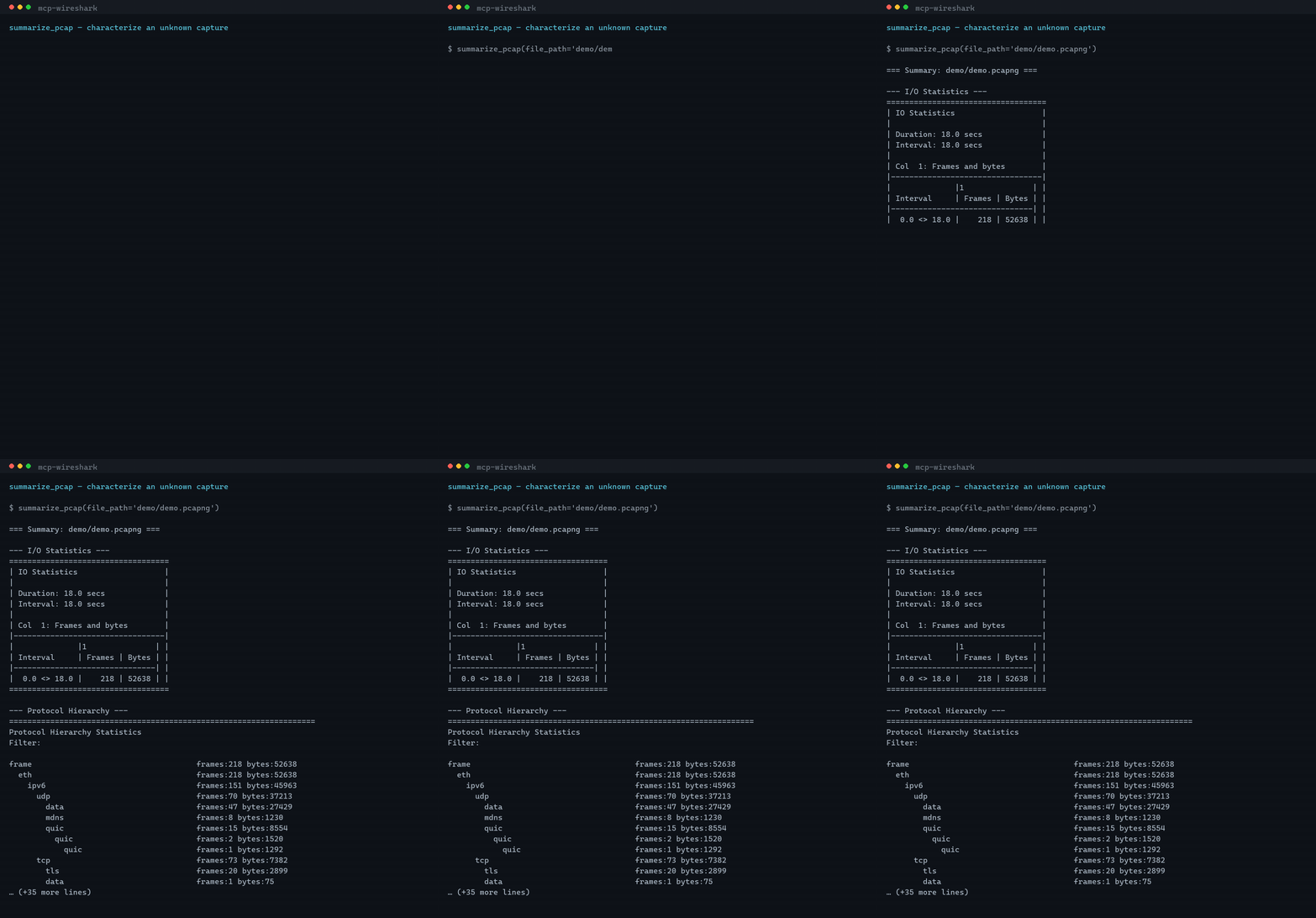
summarize_pcap | High-level summary: I/O stats, protocol hierarchy, top talkers |
stats_by_proto | Protocol hierarchy statistics |
follow_tcp | Reassemble a TCP stream and return its payload |
follow_udp | Reassemble a UDP stream and return its payload |
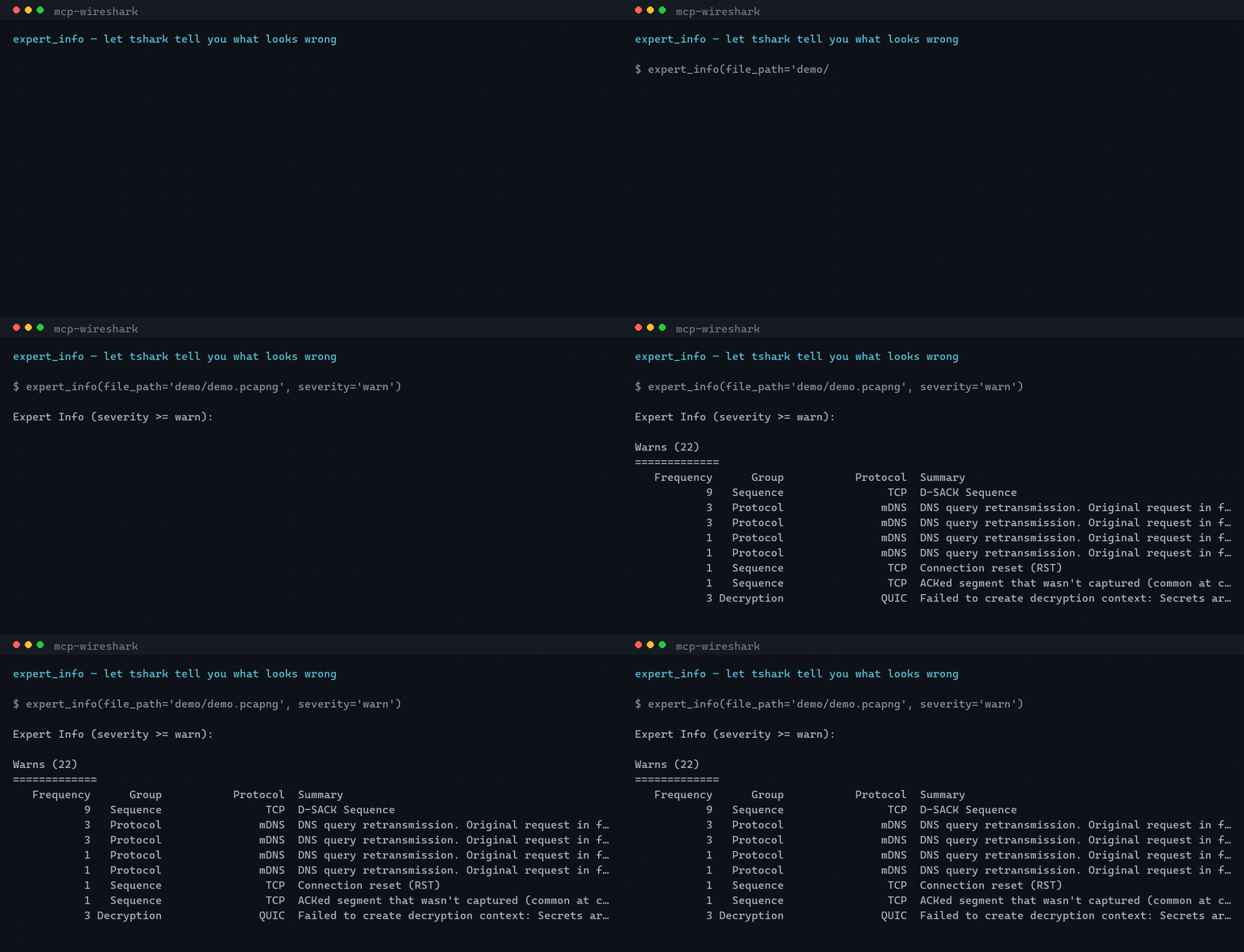
expert_info | tshark expert analysis: warnings, errors, and notes grouped by severity |
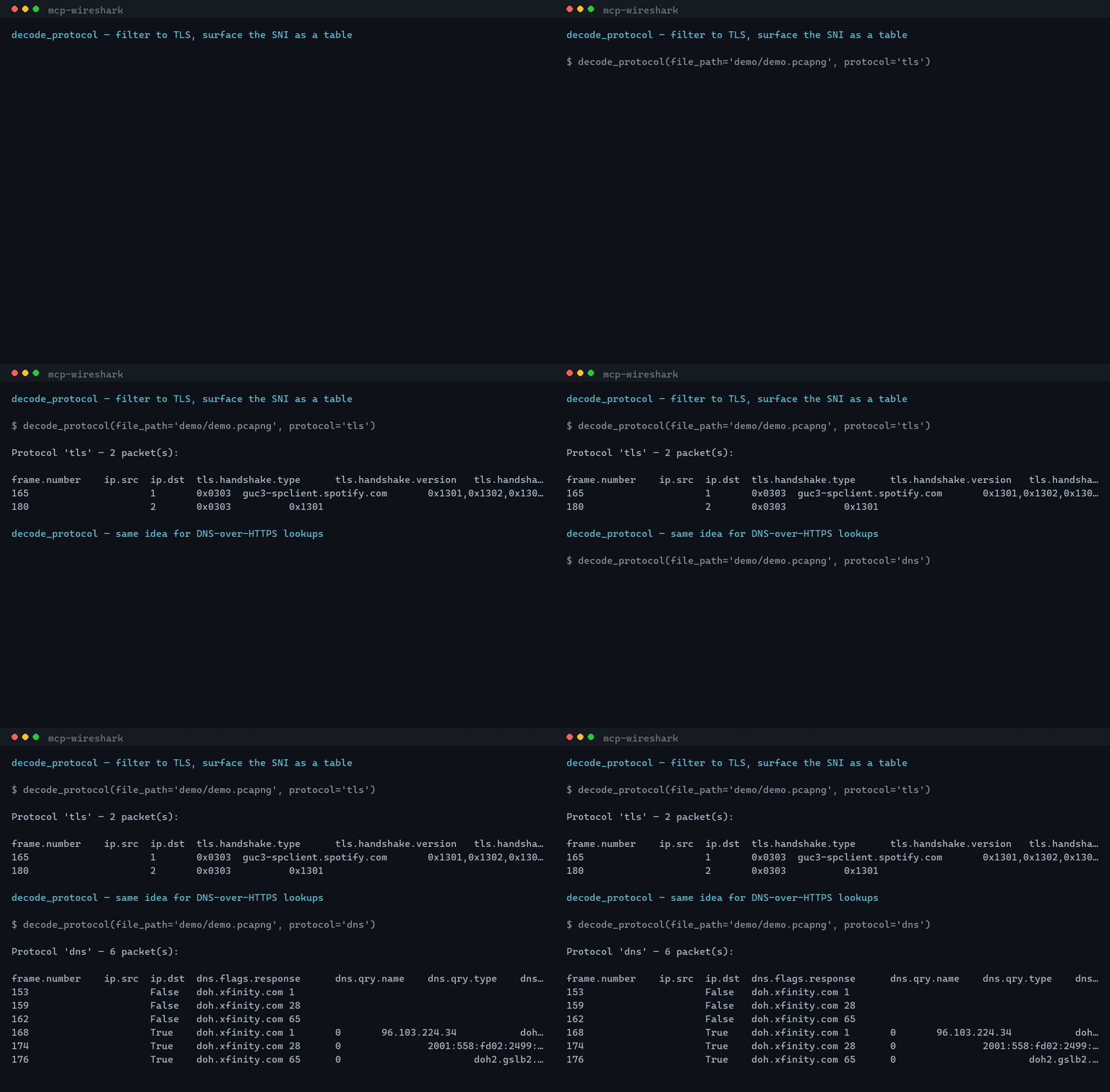
decode_protocol | Extract protocol fields as a TSV table. Curated defaults for HTTP, DNS, TLS, GOOSE, MMS, SV, SIP, ICMP; arbitrary fields for any other protocol |
protocol_stats | Aggregate -z reports (protocol hierarchy, conversations, endpoints, HTTP/DNS/SMB stats) |
analyze_iec61850 | Health triage for GOOSE/SV/MMS captures: per-source OK/WARN/FAIL with sqNum/stNum gaps, TTL violations, smpCnt discontinuities, lost sync, and MMS errors |
These create files or capture live traffic. Compliant clients may prompt before invoking.
| Tool | What it does |
|---|---|
live_capture | Capture live traffic from an interface (capped at 5 minutes / 10k packets) |
export_json | Export packets from a pcap to a JSON file at a path you choose |
These clips run the real tools against demo/demo.pcapng — a
short home-network capture. Regenerate them with python demo/render_gif.py <scene>.
summarize_pcap — characterize an unknown capture at a glance
decode_protocol — filter to a protocol and get a compact table (here: TLS SNI and DNS-over-HTTPS lookups)
expert_info — let tshark surface the warnings and anomalies for you
Drop these into Claude Code as-is:
List my network interfaces.
Summarize ./traffic.pcap.
From ./traffic.pcap, show me only HTTP requests.
Follow TCP stream 0 in ./traffic.pcap and tell me what protocol is in it.
Capture 30 seconds of traffic on Wi-Fi filtered to tcp.port == 443.
Export every DNS packet from ./traffic.pcap to ./dns.json.
Decode the GOOSE messages in ./substation.pcapng — only stNum >= 1.
Run expert analysis on ./traffic.pcap and group findings by severity.
Show me the IP conversations in ./traffic.pcap.
| Filter | Matches |
|---|---|
tcp.port == 80 | HTTP |
tcp.port == 443 | HTTPS |
dns | All DNS |
http.request | HTTP requests only |
ip.addr == 10.0.0.1 | Traffic to/from a specific host |
tcp.flags.syn == 1 && tcp.flags.ack == 0 | TCP SYN packets only |
For substation engineers analyzing IEC 61850 traffic:
| Filter | Matches |
|---|---|
goose | All GOOSE messages |
goose.stNum > 0 | GOOSE messages with state changes |
mms | All MMS traffic |
sv | Sampled Values |
Anything that speaks MCP works. The package installs an mcp-wireshark binary on PATH.
Edit ~/Library/Application Support/Claude/claude_desktop_config.json (macOS) or %APPDATA%\Claude\claude_desktop_config.json (Windows):
{
    "mcpServers": {
        "wireshark": {
            "command": "mcp-wireshark"
        }
    }
}
Create .vscode/mcp.json in your workspace:
{
    "servers": {
        "wireshark": {
            "command": "mcp-wireshark"
        }
    }
}
Use the same stdio invocation: command: mcp-wireshark. No transport flags.
tshark reachable on PATHInstall with pip or uv:
pip install mcp-wireshark
# or
uvx mcp-wireshark
Add Wireshark to your system PATH:
Win+R → run sysdm.cpl → Advanced → Environment VariablesPath → add C:\Program Files\Wiresharkcheck_installation(Avoid passing PATH through claude mcp add --env — values are taken literally, no %PATH% expansion.)
Add yourself to the wireshark group, then log out and back in:
sudo usermod -aG wireshark $USER
list_interfaces (Wireshark uses different names than ifconfig/ip).dmg)git clone https://github.com/khuynh22/mcp-wireshark.git
cd mcp-wireshark
python -m venv venv && source venv/bin/activate # Windows: venv\Scripts\activate
pip install -e ".[dev]"
pytest # tests
black src tests # format
ruff check src tests # lint
mypy src # type check
The codebase is organized so new tools land in one of two clearly-scoped files:
src/mcp_wireshark/read_tools.py — anything that just inspects statesrc/mcp_wireshark/write_tools.py — anything that captures traffic or writes filesserver.py only contains routing. See CLAUDE.md and CONTRIBUTING.md.
Every file path is validated (.. rejected, extension allow-listed). Every display filter is checked for shell metacharacters. tshark is always invoked via asyncio.create_subprocess_exec, never shell=True. Hard caps: 10k packets per call, 5 min per live capture. See SECURITY.md.
MIT — see LICENSE.
Claim this server with your GitHub account to request manual ownership verification.
Link to the catalog listing for mcp-wireshark from your README. This badge does not certify ownership, compatibility or security.
[](https://awesome-mcp.com/servers/mcp-wireshark)Public repository statistics could not be verified. Check the configured source address; unavailable counts are not zero.
Separate sources, scopes and periods. Never combined or treated as installations, active users or security reviews.
No reviewed package or image identity; download statistics are not listed yet.
Alternative and complementary servers in the same category
A directory listing describing a cancellation-letter and mailing-address service. The configured public GitHub repository returned 404 during source verification.

A hosted MCP service for browsing and searching through Singapore mobile-network proxies.

A directory listing describing a Markdown-to-PDF service. The configured public GitHub repository returned 404 during source verification.