
A directory listing describing a cancellation-letter and mailing-address service. The configured public GitHub repository returned 404 during source verification.
Repository stats unavailable
Developer Tools
An MCP server exposing 27 tools that let an AI agent create, inspect, refine, and export Excalidraw diagrams on a persistent local canvas.
Excalidraw MCP server for drawing editable diagrams on a live canvas is cataloged as an MCP server attributed to yctimlin. An MCP server exposing 27 tools that let an AI agent create, inspect, refine, and export Excalidraw diagrams on a persistent local canvas. It is categorized under developer tools. See the capability inspector for recorded interfaces and their independent review status; consult upstream documentation for the current interface.
Installation configuration is not reviewed. No executable setup is offered for this entry; inspect the source repository before proceeding.
Catalog license label: MIT. Check the source repository's current license and terms before using, modifying or distributing this software.
Capability definitions are not reviewed. Unreviewed imports are not exposed as trusted interfaces.
No reviewed records to display. This does not establish that upstream lacks this capability.
No reviewed records to display. This does not establish that upstream lacks this capability.
No reviewed records to display. This does not establish that upstream lacks this capability.
Email delivery is not connected. This page does not collect email addresses or create subscriptions.
Browse the registry for current listings instead.
Reviews for Excalidraw MCP server for drawing editable diagrams on a live canvas are not available yet
Review publishing and storage are not connected. This page does not collect or publish ratings or comments, including after sign-in.
Yes. describe returns a structured text summary and screenshot returns a rendered image, which agents use to fix labels, overlaps, and arrow routing.
No API key is required; core drawing runs locally, with outbound traffic limited to fonts and the optional share upload.
By default the canvas is in-memory, but setting EXCALIDRAW_DATA_DIR enables local restart recovery of elements, images, and snapshots.
README.md · 81720ac819d2 · Fetched 2026-11-13 09:42:24 UTC
Original upstream text, without AI rewriting. Scripts, forms and unsafe links are filtered for safety.
Showing the last retrieved documentation snapshot; check the source for current changes.


mcp-excalidraw-server gives AI agents a live Excalidraw canvas they can draw on, look at, refine, and save into your repo. Your agent creates architecture diagrams and flowcharts programmatically, sees its own work via screenshots, fixes layout problems, and exports .excalidraw files you can commit next to your code.
One canvas, three ways to drive it:
npx -y mcp-excalidraw-server <command>. Zero config, auto-starts the canvas, composable JSON in/out.2026-07-28 (server/discover, per-request _meta envelope, tool calls without a handshake) and stays compatible with 2025-era clients that open with initialize.Core drawing runs locally (Node ≥ 20, MIT licensed) — no API keys or accounts. Mermaid conversion runs in the local browser canvas; share is optional and uploads an encrypted scene to excalidraw.com by default (or your own instance). The canvas page loads Excalidraw's fonts from the esm.sh CDN.
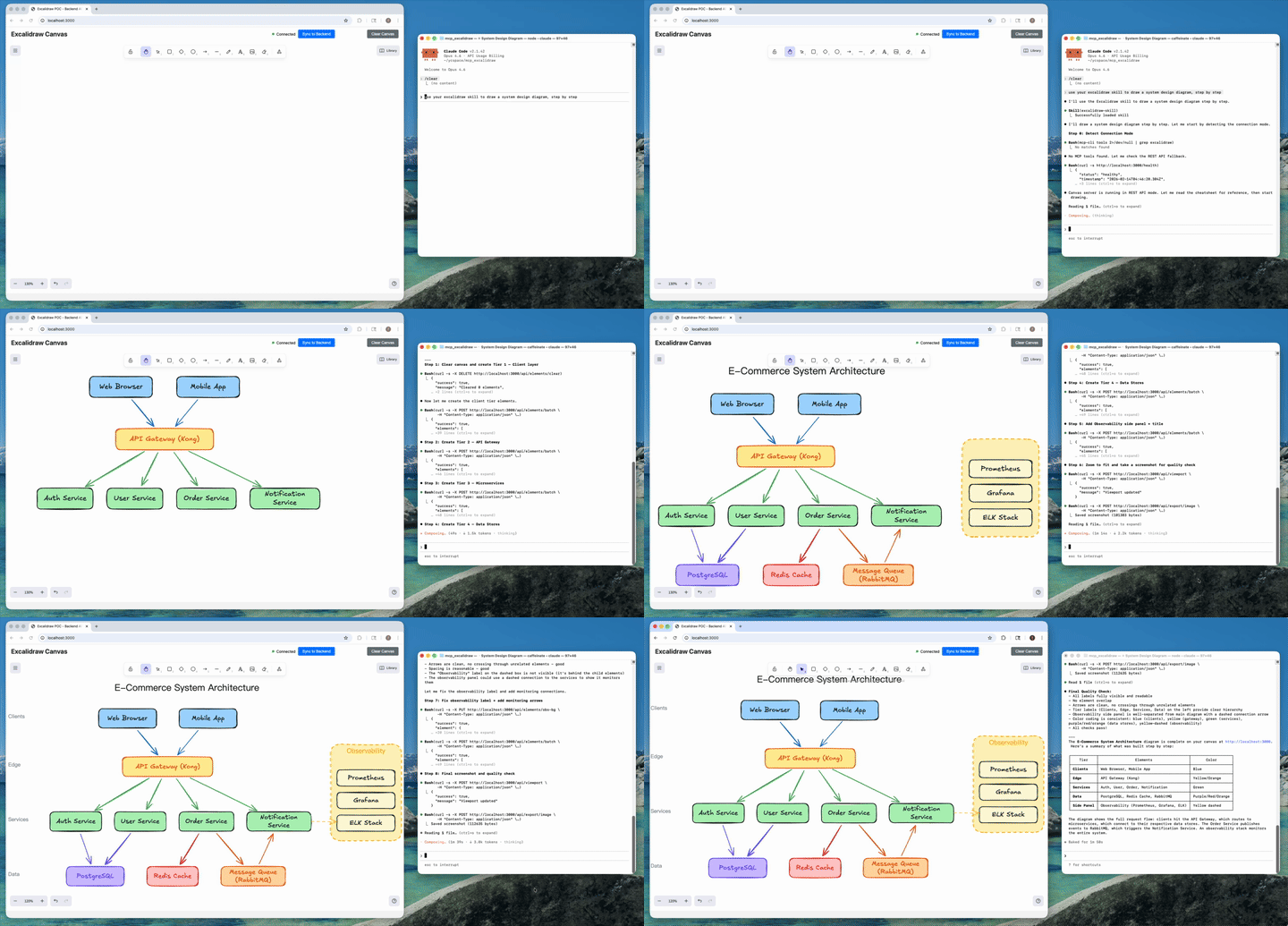
AI agent creates a complete architecture diagram from a single prompt (4x speed). Watch full video on YouTube
Ask your agent to "draw the architecture of this service" and it produces a real, editable Excalidraw diagram — not a one-shot image. Because the agent can query, screenshot, and update individual elements, it iterates until labels fit, nothing overlaps, and arrows route cleanly; then it exports the result as a .excalidraw file that lives in your repo and gets updated when the code changes.
Under the hood there are two processes, one product:
http://127.0.0.1:3000)Since v1.1 the canvas server starts itself: canvas-driving CLI commands (and the MCP server on launch) auto-spawn it if nothing is listening. status only inspects the current server state. Set EXCALIDRAW_NO_AUTOSTART=1 to opt out.
Excalidraw has an official MCP — a chat widget that streams a diagram inline from a single prompt (the model gets two tools: a format reference and create_view). It's great for "draw me a cat" in Claude or ChatGPT. We solve a different problem: giving coding agents a persistent canvas workbench.
| Official Excalidraw MCP | This Project | |
|---|---|---|
| Approach | Prompt in, diagram out (one-shot widget) | Programmatic element-level control (CLI + 27 MCP tools) |
| State | Checkpoints inside the chat widget | Live canvas with real-time sync and optional restart-safe checkpoints |
| Element CRUD | Declarative re-send with delete markers | Full create / read / update / delete per element |
| AI sees the canvas | No | describe (structured text) + screenshot (image) |
| Iterative refinement | Regenerate from checkpoint | Draw → look → adjust → look again, element by element |
| Layout tools | No | align, distribute, group / ungroup, lock, duplicate |
| File I/O | No model-facing export | .excalidraw export/import — diagrams as repo artifacts |
| Snapshot & rollback | Widget-side checkpoints | Named server-side snapshots |
| Mermaid conversion | No | mermaid / create_from_mermaid |
| Shareable URLs | Widget-only | share / export_to_excalidraw_url |
| Viewport control | Camera animations | set_viewport (zoom-to-fit all or selected elements, center on one element, manual zoom) |
| Works without MCP | No | Yes — CLI + agent skill + REST API |
| Multi-agent | Single chat | Multiple agents on the same canvas concurrently |
TL;DR — The official MCP shows Excalidraw diagrams in your chat. This project gives your coding agent a full Excalidraw workbench: a canvas it can draw on, inspect, refine, and commit to your repo.
Current package version: 2.2.0. The current release line is v2.2 — Editable PNGs & Durable Canvas.
--embed-scene / embedScene: true embeds the scene in a PNG (PNG only, off by default). Import or render it later — one .excalidraw.png is both the README preview and editable source. (#132, thanks @FortniteGamer747)EXCALIDRAW_DATA_DIR to keep elements, image files and named snapshots across restarts. Each change is saved before it is acknowledged; one process owns the directory at a time. Unset, the canvas stays in-memory. Native embeddable, iframe and magicframe elements sync in durable mode too. (#130, thanks @IndelibleVivi; #133)share / export_to_excalidraw_url at your own instance with EXCALIDRAW_SHARE_UPLOAD_URL and EXCALIDRAW_SHARE_BASE_URL. Defaults still go to excalidraw.com. (#138, thanks @j2ali)get_selection (MCP) and selection (CLI) return selected element IDs. With several tabs, the tab that last changed the selection wins; selection is in memory only. (#149, thanks @Totopo27; requested in #147 by @fgeierst)EXCALIDRAW_EXPORT_DIR after resolving symlinks; broken symlinks and file types inappropriate for the tool are refused. The CLI is unaffected. (#148, fixes #146 reported by @niananto)query_elements preserves boolean and numeric filter types. (#126, thanks @sanjayy0612)?element= links scroll after the scene loads; copy link, copy as SVG and wrap in frame preserve dark mode. (#142, #141, #143, thanks @tomerSP)invalid order key. (#115, thanks @fernandovmacedo)screenshot, export_to_image and get_canvas_screenshot render inside the canvas server: Excalidraw's own SVG exporter runs under Node (jsdom) and resvg rasterizes to PNG with bundled Excalifont/Virgil/Cascadia/Liberation fonts. Same output as the tab, deterministic (byte-identical for an unchanged scene), a few milliseconds per render, works in CI and Docker. See Headless Rendering.dark, scale (1–4), padding, elementIds (render a subset), frameId (render one frame), embedFonts. --renderer browser keeps the old tab path.render command: npx -y mcp-excalidraw-server render docs/arch.excalidraw --out docs/arch.png renders a committed file offline — no canvas server at all.width/height now default to 100×100 in exports and renders (matching the canvas) instead of collapsing to 0×0.width: 0, height: 0 (scenes from pre-2.0 servers) is re-measured on export instead of exporting invisible. (#107)server/discover, per-request _meta envelopes); legacy initialization-based clients keep working unchanged. (#98, thanks @anxkhn).excalidraw / .excalidraw.md files contain real Excalidraw elements — shape and arrow labels as bound text, live arrow bindings — so they open correctly on excalidraw.com and in the Obsidian Excalidraw plugin instead of losing labels (or being re-saved empty by the plugin). (#93, #95).excalidraw.md files import correctly (#94, thanks @cason-miles); ## Text Elements block references now cover shape labels too.containerId, textAlign, originalText, ...) pass through the server intact — fixes browser-edited text vanishing after sync. (#92, thanks @junuxyz)set_viewport gains scrollToElementIds (multi-element zoom-to-fit) and viewportZoomFactor, with strict single-mode validation and real error reporting. (#86, thanks @acercyc)npx -y mcp-excalidraw-server add|query|describe|screenshot|export|import|mermaid|snapshot|arrange|share|... — JSON on stdout, meaningful exit codes. Also installed as the excalidraw-canvas alias.EXCALIDRAW_NO_AUTOSTART=1.apply: multi-op patches ({"create":[...],"update":[{"id":"a","set":{...}}],"delete":[...]}) in a single invocation.install-skill: npx -y mcp-excalidraw-server install-skill --dir <skills-root> copies the portable agent skill into the directory your agent chooses (project or global), cleanly replacing older versions.query --filter locked=true --filter label.text=API — booleans, numbers, and nested keys work.src/core/) behind both the CLI and MCP server; canvas groupIds are the source of truth for grouping (ungroup now works across restarts); node-fetch dropped; MCP version metadata derived from package.json; canvas server writes a pidfile and shuts down cleanly.The only prerequisite is Node.js ≥ 20.
Copy this into your coding agent — it installs the portable skill into the project/global skill directory that agent already knows how to use, then verifies it by drawing a test diagram:
Install the Excalidraw canvas toolkit so you can draw diagrams for me:

1. Choose the right skill directory for this agent and scope (project or global).
2. Run: npx -y mcp-excalidraw-server install-skill --dir <that-skills-directory>
3. Read the installed excalidraw-skill/SKILL.md so you know the drawing workflow.
4. Start the canvas with: npx -y mcp-excalidraw-server start
   then tell me I can open http://127.0.0.1:3000 to watch you draw (optional).
5. Draw a small test diagram — two labeled boxes connected by an arrow — take a
   screenshot, and show me the result to confirm everything works.
| You are... | Install with | Then |
|---|---|---|
| Modern coding agent | npx -y mcp-excalidraw-server install-skill --dir <skills-root> | Let the agent choose project/global scope and its skill root |
| Claude Code shortcut | npx -y mcp-excalidraw-server install-skill | Installs to ~/.claude/skills for backward compatibility |
| Codex shortcut | npx -y mcp-excalidraw-server install-skill --target codex | Installs to ~/.codex/skills for backward compatibility |
| MCP client user (Claude Desktop, Cursor, ...) | Add the npx config below | See Configure MCP Clients |
| CLI user / scripting | Nothing — npx -y mcp-excalidraw-server <command> | See CLI Reference |
| Contributor / from source | git clone + npm ci + npm run build | See Quick Start (From Source / Docker) |
There is no separate server setup: any drawing command auto-starts the local canvas server on http://127.0.0.1:3000.
No clone, no config:
# start the canvas (drawing commands auto-start it too) and open it
npx -y mcp-excalidraw-server start
open http://127.0.0.1:3000   # optional: watch live (only mermaid needs the tab)

# draw something
echo '[
  {"id":"api","type":"rectangle","x":100,"y":100,"width":160,"height":80,"text":"API Server","backgroundColor":"#a5d8ff"},
  {"id":"db","type":"rectangle","x":400,"y":100,"width":160,"height":80,"text":"Database","backgroundColor":"#99e9f2"},
  {"type":"arrow","x":0,"y":0,"startElementId":"api","endElementId":"db","text":"SQL"}
]' | npx -y mcp-excalidraw-server add

# let your agent see its work
npx -y mcp-excalidraw-server describe
npx -y mcp-excalidraw-server screenshot --out diagram.png

# diagrams as repo artifacts
mkdir -p docs
npx -y mcp-excalidraw-server export --out docs/architecture.excalidraw

# or straight into an Obsidian vault (.md extension → Obsidian Excalidraw plugin format)
npx -y mcp-excalidraw-server export --out ~/vault/diagrams/architecture.excalidraw.md
Give your agent the full playbook:
npx -y mcp-excalidraw-server install-skill --dir <skills-root>
npx -y mcp-excalidraw-server install-skill --print-source  # inspect bundled source path
Security note: The canvas server binds
127.0.0.1only by default. If you expose it on a network interface (HOST=0.0.0.0), put network-level access controls in front — the API has no built-in authentication.
The skill at skills/excalidraw-skill/ teaches agents the full workflow — layout planning, the screenshot-verify-fix quality loop, arrow routing, anti-patterns, snapshots, and file I/O. It works through the CLI (preferred, zero setup), MCP tools (if configured), or raw REST — in that order.
npx -y mcp-excalidraw-server install-skill --dir <skills-root>
The command copies the bundled excalidraw-skill/ directory into <skills-root>/excalidraw-skill. Let your agent choose whether that root should be project-level or global. Re-running install-skill upgrades in place — it replaces the target directory, so files removed upstream don't linger.
Where the skill shines:
.excalidraw files into the repo, commit them, re-import + refine when the architecture changes..excalidraw.md extension and the file opens natively in the Obsidian Excalidraw plugin — no compatibility-mode warning, block references and sync work; import reads both plain and lz-string-compressed vault files back.npx -y mcp-excalidraw-server <command> or (after npm i -g mcp-excalidraw-server) excalidraw-canvas <command>.
Conventions: JSON results on stdout — except describe (plain text by design) and raw-content output when --out is omitted (export prints the scene JSON, screenshot --format svg prints SVG). Diagnostics on stderr. Exit codes: 0 ok, 1 error, 2 usage, 3 canvas unreachable, 4 browser tab required (only mermaid and screenshot --renderer browser). Canvas URL from EXPRESS_SERVER_URL or --url. Canvas-driving commands auto-start the server; status only reports current state. Explicit start overrides the EXCALIDRAW_NO_AUTOSTART=1 opt-out (it's user intent, not auto-start).
| Command | Description |
|---|---|
start / stop / status | Manage the canvas server (detached; stop identity-checks the live server via /health before signaling) |
add [file|-] | Batch-create elements from a JSON array (file or stdin); --one '{...}' for a single element |
apply [file|-] | One-call multi-op patch: {"create":[...],"update":[{"id":"a","set":{...}}],"delete":["id"]} |
get <id> / delete <id...> | Read / remove elements |
update <id> --set '{...}' | Update an element |
query | --type, --bbox x0,y0,x1,y1, --filter k=v (typed, nested keys), --filter-json '{...}' |
selection | Current canvas selection: selectedElementIds and count |
describe | AI-readable scene summary (plain text) |
screenshot | Render the canvas headless (no browser tab): --out f.png|f.svg, --format png|svg, --scale 1-4, --dark, --padding N, --no-background, --ids a,b, --frame <id>, --no-embed-fonts, --embed-scene (editable PNG); --renderer browser uses an open tab instead |
render [file|-] | Render a .excalidraw / .excalidraw.md / embedded-scene PNG file to PNG/SVG offline — no canvas server, same flags as screenshot |
export [--out f.excalidraw] [--format json|obsidian] / import [file|-] [--replace] | Scene file I/O — a .md out path writes Obsidian's .excalidraw.md format; import also reads PNGs with embedded scenes |
mermaid [file|-] | Mermaid → canvas (browser tab required) |
snapshot save|list|restore <name> | Named snapshots |
arrange align|distribute|group|ungroup|lock|unlock|duplicate | Layout ops (--ids a,b,c, --to left|horizontal|...) |
share | Encrypted upload → shareable URL (excalidraw.com by default; configurable self-hosted target) |
clear --yes | Wipe the canvas |
install-skill [--dir <skills-root>] | Install the portable agent skill |
Labels and arrow bindings use the agent-friendly format everywhere in the CLI: "text" on any shape, "startElementId"/"endElementId" on arrows — normalization is automatic. For a native frame, add a "type":"frame" element with a "name" and set "frameId" on its children.
Since v2.1, screenshot, export_to_image and get_canvas_screenshot render without a browser. Inside the canvas server, the scene is prepared with the canvas tab's own code (label sizing, wrapping and centering, defaults) and Excalidraw's own exportToSvg draws it under Node (a small jsdom shim supplies the DOM it expects, and text is measured with the bundled fonts' real glyph widths); resvg rasterizes the SVG to PNG. The output is what the Excalidraw canvas draws — same SVG structure as a browser export, text within half a pixel — and it is deterministic: an unchanged scene renders to byte-identical SVG and PNG, so committed images stay diff-clean.
assets/fonts (all SIL OFL 1.1; see assets/fonts/LICENSES.md). SVGs embed the faces they use, so they look right in browsers, GitHub and editors. Nunito, Lilita One and Comic Shanns render with the closest bundled face for now. Text in other scripts (CJK, emoji) falls back to the machine's fonts, with a warning.background, dark, scale 1–4 (PNG), padding, elementIds or frameId to render a subset, embedFonts (CLI/REST only), embedScene (PNG only, default false). EXCALIDRAW_RENDER_MAX_DIM (default 8192) caps the PNG's largest side.--renderer browser asks an open canvas tab to render instead (the pre-2.1 path). Useful for a second opinion; it is slower and the tab's unsynced edits are discarded first.render docs/arch.excalidraw --out docs/arch.png needs no canvas server at all — a natural fit for CI jobs that keep images next to committed diagrams.mermaid, create_from_mermaid) and set_viewport.The renderer bundle is built by npm run build:server (dist/render/excalidraw-node.mjs); npm run test:render exercises it without a browser.
The MCP server runs over stdio. Since v1.1 the simplest config is npx — no clone, no absolute paths, and the canvas auto-starts. If your MCP client and canvas are on different machines, start with Remote Canvas and HTTP-Only MCP Clients.
| Variable | Description | Default |
|---|---|---|
EXPRESS_SERVER_URL | URL of the canvas server | http://127.0.0.1:3000 |
ENABLE_CANVAS_SYNC | Enable real-time canvas sync | true |
EXCALIDRAW_NO_AUTOSTART | Set 1 to disable canvas auto-start | (unset) |
EXCALIDRAW_EXPORT_DIR | Directory MCP file tools may read and write (symlinks resolved; .excalidraw, .json, .md, .png, .svg files only) | current working dir |
EXCALIDRAW_RENDER_MAX_DIM | Largest side of a headless PNG, in pixels | 8192 |
EXCALIDRAW_PNG_WORKER_TIMEOUT_MS | Timeout for the isolated PNG rasterizer, in milliseconds | 120000 |
EXCALIDRAW_DATA_DIR | Optional local durable-state directory | (unset; in-memory) |
EXCALIDRAW_SHARE_UPLOAD_URL | Where share uploads the encrypted scene (an excalidraw-json POST endpoint) | https://json.excalidraw.com/api/v2/post/ |
EXCALIDRAW_SHARE_BASE_URL | Excalidraw app that share links open in | https://excalidraw.com |
PORT / HOST | Canvas server bind address | 3000 / 127.0.0.1 |
LOG_LEVEL | Log verbosity (error, warn, info, debug) | info |
LOG_FILE_PATH | Log file location | ~/Library/Logs/excalidraw-mcp.log (macOS), $XDG_STATE_HOME/excalidraw-mcp/excalidraw.log (Linux), %LOCALAPPDATA%\Excalidraw-MCP\excalidraw.log (Windows) |
There are two separate connections:
EXPRESS_SERVER_URL points to the canvas server's REST API. The browser UI uses a WebSocket on that same server and port.The canvas HTTP URL is not an MCP HTTP endpoint. This project does not expose MCP at /mcp or /sse; those paths are not part of its transport.
To keep a remote canvas on its default loopback-only binding, run the MCP process on your workstation and tunnel the canvas port to that machine:
# Keep this running. The remote canvas remains bound to remote 127.0.0.1:3000.
ssh -N -L 13000:127.0.0.1:3000 user@canvas-host
Then configure the local MCP process against the local end of the tunnel. The URL port must match the first port in the SSH command:
{
  "mcpServers": {
    "excalidraw": {
      "command": "npx",
      "args": ["-y", "mcp-excalidraw-server"],
      "env": {
        "EXPRESS_SERVER_URL": "http://127.0.0.1:13000",
        "EXCALIDRAW_NO_AUTOSTART": "1"
      }
    }
  }
}
Start the tunnel before the MCP client and leave it open while tools run. In this example the MCP process and browser run on the workstation, so both can use http://127.0.0.1:13000; the WebSocket also follows the page's host and port. 127.0.0.1 always means the machine or container running that process. If the MCP process runs in a container, the workstation's loopback tunnel is not that container's loopback: run the tunnel in the same network namespace as the MCP process, or configure a canvas address that is reachable from the container and protect any listener exposed beyond loopback.
If an Open WebUI, LM Studio, or other MCP client setup accepts only HTTP-based MCP connections, it cannot use the canvas URL in place of MCP. It needs a separately configured stdio-to-HTTP MCP bridge in front of this stdio server; bridge setup and client transport support are outside this project.
As a direct-LAN alternative, run the canvas process with an explicit non-loopback bind, for example from a built source checkout: HOST=0.0.0.0 PORT=3000 node dist/server.js. Then set the MCP process's EXPRESS_SERVER_URL to http://canvas-host:3000. The canvas container already binds HOST=0.0.0.0, and Compose publishes 3000:3000; scope that port mapping or bind it to a trusted interface when possible. The CLI start command only auto-starts a loopback canvas, so it is not the way to create this LAN listener. The source default remains HOST=127.0.0.1.
Direct LAN access exposes the canvas REST and WebSocket APIs, which have no built-in authentication and use permissive CORS middleware. Restrict that port to a trusted network/VPN with firewall or network-level access controls; do not expose it to the public internet.
Set EXCALIDRAW_DATA_DIR to recover elements, server-known image files, and named snapshots after a canvas-server restart. From a source checkout after npm run build:
EXCALIDRAW_DATA_DIR=/absolute/private/canvas-data \
  node dist/bin.js start
When the variable is unset, behavior and API semantics remain in-memory and no durable-state directory is created. When enabled, the directory contains a versioned canvas-state-v1.json checkpoint, a blobs/ directory, and a runtime canvas-state.lock/ ownership directory. Image payloads are stored once as immutable file-id blobs at a path-safe SHA-256 of each file ID; checkpoints record a separate content SHA-256 and contain references only. A new blob is flushed and atomically published before any checkpoint is allowed to reference it. Each accepted mutation flushes a temporary checkpoint and atomically renames it before the server broadcasts or acknowledges the mutation. Serialization recursively sorts object keys, preserves scene stacking order, and stores file and named-snapshot metadata in stable ID/name order. Invalid JSON, unsupported schemas, non-regular checkpoint paths, missing blobs, and blob-integrity failures stop startup rather than replacing recoverable state with an empty scene.
Two REST rules are stricter in durable mode, and both return 409: upload an image's file (POST /api/files) before the element that references it, and never re-upload a file ID with different content. The canvas tab and import already work this way.
If the checkpoint has already been renamed into place but the final directory flush fails, the request fails without a success broadcast and further mutations are refused until restart. The published scene stays in memory so it agrees with the file on disk; the failed request may appear in the recovered scene. On Windows, Node.js does not provide directory fsync, so the store flushes file contents and uses atomic publication without claiming the same directory durability barrier.
The data-directory lock grants one process exclusive ownership of that durable state, including when servers use different ports. It stores one token-specific owner file so stale-lock reclamation cannot delete a newer owner's evidence. The existing pidfile has a separate job: it identifies a listening process for start / stop lifecycle commands. Local filesystems and one writer are supported; network filesystems, shared multi-writer access, automatic blob garbage collection, databases, and cloud persistence are out of scope.
Privacy: durable state contains the diagram and embedded image payloads. Keep the directory outside repositories and shared folders, restrict its permissions, and mount it as a private writable volume when using containers.
Config location:
~/Library/Application Support/Claude/claude_desktop_config.json%APPDATA%\Claude\claude_desktop_config.json~/.config/Claude/claude_desktop_config.jsonnpx (recommended)
{
  "mcpServers": {
    "excalidraw": {
      "command": "npx",
      "args": ["-y", "mcp-excalidraw-server"]
    }
  }
}
Local (node)
{
  "mcpServers": {
    "excalidraw": {
      "command": "node",
      "args": ["/absolute/path/to/mcp_excalidraw/dist/index.js"],
      "env": {
        "EXPRESS_SERVER_URL": "http://127.0.0.1:3000",
        "ENABLE_CANVAS_SYNC": "true"
      }
    }
  }
}
Docker
{
  "mcpServers": {
    "excalidraw": {
      "command": "docker",
      "args": [
        "run", "-i", "--rm",
        "-e", "EXPRESS_SERVER_URL=http://host.docker.internal:3000",
        "-e", "ENABLE_CANVAS_SYNC=true",
        "ghcr.io/yctimlin/mcp_excalidraw:latest"
      ]
    }
  }
}
npx (recommended)
claude mcp add excalidraw --scope user -- npx -y mcp-excalidraw-server
Tip: for coding agents, the skill + CLI often beats MCP config entirely — let the agent pick its skill root, then run
npx -y mcp-excalidraw-server install-skill --dir <skills-root>.
Local (node) - User-level (available across all projects):
claude mcp add excalidraw --scope user \
  -e EXPRESS_SERVER_URL=http://127.0.0.1:3000 \
  -e ENABLE_CANVAS_SYNC=true \
  -- node /absolute/path/to/mcp_excalidraw/dist/index.js
Docker
claude mcp add excalidraw --scope user \
  -- docker run -i --rm \
  -e EXPRESS_SERVER_URL=http://host.docker.internal:3000 \
  -e ENABLE_CANVAS_SYNC=true \
  ghcr.io/yctimlin/mcp_excalidraw:latest
Manage servers:
claude mcp list              # List configured servers
claude mcp remove excalidraw # Remove a server
Config location: .cursor/mcp.json in your project root (or ~/.cursor/mcp.json for global config)
npx (recommended)
{
  "mcpServers": {
    "excalidraw": {
      "command": "npx",
      "args": ["-y", "mcp-excalidraw-server"]
    }
  }
}
Docker
{
  "mcpServers": {
    "excalidraw": {
      "command": "docker",
      "args": [
        "run", "-i", "--rm",
        "-e", "EXPRESS_SERVER_URL=http://host.docker.internal:3000",
        "-e", "ENABLE_CANVAS_SYNC=true",
        "ghcr.io/yctimlin/mcp_excalidraw:latest"
      ]
    }
  }
}
npx (recommended)
codex mcp add excalidraw -- npx -y mcp-excalidraw-server
Docker
codex mcp add excalidraw \
  -- docker run -i --rm \
  -e EXPRESS_SERVER_URL=http://host.docker.internal:3000 \
  -e ENABLE_CANVAS_SYNC=true \
  ghcr.io/yctimlin/mcp_excalidraw:latest
Manage servers:
codex mcp list              # List configured servers
codex mcp remove excalidraw # Remove a server
Config location: ~/.config/opencode/opencode.json or project-level opencode.json
{
  "$schema": "https://opencode.ai/config.json",
  "mcp": {
    "excalidraw": {
      "type": "local",
      "command": ["npx", "-y", "mcp-excalidraw-server"],
      "enabled": true
    }
  }
}
Config location: ~/.gemini/antigravity/mcp_config.json
{
  "mcpServers": {
    "excalidraw": {
      "command": "npx",
      "args": ["-y", "mcp-excalidraw-server"]
    }
  }
}
host.docker.internal to reach the canvas server running on your host machine. On Linux, you may need --add-host=host.docker.internal:host-gateway or use 172.17.0.1. The Docker MCP image sets EXCALIDRAW_NO_AUTOSTART=1 (it has no frontend build) — run the canvas as its own container.EXCALIDRAW_DATA_DIR for restart recovery of elements, server-known image files, and named snapshots (see Durable canvas state). Use export to save a standalone .excalidraw file; taking a snapshot alone does not provide restart recovery in the default in-memory mode.| Category | Tools |
|---|---|
| Element CRUD | create_element, get_element, update_element, delete_element, query_elements, batch_create_elements, duplicate_elements |
| Layout | align_elements, distribute_elements, group_elements, ungroup_elements, lock_elements, unlock_elements |
| Scene Awareness | describe_scene, get_canvas_screenshot, get_selection |
| File I/O | export_scene, import_scene, export_to_image, export_to_excalidraw_url, create_from_mermaid |
| State Management | clear_canvas, snapshot_scene, restore_snapshot |
| Viewport | set_viewport |
| Design Guide | read_diagram_guide |
| Resources | get_resource |
get_selection / CLI selection return selectedElementIds and count. Select elements in an open canvas tab first; among connected tabs, the last selection change wins. With no selection, the list is empty. Selection is not persisted, even in durable mode.
MCP file paths must stay inside EXCALIDRAW_EXPORT_DIR after symlink resolution; broken symlinks are refused. export_scene accepts .excalidraw, .json and .md; import_scene also accepts embedded-scene .png; export_to_image accepts .png or .svg matching its format. These restrictions do not apply to CLI file I/O.
Full schemas are discoverable via tools/list or in skills/excalidraw-skill/references/cheatsheet.md.
Viewport group focus can tune framing with viewportZoomFactor:
{
  "scrollToElementIds": ["id1", "id2", "id3"],
  "viewportZoomFactor": 0.85
}
scrollToElementIds zooms to fit every requested element, while scrollToElementId centers one element without changing the current zoom. Specify only one viewport mode per request. viewportZoomFactor accepts values greater than 0 and at most 1.
From source (Node >= 20):
npm ci
npm run build
PORT=3000 npm run canvas          # canvas server (terminal 1)
node dist/index.js                # MCP server over stdio (terminal 2, usually launched by your MCP client)
node dist/bin.js status           # or drive the CLI straight from the build
Docker canvas server:
docker run -d -p 3000:3000 --name mcp-excalidraw-canvas ghcr.io/yctimlin/mcp_excalidraw-canvas:latest
MCP server image: ghcr.io/yctimlin/mcp_excalidraw:latest (stdio; point EXPRESS_SERVER_URL at the canvas container).
npx -y mcp-excalidraw-server start
npx -y mcp-excalidraw-server status
npx -y mcp-excalidraw-server add --one '{"type":"rectangle","x":100,"y":100,"width":300,"height":200}'
npx -y mcp-excalidraw-server describe
curl http://127.0.0.1:3000/health
npm test builds the server and runs seven suites, each also available on its own:
npm test
npm run test:mcp      # MCP stdio wire protocol (see below)
npm run test:bind     # default loopback bind, duplicate-start refusal
npm run test:render   # headless renderer, export order keys, scene-prep stability
npm run test:state    # atomic import and snapshot restore, sync validation
npm run test:durable  # restart recovery, checkpoint failures, directory ownership
npm run test:share    # default and self-hosted share targets
npm run test:paths    # MCP file containment, symlinks, allowed file types
These Chromium tests build the app and start an isolated localhost server. They
cover frame reload/reconnect, mixed scenes, failed-load sync protection, stale
responses, clearing/deletion, Mermaid imports, SVG export, dropped images, and
text measurement after fonts load. They refuse to reuse an existing server; set
CANVAS_TEST_PORT if port 51910 is occupied.
npx playwright install chromium
npm run type-check:frontend
npm run test:canvas
Drives dist/index.js with raw JSON-RPC frames and checks both protocol eras:
server/discover, tool calls sent without any handshake, refusal of unsupported
protocol revisions and malformed _meta envelopes, and the legacy initialize
path.
npm run test:mcp
List tools:
npx @modelcontextprotocol/inspector --cli \
  -e EXPRESS_SERVER_URL=http://127.0.0.1:3000 \
  -e ENABLE_CANVAS_SYNC=true -- \
  node dist/index.js --method tools/list
Create a rectangle:
npx @modelcontextprotocol/inspector --cli \
  -e EXPRESS_SERVER_URL=http://127.0.0.1:3000 \
  -e ENABLE_CANVAS_SYNC=true -- \
  node dist/index.js --method tools/call --tool-name create_element \
  --tool-arg type=rectangle --tool-arg x=100 --tool-arg y=100 \
  --tool-arg width=300 --tool-arg height=200
If you use agent-browser for UI checks:
agent-browser install
agent-browser open http://127.0.0.1:3000
agent-browser wait --load networkidle
agent-browser screenshot /tmp/canvas.png
The official Excalidraw MCP is a chat widget: you prompt, it streams a diagram into the conversation (the model gets two tools). This project is a workbench for coding agents: a persistent local canvas with element-level create/read/update/delete, layout tools, screenshots the model can see, snapshots, and .excalidraw file I/O — driveable via CLI, MCP, or REST. See the full comparison table.
Claude Code, Claude Desktop, Cursor, Codex CLI, OpenCode, and Google Antigravity are documented below — but any agent that can run shell commands can use the CLI, any MCP client can use the MCP server, and anything else (LangChain, custom apps) can use the REST API.
Yes — that's the core feature. describe returns a structured text summary (ids, positions, labels, connections) and screenshot returns a rendered PNG. Agents use both to catch truncated labels, overlaps, and bad arrow routing, then fix them element by element.
No. Screenshots and PNG/SVG exports render headless inside the canvas server (see Headless Rendering), and everything else — creating, querying, updating elements, .excalidraw files — never needed one. Only two things still need an open tab: Mermaid conversion (it lays out in the browser) and viewport control (it moves a camera). The CLI exits with code 4 and tells you when that is the case. Opening the URL is still the way for a human to watch the agent draw.
By default the canvas is in-memory (restart = blank canvas). Set EXCALIDRAW_DATA_DIR for automatic local restart recovery of elements, server-known image files, and named snapshots. Portable, reviewable artifacts should still be exported as .excalidraw files and committed to your repo when appropriate.
share encrypts the scene locally with AES-GCM before uploading; the decryption key is only in the URL fragment, which excalidraw.com's server never sees. Anyone you give the full link to can view the diagram.
Yes. Set EXCALIDRAW_SHARE_UPLOAD_URL to your storage backend's scene endpoint and EXCALIDRAW_SHARE_BASE_URL to your Excalidraw app. Any backend that speaks the excalidraw-json API works, for example alswl/excalidraw-storage-backend, whose endpoint is <storage>/api/v2/scenes/:
EXCALIDRAW_SHARE_UPLOAD_URL=https://draw.example.com/api/v2/scenes/ \
EXCALIDRAW_SHARE_BASE_URL=https://draw.example.com \
  npx -y mcp-excalidraw-server share
Your app must load #json= links from that same backend (for the alswl fork: VITE_APP_BACKEND_V2_GET_URL).
No API key is required. Core drawing runs locally under MIT license. Outbound traffic is limited to the canvas page loading Excalidraw's fonts from the esm.sh CDN and the optional share upload to excalidraw.com (or your own instance, see above). The CLI, MCP server and headless renderer make no other network calls.
Yes — that's the recommended path for coding agents: npx -y mcp-excalidraw-server install-skill --dir <skills-root> and the agent drives everything through the CLI. MCP configuration is only needed for chat clients like Claude Desktop.
Yes, if the MCP process can reach the canvas server. Keep the MCP process on the machine that launches it and set EXPRESS_SERVER_URL to that canvas location. The canvas HTTP/WebSocket URL is not an MCP endpoint; for an HTTP-only MCP client, configure a separate stdio-to-HTTP bridge. See Remote Canvas and HTTP-Only MCP Clients for a loopback-preserving SSH tunnel and matching JSON configuration.
status, auto-start is disabled (EXCALIDRAW_NO_AUTOSTART=1), or EXPRESS_SERVER_URL points at a non-loopback host. Run start explicitly or fix the env.mermaid and screenshot --renderer browser need an open tab — open http://127.0.0.1:3000 in a browser and retry, or drop --renderer browser to render headless.EXPRESS_SERVER_URL points at the running canvas server (status shows the URL in use).render use the bundled fonts and are unaffected.LOG_FILE_PATH).EXCALIDRAW_DATA_DIR for atomic local restart recovery; the default remains in-memory.mermaid / create_from_mermaid lay out the diagram in the frontend. Image export and screenshots are headless since v2.1.Contributions welcome!
npm run type-check
npm run build
npm run cli -- status      # run the CLI from the local build
npm run sync:skills        # after editing skills/excalidraw-skill, sync the repo-local agent copy
Bug reports and pull requests are welcome on GitHub issues. If this project helps you, a ⭐ helps others find it.
MIT © yctimlin — not affiliated with the Excalidraw team. Excalidraw is its own MIT-licensed project; this toolkit builds on it with love.
Links: npm package · GitHub · Issues · Demo video
If you're interested in what comes next, follow me on X: @ycalintim.
Claim this server with your GitHub account to request manual ownership verification.
Link to the catalog listing for Excalidraw MCP server for drawing editable diagrams on a live canvas from your README. This badge does not certify ownership, compatibility or security.
[](https://awesome-mcp.com/servers/mcp_excalidraw)Public repository statistics could not be verified. Check the configured source address; unavailable counts are not zero.
Separate sources, scopes and periods. Never combined or treated as installations, active users or security reviews.
No reviewed package or image identity; download statistics are not listed yet.
Alternative and complementary servers in the same category
A directory listing describing a cancellation-letter and mailing-address service. The configured public GitHub repository returned 404 during source verification.

A hosted MCP service for browsing and searching through Singapore mobile-network proxies.

A directory listing describing a Markdown-to-PDF service. The configured public GitHub repository returned 404 during source verification.