


A directory listing describing a cancellation-letter and mailing-address service. The configured public GitHub repository returned 404 during source verification.
Repository stats unavailable
Developer Tools
MCPHub connects local and remote MCP servers and exposes their capabilities through unified, routable MCP endpoints with authentication and centralized operations.
MCPHub: self-hosted MCP gateway and control plane is cataloged as an MCP server attributed to samanhappy. MCPHub connects local and remote MCP servers and exposes their capabilities through unified, routable MCP endpoints with authentication and centralized operations. It is categorized under developer tools. See the capability inspector for recorded interfaces and their independent review status; consult upstream documentation for the current interface.
Installation configuration is not reviewed. No executable setup is offered for this entry; inspect the source repository before proceeding.
Catalog license label: Apache 2.0 License. Check the source repository's current license and terms before using, modifying or distributing this software.
Capability definitions are not reviewed. Unreviewed imports are not exposed as trusted interfaces.
No reviewed records to display. This does not establish that upstream lacks this capability.
No reviewed records to display. This does not establish that upstream lacks this capability.
No reviewed records to display. This does not establish that upstream lacks this capability.
Email delivery is not connected. This page does not collect email addresses or create subscriptions.
Browse the registry for current listings instead.
Reviews for MCPHub: self-hosted MCP gateway and control plane are not available yet
Review publishing and storage are not connected. This page does not collect or publish ratings or comments, including after sign-in.
MCPHub supports SSE, Streamable HTTP, and stdio for connecting local and remote MCP servers.
Yes, MCP endpoints require authentication by default to prevent accidental exposure, and unauthenticated access can be enabled by disabling bearer authentication.
Yes, setting DISABLE_WEB=true runs only the backend, API, and MCP endpoints without the bundled dashboard UI.
README.md · 6f9b1cafde47 · Fetched 2026-11-13 09:42:25 UTC
Original upstream text, without AI rewriting. Scripts, forms and unsafe links are filtered for safety.
Showing the last retrieved documentation snapshot; check the source for current changes.
An open-source, self-hosted MCP gateway and control plane for connecting, controlling, and operating MCP servers.





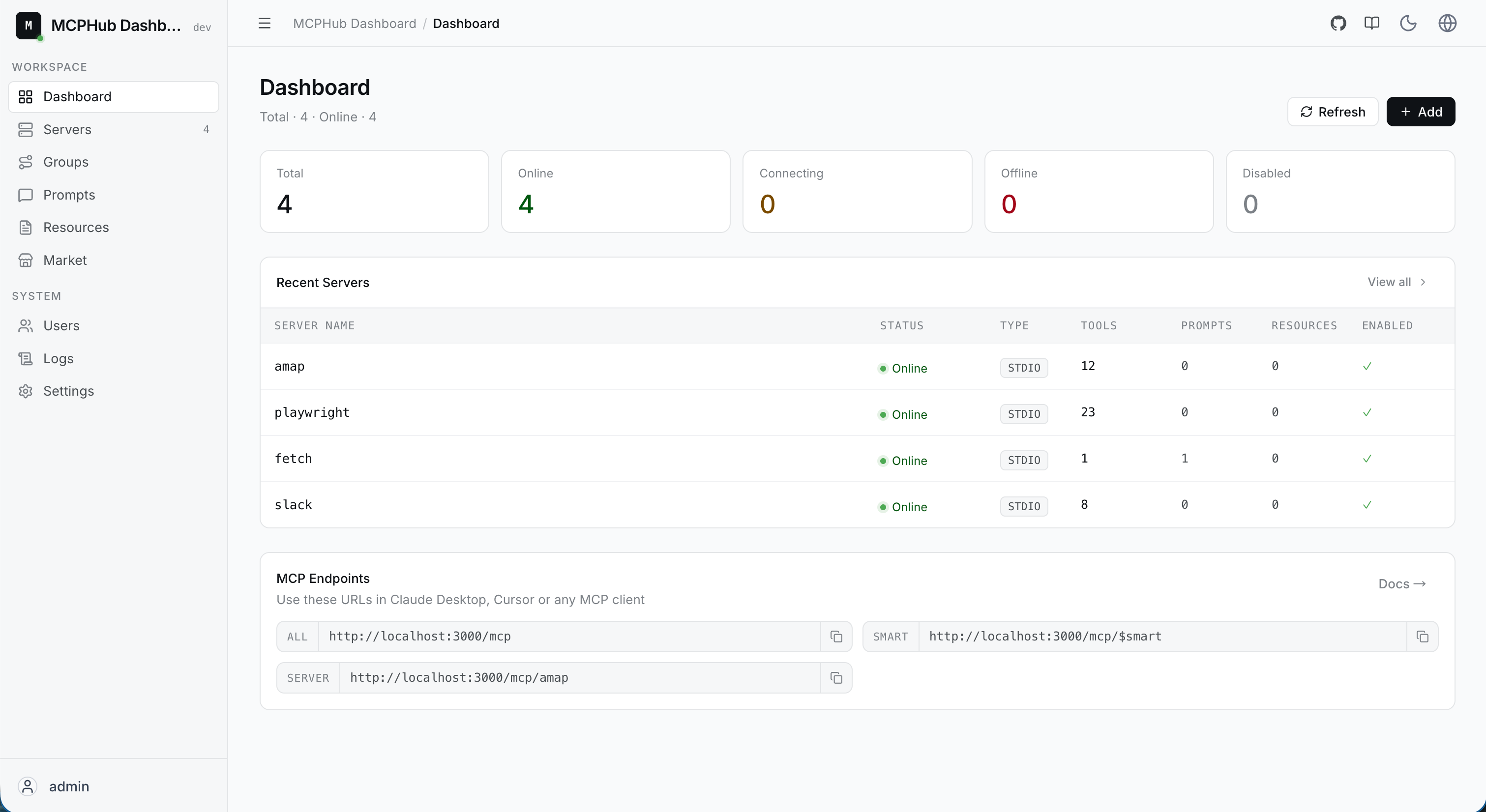
MCPHub provides a unified control point between AI clients and MCP servers. Connect local and remote MCP servers once, organize and route their capabilities through stable endpoints, control access with authentication, scoped credentials, and per-user visibility, and operate everything with centralized logs, activity tracking, and health monitoring.
It works with MCP clients such as Claude Code, Cursor, Cherry Studio, OpenWebUI, and other MCP-compatible applications.
>=22.0.0 and pnpm 10.12.4 — only needed to run from source or develop locally (see Local Development)docker run -p 3000:3000 -v ./data:/app/data samanhappy/mcphub
Open http://localhost:3000 and log in with username admin. On first launch, if no ADMIN_PASSWORD environment variable is set, a random password is generated and printed to the server logs.
Settings, users, and credential bindings persist in ./data by default.
Want your own servers? Before the first launch, create data/mcp_settings.json (see Configuration). After launch, add servers in the dashboard or edit the existing file and restart MCPHub.
Create data/mcp_settings.json before the first launch:
{
  "mcpServers": {
    "time": {
      "command": "npx",
      "args": ["-y", "time-mcp"]
    },
    "fetch": {
      "command": "uvx",
      "args": ["mcp-server-fetch"]
    }
  }
}
📖 See Configuration Guide for full options including OAuth, environment variables, and more.
See Start with Docker for the copy-paste command. Keep ./data mounted so settings, users, and credential bindings survive container recreation.
Two image variants are published under samanhappy/mcphub:
latest — the default image. Includes Node.js/pnpm, Python, uv/uvx, Git, and build tools. Covers most MCP servers.latest-full — the extended image. Adds Rust toolchain (Cargo/rustc), Docker Engine, and Playwright browsers (Chrome + Firefox, amd64 only). Use this for Rust-based servers or container-in-container workflows. Larger download.See Docker Setup for build options and Docker-in-Docker configuration.


Database mode requires a persistent MCPHUB_CREDENTIAL_ENCRYPTION_KEY or an existing key file; it no longer generates a local key automatically. Before replacing a working container, back up its original key and preserve the same value in deployment secrets. A database backup alone cannot recover encrypted credentials if the key is lost. See the Credential Key Upgrade and Recovery Guide for working deployments and recovery after a failed upgrade.
Open http://localhost:3000 (see Start with Docker for login details). You can also pre-set the password:
# Docker: set admin password via environment variable
docker run -p 3000:3000 -v ./data:/app/data -e ADMIN_PASSWORD=your-secure-password samanhappy/mcphub
Tip: Change the admin password after first login for security.
Headless mode: Set
DISABLE_WEB=trueto skip serving the bundled dashboard UI and run MCPHub with only the backend/API and MCP endpoints. This is useful when you want to manage servers directly frommcp_settings.json.
Connect AI clients (Claude Desktop, Cursor, etc.) via:
http://localhost:3000/mcp           # All servers
http://localhost:3000/mcp/{group}   # Specific group
http://localhost:3000/mcp/{server}  # Specific server
http://localhost:3000/mcp/$smart    # Smart routing
http://localhost:3000/mcp/$smart/{group}  # Smart routing within group
Set SMART_ROUTING_PATH=my_smart to use /mcp/my_smart (and /mcp/my_smart/{group}) without $. Restart to apply; /mcp/$smart remains supported. Include BASE_PATH before /mcp when configured. The custom segment must not match an existing server name, group name or group ID.
Security note: MCP endpoints require authentication by default to prevent accidental exposure. To allow unauthenticated MCP access, disable Enable Bearer Authentication in the Keys section. Skip Authentication only affects dashboard login. Use only in trusted environments.
📖 See API Reference for detailed endpoint documentation.
| Topic | Description |
|---|---|
| Quick Start | Get started in 5 minutes |
| Configuration | MCP server configuration options |
| Database Mode | PostgreSQL setup for production |
| OAuth | OAuth 2.0 client and server setup |
| Smart Routing | AI-powered tool discovery |
| MCP Apps | Interactive Apps transparent proxy |
| CLI Guide | Manage and call the hub from a terminal |
| Docker Setup | Docker deployment guide |
git clone https://github.com/samanhappy/mcphub.git
cd mcphub
pnpm install
pnpm dev
Local development uses admin / admin123 and stores its writable settings copy at data/mcp_settings.dev.json, so the repository mcp_settings.json stays credential-free.
For Windows users, start backend and frontend separately:
pnpm backend:dev,pnpm frontend:dev
📖 See Development Guide for detailed setup instructions.
mcp_settings.json by default; PostgreSQL via TypeORM with pgvector for Smart Routing@node-oauth/oauth2-server); optional Better Auth for GitHub/Google loginRunning MCPHub in production?
Work directly with the maintainer on production architecture, OAuth/OIDC, identity and access control, credential management, audit, Kubernetes, and HA readiness.
Contributions welcome! See our Discord community for discussions and support.

Chinese users can also support via WeChat Pay — see 中文版.
Licensed under the Apache 2.0 License.
Claim this server with your GitHub account to request manual ownership verification.
Link to the catalog listing for MCPHub: self-hosted MCP gateway and control plane from your README. This badge does not certify ownership, compatibility or security.
[](https://awesome-mcp.com/servers/mcphub)Public repository statistics could not be verified. Check the configured source address; unavailable counts are not zero.
Separate sources, scopes and periods. Never combined or treated as installations, active users or security reviews.
No reviewed package or image identity; download statistics are not listed yet.
Alternative and complementary servers in the same category
A directory listing describing a cancellation-letter and mailing-address service. The configured public GitHub repository returned 404 during source verification.

A hosted MCP service for browsing and searching through Singapore mobile-network proxies.

A directory listing describing a Markdown-to-PDF service. The configured public GitHub repository returned 404 during source verification.