
A directory listing describing a cancellation-letter and mailing-address service. The configured public GitHub repository returned 404 during source verification.
Repository stats unavailable
Developer Tools
Workflows MCP (mcpn) is an MCP server that orchestrates prompts and multiple MCP servers into reusable, shareable YAML workflows.
Workflows MCP (mcpn) is cataloged as an MCP server attributed to dx-zero. Workflows MCP (mcpn) is an MCP server that orchestrates prompts and multiple MCP servers into reusable, shareable YAML workflows. It is categorized under developer tools. See the capability inspector for recorded interfaces and their independent review status; consult upstream documentation for the current interface.
Installation configuration is not reviewed. No executable setup is offered for this entry; inspect the source repository before proceeding.
Catalog license label: Not specified. Check the source repository's current license and terms before using, modifying or distributing this software.
Capability definitions are not reviewed. Unreviewed imports are not exposed as trusted interfaces.
No reviewed records to display. This does not establish that upstream lacks this capability.
No reviewed records to display. This does not establish that upstream lacks this capability.
No reviewed records to display. This does not establish that upstream lacks this capability.
Email delivery is not connected. This page does not collect email addresses or create subscriptions.
Browse the registry for current listings instead.
Reviews for Workflows MCP (mcpn) are not available yet
Review publishing and storage are not connected. This page does not collect or publish ratings or comments, including after sign-in.
Yes. Custom configs can be loaded from multiple YAML files in .workflows or .mcp-workflows directories, and custom workflow folders can be set up for each project.
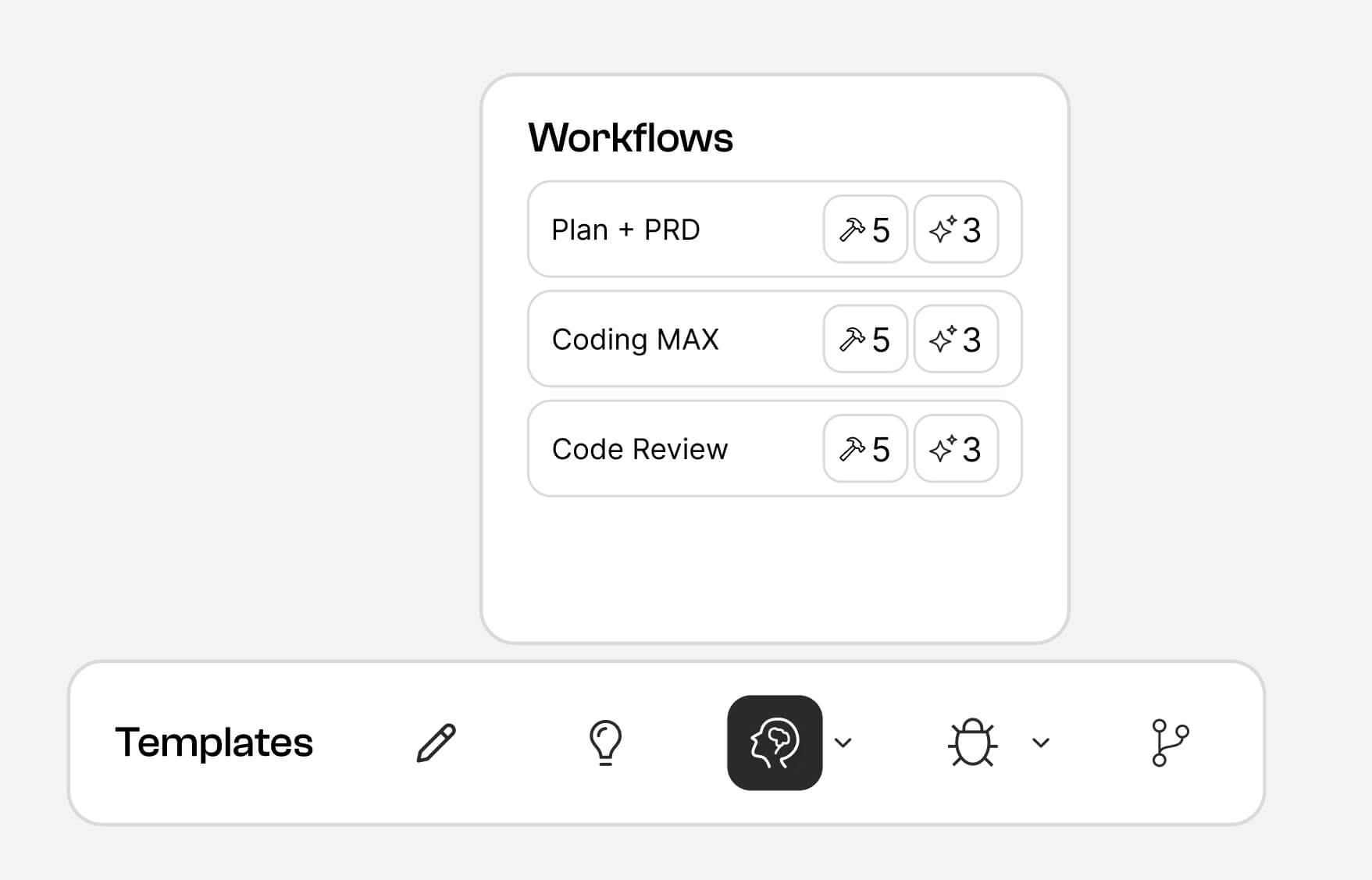
The README lists preset workflow modes for thinking, coding, and github use.
Parameters are validated based on their type definitions and injected into prompts at runtime.
README.md · 3aedba338596 · Fetched 2026-11-13 08:09:50 UTC
Original upstream text, without AI rewriting. Scripts, forms and unsafe links are filtered for safety.
Showing the last retrieved documentation snapshot; check the source for current changes.

mcpn.ai helps you create, organize, and share AI workflows and prompts.
Like a dynamic prompt library you can share & version across MCP tools and servers for specific tasks.



Created by


Basic Example
|
|
Workflows MCP (mcpn) are the building blocks of software development, an orchestration of multiple MCP servers and prompts.
Think of it like a dynamic prompting library that you can easily share and version control through yaml files that also lets you define how to best use many MCP tools across many MCP servers for specific tasks.
Install the MCP server into an MCP client using the following command or JSON:
npx -y mcpn@latest init
If using JSON in Cursor to setup your MCP server, you can use the following config:
{
  "mcpServers": {
    "workflows-mcp": {
      "command": "npx",
      "args": ["-y", "mcpn@latest server"]
    }
  }
}
Documentation: https://mcpn.ai
... TBD
... TBD
... TBD
========================================================================
Move below to documentation
The key to effective MCP use is to know when/how to use the right tools. Workflows MCP helps make this process MUCH easier and faster. With Workflows MCP, you can:
✅ Combine prompts with MCP servers into reusable & easy to edit/share/organize workflows
✅ Trigger workflows with custom commands like: "enter debugger mode" or "use thinking mode"
✅ Define custom strategies for how to use many tools in a workflow (sequential or situational/dynamic)
✅ Easily onboard your team to the best prompts + ways to use many MCP tools w/ version control.
We also provide a number of useful presets to get you started 🫡
The goal of this project is to turn prompts into programmable tools and rules for AI in a code editor more deterministic while reducing the overall amount of token use across all requests. Since stuffing a global set of rules for AI can eat up your context window, using MCP to route to prompts and workflows can help reduce the overall amount of tokens used across all requests.
Workflows for MCP are also incredibly powerful! For instance, you can create an "production incident workflow" tool that has a special system prompt to reason about an incident in a particular way and then use a series of tools in a specific order to analyze + potentially resolve the incident. This may involve things like:
And since these workflows are all defined in YAML and can be referenced from anywhere on your machine, you can easily rally your team around when/how to use the best prompts and sequences of MCP tools for specific tasks 🦾
.workflows or .mcp-workflows directoryWorkflows MCP includes multiple preset workflow modes out of the box for thinking, coding, and github use:
Thinking: General purpose tools to improve reasoning on any task
Coding: Universally applicable tools for common coding tasks Universally applicable tools for common coding tasks
GitHub: Tools to simplify common GitHub tasks. Great for anyone who is a beginner with source control using Git and the Github CLI
Install the MCP server into an MCP client using the following command or JSON:
npx -y mcpn@latest init
If using JSON in Cursor to setup your MCP server, you can use the following config:
{
  "mcpServers": {
    "workflows-mcp": {
      "command": "npx",
      "args": ["-y", "mcpn@latest server"]
    }
  }
}
To provide custom configurations, you can use the --config flag to point to a directory containing YAML configuration files. The directory must be named .workflows or .mcp-workflows as so:
npx mcpn@latest server --config /path/to/.workflows
If you want to enable presets, you can use the --preset flag to specify which presets to load:
npx mcpn@latest server --preset thinking,coding,github
Here's what this would look like in a Cursor config all combined:
{
  "mcpServers": {
    "workflows-mcp": {
      "command": "npx",
      "args": [
        "mcpn@latest server",
        "--config",
        "/path/to/.workflows",
        "--preset",
        "thinking,coding"
      ]
    }
  }
}
Note:
thinking preset.Create a .workflows or .mcp-workflows directory in your project and add YAML configuration files with any name (must end with .yaml or .yml). These configurations will also override the preset defaults if named the same as a preset tool.
workflow_name:
  description: "Description of what this workflow does"
  prompt: |
    Enter your multi-line
    prompt here like this
  toolMode: "situational" # can be omitted as it's the default
  tools: "analyzeLogs, generateReport, validateFindings"
You can define tools in several ways.
Here's an example of a tool that debugs a problem in a codebase with tools used situationally / as needed:
web_debugger_mode:
  description: Debug my codebase my web application with browser logs and BrowserTools MCP
  prompt: |
    Deeply reflect upon all of this and think about why this isn't working. Theorize 4-6 different possible sources of the problem.

    Then, deeply reason about the root cause and distill your theories down to the 1-2 most probable sources of the problem before suggesting next steps.
  tools: getConsoleLogs, getConsoleErrors, getNetworkLogs, getNetworkErrors, takeScreenshot
This will return the following MCP response:
Deeply reflect upon all of this and think about why this isn't working. Theorize 4-6 different possible sources of the problem.


## Available Tools
Use these tools as needed to complete the user's request:

- getConsoleLogs
- getConsoleErrors
- getNetworkLogs
- getNetworkErrors
- takeScreenshot

After using each tool, return a 'Next Steps' section with a list of the next steps to take / remaining tools to invoke along with each tool's prompt/description and 'optional' flag if present.
A powerful feature is the ability to inject parameters into your prompts using the {{ parameter_name }} syntax:
custom_mode:
  description: "Workflow with parameter injection"
  parameters:
    thought:
      type: "string"
      description: "A thought to deeply reflect upon"
      required: true
    idea:
      type: "string"
      description: "An additional idea to consider"
  prompt: |
    Deeply reflect upon the provided thought.
    Here's the thought: {{ thought }}

    Additional idea to consider: {{ idea }}

    Reflect upon the implications/tradeoffs it may have as it relates to my current goals.
Parameters are automatically validated based on their type definitions and injected into your prompts at runtime.
In sequential mode, tools are executed in a specific order:
web_debugger_mode:
  description: Debug my codebase my web application with browser logs and BrowserTools MCP
  prompt: |
    Deeply reflect upon all of this and think about why this isn't working. Theorize 4-6 different possible sources of the problem.
  toolMode: sequential
  tools: getConsoleLogs, getConsoleErrors, getNetworkLogs, getNetworkErrors, takeScreenshot
This will return the following MCP response:
Deeply reflect upon all of this and think about why this isn't working. Theorize 4-6 different possible sources of the problem.

## Available Tools
If all required user input/feedback is acquired or if no input/feedback is needed, execute this exact sequence of tools to complete this task:

1. getConsoleLogs
2. getConsoleErrors
3. getNetworkLogs
4. getNetworkErrors
5. takeScreenshot

After using each tool, return a 'Next Steps' section with a list of the next steps to take / remaining tools to invoke along with each tool's prompt/description and 'optional' flag if present.
Includes ability to define prompts for each tool and an optional flag to indicate if the tool is optional or not in the sequence:
deep_thinking_mode:
  description: Reflect on a thought and produce a reflection/new set of thoughts
  parameters:
    thought:
      type: string
      description: A thought to deeply reflect upon
      required: true
  prompt: |
    Deeply reflect upon the provided thought.
    Reflect upon the implications/tradeoffs it may have as it relates to my current goals, challenges and our conversation.
    Do not change anything in our system, just return some thoughts/considerations/analysis based on your reflection of the provided thought.
  toolMode: "sequential"
  tools:
    analyze_thought: analyze a previously generated thought
    explore_perspectives: think about additional perspectives given the analysis
    apply_findings:
      propmt: implement the findings of the analysis
      optional: true
Each YAML file should contain a mapping of tool names to their configuration. Configurations can be loaded from two sources:
presets directory).workflows or .mcp-workflows directory)For each tool, you can specify:
name: Optional name override for the registered tool (default is the config key)description: Description of what the workflow/tool doesprompt: Custom prompt (completely replaces default prompt if workflow name is also an active preset)context: Additional context to append to the prompt (does not replace default prompt for presets)tools: Array or object of tools available in this mode, with flexible definition stylestoolMode: Mode of tool execution, either "sequential" or "situational" (defaults to "situational")parameters: Object mapping of parameters as input to the tool - supports template injection using {{ parameter_name }}disabled: Boolean to disable the toolTools can accept typed parameters that an MCP Client / agent can provide to improve reasoning capabilities for your prompt/workflow. These inputs are automatically converted to Zod schemas for validation and type safety. Each parameter is defined with the following properties:
| Property | Description | Required |
|---|---|---|
type | Data type: "string", "number", "boolean", "array", "object", or "enum" | Yes |
description | Human-readable description of the parameter | No |
required | Whether the parameter is required | No (defaults to false) |
default | Default value if not provided | No |
enum | Array of valid values (required for enum type only) | Yes (for enum type) |
items | For array types, defines the type of items in the array | No |
properties | For object types, defines the properties of the object | No |
Claim this server with your GitHub account to request manual ownership verification.
Link to the catalog listing for Workflows MCP (mcpn) from your README. This badge does not certify ownership, compatibility or security.
[](https://awesome-mcp.com/servers/mcpn)Public repository statistics could not be verified. Check the configured source address; unavailable counts are not zero.
Separate sources, scopes and periods. Never combined or treated as installations, active users or security reviews.
No reviewed package or image identity; download statistics are not listed yet.
Alternative and complementary servers in the same category
A directory listing describing a cancellation-letter and mailing-address service. The configured public GitHub repository returned 404 during source verification.

A hosted MCP service for browsing and searching through Singapore mobile-network proxies.

A directory listing describing a Markdown-to-PDF service. The configured public GitHub repository returned 404 during source verification.