

A directory listing describing a cancellation-letter and mailing-address service. The configured public GitHub repository returned 404 during source verification.
Repository stats unavailable
Developer Tools
A proxy MCP server that federates hundreds of upstream MCP servers behind one endpoint and gives agents built-in discovery, call and management tools instead of the full upstream catalog.
MCPProxy — MCP server proxy for AI agents is cataloged as an MCP server attributed to smart-mcp-proxy. A proxy MCP server that federates hundreds of upstream MCP servers behind one endpoint and gives agents built-in discovery, call and management tools instead of the full upstream catalog. It is categorized under developer tools. See the capability inspector for recorded interfaces and their independent review status; consult upstream documentation for the current interface.
Installation configuration is not reviewed. No executable setup is offered for this entry; inspect the source repository before proceeding.
Catalog license label: MIT. Check the source repository's current license and terms before using, modifying or distributing this software.
Capability definitions are not reviewed. Unreviewed imports are not exposed as trusted interfaces.
No reviewed records to display. This does not establish that upstream lacks this capability.
No reviewed records to display. This does not establish that upstream lacks this capability.
No reviewed records to display. This does not establish that upstream lacks this capability.
Email delivery is not connected. This page does not collect email addresses or create subscriptions.
Browse the registry for current listings instead.
Reviews for MCPProxy — MCP server proxy for AI agents are not available yet
Review publishing and storage are not connected. This page does not collect or publish ratings or comments, including after sign-in.
No; a clean scan only means the offline checks found nothing in the tool definitions.
No; savings vary and on a 45-tool corpus the proxy's initial menu was larger than listing all upstream tools.
README.md · 3519e664c651 · Fetched 2026-11-13 13:12:28 UTC
Original upstream text, without AI rewriting. Scripts, forms and unsafe links are filtered for safety.
Showing the last retrieved documentation snapshot; check the source for current changes.




📺 Watch the full walkthrough · 📚 Read the docs · 🌐 mcpproxy.app
The demo above shows the embedded web UI. The MCPProxy core is a single binary for macOS, Linux, and Windows — the web UI ships inside it, with no extra service to run. On macOS, an optional menu‑bar app adds one‑click convenience (start/stop, server health, quarantine, logs).
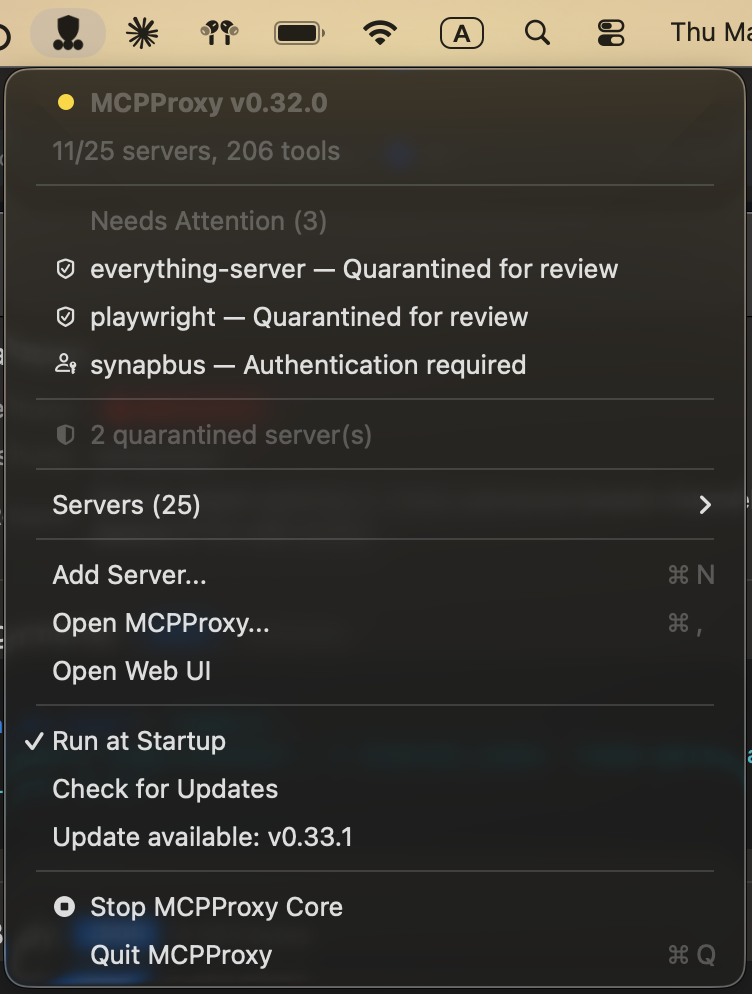
retrieve_tools, describe_tool, the call_tool_* variants and a few management tools) instead of the full upstream tool catalog, and fetch schemas on demand (in retrieve_tools and code_execution routing; direct routing exposes upstream tools individually, see Routing modes). How much context this saves depends on the number of tools, the routing mode, the client and the task; see Token savings: what is and is not measured.manual trust mode, most later changes to an approved tool's definition are held for review again. Known exceptions: input-schema-only edits outside scan mode, a newly added output schema, and a description added to a tool that was approved with an empty description are admitted without a hold; scan mode admits clean changes and misses what its detectors miss; auto mode does not hold changes. This reduces exposure to malicious tool definitions (Tool Poisoning Attacks); it is not a guarantee of safety. See What quarantine does and does not cover.On-demand discovery reduces how many upstream tool definitions an agent loads into context up front. The saving is not a fixed percentage: it grows with the number of connected tools and depends on the routing mode, the client and the task. MCPProxy does not publish a headline token-reduction or accuracy-improvement figure, and it makes no latency claim.
What the repository does measure, as a first-party, deterministic estimate (see bench/README.md for the method and to reproduce it with go run ./bench/cmd/bench):
cl100k_base.retrieve_tools mode and 1874 in code_execution mode, against 1730 for the baseline), because the proxy's own tools have a fixed cost. A saving appears only above a break-even number of upstream tools, so quote the tool count with any percentage.macOS (Recommended - DMG Installer):
Download the latest DMG installer for your architecture:
mcpproxy-*-darwin-arm64.dmgmcpproxy-*-darwin-amd64.dmgWindows (Recommended - Installer):
Download the latest Windows installer for your architecture:
mcpproxy-setup-*-amd64.exemcpproxy-setup-*-arm64.exeThe installer automatically:
mcpproxy.exe (core server) and mcpproxy-tray.exe (system tray app) to Program Files.\mcpproxy-setup.exe /VERYSILENTAlternative install methods:
macOS (Homebrew):
# macOS — GUI tray app (recommended):
brew install --cask smart-mcp-proxy/mcpproxy/mcpproxy

# macOS / Linux — headless CLI only:
brew install smart-mcp-proxy/mcpproxy/mcpproxy
The cask installs the menu-bar app (bundles the CLI); the formula is the CLI binary only. Both update via brew upgrade.
Linux (Debian/Ubuntu) — apt repository, auto-updates via apt upgrade:
sudo install -m 0755 -d /etc/apt/keyrings
curl -fsSL https://apt.mcpproxy.app/mcpproxy.gpg \
  | sudo tee /etc/apt/keyrings/mcpproxy.gpg > /dev/null
echo "deb [arch=$(dpkg --print-architecture) signed-by=/etc/apt/keyrings/mcpproxy.gpg] https://apt.mcpproxy.app stable main" \
  | sudo tee /etc/apt/sources.list.d/mcpproxy.list > /dev/null
sudo apt update && sudo apt install mcpproxy
Linux (Fedora / RHEL / Rocky / AlmaLinux) — dnf repository, auto-updates via dnf upgrade:
sudo dnf config-manager --add-repo https://rpm.mcpproxy.app/mcpproxy.repo
# Fedora 41+ (dnf5): sudo curl -fsSL https://rpm.mcpproxy.app/mcpproxy.repo -o /etc/yum.repos.d/mcpproxy.repo
sudo dnf install -y mcpproxy
Arch Linux (AUR): mcpproxy-bin
yay -S mcpproxy-bin
# or
git clone https://aur.archlinux.org/mcpproxy-bin.git && cd mcpproxy-bin && makepkg -si
The apt and dnf packages ship a hardened systemd unit and start the service automatically. Repository signing key fingerprint: 3B6F A1AD 5D53 59DA 51F1 8DDC E1B5 9B9B A1CB 8A3B.
For one-off .deb / .rpm downloads (air-gapped installs), grab them from the latest release.
Manual download (all platforms):
Prerelease Builds (Latest Features):
Want to try the newest features? Download prerelease builds from the next branch:
dmg-darwin-arm64 (Apple Silicon Macs)dmg-darwin-amd64 (Intel Macs)versioned-linux-amd64, versioned-windows-amd64 (other platforms)Note: Prerelease builds are signed and notarized for macOS but contain cutting-edge features that may be unstable.
Anywhere with Go 1.26+:
go install github.com/smart-mcp-proxy/mcpproxy-go/cmd/mcpproxy@latest
mcpproxy serve # starts HTTP server on :8080 and shows tray
New servers are held in quarantine until you review them, so adding a server is a two-step journey: add, then review and approve. The full walkthrough, with a real remote server (Context7), is the published Quick Start. In short (Context7 is a public, read-only documentation server; substitute any server you trust):
# 1. add (held in quarantine until approved)
mcpproxy upstream add context7 https://mcp.context7.com/mcp

# 2. review: capture the tool definitions, run the offline scan, read the verdict
mcpproxy review fetch context7
mcpproxy security rescan context7
mcpproxy review show context7

# 3. approve (with no --tools/--all, only read-only tools with a clean scan are allowed)
mcpproxy review approve context7 --yes

# 4. one harmless read, then see it in the activity log
mcpproxy call tool-read -t context7:resolve-library-id -j '{"libraryName":"vue-router","query":"routing"}'
mcpproxy activity list --limit 3
A clean scan is not proof that a server is safe; it only means the offline checks found nothing in the tool definitions. Review what you approve.
You can also edit ~/.mcpproxy/mcp_config.json by hand; a first-seen entry is held for review in the same way:
{
  "listen": "127.0.0.1:8080",
  "mcpServers": [
    { "name": "local-python", "command": "python", "args": ["-m", "my_server"], "protocol": "stdio", "enabled": true },
    { "name": "remote-http", "url": "http://localhost:3001", "protocol": "http", "enabled": true }
  ]
}
See Configuration and Upstream Servers for the full reference, and Security Quarantine for what the review gate does and does not cover.
📖 Complete Setup Guide - Detailed instructions for Cursor, VS Code, Claude Desktop, and Goose
    "MCPProxy": {
      "type": "http",
      "url": "http://localhost:8080/mcp/"
    }
Once connected, your agent sees a handful of built-in MCPProxy tools instead of hundreds of upstream schemas. A typical session has three beats — discover, call, audit — plus an optional preflight gate for unattended automations.
The agent asks for what it needs in plain keywords via retrieve_tools:
{ "query": "create github issue", "limit": 5 }
MCPProxy runs a BM25 search across every connected server and returns only the top-ranked matches — each with a call_with hint recommending the right call variant for its annotations:
{
  "tools": [
    { "name": "github:create_issue", "score": 0.89, "call_with": "call_tool_write" },
    { "name": "gitlab:create_issue", "score": 0.72, "call_with": "call_tool_write" }
  ]
}
This is where the token savings come from: the schemas of the hundreds of tools the agent didn't need never enter its context. The agent loads full schemas on demand with describe_tool (batch up to 5 ids) only for the tools it's about to use.
The agent executes the tool through the variant matching its intent (call_tool_read, call_tool_write, or call_tool_destructive), addressing it as server:tool:
{
  "name": "github:create_issue",
  "args": { "repo": "acme/api", "title": "Bug report" },
  "intent_reason": "Filing bug per user request"
}
MCPProxy validates the intent against the tool's annotations (a "read" call can't reach a destructive tool) and checks quarantine and approval state before the call is forwarded. Sensitive-data detection flags potential secrets in arguments and responses in the activity log; it does not block the call by default. Optional output sanitisation can redact detected secrets or block critical detections in supported text responses before they are forwarded. It does not cover tool arguments, non-text content, direct routing mode, or upstream error responses.
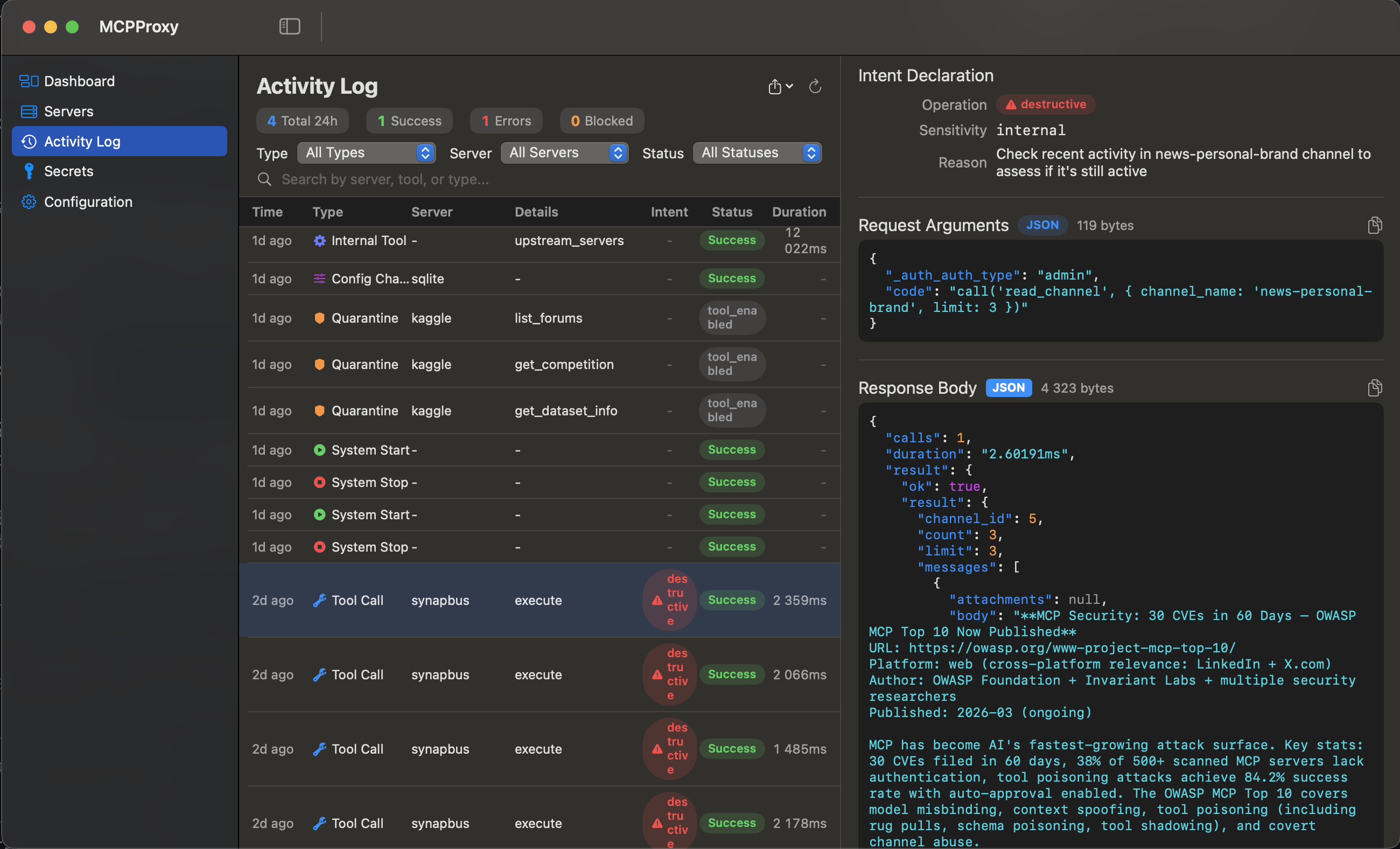
Calls are recorded in the local Activity Log with a request ID, so you can inspect what an agent did. The log is bounded by configurable retention (age, record count and size) and a per-record response size cap, so it is an inspection and debugging aid, not a compliance guarantee:
mcpproxy activity list                          # everything, newest first
mcpproxy activity list --request-id <id>        # one workflow, correlated
For recurring headless jobs (cron, CI, n8n), don't let the agent discover a missing tool the expensive way. One preflight command checks that every required tool is ready — without contacting any upstream server — and reports exactly why when it isn't (server quarantined, tool changed since approval, OAuth expired, typo'd id):
mcpproxy tools preflight gh-ops:sync_issues slack:post_message --wait 10s
case $? in
  0)  run-agent-session ;;   # all ready — go
  10) exit 75 ;;             # transient (server starting) — let the next cron tick retry
  11) page-operator ;;       # blocked — someone must approve / enable / log in
  12) fail-pipeline ;;       # unknown tool id — the automation itself is misconfigured
esac
See Required-Tools Preflight for the full reason taxonomy, REST endpoint, and GitHub Actions / n8n recipes.
MCPProxy works with HTTP by default for easy setup. HTTPS is optional and primarily useful for production environments or when stricter security is required.
💡 Note: Most users can stick with HTTP (the default) as it works perfectly with all supported clients including Claude Desktop, Cursor, and VS Code.
1. Enable HTTPS (choose one method):
# Method 1: Environment variable
export MCPPROXY_TLS_ENABLED=true
mcpproxy serve

# Method 2: Config file
# Edit ~/.mcpproxy/mcp_config.json and set "tls.enabled": true
2. Trust the certificate (one-time setup):
mcpproxy trust-cert
3. Use HTTPS URLs:
https://localhost:8080/mcphttps://localhost:8080/ui/For Claude Desktop, add this to your claude_desktop_config.json:
HTTP (Default - Recommended):
{
  "mcpServers": {
    "mcpproxy": {
      "command": "npx",
      "args": [
        "-y",
        "mcp-remote",
        "http://localhost:8080/mcp"
      ]
    }
  }
}
HTTPS (With Certificate Trust):
{
  "mcpServers": {
    "mcpproxy": {
      "command": "npx",
      "args": [
        "-y",
        "mcp-remote",
        "https://localhost:8080/mcp"
      ],
      "env": {
        "NODE_EXTRA_CA_CERTS": "~/.mcpproxy/certs/ca.pem"
      }
    }
  }
}
localhost, 127.0.0.1, ::1mcpproxy trust-cert to add to system keychain~/.mcpproxy/certs/ (ca.pem, server.pem, server-key.pem)Certificate trust issues:
# Re-trust certificate
mcpproxy trust-cert --force

# Check certificate location
ls ~/.mcpproxy/certs/

# Test HTTPS connection
curl -k https://localhost:8080/api/v1/status
Claude Desktop connection issues:
NODE_EXTRA_CA_CERTS points to the correct ca.pem filemcpproxy serve --log-level=debugWe welcome issues, feature ideas, and PRs!
make dev-setup                # Install swag, frontend deps, Playwright
brew install prek             # Install pre-commit hook runner (or: uv tool install prek)
prek install                  # Install pre-commit hooks
prek install --hook-type pre-push  # Install pre-push hooks
We use prek to catch issues before they reach CI:
| Hook | Stage | What it does |
|---|---|---|
gofmt | pre-commit | Auto-formats staged Go files |
trailing-whitespace | pre-commit | Removes trailing whitespace |
end-of-file-fixer | pre-commit | Ensures files end with newline |
check-merge-conflict | pre-commit | Detects merge conflict markers |
swagger-verify | pre-push | Fails if OpenAPI spec is out of date |
go-build | pre-push | Verifies the project compiles |
Run hooks manually: prek run --all-files
make build          # Build frontend + backend
make swagger        # Regenerate OpenAPI spec
make test           # Unit tests
make test-e2e       # E2E tests
make lint           # Run linters
Claim this server with your GitHub account to request manual ownership verification.
Link to the catalog listing for MCPProxy — MCP server proxy for AI agents from your README. This badge does not certify ownership, compatibility or security.
[](https://awesome-mcp.com/servers/mcpproxy-go)Public repository statistics could not be verified. Check the configured source address; unavailable counts are not zero.
Separate sources, scopes and periods. Never combined or treated as installations, active users or security reviews.
No reviewed package or image identity; download statistics are not listed yet.
Alternative and complementary servers in the same category
A directory listing describing a cancellation-letter and mailing-address service. The configured public GitHub repository returned 404 during source verification.

A hosted MCP service for browsing and searching through Singapore mobile-network proxies.

A directory listing describing a Markdown-to-PDF service. The configured public GitHub repository returned 404 during source verification.