md2doc Markdown to DOCX MCP Server

md2doc Markdown to DOCX MCP Server

md2doc-mcp•byyorick-ryu

An MCP server that converts Markdown text into DOCX documents through an external conversion service, with template selection and multi-language support.

License: MIT•Runtime: Awaiting documentation review•Category: file systems-docs

WHAT IT DOES

  • •Converts Markdown text into DOCX documents.
  • •Lists available document templates by language.
  • •Supports custom templates and multiple languages such as English and Chinese.

BEST FOR

  • •Users who want to turn Markdown content into Word documents from an MCP client.
  • •Workflows that need to select a template or language when generating DOCX files.

ABOUT MD2DOC-MCP

md2doc Markdown to DOCX MCP Server is cataloged as an MCP server attributed to yorick-ryu. An MCP server that converts Markdown text into DOCX documents through an external conversion service, with template selection and multi-language support. It is categorized under file systems-docs. See the capability inspector for recorded interfaces and their independent review status; consult upstream documentation for the current interface.

HOW TO INSTALL

Installation configuration is not reviewed. No executable setup is offered for this entry; inspect the source repository before proceeding.

LICENSE

Catalog license label: MIT. Check the source repository's current license and terms before using, modifying or distributing this software.

Capability inspector

Capability definitions are not reviewed. Unreviewed imports are not exposed as trusted interfaces.

Tools (0)

No reviewed records to display. This does not establish that upstream lacks this capability.

Resources (0)

No reviewed records to display. This does not establish that upstream lacks this capability.

Prompts (0)

No reviewed records to display. This does not establish that upstream lacks this capability.

NEWSLETTER - COMING LATER

Newsletter subscriptions are not open yet

Email delivery is not connected. This page does not collect email addresses or create subscriptions.

Browse the registry for current listings instead.

Community Reviews

Coming later

Reviews for md2doc Markdown to DOCX MCP Server are not available yet

Review publishing and storage are not connected. This page does not collect or publish ratings or comments, including after sign-in.

FREQUENTLY ASKED QUESTIONS

Does the server convert Markdown locally?

No, the README states it converts Markdown to DOCX using an external conversion service.

Can the server list templates before conversion?

Yes, it provides a list_templates tool that returns available templates by language.

Upstream README

View this exact version on GitHub

README.md · ef141e4b72ca · Fetched 2026-11-13 10:22:58 UTC

Original upstream text, without AI rewriting. Scripts, forms and unsafe links are filtered for safety.

Showing the last retrieved documentation snapshot; check the source for current changes.

md2doc - Markdown to DOCX MCP Server


PyPI version MCP Badge License: MIT

A Model Context Protocol (MCP) server that converts Markdown text to DOCX format using an external conversion service.
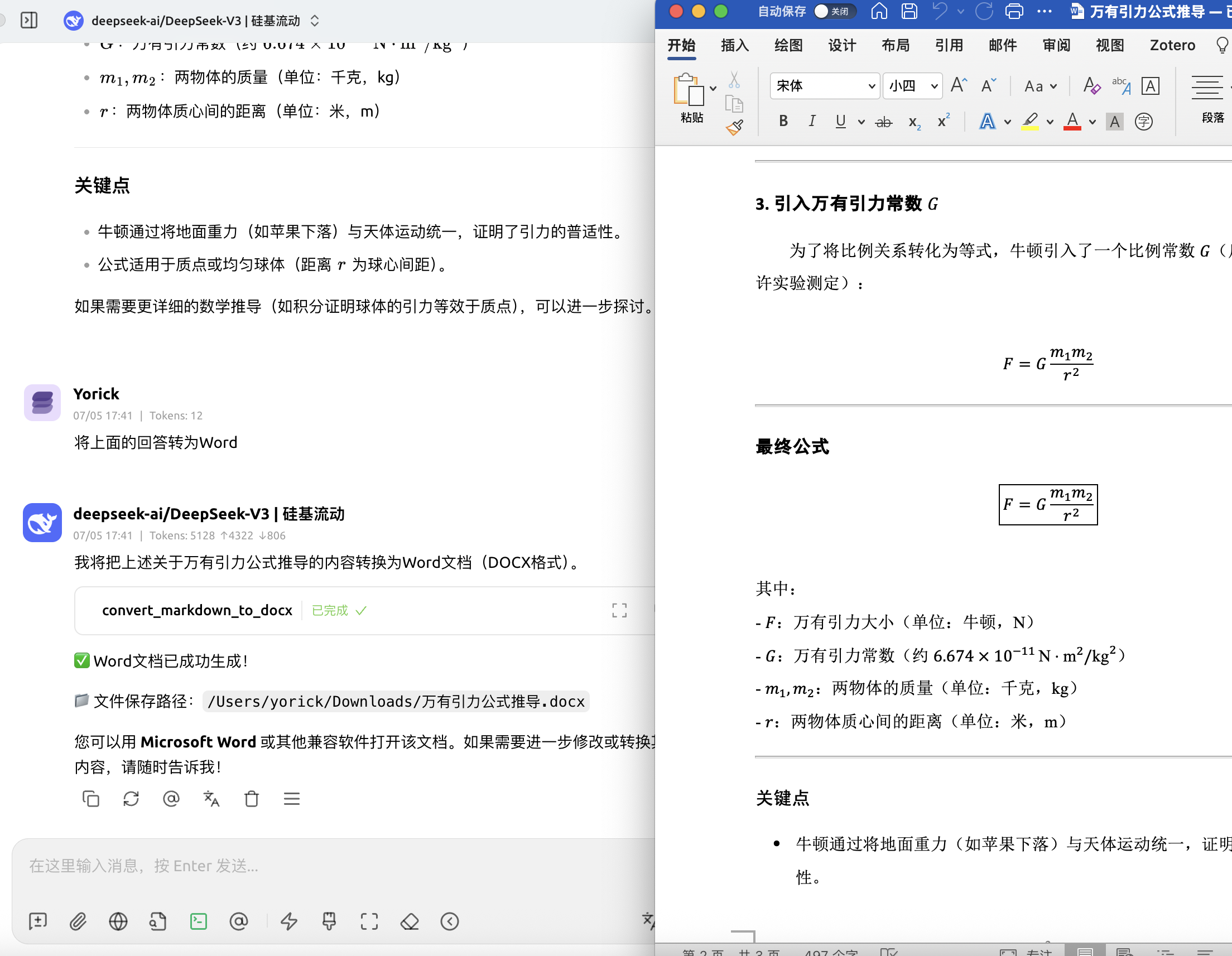
md2doc Demo

Features

  • Convert Markdown text to DOCX format
  • Support for custom templates
  • Multi-language support (English, Chinese, etc.)
  • Automatic file download to user's Downloads directory
  • Template listing and management

Usage

Cherry Studio

  1. Open Cherry Studio
  2. Go to Settings → MCP
  3. Add the server configuration:
    {
      "mcpServers": {
        "md2doc": {
          "command": "uvx",
          "args": ["md2doc"],
          "env": {
            "DEEP_SHARE_API_KEY": "your-api-key-here"
          }
        }
      }
    }
    

Claude Desktop

  1. Open your Claude Desktop configuration file:

    • macOS: ~/Library/Application Support/Claude/claude_desktop_config.json
    • Windows: %APPDATA%\Claude\claude_desktop_config.json
  2. Add the md2doc server:

    {
      "mcpServers": {
        "md2doc": {
          "command": "uvx",
          "args": ["md2doc"],
          "env": {
            "DEEP_SHARE_API_KEY": "your-api-key-here"
          }
        }
      }
    }
    
  3. Restart Claude Desktop

Command Line (Quick Start)

For immediate use without any client setup:

# Install and run the server
uvx md2doc

# Or with environment variable
DEEP_SHARE_API_KEY="your-api-key-here" uvx md2doc

Python Integration

You can also use md2doc directly in your Python projects:

import asyncio
from md2doc.api_client import ConversionAPIClient
from md2doc.models import ConvertTextRequest

async def convert_markdown():
    client = ConversionAPIClient()
    
    request = ConvertTextRequest(
        content="# Hello World\n\nThis is **markdown** content.",
        filename="example",
        language="zh",
        template_name="templates",
        remove_hr=False,
        compat_mode=True
    )
    
    response = await client.convert_text(request)
    if response.success:
        print(f"File saved to: {response.file_path}")

# Run the conversion
asyncio.run(convert_markdown())

Other MCP Clients

The server works with any MCP-compatible client. Configure it to run:

uvx md2doc

With environment variables:

DEEP_SHARE_API_KEY="your-api-key-here" uvx md2doc

Cloud Deployment (Remote Server)

When deploying this MCP server on a cloud server (VPS/Docker), set MCP_SAVE_REMOTE=true to return a temporary download link instead of saving to a local directory:

# In your cloud environment
export DEEP_SHARE_API_KEY="your-api-key-here"
export MCP_SAVE_REMOTE=true

uvx md2doc

The server will provide a download link for the converted document.

API Key

Free Trial API Key

Use this key for testing:

f4e8fe6f-e39e-486f-b7e7-e037d2ec216f

Purchase API Key

Available Tools

  • convert_markdown_to_docx: Convert markdown text to DOCX
  • list_templates: Get available templates by language

License

MIT

Install configuration

Are you the maintainer?

Claim this server with your GitHub account to request manual ownership verification.

README Embed Badge
Markdown

Link to the catalog listing for md2doc Markdown to DOCX MCP Server from your README. This badge does not certify ownership, compatibility or security.

[![MCP catalog listing](https://img.shields.io/badge/MCP-awesome--mcp-orange?style=flat-square)](https://awesome-mcp.com/servers/md2doc-mcp)

REPOSITORY STATS

GitHub StarsUnavailable
ForksUnavailable

Public repository statistics could not be verified. Check the configured source address; unavailable counts are not zero.

Downloads and pulls

Separate sources, scopes and periods. Never combined or treated as installations, active users or security reviews.

No reviewed package or image identity; download statistics are not listed yet.

Related file systems-docs MCP Servers

Alternative and complementary servers in the same category

View all in file systems-docs →

A Model Context Protocol server for global law with read-only tools to find and read provisions by date, trace the law behind each word, search text and changes, and check cases or briefs against law in force.

Repository stats unavailable
Files & Documentation
LoreKeeper MCP server
lorekeeper-rpg-lorekeeper-com•lore-keeper

Hosted MCP server for tabletop RPG worlds that organizes messy notes and documents into a private store and lets MCP apps search lore, read documents, find characters, and optionally generate character or world pictures.

Repository stats unavailable
Files & Documentation

An MCP server that gives AI assistants scoped file system operations inside a project directory, with read-only reference projects plus git and GitHub tools.

Repository stats unavailable
Files & Documentation