
A directory listing describing a cancellation-letter and mailing-address service. The configured public GitHub repository returned 404 during source verification.
Repository stats unavailable
Developer Tools
An MCP server that exposes a validate_syntax tool to check Mermaid diagrams for syntax errors, using puppeteer-core and the mermaid API with an already installed Chrome-based or Firefox browser.
mermaider: an MCP server for validating Mermaid diagram syntax is cataloged as an MCP server attributed to vtomilin. An MCP server that exposes a validate_syntax tool to check Mermaid diagrams for syntax errors, using puppeteer-core and the mermaid API with an already installed Chrome-based or Firefox browser. It is categorized under developer tools. See the capability inspector for recorded interfaces and their independent review status; consult upstream documentation for the current interface.
Installation configuration is not reviewed. No executable setup is offered for this entry; inspect the source repository before proceeding.
Catalog license label: MIT. Check the source repository's current license and terms before using, modifying or distributing this software.
Capability definitions are not reviewed. Unreviewed imports are not exposed as trusted interfaces.
No reviewed records to display. This does not establish that upstream lacks this capability.
No reviewed records to display. This does not establish that upstream lacks this capability.
No reviewed records to display. This does not establish that upstream lacks this capability.
Email delivery is not connected. This page does not collect email addresses or create subscriptions.
Browse the registry for current listings instead.
Reviews for mermaider: an MCP server for validating Mermaid diagram syntax are not available yet
Review publishing and storage are not connected. This page does not collect or publish ratings or comments, including after sign-in.
The mermaid library needs a full browser DOM even for parsing diagrams, which packages like happy-dom and jsdom do not adequately provide.
Configuration is passed as an inline JSON string or a config file path, with options such as executablePath and browser matching Puppeteer's LaunchOptions.
README.md · c9cc80641855 · Fetched 2026-11-13 13:38:56 UTC
Original upstream text, without AI rewriting. Scripts, forms and unsafe links are filtered for safety.
Showing the last retrieved documentation snapshot; check the source for current changes.
mermaider MCP server: fast, reliable Mermaid diagram syntax checkerTable of Contents
The mermaider is an MCP server that provides validate_syntax tool that checks all Mermaid diagram types for syntax errors.
For that, it uses puppeteer-core package and mermaid-js/mermaid API directly to efficiently use already installed Chrome-based or Firefox browser.
Efficiently means:
validate_syntax tool call reuses the browser and the page.Unfortunately, mermaid-js/mermaid relies on full browser context (DOM) for its functionality, even for parsing the diagrams. Packages like happy-dom or jsdom do not quite cut it.
The mermaider uses relatively light-weight puppeteer-core package (as opposed to full puppeteer) to access already installed browser.
Modern LLMs typically are perfectly capable of generating Mermaid diagrams, however often lack ability to reliably check the generated syntax. This is where the mermaider MCP comes in.
mermaider different?There are other MCPs that can (sort of) validate Mermaid syntax, however, they typically work by launching mmdc command-line utility process every time respective tool is invoked (by the LLM).
That brings a few issues:
Speed: spawning mmdc process, which (then itself launches the browser) for every tool call is slow and expensive.
Non-determinism: mmdc's purpose really is to generate images, not validate syntax. As such, occasionally it exits with 0 code and generates an image (like one below) for diagrams with broken syntax as opposed to exiting with non-zero code and spitting out an error message to STDERR. In this case, MCP server that uses mmdc would have no idea the error occurred so you end up with a bunch of these images instead of your diagrams.

Side Effects: mmdc may install Chrome browser unbeknownst to you as that is the default puppeteer's behaviour, quote:
When you install Puppeteer, it automatically downloads a recent version of Chrome for Testing (~170MB macOS, ~282MB Linux, ~280MB Windows) and a chrome-headless-shell binary (starting with Puppeteer v21.6.0) that is guaranteed to work with Puppeteer. The browser is downloaded to the $HOME/.cache/puppeteer folder by default (starting with Puppeteer v19.0.0). See configuration for configuration options and environmental variables to control the download behavior.
In general, below is the command that your MCP client should use:
npx -y @vtomilin/mermaider <config>
Where <config> is either an inline JSON string, or a config file path, e.g.
npx -y @vtomilin/mermaider '{"executablePath": "/Applications/FirefoxDeveloperEdition.app/Contents/MacOS/firefox", "browser": "firefox"}'
Or:
npx -y @vtomilin/mermaider /home/user/etc/Firefox.json
Where /home/user/etc/Firefox.json is a JSON file containing the configuration, for example, for Firefox browser:
{
  "executablePath": "/Applications/FirefoxDeveloperEdition.app/Contents/MacOS/firefox",
  "browser": "firefox"
}
Another config file example, using the Brave (Chrome-based) browser:
{
  "executablePath": "/Applications/Brave Browser.app/Contents/MacOS/Brave Browser"
}
Complete list of available Browser configuration options defined in Puppeteer's Browser Launchoptions.
Press Cmd-Shift-P (or Ctrl-Shift-P), then MCP: Add Server.... Select Command (stdio) Run a local command that implements the MCP protocol. Enter npx -y @vtomilin/mermaider /home/user/etc/Firefox.json (or whatever config method). Enter the server name (mermaider). And you should be all set.
{
  "mcpServers": {
    "mermaider": {
      "command": "npx",
      "args": ["-y", "@vtomilin/mermaider", "/home/user/etc/Firefox.json"]
    }
  }
}
Even though this project is built with Bun the mermaider package can not be run directly with bunx at the moment. You would have to install the package globally with bun add -g @vtomilin/mermaider first. Then you can just use mermaider-bun executable to run the server:
{
  "mcpServers": {
    "mermaider": {
      "command": "mermaider-bun",
      "args": ["/home/user/etc/Firefox.json"]
    }
  }
}
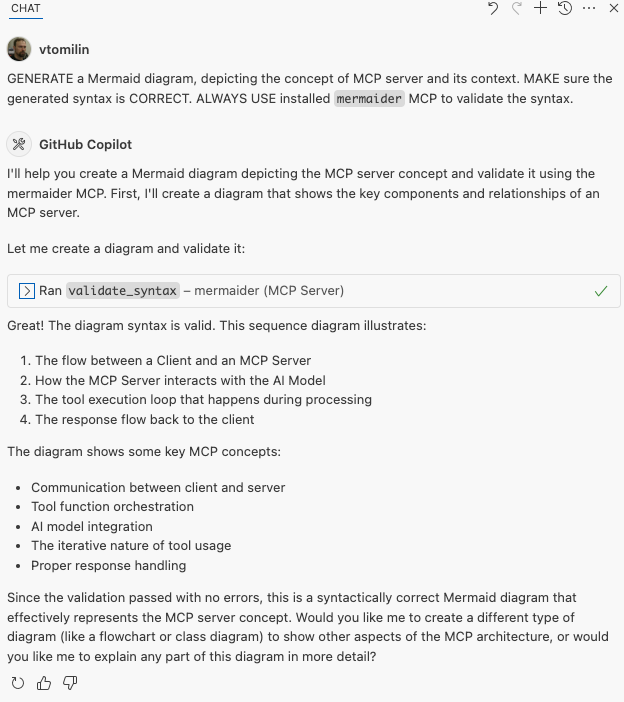
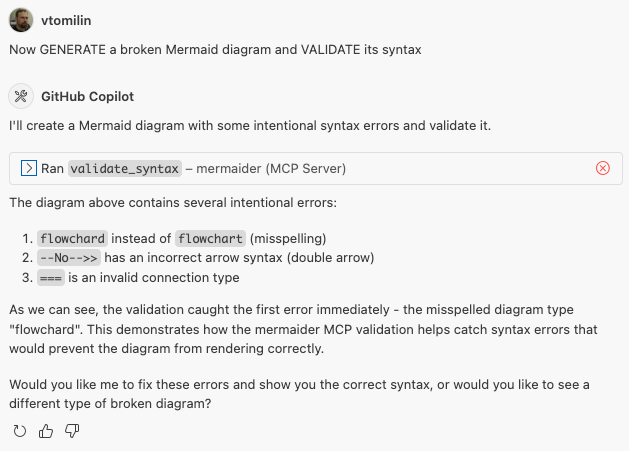
mermaider MCP. Do not use your primary browser.Example sessions using Github Copilot in VSCode:
Generating a diagram and checking its syntax with mermaider:
Generating an intentionally broken diagram and checking its syntax with mermaider:
Claim this server with your GitHub account to request manual ownership verification.
Link to the catalog listing for mermaider: an MCP server for validating Mermaid diagram syntax from your README. This badge does not certify ownership, compatibility or security.
[](https://awesome-mcp.com/servers/mermaider)Public repository statistics could not be verified. Check the configured source address; unavailable counts are not zero.
Separate sources, scopes and periods. Never combined or treated as installations, active users or security reviews.
No reviewed package or image identity; download statistics are not listed yet.
Alternative and complementary servers in the same category
A directory listing describing a cancellation-letter and mailing-address service. The configured public GitHub repository returned 404 during source verification.

A hosted MCP service for browsing and searching through Singapore mobile-network proxies.

A directory listing describing a Markdown-to-PDF service. The configured public GitHub repository returned 404 during source verification.