
A directory listing describing a cancellation-letter and mailing-address service. The configured public GitHub repository returned 404 during source verification.
Repository stats unavailable
Developer Tools
An MCP server that converts STL, OBJ, and PLY meshes of simple mechanical parts into parametric CAD, including STEP files and editable CadQuery, OpenSCAD, and FreeCAD scripts.
mesh2cad MCP server is cataloged as an MCP server attributed to emirmrkaljevic. An MCP server that converts STL, OBJ, and PLY meshes of simple mechanical parts into parametric CAD, including STEP files and editable CadQuery, OpenSCAD, and FreeCAD scripts. It is categorized under developer tools. See the capability inspector for recorded interfaces and their independent review status; consult upstream documentation for the current interface.
Installation configuration is not reviewed. No executable setup is offered for this entry; inspect the source repository before proceeding.
Catalog license label: MIT. Check the source repository's current license and terms before using, modifying or distributing this software.
Capability definitions are not reviewed. Unreviewed imports are not exposed as trusted interfaces.
No reviewed records to display. This does not establish that upstream lacks this capability.
No reviewed records to display. This does not establish that upstream lacks this capability.
No reviewed records to display. This does not establish that upstream lacks this capability.
Email delivery is not connected. This page does not collect email addresses or create subscriptions.
Browse the registry for current listings instead.
Reviews for mesh2cad MCP server are not available yet
Review publishing and storage are not connected. This page does not collect or publish ratings or comments, including after sign-in.
No. The fit runs locally on your machine and nothing is uploaded.
The script is not written and the command exits with code 2, printing the reason.
No. It does not recover organic or sculpted shapes, scans, or free-form surfaces.
README.md · 926965fc5128 · Fetched 2026-11-13 14:09:58 UTC
Original upstream text, without AI rewriting. Scripts, forms and unsafe links are filtered for safety.
Showing the last retrieved documentation snapshot; check the source for current changes.
mesh2cad converts an STL mesh of a simple mechanical part into editable parametric CAD: STEP, CadQuery, OpenSCAD, and FreeCAD scripts. It is also an MCP server.



If you find this useful, you can support me by getting a SkinToScan pack, my other project. It's a one-time purchase that directly funds my open-source work.



OBJ and PLY meshes work the same way. The fit runs on your machine. Nothing is uploaded.
A STEP file is the solid. When the fit is exact, a hole is one cylindrical face, not a ring of triangles. A script is for changing a dimension and rebuilding. CadQuery is Python. OpenSCAD is the text the Customizer on Thingiverse and Printables edits. The FreeCAD file is a macro. All three use the same names, so hole_1_d is the same hole in each of them.
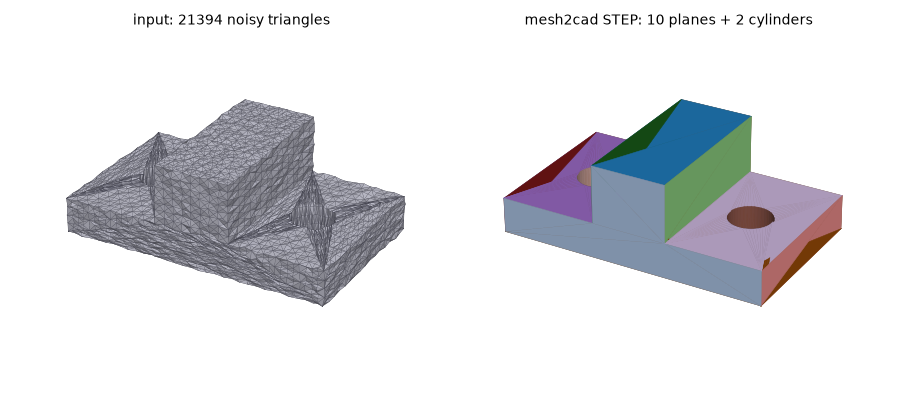
Left: a 21k-triangle mesh with 0.1 mm noise. Right: the STEP file mesh2cad writes, 10 planes and 2 cylinders, max deviation 0.05 mm from the true part.
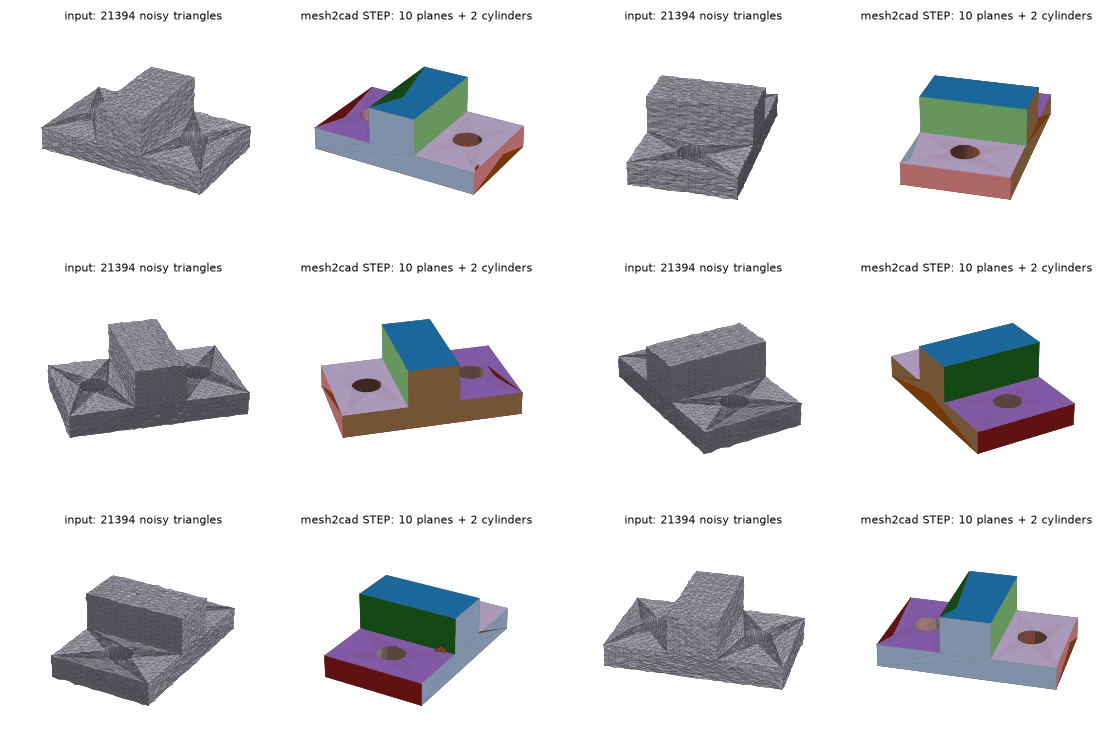
Four printer parts, with the STEP files and the generated scripts, are in the example gallery.
pip install mesh2cad
Python 3.10 or newer. That install is the command line tool and STEP export. OpenCascade comes in with the package (cadquery-ocp).
pip install "mesh2cad[mcp]" adds the server. pip install "mesh2cad[cadquery]" lets mesh2cad run a generated .py and check it before the file is written. OpenSCAD and FreeCAD are separate programs, not pip packages. Without openscad on PATH, a .scad file is still written and the command says it was not verified. A .FCMacro is written only when a check passes. What happens when freecadcmd is missing is in Install.
mesh2cad convert bracket.stl --cadquery bracket.py
mesh2cad edit bracket.py --set hole_1_d=8 --in-place -o bracket.step
The first command writes bracket.py. Diameters, thicknesses, and positions are names at the top of the file. The second sets hole_1_d to 8 mm, rewrites the script, and writes bracket.step. Every other byte of the file stays as it was.
mesh2cad edit bracket.py --set base_x=+2 adds 2 mm to the current length. A leading + or - is a change from the current number, not how you set a negative value. mesh2cad params bracket.py prints each name, its value, and the unit when there is one.
A STEP file on its own is mesh2cad convert part.stl -o part.step. Add --report report.md for the numbers: Hausdorff and RMS deviation, volume error, face types, and the method (exact, faceted-hybrid, or faceted). Open that STEP file in FreeCAD, Fusion, Onshape, or another CAD tool and select a face.
If the part is outside what a script can express, or the rebuilt solid misses the check, the script is not written and the command exits with code 2. The reason is printed. The same convert can write .scad and .FCMacro. Flags are in the CLI reference. What the scripts contain is in CadQuery, OpenSCAD, and FreeCAD. The edit rules are in Parameters.
It is meant for simple mechanical parts: plates, brackets, and boxes with holes, slots, bosses, and fillets. It fits planes, cylinders, spheres, cones, and constant-radius rounds, and writes those as faces you can select.
It does not recover organic or sculpted shapes, scans, or free-form surfaces. When a fit is poor it does not invent a surface. STEP output falls back to a faceted solid that is still valid, and the report names that fallback. A script is held to a tighter check: deviation at most max(4 times the tolerance, 0.1 mm), and volume error at most 1%. Miss that, and the script is refused.
Six Original Prusa i3 MK3S printed parts in the test set come back as exact STEP, and all six also as a script. The measurements, including the small belt-profile patches that stay faceted, are in Real parts. Synthetic noise tests are in Benchmarks. The fitted-surface list, the parameter names, and the refusals are in Limits (v0.27.0). The pipeline is in How it works.
pip install "mesh2cad[mcp]"
mesh2cad mcp
That starts the server on stdio. Point a client at it like this:
{ "mcpServers": { "mesh2cad": { "command": "mesh2cad", "args": ["mcp"] } } }
The tools are convert, analyze, report, to_cadquery, to_openscad, to_freecad, list_params, and edit_params. Arguments, return values, and the directory listings are in MCP.
Install is the extras and the OpenSCAD and FreeCAD programs. CLI is every command. CadQuery, OpenSCAD, and FreeCAD are the parameter lists and the checks. Parameters is params and edit. MCP is the tool reference. How it works, Limits, Benchmarks, and Real parts are the fit, the refusals, and the numbers. Development is how to run the tests. The changelog is the version history.
Shorter pages on the project site: overview, STL to STEP, STL to OpenSCAD and CadQuery, and FAQ.
A mesh that converts badly can go in a GitHub issue. There is a template for an STL that fails.
MIT. See LICENSE.
Claim this server with your GitHub account to request manual ownership verification.
Link to the catalog listing for mesh2cad MCP server from your README. This badge does not certify ownership, compatibility or security.
[](https://awesome-mcp.com/servers/mesh2cad)Public repository statistics could not be verified. Check the configured source address; unavailable counts are not zero.
Separate sources, scopes and periods. Never combined or treated as installations, active users or security reviews.
No reviewed package or image identity; download statistics are not listed yet.
Alternative and complementary servers in the same category
A directory listing describing a cancellation-letter and mailing-address service. The configured public GitHub repository returned 404 during source verification.

A hosted MCP service for browsing and searching through Singapore mobile-network proxies.

A directory listing describing a Markdown-to-PDF service. The configured public GitHub repository returned 404 during source verification.