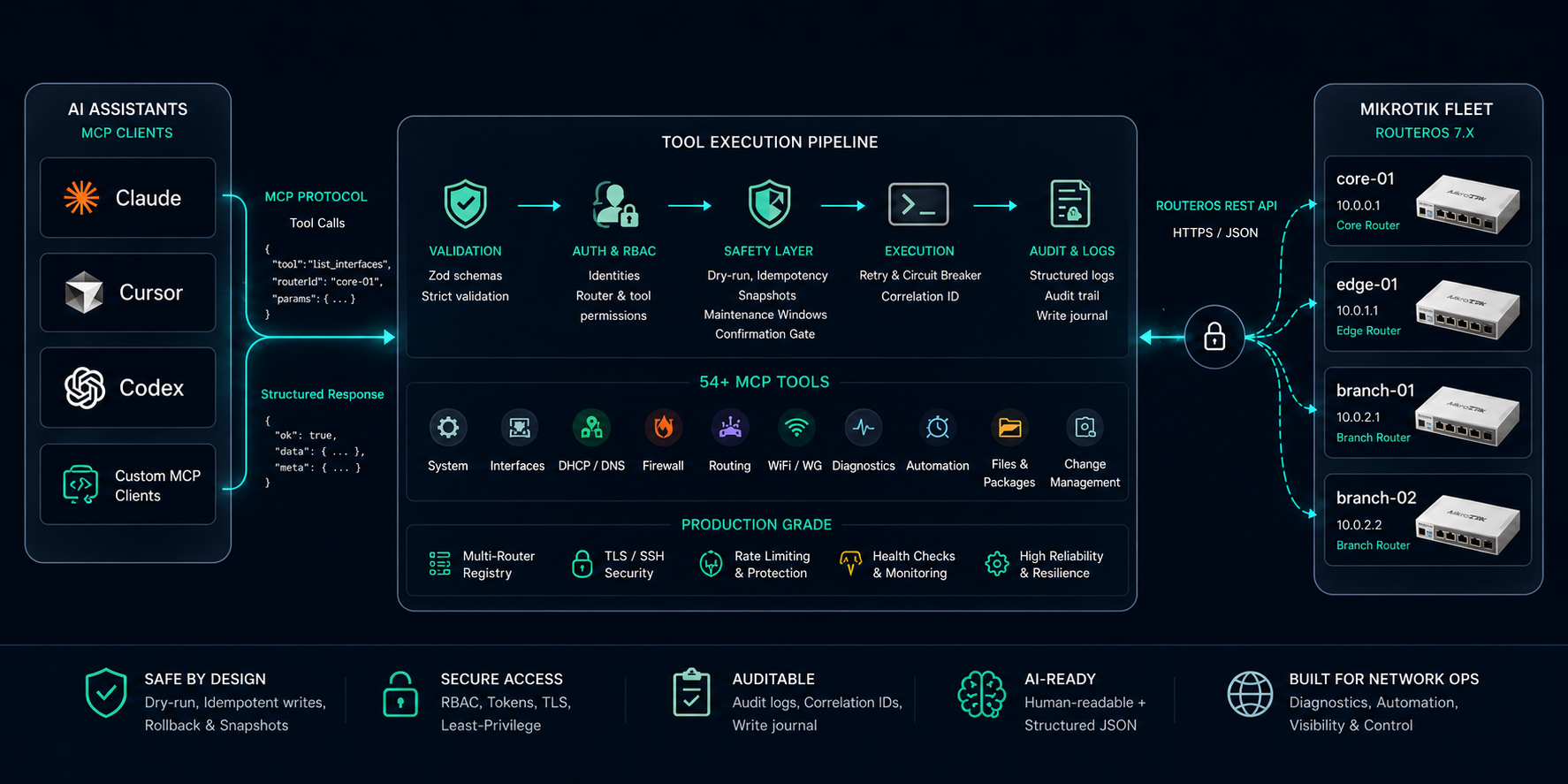
MikroMCP is an open-source Model Context Protocol server that exposes MikroTik RouterOS as 133 typed, auditable tools, letting AI assistants inspect, diagnose, and safely operate routers in natural language instead of improvising CLI commands.
•Provides typed tools for router management, network operations, firewall policy, and routing visibility, covering system status, interfaces, DHCP leases, DNS records, firewall and NAT rules, routes, BGP peers, and OSPF neighbors.
•Adds change-safety mechanisms including dry-run previews, idempotent writes, snapshots, a write journal, and plan, apply, and rollback workflows.
•Offers secure access controls including HTTP bearer auth, bcrypt token hashes, RBAC, router and tool restrictions, and confirmation tokens.
•Supports diagnostics such as router-originated ping, traceroute, torch, log filtering, and guarded SSH command execution.
BEST FOR
•Network engineers and DevOps teams who want AI assistants to inspect and manage MikroTik routers safely using structured tools instead of raw CLI commands.
•Reviewing and diagnosing firewall and interface configuration on live routers before making changes.
•Planning, previewing, and rolling back router configuration changes with approval gates.
ABOUT MIKROMCP
MCP server for MikroTik RouterOS and SwOS network automation is cataloged as an MCP server attributed to alikarami. MikroMCP is an open-source Model Context Protocol server that exposes MikroTik RouterOS as 133 typed, auditable tools, letting AI assistants inspect, diagnose, and safely operate routers in natural language instead of improvising CLI commands. It is categorized under cloud devops. See the capability inspector for recorded interfaces and their independent review status; consult upstream documentation for the current interface.
HOW TO INSTALL
Installation configuration is not reviewed. No executable setup is offered for this entry; inspect the source repository before proceeding.
LICENSE
Catalog license label: MIT. Check the source repository's current license and terms before using, modifying or distributing this software.
Capability inspector
Capability definitions are not reviewed. Unreviewed imports are not exposed as trusted interfaces.
Tools (0)
No reviewed records to display. This does not establish that upstream lacks this capability.
Resources (0)
No reviewed records to display. This does not establish that upstream lacks this capability.
Prompts (0)
No reviewed records to display. This does not establish that upstream lacks this capability.
NEWSLETTER - COMING LATER
Newsletter subscriptions are not open yet
Email delivery is not connected. This page does not collect email addresses or create subscriptions.
Browse the registry for current listings instead.
Community Reviews
Coming later
Reviews for MCP server for MikroTik RouterOS and SwOS network automation are not available yet
Review publishing and storage are not connected. This page does not collect or publish ratings or comments, including after sign-in.
FREQUENTLY ASKED QUESTIONS
What is MikroMCP?
It is an open-source Model Context Protocol server that exposes MikroTik RouterOS as 133 typed, auditable tools so AI assistants can inspect, diagnose, and safely operate routers in natural language.
How does MikroMCP differ from the RouterOS REST/API?
The RouterOS REST/API exposes raw endpoints, while MikroMCP wraps them in schema-validated, idempotent, dry-run-able tools with RBAC, audit logging, snapshots, and rollback as a safety layer for LLMs.
How does MikroMCP differ from SSH automation?
Instead of screen-scraping CLI output over SSH scripts, MikroMCP returns structured, typed results with confirmation gates and per-router circuit breakers, using SSH only where REST cannot reach.
README.md · 938de548d345 · Fetched 2026-11-13 11:39:50 UTC
Original upstream text, without AI rewriting. Scripts, forms and unsafe links are filtered for safety.
Showing the last retrieved documentation snapshot; check the source for current changes.
MikroMCP
AI-native network automation for MikroTik RouterOS and SwOS. MikroMCP exposes RouterOS routers and SwOS switches as a typed, auditable Model Context Protocol server so Claude, Cursor, Codex, and other MCP clients can inspect, diagnose, and safely operate MikroTik gear in natural language.
MikroMCP exists because raw router CLI access is the wrong abstraction for AI agents. RouterOS is powerful, but asking an LLM to improvise shell commands against production network gear is risky. MikroMCP gives agents a controlled tool surface: strict schemas, idempotent writes, dry-run previews, per-router circuit breakers, retry policies, RBAC, audit logs, snapshots, and rollback-aware change workflows.
In one sentence: MikroMCP turns MikroTik RouterOS into a production-minded MCP control plane for AI infrastructure, DevOps automation, and modern router management.
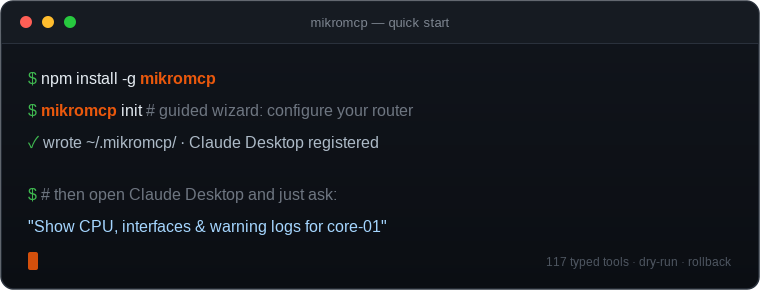
Quick Start
That's the whole setup for a single-router stdio deployment. For standalone binaries, Docker, HTTP/SSE mode, the RouterOS API prerequisites, and the full 15-minute walkthrough, see the Getting Started guide.
Feature Showcase
Category
What MikroMCP covers
🧭 Router management
System status, clock, reboot, packages, files, scripts, scheduler jobs, containers
🌐 Network operations
Interfaces, VLANs, IP addresses, DHCP leases, DNS static records, bridge ports, WiFi clients
Experimental. MikroTik SwOS and SwOS Lite switches (deviceType: "swos") over the reverse-engineered .b HTTP API: port links, PoE, SFP diagnostics, guarded whole-blob writes with a firmware-compatibility check, the whole switch config as one YAML document (export, dry-run, apply), backups and firmware upgrades
Human-readable responses plus structured JSON content for reasoning, chaining, and automation; server advertises an instructions string on MCP initialize so clients self-configure; optional routerId resolved via MIKROMCP_DEFAULT_ROUTER for single-router setups; usage skill for safe, guided tool use in Claude Code
🧩 MCP compatibility
stdio for desktop clients, Streamable HTTP and legacy SSE for remote or service-style clients
133 typed tools in total — browse the full catalog with parameters, defaults, and copy-paste example prompts in Available Tools.
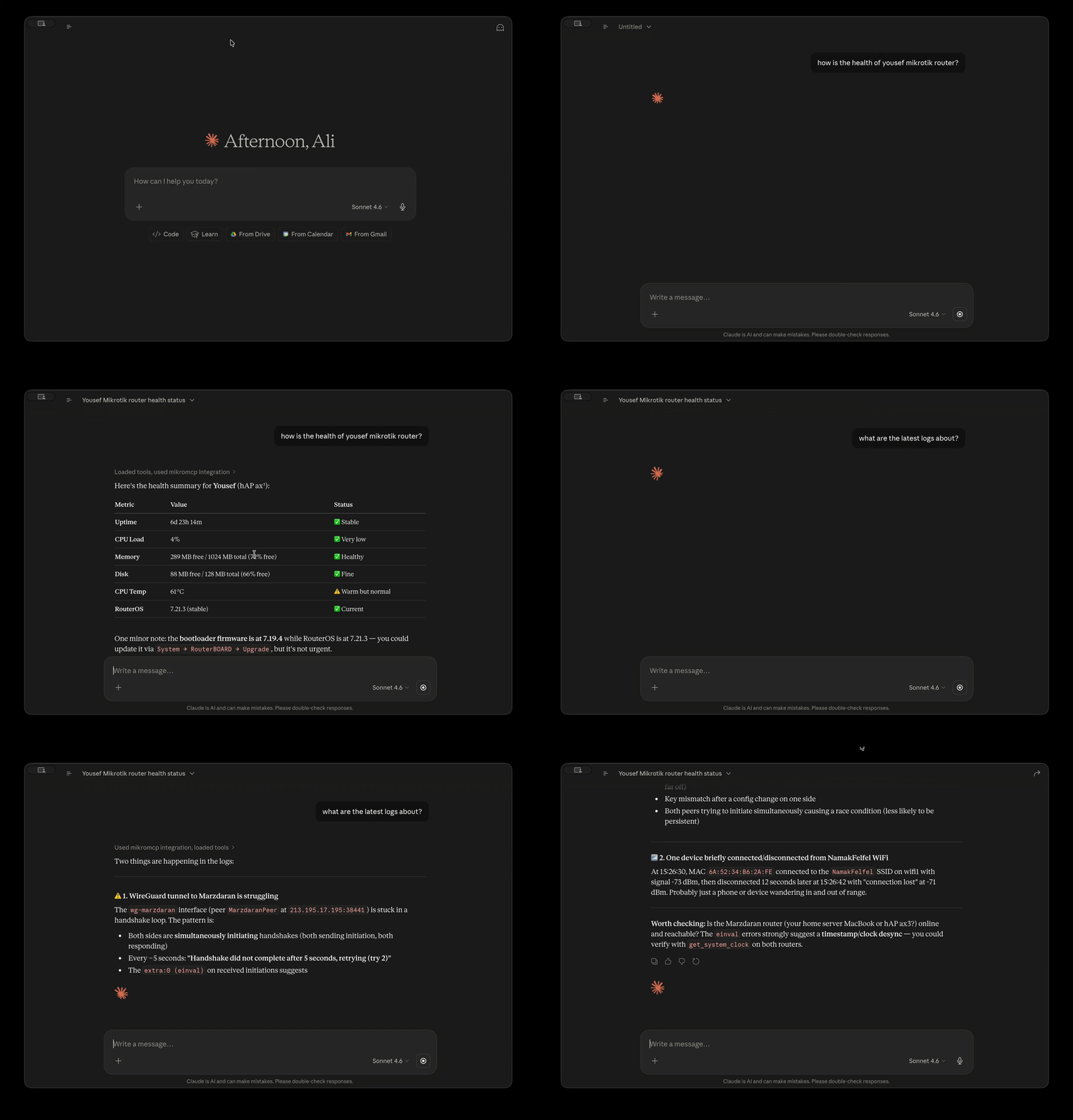
Demo
Usage
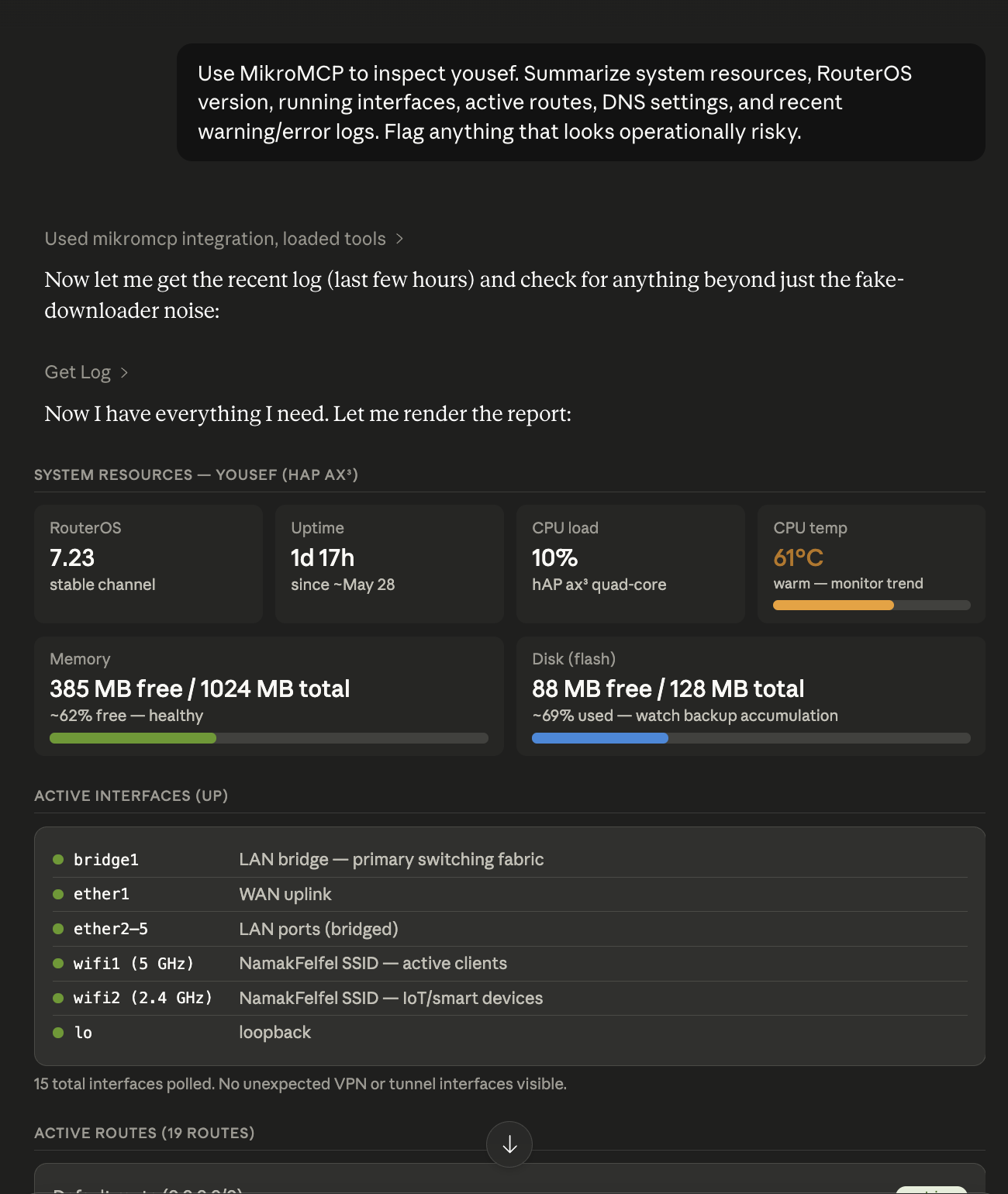
Review by Claude
Real-World Usage Examples
Router Inspection
Use MikroMCP to inspect core-01. Summarize system resources, RouterOS version,
running interfaces, active routes, DNS settings, and recent warning/error logs.
Flag anything that looks operationally risky.
Firewall Management
List firewall filter and NAT rules on edge-01. Identify disabled rules,
overlapping port forwards, broad accept rules, and anything without comments.
Do not change anything yet.
Safe Static Route Change
Dry-run a route on core-01 for 10.20.0.0/16 via 192.168.88.1 in the main table.
Show the exact planned diff and tell me whether an existing route conflicts.
WireGuard Operations
Show WireGuard peers on branch-02. Sort by last handshake age and flag peers
that have not handshaken recently or have no transfer counters.
Interface Diagnostics
Check interface health on edge-01, then run ping and traceroute from the router
to 1.1.1.1. If packet loss is present, use torch on the WAN interface for a
short traffic snapshot.
Plan / Apply / Rollback Workflow
Create a change plan that adds a DNS record and a firewall address-list entry
on edge-01. Use dry-run first, explain the plan, then wait for approval before
applying anything.
Why MikroMCP Is Useful For AI Agents
MCP gives LLMs a standard way to call tools. MikroMCP makes RouterOS a high-quality MCP target by turning network operations into well-described, machine-readable, permission-aware actions.
AI assistants can use MikroMCP to:
Investigate router state without memorizing RouterOS command syntax.
Chain tool calls across interfaces, routes, firewall rules, logs, and diagnostics.
Return both operator-friendly summaries and structured JSON for follow-up reasoning.
Preview changes before mutation and explain exactly what would happen.
Respect tool-level authorization, router scoping, maintenance windows, and confirmation gates.
FAQ
What is MikroMCP?
MikroMCP is an open-source Model Context Protocol (MCP) server that exposes MikroTik RouterOS as 133 typed, auditable tools — letting AI assistants inspect, diagnose, and safely operate routers in natural language instead of improvising CLI commands.
MikroMCP vs RouterOS API
The RouterOS REST/API exposes raw endpoints. MikroMCP wraps them in schema-validated, idempotent, dry-run-able tools with RBAC, audit logging, snapshots, and rollback — the safety layer an LLM needs before it touches production gear.
MikroMCP vs SSH automation
Instead of brittle SSH scripts that screen-scrape CLI output, MikroMCP returns structured, typed results with confirmation gates and per-router circuit breakers. SSH is used only where REST can't reach — ping and guarded run_command.
MikroMCP for Claude Code
MikroMCP speaks MCP over stdio and HTTP/SSE, so Claude Code and Claude Desktop drive RouterOS directly. Pair it with the bundled usage skill for safe, guided workflows.
MikroMCP is purpose-built for MikroTik/RouterOS operations with production-grade safety — dry-run, rollback, audit, and RBAC — making it a strong MCP choice for network engineers adopting AI tooling.
Documentation
The README stays intentionally short. Everything below is documented in depth in the wiki:
Issues, bug reports, tool requests, documentation improvements, and pull requests are welcome.
Good first contributions:
Add a read-only tool for an uncovered RouterOS surface.
Add screenshots, demo GIFs, or topology diagrams.
Expand tests around RouterOS response normalization and idempotency edge cases.
Help validate RouterOS version compatibility across real MikroTik devices and CHR.
Development standards:
TypeScript strict mode, ESM imports with .js extensions
Zod schemas with .strict(), idempotency and dryRun for write tools
MikroMCPError for domain errors, focused Vitest coverage for every tool
Please open an issue before large changes so maintainers can align on scope.
Acknowledgements
@f0086 — SwOS / SwOS Lite switch support (v1.9.0), which took MikroMCP beyond RouterOS for the first time.
@karamble — full SwOS support (v1.14.0): the full-SwOS dialect, whole-switch config apply, backups, firmware upgrades, password changes and switch-bound secrets.
Security
MikroMCP controls real network devices — treat it like an operations system: least-privilege RouterOS users, verified TLS (or pinned fingerprints), credentials only in ~/.mikromcp/.env, scoped RBAC identities, and audit logging for shared use. The full hardening checklist and vulnerability-reporting process are on the Security page.
Community And Support
⭐ Star the repository if MikroMCP helps your MikroTik or MCP workflow.
🍴 Fork it to add RouterOS surfaces your network depends on.
🧵 Open an issue for bugs, feature requests, compatibility notes, or documentation gaps.
Claim this server with your GitHub account to request manual ownership verification.
README Embed Badge
Markdown
Link to the catalog listing for MCP server for MikroTik RouterOS and SwOS network automation from your README. This badge does not certify ownership, compatibility or security.
A Model Context Protocol server built on Huawei Cloud services that enables AI assistants to operate Huawei Cloud resources within conversational workflows, supporting ECS, OBS, GaussDB, and other cloud products.
A deprecated Model Context Protocol server for interacting with Kong Konnect APIs, enabling AI assistants to query and analyze Kong Gateway configurations, traffic, and analytics.