
A directory listing describing a cancellation-letter and mailing-address service. The configured public GitHub repository returned 404 during source verification.
Repository stats unavailable
Developer Tools
An MCP server that lets agents and LLMs interact with native iOS and Android applications and devices via accessibility snapshots or screenshot-based coordinate taps, across simulators, emulators and real devices.
Mobile MCP server for iOS and Android automation is cataloged as an MCP server attributed to mobile-next. An MCP server that lets agents and LLMs interact with native iOS and Android applications and devices via accessibility snapshots or screenshot-based coordinate taps, across simulators, emulators and real devices. It is categorized under developer tools. See the capability inspector for recorded interfaces and their independent review status; consult upstream documentation for the current interface.
Installation configuration is not reviewed. No executable setup is offered for this entry; inspect the source repository before proceeding.
Catalog license label: Not specified. Check the source repository's current license and terms before using, modifying or distributing this software.
Capability definitions are not reviewed. Unreviewed imports are not exposed as trusted interfaces.
No reviewed records to display. This does not establish that upstream lacks this capability.
No reviewed records to display. This does not establish that upstream lacks this capability.
No reviewed records to display. This does not establish that upstream lacks this capability.
Email delivery is not connected. This page does not collect email addresses or create subscriptions.
Browse the registry for current listings instead.
Reviews for Mobile MCP server for iOS and Android automation are not available yet
Review publishing and storage are not connected. This page does not collect or publish ratings or comments, including after sign-in.
The server works with iOS simulators, iOS real devices, Android emulators and Android real devices.
No. The README states no XCUITest, Espresso or per-platform glue is required.
Yes, by default it runs over stdio, but the --listen flag starts a Streamable HTTP server instead.
README.md · ad3b42336d89 · Fetched 2026-11-13 09:28:39 UTC
Original upstream text, without AI rewriting. Scripts, forms and unsafe links are filtered for safety.
Showing the last retrieved documentation snapshot; check the source for current changes.
This is an MCP Server that enables scalable mobile automation, development through a platform-agnostic interface, eliminating the need for distinct iOS or Android knowledge. You can run it on emulators, simulators, and real devices (iOS and Android).
This server allows Agents and LLMs to interact with native iOS/Android applications and devices through structured accessibility snapshots or coordinate-based taps based on screenshots.
Works with Claude Code, Codex, Gemini, GitHub Copilot, Antigravity — or any MCP-compatible client.
Run it against devices on your own machine, or against real iOS and Android devices in the cloud with Mobile Next Cloud — same tools, no local setup.






https://github.com/user-attachments/assets/bb084777-beb3-4930-ae6f-8d3fe694ddde
Quick install detects the MCP clients on this machine (Claude Code, Codex, Cursor, VS Code, Gemini CLI and more) and lets you pick which ones to configure:
npx @mobilenext/mobile-mcp@latest install
Add --yes to configure every detected client without asking.
Manual setup per client: Installation and configuration
How we help to scale mobile automation:
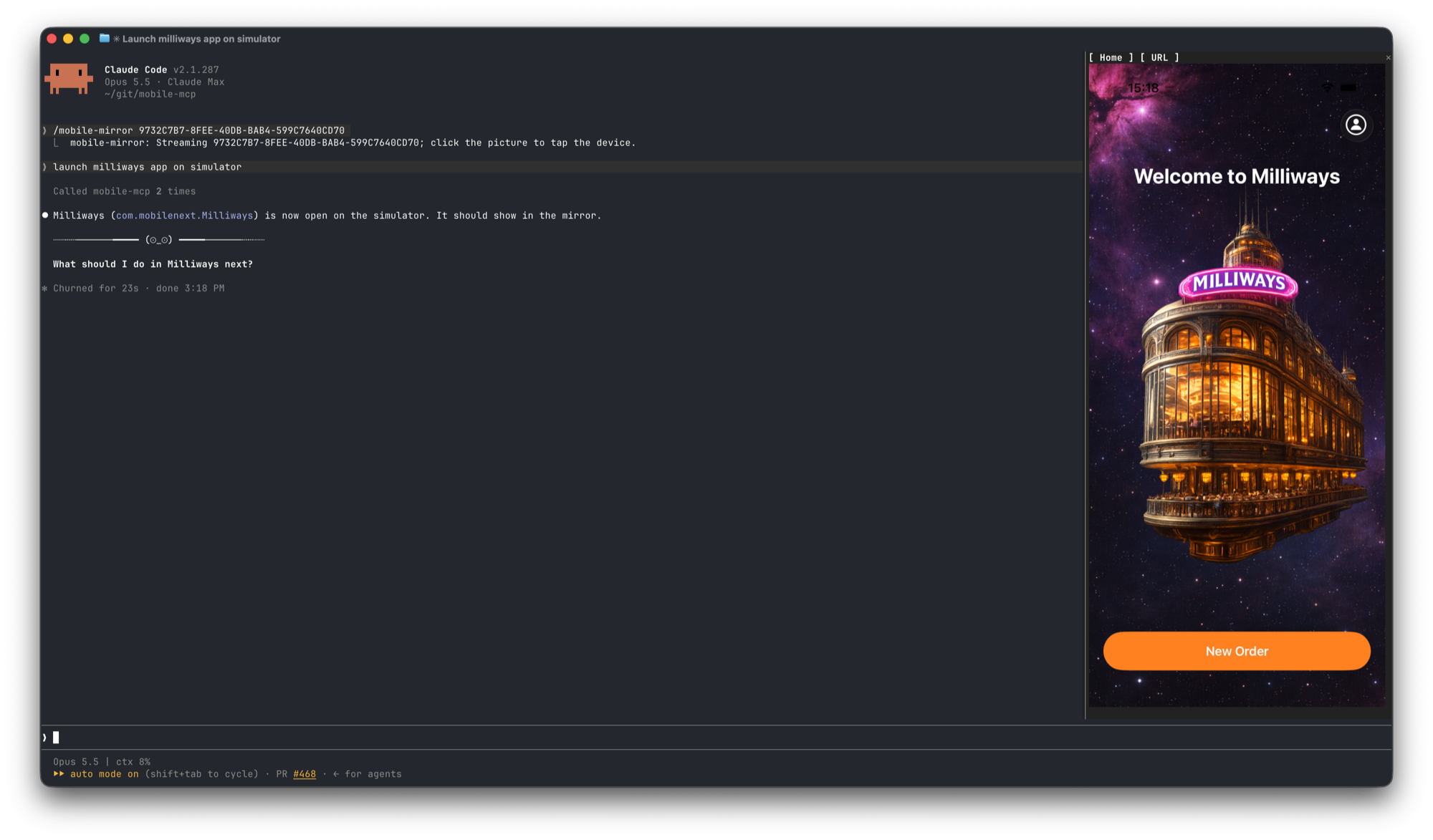
/mobile-mirror to see the device's live screen in a side pane, then tap, type and press Home/Back without leaving the terminal.
| Target | Supported | Setup |
|---|---|---|
| iOS Simulator | ✅ | Xcode + a booted simulator (xcrun simctl) |
| iOS Real Device | ✅ | Device connected over USB and trusted |
| Android Emulator | ✅ | Android SDK + running emulator (adb) |
| Android Real Device | ✅ | adb + USB debugging enabled & authorized |
mobile_list_available_devices - List all available devices (simulators, emulators, and real devices)mobile_get_screen_size - Get the screen size of the mobile device in pixelsmobile_get_orientation - Get the current screen orientation of the devicemobile_set_orientation - Change the screen orientation (portrait/landscape)mobile_fold_device - Fold or unfold a foldable device (iPhone Duo simulators, foldable Android emulators)mobile_set_location - Override the GPS location reported by the device, or clear the overridemobile_clipboard - Read or replace the device clipboardmobile_login_to_cloud_provider - Authenticate this machine with the cloud device provider (browser-based device-code login)mobile_list_remote_devices - List device models available to reserve from the cloud fleetmobile_allocate_remote_device - Reserve a physical cloud device for exclusive usemobile_release_remote_device - Release a reserved cloud device back to the fleetmobile_list_apps - List all installed apps on the devicemobile_get_foreground_app - Get the app currently in the foregroundmobile_launch_app - Launch an app using its package namemobile_terminate_app - Stop and terminate a running appmobile_install_app - Install an app from file (.apk, .ipa, .app, .zip)mobile_uninstall_app - Uninstall an app by its package name or bundle IDmobile_clear_app_data - Clear an app's data so it starts fresh (Android and iOS Simulator)mobile_take_screenshot - Take a screenshot to understand what's on screenmobile_save_screenshot - Save a screenshot to a filemobile_list_elements_on_screen - List UI elements with their coordinates and propertiesmobile_click_on_screen_at_coordinates - Click at specific x,y coordinates or on an element by its refmobile_double_tap_on_screen - Double-tap at specific coordinates or on an element by its refmobile_long_press_on_screen_at_coordinates - Long press at specific coordinates or on an element by its refmobile_swipe_on_screen - Swipe in any direction (up, down, left, right)mobile_start_screen_recording - Start recording the device screen to a video filemobile_stop_screen_recording - Stop the active screen recording and save the videomobile_type_keys - Type text into focused elements with optional submitmobile_press_button - Press device buttons (HOME, BACK, VOLUME_UP/DOWN, ENTER, etc.)mobile_open_url - Open http/https URLs in the device browsermobile_get_device_logs - Collect live device logs (logcat on Android, unified log on iOS), optionally saved to a filemobile_list_crashes - List crash reports available on the devicemobile_get_crash - Get the full content of a crash report by its IDmobile_batch_commands - Run multiple tools in sequence in a single call (e.g. click, type, click), optionally listing screen elements at the end
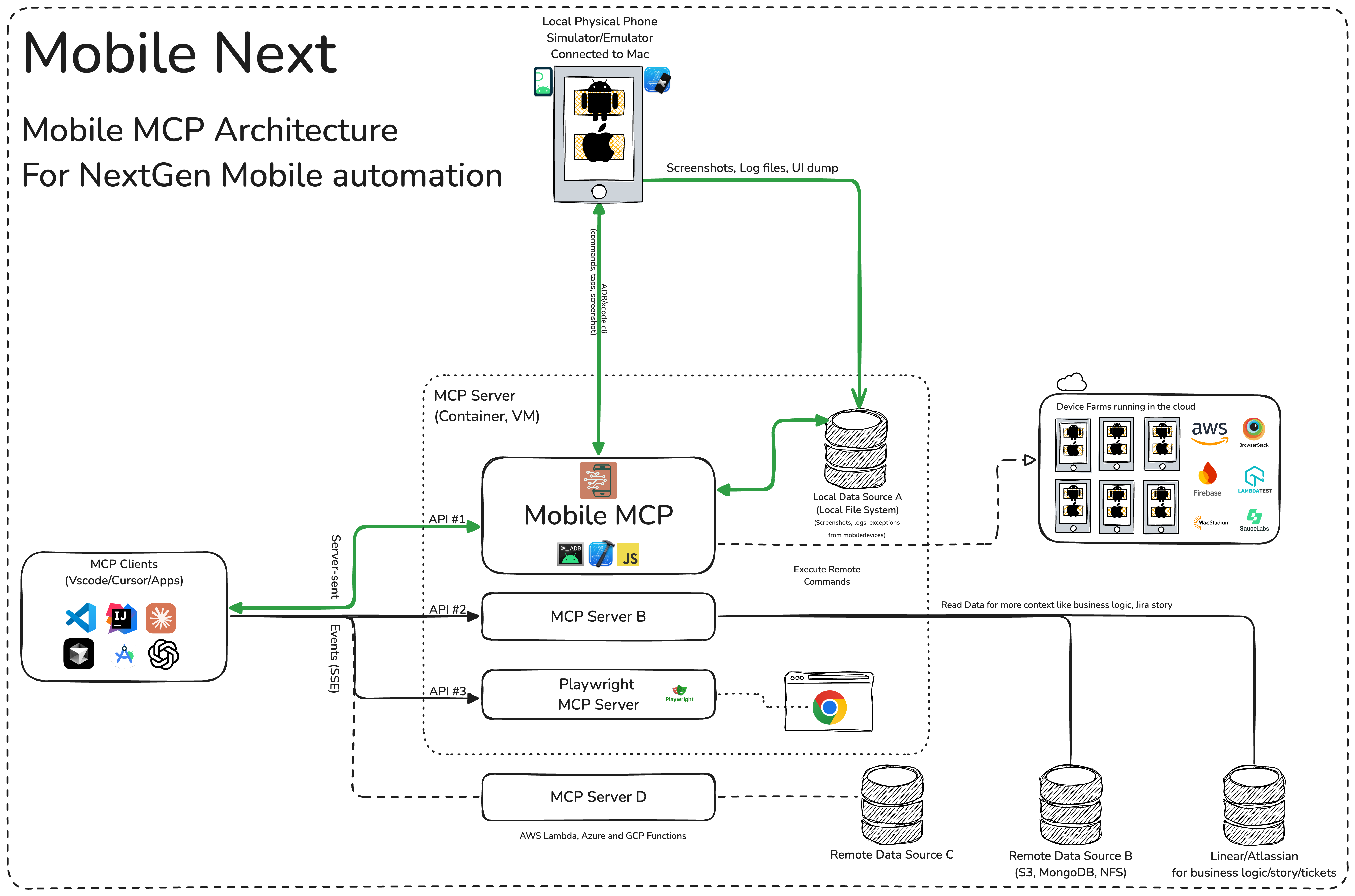
More details in our wiki page for setup, configuration and debugging related questions.
What you will need to connect MCP with your agent and mobile devices:
To configure it by hand, this standard config works in most of the tools:
{
  "mcpServers": {
    "mobile-mcp": {
      "command": "npx",
      "args": ["-y", "@mobilenext/mobile-mcp@latest"]
    }
  }
}
Add via the Amp VS Code extension settings screen or by updating your settings.json file:
"amp.mcpServers": {
  "mobile-mcp": {
    "command": "npx",
    "args": [
      "@mobilenext/mobile-mcp@latest"
    ]
  }
}
Amp CLI:
Run the following command in your terminal:
amp mcp add mobile-mcp -- npx @mobilenext/mobile-mcp@latest
Antigravity doesn't have a CLI command to add MCP servers, so add it manually. Edit ~/.gemini/config/mcp_config.json and add:
{
  "mcpServers": {
    "mobile-mcp": {
      "command": "npx",
      "args": ["-y", "@mobilenext/mobile-mcp@latest"]
    }
  }
}
Install the plugin from inside Claude Code. It adds the Mobile MCP server and /mobile-mirror:
/plugin marketplace add mobile-next/mobile-mcp
/plugin install mobile-mcp@mobile-mcp
/mobile-mirror [device-id] opens a pane with the device's live screen. Click the picture to tap, type to send keys, and use the Home, Back, App Switch and URL buttons above it. The picture needs a terminal with the kitty graphics protocol, such as kitty or Ghostty.
If you can't use plugins, add only the MCP server with the Claude Code CLI:
claude mcp add mobile-mcp -- npx -y @mobilenext/mobile-mcp@latest
Follow the MCP install guide, use json configuration above.
Use the Codex CLI to add the Mobile MCP server:
codex mcp add mobile-mcp npx "@mobilenext/mobile-mcp@latest"
Alternatively, create or edit the configuration file ~/.codex/config.toml and add:
[mcp_servers.mobile-mcp]
command = "npx"
args = ["@mobilenext/mobile-mcp@latest"]
For more information, see the Codex MCP documentation.
Use the Copilot CLI to interactively add the Mobile MCP server:
/mcp add
You can edit the configuration file ~/.copilot/mcp-config.json and add:
{
  "mcpServers": {
    "mobile-mcp": {
      "type": "local",
      "command": "npx",
      "tools": [
        "*"
      ],
      "args": [
        "@mobilenext/mobile-mcp@latest"
      ]
    }
  }
}
For more information, see the Copilot CLI documentation.

Go to Cursor Settings -> MCP -> Add new MCP Server. Name to your liking, use command type with the command npx -y @mobilenext/mobile-mcp@latest. You can also verify config or add command like arguments via clicking Edit.
Use the Gemini CLI to add the Mobile MCP server:
gemini mcp add mobile-mcp npx -y @mobilenext/mobile-mcp@latest

Go to Advanced settings -> Extensions -> Add custom extension. Name to your liking, use type STDIO, and set the command to npx -y @mobilenext/mobile-mcp@latest. Click "Add Extension".
Follow the MCP Servers documentation. For example in .kiro/settings/mcp.json:
{
  "mcpServers": {
    "mobile-mcp": {
      "command": "npx",
      "args": [
        "@mobilenext/mobile-mcp@latest"
      ]
    }
  }
}
Follow the MCP Servers documentation. For example in ~/.config/opencode/opencode.json:
{
  "$schema": "https://opencode.ai/config.json",
  "mcp": {
    "mobile-mcp": {
      "type": "local",
      "command": [
        "npx",
        "@mobilenext/mobile-mcp@latest"
      ],
      "enabled": true
    }
  }
}
Open Windsurf settings, navigate to MCP servers, and add a new server using the command type with:
npx @mobilenext/mobile-mcp@latest
Or add the standard config under mcpServers in your settings as shown above.
Once the server is configured, ask your agent to list devices:
list available devices
You should get back your running simulators, emulators, and connected devices. If you do, Mobile MCP is wired up correctly. If the list is empty, make sure a simulator or emulator is running (see Prerequisites) — for more help, check the wiki.
Using Mobile MCP to automate a mobile app, or to test one? Tell your agent to write the flow as a Mobilewright test. It becomes deterministic, and part of your CI/CD workflow.
import { test, expect } from '@mobilewright/test';

test('sign in', async ({ screen }) => {
  await screen.getByLabel('Email').fill('user@example.com');
  await screen.getByRole('button', { name: 'Sign In' }).tap();
  await expect(screen.getByText('Welcome back')).toBeVisible();
});
Start with npm init mobilewright@latest. The step-by-step guide goes from an agent session to a test running in GitHub Actions.
Want to scale to hundreds of devices? Use Mobile MCP in your CI/CD pipeline?
In your Agent, prompt:
log in to mobile next cloud and then show me which remote devices are available to me
By default, Mobile MCP runs over stdio. To start a Streamable HTTP server instead, use the --listen flag:
npx @mobilenext/mobile-mcp@latest --listen 3000
This binds to localhost:3000. To bind to a specific interface:
npx @mobilenext/mobile-mcp@latest --listen 0.0.0.0:3000
Then configure your MCP client to connect to http://<host>:3000/mcp (or https://…/mcp behind TLS). The endpoint accepts Streamable HTTP (POST on /mcp); remote mode is stateless (no session affinity required), which works well with Smithery and other horizontal hosts.
Migration note:
--listenpreviously served the deprecated HTTP+SSE transport on/mcp. Clients must use Streamable HTTP againsthttp(s)://host:port/mcp. The old pure-SSE flow on/mcpis no longer available.
When binding to localhost, Host-header DNS rebinding protection is enabled automatically.
To require Bearer token authorization on the HTTP server, set the MOBILEMCP_AUTH environment variable:
MOBILEMCP_AUTH=my-secret-token npx @mobilenext/mobile-mcp@latest --listen 3000
When set, all requests must include the header Authorization: Bearer my-secret-token. When unset, the server accepts unauthenticated connections and logs a warning.
After adding the MCP server to your IDE/Client, you can instruct your AI assistant to use the available tools. For example, in Cursor's agent mode, you could use the prompts below to quickly validate, test and iterate on UI interactions, read information from screen, go through complex workflows. Be descriptive, straight to the point.
You can specify detailed workflows in a single prompt, verify business logic, setup automations. You can go crazy:
Search for a video, comment, like and share it.
Find the video called " Beginner Recipe for Tonkotsu Ramen" by Way of
Ramen, click on like video, after liking write a comment " this was
delicious, will make it next Friday", share the video with the first
contact in your whatsapp list.
Download a successful step counter app, register, setup workout and 5-star the app
Find and Download a free "Pomodoro" app that has more than 1k stars.
Launch the app, register with my email, after registration find how to
start a pomodoro timer. When the pomodoro timer started, go back to the
app store and rate the app 5 stars, and leave a comment how useful the
app is.
Search in Substack, read, highlight, comment and save an article
Open Substack website, search for "Latest trends in AI automation 2025",
open the first article, highlight the section titled "Emerging AI trends",
and save article to reading list for later review, comment a random
paragraph summary.
Reserve a workout class, set timer
Open ClassPass, search for yoga classes tomorrow morning within 2 miles,
book the highest-rated class at 7 AM, confirm reservation,
setup a timer for the booked slot in the phone
Find a local event, setup calendar event
Open Eventbrite, search for AI startup meetup events happening this
weekend in "Austin, TX", select the most popular one, register and RSVP
yes to the event, setup a calendar event as a reminder.
Check weather forecast and send a Whatsapp/Telegram/Slack message
Open Weather app, check tomorrow's weather forecast for "Berlin", and
send the summary via Whatsapp/Telegram/Slack to contact "Lauren Trown",
thumbs up their response.
Open Zoom app, schedule a meeting titled "AI Hackathon" for tomorrow at
10AM with a duration of 1 hour, copy the invitation link, and send it via
Gmail to contacts "team@example.com".
| Variable | Description | Example |
|---|---|---|
MOBILEMCP_AUTH | Require a Bearer token on the Streamable HTTP server (--listen) — every request must then send Authorization: Bearer <token>. | MOBILEMCP_AUTH=my-secret-token |
MOBILEMCP_DISABLE_TELEMETRY | Disable anonymous usage telemetry. | MOBILEMCP_DISABLE_TELEMETRY=1 |
MOBILEMCP_ALLOW_UNSAFE_URLS | Allow mobile_open_url to open non-standard URL schemes (blocked by default). | MOBILEMCP_ALLOW_UNSAFE_URLS=1 |
MOBILEMCP_LEGACY_ROBOT | Use the legacy platform-specific robots for Android devices and physical iOS devices. iOS simulators continue to use mobilecli. | MOBILEMCP_LEGACY_ROBOT=1 |
When launched, Mobile MCP can connect to:
Make sure you have your mobile platform SDKs (Xcode, Android SDK) installed and configured properly before running Mobile Next Mobile MCP.
Mobile MCP collects anonymous usage telemetry via PostHog and Scarf. To disable it, set the MOBILEMCP_DISABLE_TELEMETRY environment variable:
MOBILEMCP_DISABLE_TELEMETRY=1 npx @mobilenext/mobile-mcp@latest
For json configurations:
{
  "mcpServers": {
    "mobile-mcp": {
      "command": "npx",
      "args": ["-y", "@mobilenext/mobile-mcp@latest"],
      "env": {
        "MOBILEMCP_DISABLE_TELEMETRY": "1"
      }
    }
  }
}
When you do not have a real device connected to your machine, you can run Mobile MCP with an emulator or simulator in the background.
For example, on Android:
On iOS, you'll need Xcode and to run the Simulator before using Mobile MCP with that simulator instance.
xcrun simctl listxcrun simctl boot "iPhone 16"Mobile MCP is one piece of a toolkit for driving real mobile devices:
log in to mobile next cloud and then show me which remote devices are available to me to get started.We're continuously improving Mobile MCP. See what we're building next in ROADMAP.md — priorities are shaped heavily by community feedback, so tell us what you'd like to see.
Contributions are welcome — code, docs, bug reports, and ideas.
Please also review our Code of Conduct.
Mobile MCP runs locally and communicates only with the devices you connect. See the Mobile Next privacy policy at https://mobilenext.ai/privacy for data collection, usage, retention, and contact information.
Claim this server with your GitHub account to request manual ownership verification.
Link to the catalog listing for Mobile MCP server for iOS and Android automation from your README. This badge does not certify ownership, compatibility or security.
[](https://awesome-mcp.com/servers/mobile-next)Public repository statistics could not be verified. Check the configured source address; unavailable counts are not zero.
Separate sources, scopes and periods. Never combined or treated as installations, active users or security reviews.
No reviewed package or image identity; download statistics are not listed yet.
Alternative and complementary servers in the same category
A directory listing describing a cancellation-letter and mailing-address service. The configured public GitHub repository returned 404 during source verification.

A hosted MCP service for browsing and searching through Singapore mobile-network proxies.

A directory listing describing a Markdown-to-PDF service. The configured public GitHub repository returned 404 during source verification.