

Store and retrieve entities, relations and observations in a persistent local knowledge graph.
create_entitiescreate_relationsadd_observations+6 more
92K
AI & Multi-Agent
An MCP server that generates 2D molecule visualizations and calculates molecular properties from SMILES strings or common molecule names.
Molecule Visualizer MCP Server is cataloged as an MCP server attributed to leelasd. An MCP server that generates 2D molecule visualizations and calculates molecular properties from SMILES strings or common molecule names. It is categorized under ai agents-models. See the capability inspector for recorded interfaces and their independent review status; consult upstream documentation for the current interface.
Installation configuration is not reviewed. No executable setup is offered for this entry; inspect the source repository before proceeding.
Catalog license label: Apache License. Check the source repository's current license and terms before using, modifying or distributing this software.
Capability definitions are not reviewed. Unreviewed imports are not exposed as trusted interfaces.
No reviewed records to display. This does not establish that upstream lacks this capability.
No reviewed records to display. This does not establish that upstream lacks this capability.
No reviewed records to display. This does not establish that upstream lacks this capability.
Email delivery is not connected. This page does not collect email addresses or create subscriptions.
Browse the registry for current listings instead.
Reviews for Molecule Visualizer MCP Server are not available yet
Review publishing and storage are not connected. This page does not collect or publish ratings or comments, including after sign-in.
Yes, it can generate 2D visualizations from SMILES strings or common names.
Yes, atom indices can optionally be shown for educational purposes.
Yes, image width and height are configurable parameters.
README.md · 92a0959b2e13 · Fetched 2026-11-13 10:44:41 UTC
Original upstream text, without AI rewriting. Scripts, forms and unsafe links are filtered for safety.
Showing the last retrieved documentation snapshot; check the source for current changes.



A Model Context Protocol (MCP) server that provides tools for visualizing molecules and retrieving molecular properties using SMILES codes. This server integrates with LLM applications like Claude Desktop to provide chemistry-focused capabilities.
The Molecule Visualizer MCP server provides LLM applications with the ability to:
This enables chemistry-related use cases such as exploring molecular structures, analyzing chemical properties, and generating molecule visualizations for educational content or research assistance.
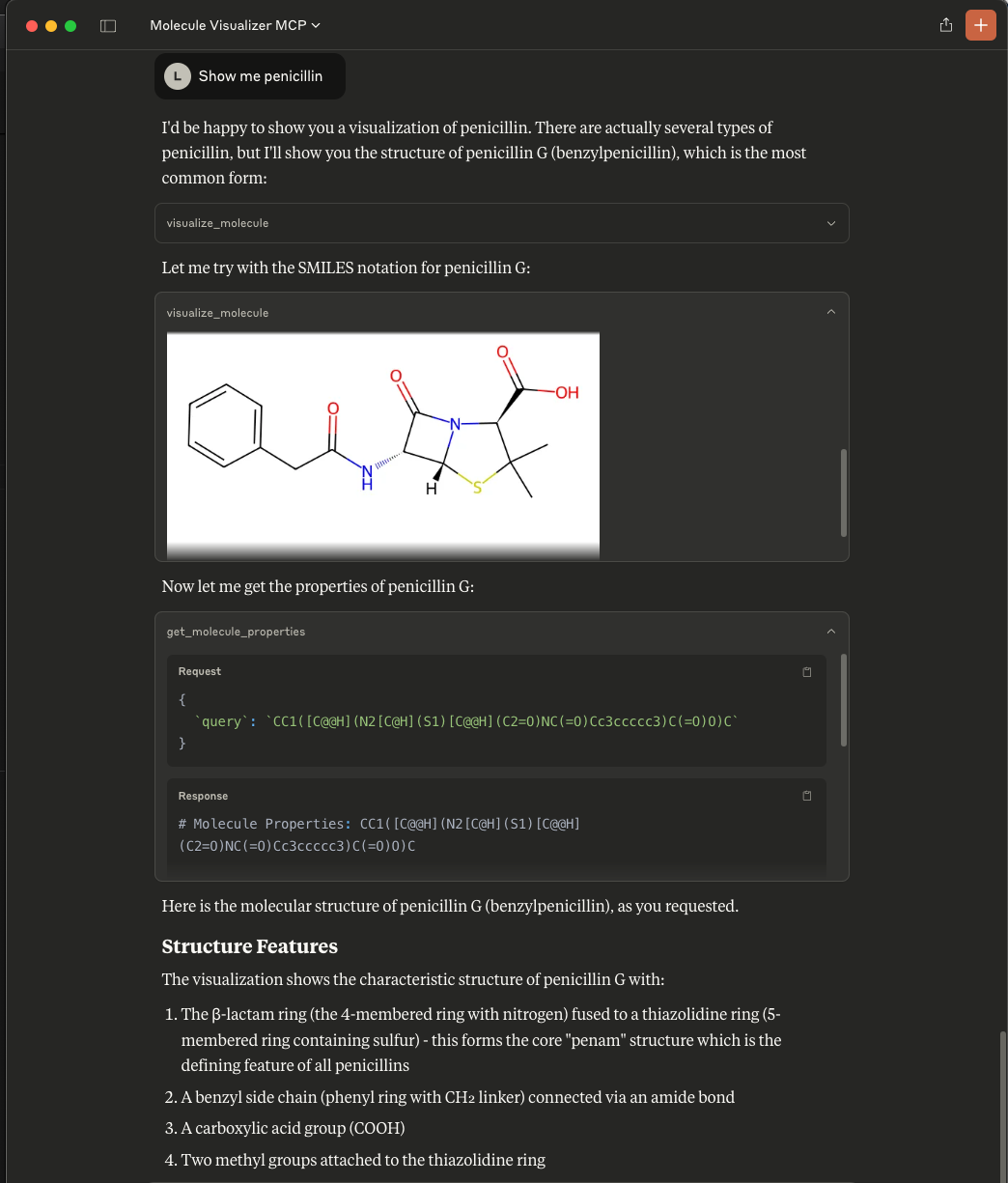
Claude using the Molecule Visualizer MCP server to display molecular structures.
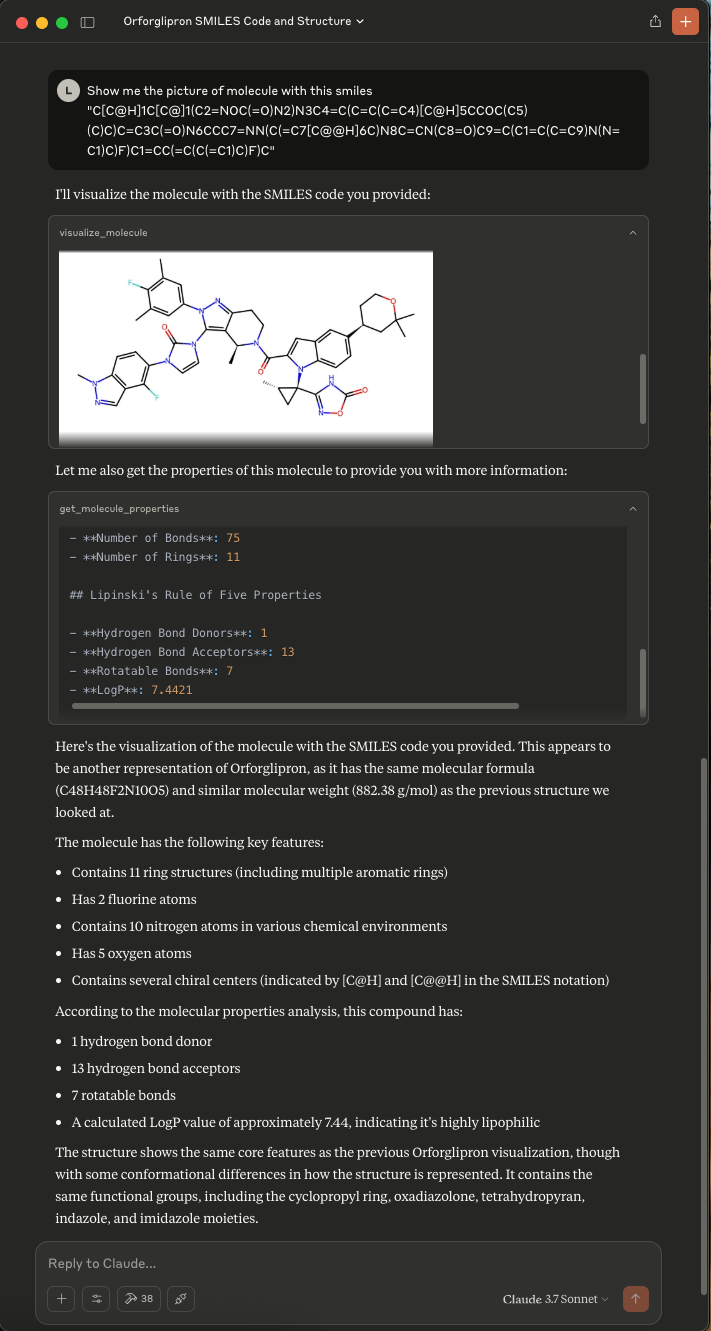
Providing direct SMILES codes to generate molecular visualizations.
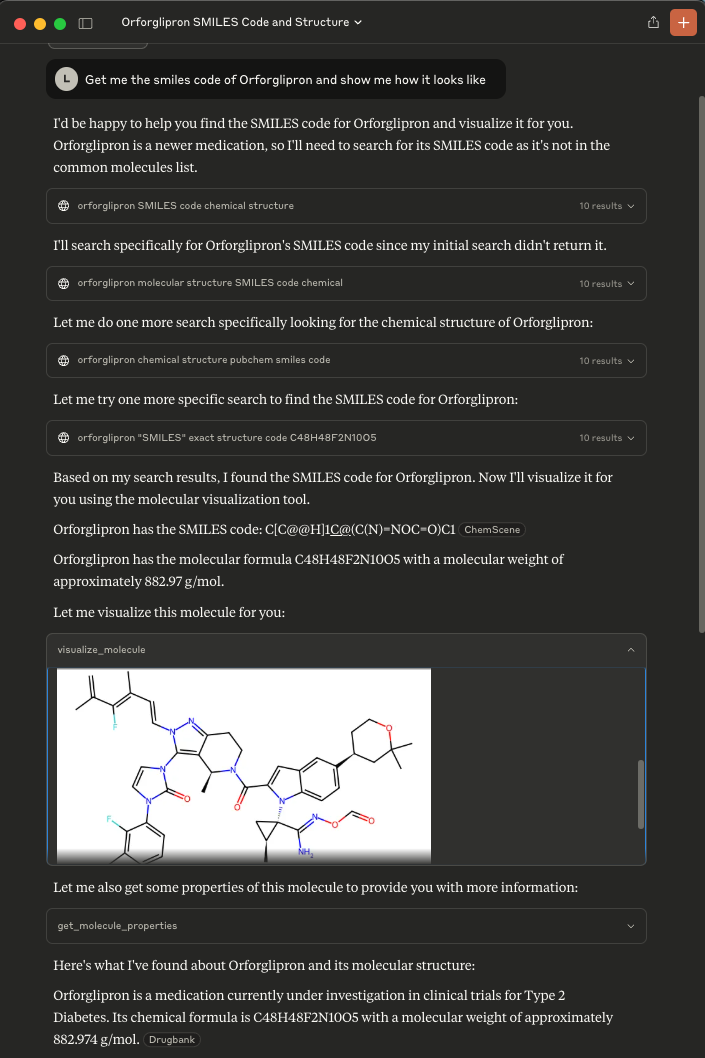
Attempting similar visualization with web access did not work as Claude fails at getting the right smiles code from the internet. - MCP provides more reliable chemistry capabilities if pubchempy and chembl client are added to this.
Clone this repository:
git clone https://github.com/yourusername/molecule-visualizer.git
cd molecule-visualizer
Run the setup script which creates a virtual environment and installs dependencies:
chmod +x setup.sh
./setup.sh
Activate the virtual environment:
source venv/bin/activate
You can also use the fast uv package manager (recommended in the MCP documentation):
Install uv if you don't already have it:
pip install uv
Create a virtual environment:
uv venv
Install dependencies:
uv pip install -r requirements.txt
Or install dependencies directly:
uv add "mcp[cli]"
uv add "rdkit>=2023.3.1"
uv add "pillow>=10.0.0"
Activate the virtual environment:
source .venv/bin/activate
To run the server directly:
python molecule_server.py
The server will start and listen for MCP connections.
Install Claude Desktop
Edit your Claude Desktop configuration file:
~/Library/Application Support/Claude/claude_desktop_config.json%APPDATA%\Claude\claude_desktop_config.jsonAdd the Molecule Visualizer server configuration:
{
  "mcpServers": {
    "Molecule Visualizer": {
      "command": "uv",
      "args": [
        "run",
        "--with",
        "mcp[cli]",
        "--with",
        "pillow",
        "--with",
        "rdkit",
        "mcp",
        "run",
        "/ABSOLUTE-PATH-TO-MOLECULE-SERVER/molecule_server.py"
      ]
    }
  }
}
Restart Claude Desktop
In Claude, you can now use molecule visualization:
Please show me a visualization of aspirin
A test client is included to demonstrate how to use the server:
python test_client.py
This will connect to the server and run through several examples of using the tools and resources.
visualize_moleculeGenerate a 2D visualization of a molecule as an Image object.
Parameters:
query (string): Molecule name or SMILES stringwidth (integer, optional): Width in pixels (default: 400)height (integer, optional): Height in pixels (default: 300)show_atom_indices (boolean, optional): Whether to show atom indices (default: false)Returns:
visualize_molecule_markdownGenerate a 2D visualization of a molecule as a markdown string with embedded base64-encoded image.
Parameters:
visualize_moleculeReturns:
get_molecule_propertiesGet properties of a molecule.
Parameters:
query (string): Molecule name or SMILES stringReturns:
get_common_moleculesGet a list of common molecules that can be visualized.
Parameters:
Returns:
molecule://{name}/smilesGet the SMILES string for a common molecule.
Parameters:
name (string): Name of the common moleculeReturns:
molecules://commonList all common molecules available in the database.
Returns:
from mcp import ClientSession, StdioServerParameters
from mcp.client.stdio import stdio_client

async def visualize():
    server_params = StdioServerParameters(
        command="python",
        args=["path/to/molecule_server.py"],
        env=None
    )

    async with stdio_client(server_params) as (stdin, stdout):
        client = ClientSession(stdin, stdout)
        await client.initialize()

        # Visualize aspirin
        result = await client.call_tool("visualize_molecule", {"query": "aspirin"})

        # The image data is in result.content[0].image.data
        # The image format is in result.content[0].image.format

        # Save the image to a file
        with open("aspirin.png", "wb") as f:
            f.write(result.content[0].image.data)
# Using the client from above
result = await client.call_tool("get_molecule_properties", {"query": "caffeine"})
print(result.content[0].text)
Dependencies are listed in requirements.txt:
mcp[cli]>=0.1.0
rdkit>=2023.3.1
pillow>=10.0.0
This project is licensed under the Apache License - see the LICENSE file for details.
Contributions are welcome! Here are ways you can contribute:
To contribute:
Please ensure your code follows the existing style and includes appropriate tests and documentation.
Claim this server with your GitHub account to request manual ownership verification.
Link to the catalog listing for Molecule Visualizer MCP Server from your README. This badge does not certify ownership, compatibility or security.
[](https://awesome-mcp.com/servers/molecule_mcp)Public repository statistics could not be verified. Check the configured source address; unavailable counts are not zero.
Separate sources, scopes and periods. Never combined or treated as installations, active users or security reviews.
No reviewed package or image identity; download statistics are not listed yet.
Alternative and complementary servers in the same category
Store and retrieve entities, relations and observations in a persistent local knowledge graph.
Organize problem solving into revisable, branching thought steps through an MCP tool.

Query-aware context compression with an MCP plugin for coding agents, plus Python and HTTP interfaces for reducing the context sent to a language model.