MSK MCP Server
A comprehensive Model Context Protocol server that provides management capabilities for Amazon MSK (Managed Streaming for Apache Kafka) including MirrorMaker2 connectors, custom domain creation, and disaster recovery operations. This server enables LLMs to create, configure, and manage complete MSK infrastructure with advanced DNS management and DR switching capabilities.
[!CAUTION]
This server requires AWS credentials with permissions to access MSK Connect, S3, Route53, and related AWS services. Exercise caution when using this MCP server to ensure proper AWS security practices.
The server provides two main modules:
- MirrorMaker2 Module (mm2) - Complete MM2 pipeline orchestration with custom plugin creation, connector configuration, and status monitoring
- Custom Domain Module (dr) - MSK custom domain creation with Route53 integration and disaster recovery switching capabilities
Custom Domain Module only support PLAINTEXT, MSK MM2 support multiple authentication methods (IAM, PLAINTEXT, SCRAM-SHA-512) and handle long-running operations with proper timeouts and retries.
Features
MSK Custom Domain & Disaster Recovery (dr module)
- Custom Domain Creation - Creates custom DNS domains for MSK clusters using Route53
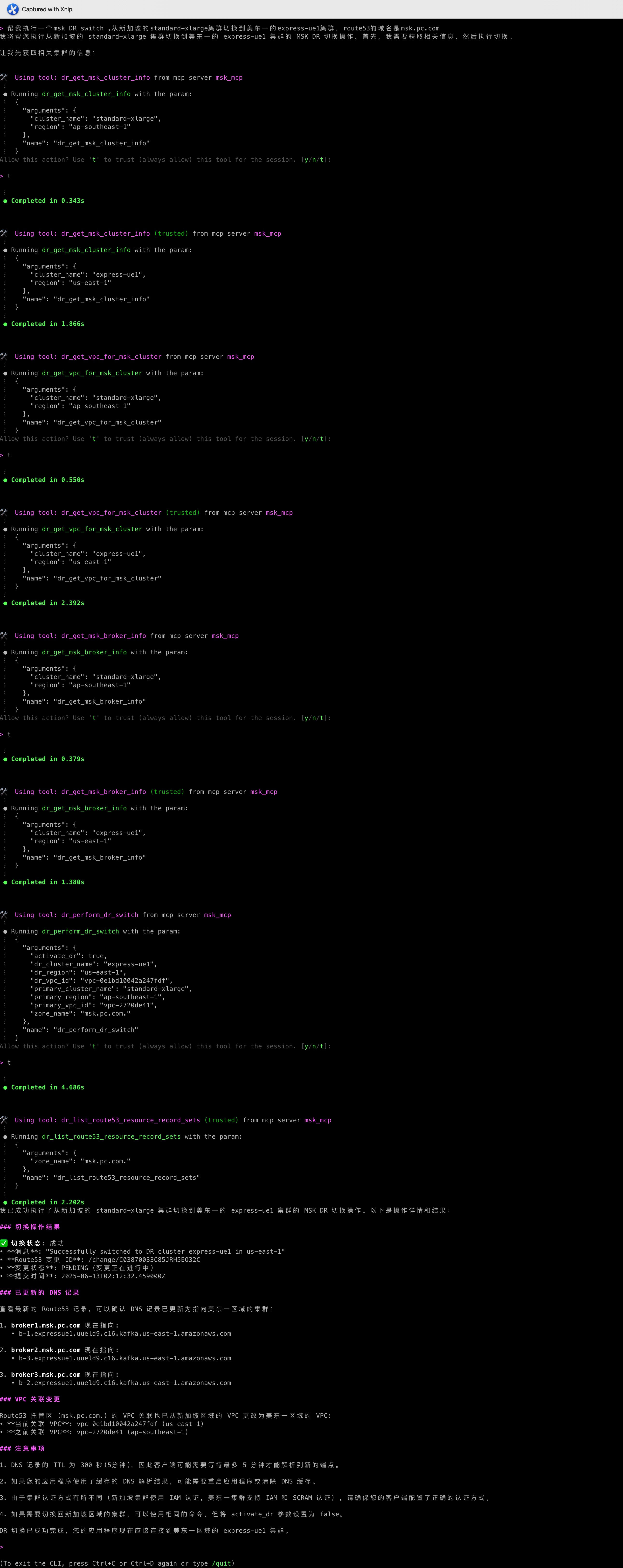
- Disaster Recovery Switching - Automated DR failover between primary and secondary MSK clusters
- Route53 Integration - Manages DNS records and VPC associations for seamless switching
- Cluster Information - Retrieves detailed MSK cluster and broker information
- VPC Management - Automatic VPC discovery and association for cross-region deployments
Core MirrorMaker2 Management
- Complete MM2 Pipeline Setup - Orchestrates full MirrorMaker2 replication setup with three connector types (Heartbeat, Checkpoint, Source)
- Custom Plugin Management - Creates and manages MSK Connect custom plugins with automatic S3 integration
- Authentication Support - Configures IAM, PLAINTEXT, and SCRAM-SHA-512 authentication for source and target clusters
- Status Monitoring - Real-time monitoring of connector and plugin states with automated waiting functions
MSK Custom Domain & Disaster Recovery
get_msk_cluster_info - Retrieves detailed information about an MSK clusterget_msk_broker_info - Gets broker information and bootstrap addresses for MSK clustersget_vpc_for_msk_cluster - Discovers VPC information for MSK cluster networkingget_route53_hosted_zone_info - Retrieves Route53 hosted zone detailscreate_msk_custom_domain - Creates custom DNS domains for MSK clusters with Route53 integrationlist_route53_resource_record_sets - Lists all DNS records in a Route53 hosted zoneperform_dr_switch - Performs disaster recovery switching between primary and DR clusters
Plugin Management
create_empty_plugin_zip - Creates an empty MirrorMaker2 plugin ZIP file and uploads to S3create_custom_plugin - Creates MSK Connect custom plugin from S3-stored ZIP filecheck_plugin_status - Checks the current status of a custom pluginwait_for_plugin_ready - Waits for plugin to reach ACTIVE state with timeout handling
Connector Management
create_mirror_heartbeat_connector - Creates MirrorHeartbeatConnector for cluster monitoringcreate_mirror_checkpoint_connector - Creates MirrorCheckpointConnector for offset trackingcreate_mirror_source_connector - Creates MirrorSourceConnector for data replicationcheck_connector_status - Monitors connector operational statuswait_for_connector_ready - Waits for connector to reach RUNNING state
Worker Configuration
create_worker_configuration - Creates MSK Connect worker configurationsdescribe_worker_configuration - Retrieves worker configuration detailsdelete_worker_configuration - Removes worker configurations
High-Level Operations
create_complete_mm2_setup - End-to-end MirrorMaker2 setup orchestrationupdate_connector - Updates existing connector configurationsdelete_connector - Safely removes connectorslist_connectors - Lists all MSK Connect connectorsdescribe_connector - Detailed connector information
Available Resources
msk://clusters - Lists all MSK clusters with detailed informationmsk://clusters/{cluster_name} - Detailed information about specific MSK clustersmsk://route53/zones - Lists all Route53 hosted zonesmsk://route53/zones/{zone_name}/records - DNS records for specific hosted zonesmsk://connectors - Lists all MSK Connect connectorsmsk://plugins - Lists all custom pluginsmsk://worker-configs - Lists all worker configurationsmsk://connector-status/{connector_name} - Real-time connector status information
Available Prompts
- setup_msk_custom_domain - Guidance for creating custom domains for MSK clusters with Route53
- configure_msk_disaster_recovery - Step-by-step DR setup between primary and secondary clusters
- perform_msk_dr_failover - Instructions for executing disaster recovery failover operations
- setup_complete_mm2_replication - Guidance for setting up complete MirrorMaker2 replication between clusters
- troubleshoot_connector - Troubleshooting guidance for connector issues
- optimize_mm2_performance - Performance optimization recommendations for different scales
Prerequisites
-
AWS Account Setup
- AWS account with appropriate permissions
- MSK clusters (source and target) properly configured
- VPC subnets and security groups configured for MSK Connect
- IAM service execution role for MSK Connect
-
Required AWS Permissions
{
  "Version": "2012-10-17",
  "Statement": [
    {
      "Effect": "Allow",
      "Action": [
        "kafkaconnect:*",
        "kafka:*",
        "s3:GetObject",
        "s3:PutObject",
        "s3:ListBucket",
        "route53:*",
        "ec2:DescribeSubnets",
        "ec2:DescribeVpcs"
      ],
      "Resource": "*"
    }
  ]
}
-
S3 Bucket
- S3 bucket for storing MirrorMaker2 plugin files
- Proper IAM permissions for MSK Connect to access the bucket
-
Route53 Hosted Zone (for custom domain functionality)
- Route53 hosted zone for custom domain creation
- Proper IAM permissions for Route53 record management
- VPC associations configured for private hosted zones
-
Network Configuration
- VPC subnets accessible to both source and target MSK clusters
- Security groups allowing MSK Connect to communicate with clusters
Installation
Using uv (recommended)
When using uv no specific installation is needed. We will use uvx to directly run msk-mcp-server.
Using PIP
Alternatively you can install msk-mcp-server via pip:
pip install msk-mcp-server
After installation, you can run it as a script using:
python -m mcp_server_msk_mm2
Configuration
Add to your Claude settings:
Using uvx with latest version
{
  "mcpServers": {
    "msk-mcp-server": {
      "command": "uvx",
      "args": ["msk-mcp-server@latest"],
      "env": {
        "AWS_REGION": "us-east-1",
        "AWS_PROFILE": "your-aws-profile",
        "FASTMCP_LOG_LEVEL": "ERROR"
      },
      "disabled": false,
      "autoApprove": []
    }
  }
}
Using uvx (simple)
{
  "mcpServers": {
    "msk-mm2": {
      "command": "uvx",
      "args": ["msk-mcp-server"],
      "env": {
        "AWS_REGION": "us-east-1",
        "AWS_PROFILE": "your-aws-profile"
      }
    }
  }
}
Using pip installation
{
  "mcpServers": {
    "msk-mm2": {
      "command": "python",
      "args": ["-m", "mcp_server_msk_mm2"],
      "env": {
        "AWS_REGION": "us-east-1",
        "AWS_PROFILE": "your-aws-profile"
      }
    }
  }
}
For manual installation, add the following JSON block to your User Settings (JSON) file in VS Code. You can do this by pressing Ctrl + Shift + P and typing Preferences: Open User Settings (JSON).
Optionally, you can add it to a file called .vscode/mcp.json in your workspace. This will allow you to share the configuration with others.
Note that the mcp key is needed when using the mcp.json file.
Using uvx with latest version
{
  "mcp": {
    "servers": {
      "msk-mcp-server": {
        "command": "uvx",
        "args": ["msk-mcp-server@latest"],
        "env": {
          "AWS_REGION": "us-east-1",
          "AWS_PROFILE": "your-aws-profile",
          "FASTMCP_LOG_LEVEL": "ERROR"
        },
        "disabled": false,
        "autoApprove": []
      }
    }
  }
}
Using uvx (simple)
{
  "mcp": {
    "servers": {
      "msk-mm2": {
        "command": "uvx",
        "args": ["msk-mcp-server"],
        "env": {
          "AWS_REGION": "us-east-1",
          "AWS_PROFILE": "your-aws-profile"
        }
      }
    }
  }
}
Environment Variables
AWS Configuration
AWS_REGION - AWS region for MSK Connect operations (default: uses AWS SDK default)AWS_PROFILE - AWS profile to use for authenticationAWS_ACCESS_KEY_ID - AWS access key (if not using profiles)AWS_SECRET_ACCESS_KEY - AWS secret key (if not using profiles)
Timeout Configuration
AWS_READ_TIMEOUT - Read timeout for AWS operations in seconds (default: 300)AWS_CONNECT_TIMEOUT - Connection timeout for AWS operations in seconds (default: 60)
Usage Examples
MSK Custom Domain Creation
Create custom DNS domains for your MSK clusters:
{
  "tool": "create_msk_custom_domain",
  "arguments": {
    "region": "us-east-1",
    "cluster_name": "my-msk-cluster",
    "zone_name": "kafka.example.com.",
    "vpc_id": "vpc-12345678"
  }
}
Disaster Recovery Switching
Perform DR failover between primary and secondary clusters:
{
  "tool": "perform_dr_switch",
  "arguments": {
    "primary_region": "us-east-1",
    "primary_cluster_name": "primary-cluster",
    "dr_region": "us-west-2",
    "dr_cluster_name": "dr-cluster",
    "zone_name": "kafka.example.com.",
    "activate_dr": true
  }
}
Retrieve detailed cluster and broker information:
{
  "tool": "get_msk_cluster_info",
  "arguments": {
    "region": "us-east-1",
    "cluster_name": "my-msk-cluster"
  }
}
Complete MirrorMaker2 Setup
The server provides a high-level orchestration tool for complete setup:
{
  "tool": "create_complete_mm2_setup",
  "arguments": {
    "plugin_name": "my-mm2-plugin",
    "s3_bucket": "my-kafka-plugins",
    "s3_key": "mm2/mirrormaker2.zip",
    "source_bootstrap_servers": "source-cluster.kafka.us-east-1.amazonaws.com:9092",
    "target_bootstrap_servers": "target-cluster.kafka.us-east-1.amazonaws.com:9092",
    "service_execution_role_arn": "arn:aws:iam::123456789012:role/MSKConnectRole",
    "vpc_subnets": ["subnet-12345", "subnet-67890"],
    "vpc_security_groups": ["sg-abcdef"],
    "source_auth_type": "iam",
    "target_auth_type": "iam"
  }
}
Monitor Connector Status
{
  "tool": "check_connector_status",
  "arguments": {
    "connector_arn": "arn:aws:kafkaconnect:us-east-1:123456789012:connector/my-connector/abc-123"
  }
}
Authentication Methods
IAM Authentication
{
  "source_auth_type": "iam",
  "source_role_arn": "arn:aws:iam::123456789012:role/MSKSourceRole"
}
SCRAM-SHA-512 Authentication
{
  "source_auth_type": "scram-sha-512",
  "source_username": "kafka-user",
  "source_password": "kafka-password"
}
PLAINTEXT Authentication
{
  "source_auth_type": "plaintext",
  "source_username": "kafka-user",
  "source_password": "kafka-password"
}
Debugging
You can use the MCP inspector to debug the server:
For uvx installations:
npx @modelcontextprotocol/inspector uvx msk-mcp-server
Or if you've installed the package in a specific directory or are developing on it:
cd path/to/msk-mcp-server
npx @modelcontextprotocol/inspector python -m mcp_server_msk_mm2
Architecture
The server is built with a modular architecture:
Core Framework:
- FastMCP Framework - Modern MCP server implementation with dependency management
- Modular Design - Separate modules for different MSK management capabilities
- Unified Interface - Single server instance with mounted submodules
Module Structure:
- mm2 Module - Complete MirrorMaker2 connector management
- dr Module - Custom domain creation and disaster recovery operations
Technical Features:
- Sync Operations - All operations are synchronous for better reliability
- Comprehensive Error Handling - Detailed error messages with AWS error codes
- Status Monitoring - Built-in polling for long-running operations
- Retry Logic - Exponential backoff for transient failures
- Resource Validation - Parameter validation and state checking
Contributing
We encourage contributions to help expand and improve msk-mcp-server. Whether you want to add new tools, enhance existing functionality, or improve documentation, your input is valuable.
For examples of other MCP servers and implementation patterns, see:
https://github.com/modelcontextprotocol/servers
Pull requests are welcome! Feel free to contribute new ideas, bug fixes, or enhancements to make msk-mcp-server even more powerful and useful.
License
msk-mcp-server is licensed under the MIT License. This means you are free to use, modify, and distribute the software, subject to the terms and conditions of the MIT License. For more details, please see the LICENSE file in the project repository.


