Nutrient DWS MCP Server
[!IMPORTANT]
This local MCP server is no longer supported. Use Nutrient MCP instead.
Nutrient now hosts its MCP server at https://mcp.nutrient.io/mcp. Add that URL to your MCP client and sign in with your Nutrient account. There's nothing to install, no API key and no sandbox folder.
# Claude Code
claude mcp add --transport http --scope user nutrient https://mcp.nutrient.io/mcp
# then run /mcp, choose nutrient, and select Authenticate

# Codex
codex mcp add nutrient --url https://mcp.nutrient.io/mcp && codex mcp login nutrient
In the Claude app, add https://mcp.nutrient.io/mcp as a custom connector. To switch, remove @nutrient-sdk/dws-mcp-server from your client config and add the URL. This repository stays up for reference only. It won't get new features or fixes.
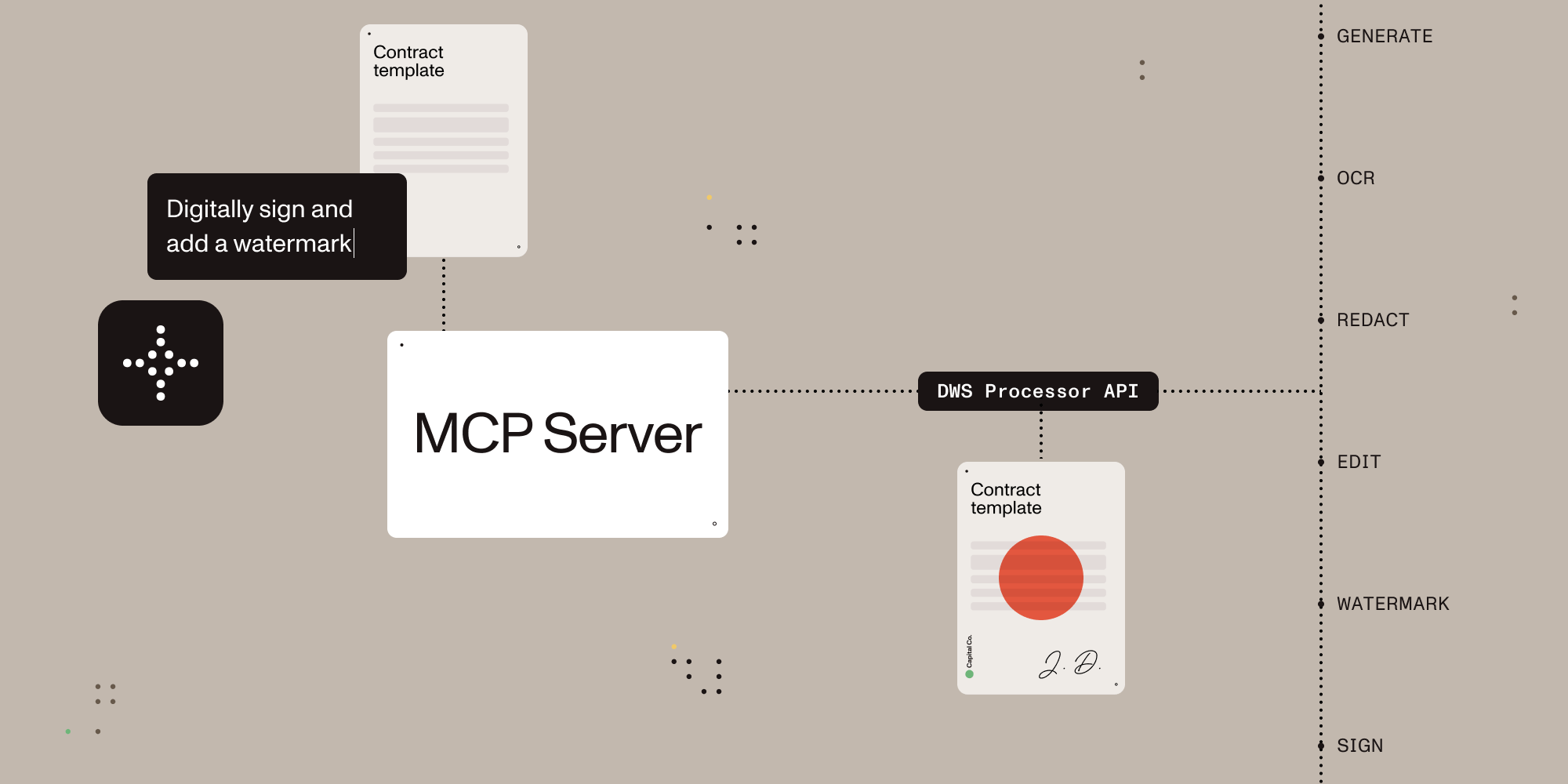


Give AI agents the power to generate, read, extract, process, and sign documents.
Description
A Model Context Protocol (MCP) server that connects AI assistants to the Nutrient Document Web Service (DWS) Processor and Data Extraction APIs — enabling document creation, editing, conversion, digital signing, OCR, and redaction, plus structured data extraction (typed JSON with bounding boxes and confidence, or schema-guided field extraction with per-field citations) through natural language.
Features
- Local stdio MCP server for Claude Desktop and other MCP-compatible clients
- Browser-based OAuth on the first request that uses the Nutrient API, with optional API-key fallback for CI and headless environments
- Document conversion, OCR, redaction, watermarking, annotation flattening, and digital signing (Processor API)
- Data extraction (Data Extraction API): parse whole documents to Markdown or spatial JSON, then pull named fields into a JSON schema you define, with per-field citations. Four parse modes:
text (1 credit/page, no OCR), structure (1.5), understand (9, the default), agentic (18, VLM)
- Sandbox-aware local file handling with explicit output paths
- Read-only account lookup for DWS credits and usage
What You Can Do
Once configured, you (or your AI agent) can process documents through natural language:
You: "Merge report-q1.pdf and report-q2.pdf into a single document"
AI: "Done! I've merged both reports into combined-report.pdf (24 pages total)."
You: "Redact all social security numbers and email addresses from application.pdf"
AI: "I found and redacted 5 SSNs and 3 email addresses. The redacted version is saved as application-redacted.pdf."
You: "Digitally sign this contract with a visible signature on page 3"
AI: "I've applied a PAdES-compliant digital signature to contract.pdf. The signed document is saved as contract-signed.pdf."
You: "Convert this PDF to markdown"
AI: "Here's the markdown content extracted from your document..."
You: "OCR this scanned document in German and extract the text"
AI: "I've processed the scan with German OCR. Here's the extracted text..."
You: "Pull the vendor, invoice number, total, and due date out of invoice-0341.pdf, with citations"
AI: "Here are the four fields as JSON. Each value cites the page and bounding box it came from..."
Installation
Install it from Claude Desktop Settings -> Extensions if you are using Claude Desktop. If you are developing locally, use the manual setup below.
The Claude Desktop MCPB extension defaults its sandbox directory to ~/Documents/Nutrient. You can change that directory in the extension settings. Clearing the field starts the server without sandbox restrictions, so file operations can use any path visible to your user account.
1. Create a Nutrient Account
Sign up for free at nutrient.io/api.
For local desktop use, the recommended path is to omit NUTRIENT_DWS_API_KEY and complete the browser sign-in flow on the first request that uses the Nutrient API. For CI, headless environments, or scripted setups, create an API key in the dashboard and set NUTRIENT_DWS_API_KEY.
Choose your platform and add the configuration:
Claude Desktop
Open Settings → Developer → Edit Config, then add:
macOS: ~/Library/Application Support/Claude/claude_desktop_config.json
Windows: %APPDATA%\Claude\claude_desktop_config.json
{
  "mcpServers": {
    "nutrient-dws": {
      "command": "npx",
      "args": ["-y", "@nutrient-sdk/dws-mcp-server"],
      "env": {
        "SANDBOX_PATH": "/your/sandbox/directory",
        // "C:\\your\\sandbox\\directory" for Windows
        // Optional for CI or headless usage:
        // "NUTRIENT_DWS_API_KEY": "YOUR_API_KEY_HERE"
      },
    },
  },
}
Cursor
Create .cursor/mcp.json in your project root:
{
  "mcpServers": {
    "nutrient-dws": {
      "command": "npx",
      "args": ["-y", "@nutrient-sdk/dws-mcp-server"],
      "env": {
        "SANDBOX_PATH": "/your/project/documents",
        // "C:\\your\\project\\documents" for Windows
        // Optional for CI or headless usage:
        // "NUTRIENT_DWS_API_KEY": "YOUR_API_KEY_HERE"
      },
    },
  },
}
Windsurf
Add to ~/.codeium/windsurf/mcp_config.json:
{
  "mcpServers": {
    "nutrient-dws": {
      "command": "npx",
      "args": ["-y", "@nutrient-sdk/dws-mcp-server"],
      "env": {
        "SANDBOX_PATH": "/your/sandbox/directory",
        // "C:\\your\\sandbox\\directory" for Windows
        // Optional for CI or headless usage:
        // "NUTRIENT_DWS_API_KEY": "YOUR_API_KEY_HERE"
      },
    },
  },
}
VS Code (GitHub Copilot)
Create .vscode/mcp.json in your project, or add the same server definition to your user mcp.json profile:
{
  "servers": {
    "nutrient-dws": {
      "type": "stdio",
      "command": "npx",
      "args": ["-y", "@nutrient-sdk/dws-mcp-server"],
      "env": {
        "SANDBOX_PATH": "${workspaceFolder}",
        // Optional for CI or headless usage:
        // "NUTRIENT_DWS_API_KEY": "YOUR_API_KEY_HERE"
      },
    },
  },
}
Other MCP Clients
Any MCP-compatible client can connect using stdio transport:
SANDBOX_PATH=/your/path npx @nutrient-sdk/dws-mcp-server

# Optional for CI or headless usage:
NUTRIENT_DWS_API_KEY=your_key SANDBOX_PATH=/your/path npx @nutrient-sdk/dws-mcp-server
3. Restart Your AI Client
Restart the application to pick up the new MCP server configuration.
4. Start Processing Documents
Place documents in your sandbox directory and use explicit file names or paths in prompts. Explicit paths are safer and more reliable than vague file-browsing requests.
Prompts
sign_and_watermark — Add a text watermark to a document, then digitally sign the watermarked PDF.extract_document_fields — Extract named fields into a JSON object, optionally retaining citations in a file.redact_pii — Detect and permanently redact personally identifiable information from a document.parse_for_rag — Parse a document as Markdown for retrieval-augmented generation and search indexing.office_to_pdfa — Convert an Office document to an archival PDF/A file.
Document Processor Capabilities
The parse_document and extract_fields tools wrap the DWS Data Extraction API and authenticate as follows:
- OAuth (no
NUTRIENT_DWS_API_KEY set): the same browser-flow token used by every other tool also covers Data Extraction. No extra configuration is needed.
- Static API key: Data Extraction is a separate product with its own tenant, so the Processor key in
NUTRIENT_DWS_API_KEY cannot be reused. Set NUTRIENT_DWS_EXTRACTION_API_KEY to a Data Extraction key from the dashboard. Without it, parse_document and extract_fields return an error instead of calling the API.
parse_document runs one of four processing modes:
- Spatial output returns typed elements (paragraphs, tables, key-value regions, formulas, pictures, handwriting) with bounding boxes, confidence scores, and reading order. Because the element list can be large, it is written to
outputPath and the tool returns a content-free summary (element counts, low-confidence flags, page geometry).
- Markdown output returns whole-document Markdown inline, or writes it to
outputPath when provided (recommended for large documents) — useful for RAG and search indexing.
- Both at once: pass
formats: ["spatial", "markdown"] instead of format to get output.elements and output.markdown in one call. The second format is billed at no extra cost. outputPath is required (as for spatial alone); the summary also reports the markdown byte length.
The document can be supplied either as filePath (uploaded from the local file system or sandbox) or url (fetched directly by the API) — provide exactly one.
Additional options:
language — OCR language(s) for structure/understand/agentic modes; left unset, the API auto-detects. maxLanguages / maxScripts cap how many languages/scripts auto-detection considers, and only apply when language is left unset.- Markdown-only formatting:
useHtmlTables (default true), enableSemanticBlockFormatting (default true), includeHeadersAndFooters (default false), extractWordsFromPictures (default false).
- Each response reports Data Extraction credit usage. These are a separate balance from the Processor API credits reported by
check_credits.
Note: Extracted content returned inline (Markdown output, or extract_fields results) enters the conversation and may be logged by the host. For sensitive documents, prefer spatial output to a file plus targeted extract_fields calls.
Where parse_document parses a whole document into elements or Markdown, extract_fields pulls out only the fields you name. Pass a JSON schema (schema) whose root is type: "object" with properties — the response's output.data matches that shape, e.g. { invoiceNumber, total, lineItems: [...] }.
- Supported schema keywords:
type, properties, required, items, description, string enum, and format: "date". $ref/$defs and composition/conditional keywords (allOf/anyOf/oneOf/if/then/else) are rejected. Schemas are closed — do not set additionalProperties yourself. Limits: 32 KB serialized, 500 fields, 50 properties per object, 5 nesting levels, enum values capped at 50.
mode runs the parse feeding the extraction: structure (1.5 credits/page), understand (default, 9 credits/page), or agentic (18 credits/page) — no text mode, since schema-guided extraction needs the structural parse text mode skips. Total cost per page is that parse component plus a fixed extract component, in Data Extraction credits.output.data is always returned inline, pretty-printed — it is the answer, bounded by your own schema. Alongside it, a citation match summary reports how each field was grounded (id_match, id_match_multiblock, id_match_partial, fuzzy_match, not_found) and lists which field paths came back not_found (capped at 10, then "+N more"). Field paths come from your schema, not the document, so this leaks no document content.- Per-field citations (bounding box, confidence, match quality) and page geometry are only kept when
outputPath is set — they can be large and add little without the document open alongside them. Without outputPath, a note says they were omitted.
includeCitations (server default true), strict (default false), and multimodal (default false, increases cost/latency) are only sent when you set them explicitly.instructions (free text, up to 10000 characters) adds guidance for ambiguous fields. language/maxLanguages/maxScripts tune OCR the same way as parse_document.
Usage Examples
These examples assume your files live inside the configured sandbox and that you use explicit paths.
Example 1: HTML -> PDF -> signing
User prompt: Convert /path/to/sandbox/invoice.html to PDF and save it as /path/to/sandbox/invoice.pdf. Then digitally sign /path/to/sandbox/invoice.pdf with a visible signature and save it as /path/to/sandbox/invoice-signed.pdf.
What happens: The server uploads the HTML file to Nutrient, saves the generated PDF in the sandbox, then signs that PDF and writes the signed result back to the requested output path.
User prompt: Run OCR on /path/to/sandbox/scanned-contract.pdf, return the extracted text, and save the OCR'd file as /path/to/sandbox/scanned-contract-ocr.pdf.
What happens: The server sends the scanned PDF to Nutrient for OCR, returns the extracted text in Claude, and writes the OCR-processed file back to the sandbox for later use.
Example 3: Check credits -> process -> inspect output
User prompt: Check my Nutrient credits, convert /path/to/sandbox/report.docx to PDF, save it as /path/to/sandbox/report.pdf, and then tell me where the output file was written.
What happens: The server first performs a read-only account lookup, then converts the DOCX file to PDF, saves the result in the sandbox, and tells the user exactly where the output file was written.
User prompt: Extract vendor_name, invoice_number, total_amount and due_date from /path/to/sandbox/invoice-0341.pdf and save the citations next to it.
What happens: The agent calls extract_fields with a small JSON schema ({ "type": "object", "properties": { "vendor_name": {"type": "string"}, "invoice_number": {"type": "string"}, "total_amount": {"type": "string"}, "due_date": {"type": "string"} } }) and an outputPath. The server sends the PDF to the Data Extraction API, returns the four values inline as JSON with a citation match summary, and writes the full per-field citations (page, bounding box, confidence) to the output file for auditing.
Use with AI Agent Frameworks
This MCP server works with any platform that supports the Model Context Protocol:
Why Nutrient?
The Read-Write Gap
AI can read and understand documents — but most tools stop there. Nutrient gives AI agents the ability to actually manipulate documents: merge, redact, sign, watermark, convert formats, extract structured data, and more.
- Beyond PDF reading — Not just text extraction. Full document creation, editing, and transformation.
- Production-grade — Trusted by thousands of companies for mission-critical document processing.
- Standards-compliant — PAdES digital signatures, PDF/A archiving, PDF/UA accessibility.
- Cloud-native — No infrastructure to manage. Send documents to the API, get results back.
- Comprehensive redaction — Built-in presets for SSNs, credit cards, phone numbers, emails, dates, and more.
- Multi-format — Process PDFs, Office documents, images, HTML, and Markdown.
Configuration
Sandbox Mode (Recommended)
The server supports sandbox mode that restricts file operations to a specific directory. Set the SANDBOX_PATH environment variable to enable it:
export SANDBOX_PATH=/path/to/sandbox/directory
npx @nutrient-sdk/dws-mcp-server
Supported CLI flags are --sandbox <dir> and -s <dir>. Unrecognized flags cause a startup error.
When sandbox mode is enabled:
- Relative paths resolve relative to the sandbox directory
- All input file paths are validated to ensure they reside in the sandbox
- Processed files are saved within the sandbox
Note: If no sandbox directory is specified, the server operates without file path restrictions. Sandbox mode is strongly recommended for security.
Output Location
Processed files are saved to a location determined by the AI. To guide output placement, use explicit output paths such as save the result to /path/to/sandbox/output/result.pdf or create an output directory in your sandbox.
Authentication
The server authenticates to the Nutrient DWS API (https://api.nutrient.io) using one of:
When no API key is configured, the server stays connected and opens a browser-based OAuth flow on the first request that uses the Nutrient API (similar to gh auth login). Tokens are cached at $XDG_CONFIG_HOME/nutrient/credentials.json or ~/.config/nutrient/credentials.json and refreshed automatically.
Data Extraction (parse_document, extract_fields) is a separate product with its own tenant. Under OAuth, one token covers both products — nothing extra to configure. Under a static API key, the Processor key in NUTRIENT_DWS_API_KEY cannot be reused for extraction; set NUTRIENT_DWS_EXTRACTION_API_KEY to a Data Extraction key from the dashboard, or omit NUTRIENT_DWS_API_KEY entirely to use OAuth instead.
Setting only NUTRIENT_DWS_EXTRACTION_API_KEY (with no NUTRIENT_DWS_API_KEY) runs the server in extraction-only mode: parse_document and extract_fields work normally, while the Processor tools (document_processor, document_signer, ai_redactor, check_credits) return an error instead of calling the API.
Environment Variables
* If omitted, the server uses an OAuth browser flow to authenticate with the Nutrient API.
† Only relevant when NUTRIENT_DWS_API_KEY is set — Data Extraction is a separate product/tenant, so the Processor key cannot also authenticate it. Not needed under OAuth, which covers both products with one token.
Data Handling
What Stays Local
- The MCP server process, sandbox enforcement, and file path resolution run on the local machine.
sandbox_file_tree and directory_tree inspect local files only. They do not upload document contents to Nutrient.- API keys and OAuth credentials are stored locally on the machine running the MCP server.
What Gets Sent to Nutrient
document_processor, document_signer, and ai_redactor upload the document files and processing instructions to the Nutrient DWS API so the requested operation can run.check_credits sends an authenticated account lookup but does not upload document files.- Processed results are written back to the local output path you request.
Security Note: Token Storage
When using the OAuth browser flow, access tokens and refresh tokens are cached in plaintext at $XDG_CONFIG_HOME/nutrient/credentials.json or ~/.config/nutrient/credentials.json (permissions 0600). This file contains credentials equivalent to your API key. Do not commit it to version control or include it in shared backups.
Privacy Policy
This extension reads files from the local sandbox, sends document contents and processing instructions to Nutrient when you invoke document tools, and stores API keys or OAuth credentials locally on the machine running the MCP server.
Nutrient's privacy policy is available at nutrient.io/legal/privacy.
Support
For product or account support, contact Nutrient at nutrient.io/company/contact.
For bugs or feature requests specific to this MCP package, use GitHub issues.
Troubleshooting
Reset authentication to a clean state
If OAuth authentication stops working, delete the cached token file to start fresh:
rm "${XDG_CONFIG_HOME:-$HOME/.config}/nutrient/credentials.json"
The server will automatically register a new client and open the browser for consent on the next tool call.
FAQ
Server not appearing in Claude Desktop?
- Ensure Node.js 18+ is installed (
node --version)
- Check the config file path is correct for your OS
- Restart Claude Desktop completely (check Task Manager/Activity Monitor)
Browser doesn't open for OAuth login?
- This happens in headless or remote environments (SSH, Docker, CI). Set
NUTRIENT_DWS_API_KEY instead — the server skips the browser flow when an API key is configured.
- On macOS, ensure a default browser is set in System Settings → Desktop & Dock → Default web browser.
Asked to sign in again after upgrading?
- To support Data Extraction (
parse_document, extract_fields), the server now requests a broader OAuth scope so a single token covers both the Processor and Data Extraction products. Tokens cached by an older version predate that scope, so the server prompts for consent once more on the next tool call. This is expected and happens only once — the new token is cached and refreshed as usual.
- In headless or CI environments where the browser can't open for that one-time consent, set
NUTRIENT_DWS_API_KEY (and NUTRIENT_DWS_EXTRACTION_API_KEY for Data Extraction) to skip the OAuth flow.
"Token exchange failed" or "OAuth authorization failed"?
- Delete
${XDG_CONFIG_HOME:-$HOME/.config}/nutrient/credentials.json and try again.
- If using a custom
AUTH_SERVER_URL, verify the server is reachable and its /oauth/token endpoint is working.
"Dynamic client registration failed"?
- If using a custom
AUTH_SERVER_URL, verify it is reachable.
- Ensure the custom auth server supports RFC 7591 Dynamic Client Registration at its
/oauth/register endpoint.
"API key invalid" errors?
- Verify your API key at dashboard.nutrient.io
- Ensure the key is set correctly in the
env section (no extra spaces)
Token expired but refresh fails?
- The server automatically refreshes expired tokens using the cached refresh token. If refresh fails (e.g., the refresh token was revoked), delete
${XDG_CONFIG_HOME:-$HOME/.config}/nutrient/credentials.json — the server will re-authenticate via the browser on the next call.
Files not found?
- Check that
SANDBOX_PATH points to an existing directory
- Ensure your documents are inside the sandbox directory
- Ask the assistant to inspect the configured sandbox, or inspect the sandbox directory directly
Contributing
Please see the contribution guidelines in CONTRIBUTING.md.
License
MIT License — see LICENSE for details.


