
A directory listing describing a cancellation-letter and mailing-address service. The configured public GitHub repository returned 404 during source verification.
Repository stats unavailable
Developer Tools
An MCP server that adds an /mcp endpoint to Odoo, letting MCP clients read and write Odoo data as the authenticated user with an audit log of every call.
Secure MCP Server for Odoo is cataloged as an MCP server attributed to kienphan91. An MCP server that adds an /mcp endpoint to Odoo, letting MCP clients read and write Odoo data as the authenticated user with an audit log of every call. It is categorized under developer tools. See the capability inspector for recorded interfaces and their independent review status; consult upstream documentation for the current interface.
Installation configuration is not reviewed. No executable setup is offered for this entry; inspect the source repository before proceeding.
Catalog license label: Not specified. Check the source repository's current license and terms before using, modifying or distributing this software.
Capability definitions are not reviewed. Unreviewed imports are not exposed as trusted interfaces.
No reviewed records to display. This does not establish that upstream lacks this capability.
No reviewed records to display. This does not establish that upstream lacks this capability.
No reviewed records to display. This does not establish that upstream lacks this capability.
Email delivery is not connected. This page does not collect email addresses or create subscriptions.
Browse the registry for current listings instead.
Reviews for Secure MCP Server for Odoo are not available yet
Review publishing and storage are not connected. This page does not collect or publish ratings or comments, including after sign-in.
No; calls run with that user's Odoo access rights, record rules and field groups.
Only for users set to Read & write and only on allowed models; delete stays off until enabled per company, and dry-run or preview settings let you check changes first.
The module sends nothing anywhere and calls no external service; what an AI client reads is processed by that client's provider.
README.md · 725c36ec1970 · Fetched 2026-11-13 14:19:41 UTC
Original upstream text, without AI rewriting. Scripts, forms and unsafe links are filtered for safety.
Showing the last retrieved documentation snapshot; check the source for current changes.
A Model Context Protocol (MCP) server inside Odoo: let Claude Code, Claude Desktop, Cursor and other MCP clients read and write Odoo as the logged-in user, never as more, with an audit log of every call.
This repository contains documentation only. The module source is distributed through the Odoo Apps Store under the Odoo Proprietary License v1.0 (OPL-1).
| Module technical name | mcp_server_secure |
| Vendor | Kevin Apps |
| Odoo versions | 17.0, 18.0, 19.0, 20.0 (tested on Community) |
| Price | €49 |
| License | OPL-1 (module), CC BY 4.0 (this documentation) |
Secure MCP Server adds one endpoint, /mcp, to your Odoo. It speaks the Model Context Protocol (Streamable HTTP, JSON-RPC 2.0). An AI client authenticates with an Odoo API key, and every tool call runs as the user who owns that key: access rights, record rules, field groups and multi-company rules apply exactly as in the Odoo interface.
There is no service account, no sudo for data, no raw SQL and no code execution. The module calls no external service. It depends on base only.
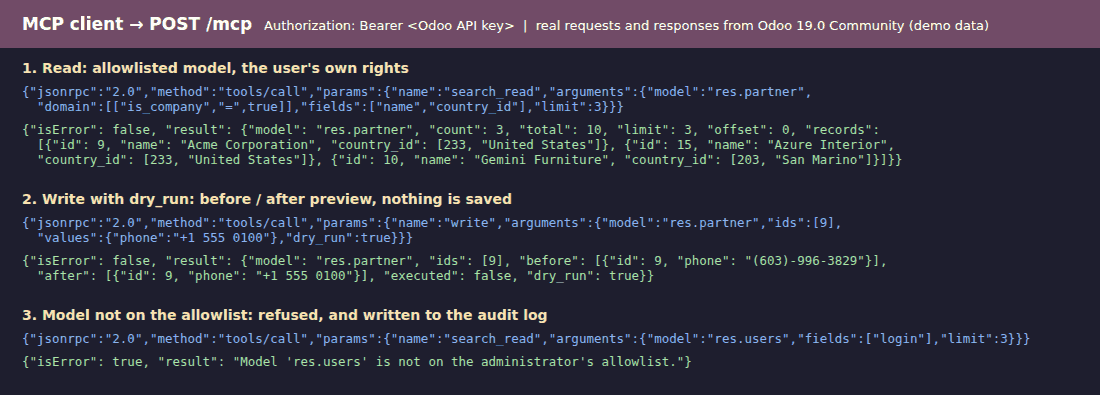
Authorization: Bearer header.ir.* model except attachments, filters, exports and external IDs, read only) are always blocked.create and write support dry_run (before / after preview, nothing saved). Optional "Writes require preview" setting issues a single-use token (valid 10 minutes) bound to the user, tool and exact arguments.unlink must be switched on per company. While it is off, x2many commands that delete lines are refused.Taken on a throwaway Odoo 19.0 Community database with demo data.
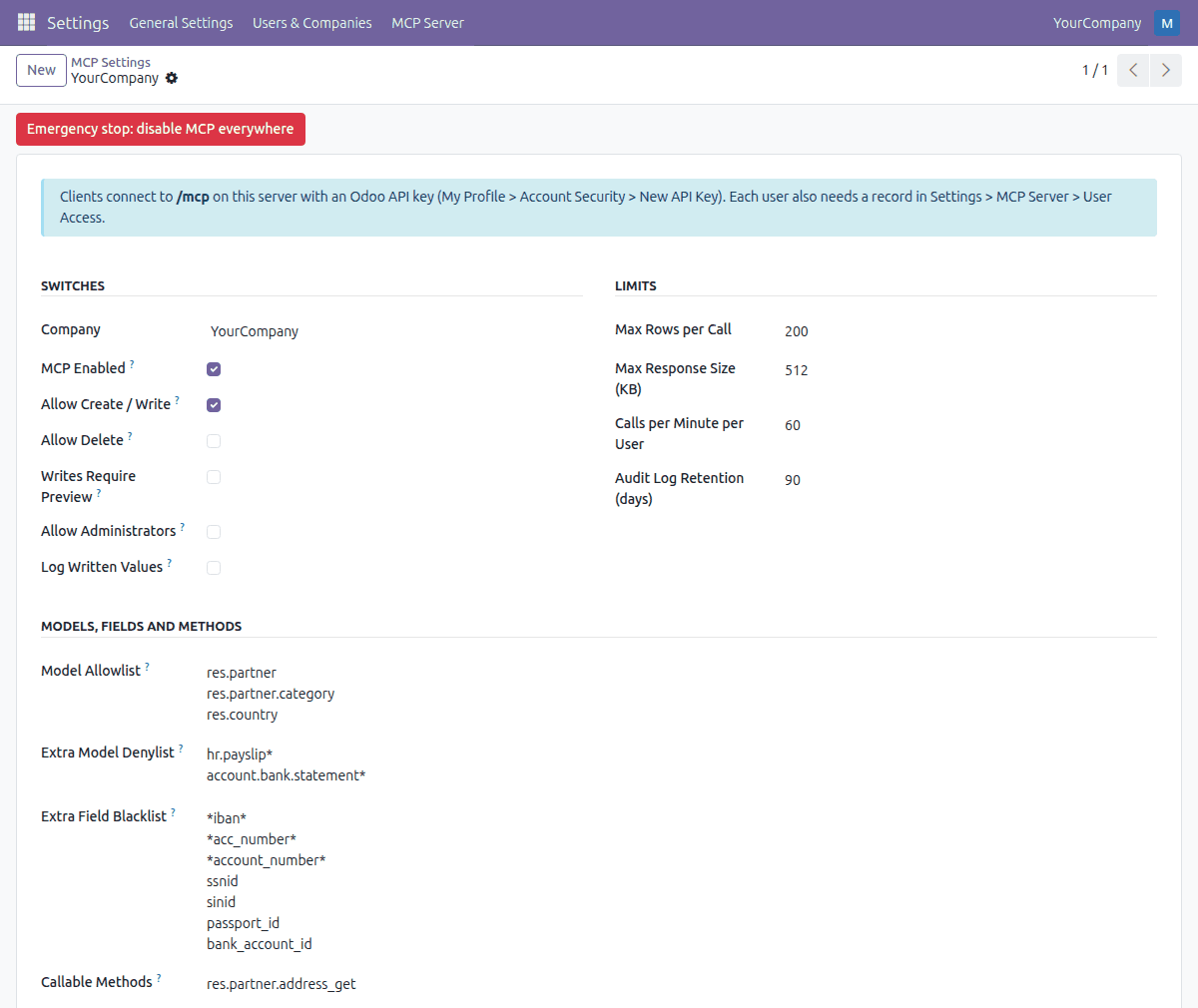
Settings per company: kill switch, limits, model allowlist and denylist, field blacklist
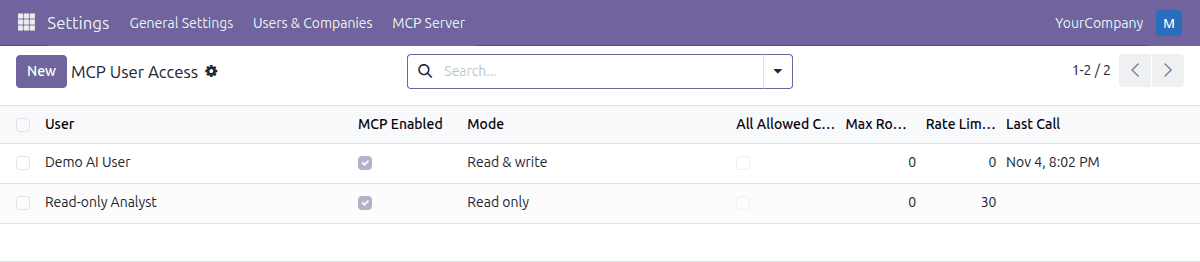
User access: Read only or Read & write per user
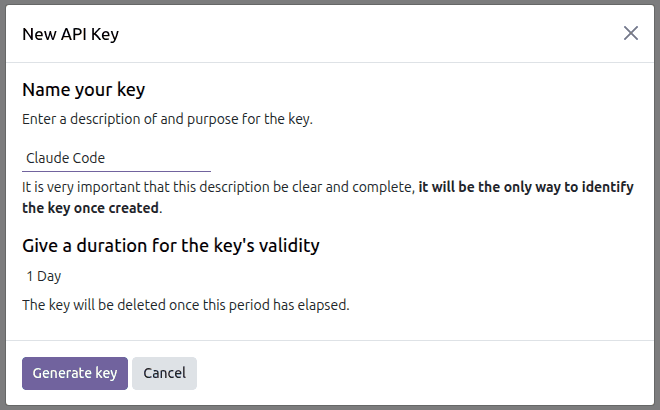
Each user creates an Odoo API key for the AI client
What the AI client sees: a read, a dry-run write preview and a refused call
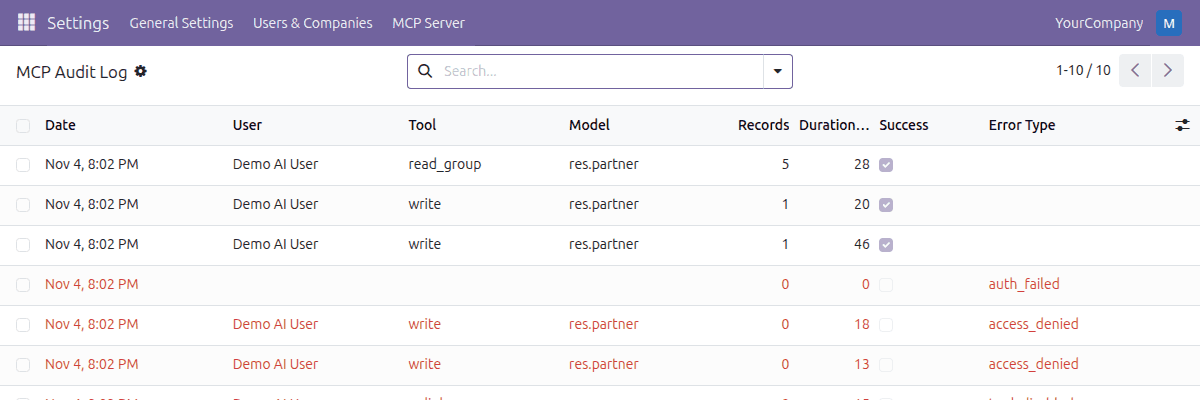
Audit log: successful and refused calls
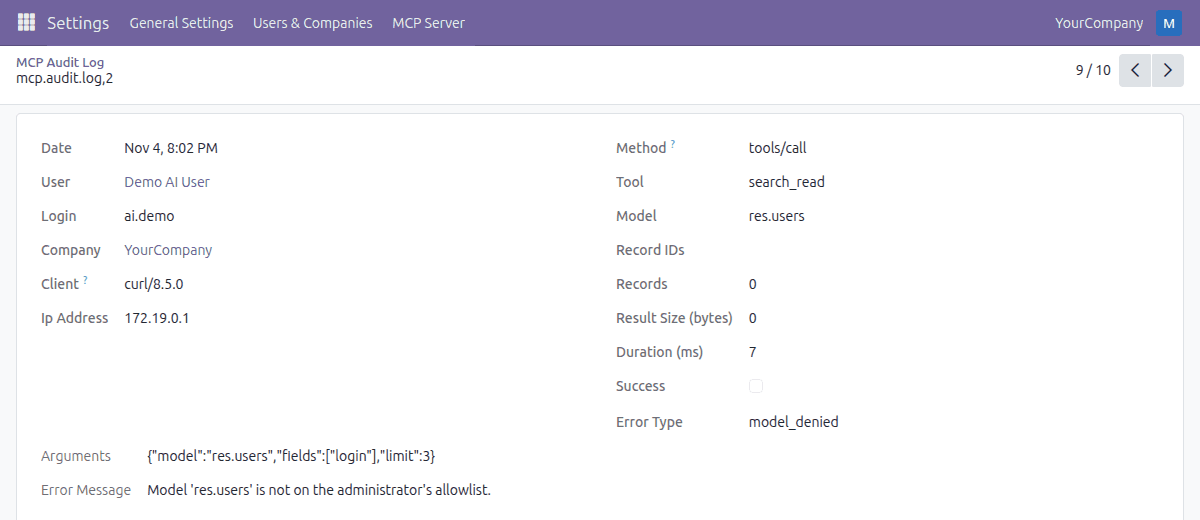
Audit log entry: user, tool, model, arguments, duration and error
Replace YOUR-ODOO and YOUR_API_KEY in the examples.
claude mcp add --transport http odoo https://YOUR-ODOO/mcp \
  --header "Authorization: Bearer YOUR_API_KEY"
In ~/.cursor/mcp.json or .cursor/mcp.json:
{
  "mcpServers": {
    "odoo": {
      "url": "https://YOUR-ODOO/mcp",
      "headers": { "Authorization": "Bearer YOUR_API_KEY" }
    }
  }
}
Claude Desktop launches local servers, so it uses the small stdio bridge shipped inside the module (mcp_server_secure/tools/mcp_stdio_bridge.py, Python 3, standard library only). In claude_desktop_config.json:
{
  "mcpServers": {
    "odoo": {
      "command": "python3",
      "args": ["/path/to/mcp_stdio_bridge.py"],
      "env": {
        "ODOO_MCP_URL": "https://YOUR-ODOO/mcp",
        "ODOO_API_KEY": "YOUR_API_KEY"
      }
    }
  }
}
The same bridge works for any client that only supports stdio. If your Odoo has several databases, set --db-filter (or use a sub-domain per database) so that /mcp resolves to one.
Behind a reverse proxy, forward the Authorization header and use HTTPS. Start Odoo with --proxy-mode so audit entries record the real IP address.
| Tool | What it does | Availability |
|---|---|---|
list_models | Discover the models the user can see | always |
describe_model | Fields, types and selections of a model | always |
search_read | Domain, fields, order, limit and offset, with row and size caps | always |
read | Read records by id | always |
read_group | Group and aggregate (sum, avg, min, max, count), date grouping | always |
create | Create a record (supports dry_run) | Read & write users, company write switch on |
write | Update records (supports dry_run) | Read & write users, company write switch on |
unlink | Delete records | off by default; enable per company ("Allow Delete") |
call_method | Call a public business method, e.g. sale.order.action_confirm | only methods you whitelist in settings; private methods never |
Protocol methods: initialize, ping, tools/list, tools/call. No resources, prompts, SSE or sessions.
Authorization: Bearer header, never in the URL.Origin header are accepted only for the origin of web.base.url or an origin you list. No CORS is implemented; desktop and CLI clients send no Origin.The module cannot protect data from a user who is allowed to see it. Use dedicated users with the minimum rights.
call_method cannot be previewed with dry_run.dry_run runs the write in a rolled-back savepoint; database sequence numbers, file store writes and external checks (for example VAT number validation) are not undone.--db-filter or sub-domains so that /mcp resolves to one database.According to Odoo's documentation, Odoo 20 ships its own MCP server as part of its AI features (OAuth or API key). If you run Odoo 20 Enterprise and it covers your needs, use it. This module is for Odoo Community, Odoo 17.0 to 19.0, and teams that need an audit log with retention, rate limit, kill switch, allowlist and dry-run. Odoo 20's server has OAuth 2.1 sign-in and tools built from AI server actions, which this module does not.
Does it work with Claude Code, Claude Desktop and Cursor?
Claude Code and Cursor connect directly to /mcp with the API key. Claude Desktop uses the stdio bridge. Any other client that supports MCP Streamable HTTP with a custom Authorization header, or stdio, can use it too.
Does it work with claude.ai custom connectors or ChatGPT connectors?
Only if the client lets you send an Authorization: Bearer header (or you use the stdio bridge). This version has no OAuth, so connector screens that require OAuth sign-in cannot connect. ChatGPT has not been tested.
Can the AI see more than the user it connects as? No. Calls run with that user's Odoo rights, record rules and field groups.
Can it change or delete data?
Only for users you set to Read & write, only on allowed models, and delete is off until you enable it per company. Use dry_run or "Writes require preview" to check changes first.
Is data sent to a third party? The module sends nothing anywhere and calls no external service. What an AI client reads is processed by that client's provider.
Does it work on Odoo Community? On Enterprise?
It depends on base only and is tested on Community 17.0 to 20.0. Enterprise has not been tested.
How do I stop it? Press Emergency stop: disable MCP everywhere in the settings, or untick MCP Enabled for a company or a user.
€49 on the Odoo Apps Store:
Use the support contact on the module's Odoo Apps Store page.
The module is licensed under the Odoo Proprietary License v1.0 (OPL-1) and is not part of this repository. Documentation and images in this repository are licensed under CC BY 4.0.
Claim this server with your GitHub account to request manual ownership verification.
Link to the catalog listing for Secure MCP Server for Odoo from your README. This badge does not certify ownership, compatibility or security.
[](https://awesome-mcp.com/servers/odoo-secure-mcp-server)Public repository statistics could not be verified. Check the configured source address; unavailable counts are not zero.
Separate sources, scopes and periods. Never combined or treated as installations, active users or security reviews.
No reviewed package or image identity; download statistics are not listed yet.
Alternative and complementary servers in the same category
A directory listing describing a cancellation-letter and mailing-address service. The configured public GitHub repository returned 404 during source verification.

A hosted MCP service for browsing and searching through Singapore mobile-network proxies.

A directory listing describing a Markdown-to-PDF service. The configured public GitHub repository returned 404 during source verification.