
A directory listing describing a cancellation-letter and mailing-address service. The configured public GitHub repository returned 404 during source verification.
Repository stats unavailable
Developer Tools
An MCP server that proxies any OpenAPI v3.1 compliant API so Claude can discover endpoints and make API calls on your behalf.
OpenAPI MCP Server is cataloged as an MCP server attributed to asabya. An MCP server that proxies any OpenAPI v3.1 compliant API so Claude can discover endpoints and make API calls on your behalf. It is categorized under developer tools. See the capability inspector for recorded interfaces and their independent review status; consult upstream documentation for the current interface.
Installation configuration is not reviewed. No executable setup is offered for this entry; inspect the source repository before proceeding.
Catalog license label: MIT. Check the source repository's current license and terms before using, modifying or distributing this software.
Capability definitions are not reviewed. Unreviewed imports are not exposed as trusted interfaces.
No reviewed records to display. This does not establish that upstream lacks this capability.
No reviewed records to display. This does not establish that upstream lacks this capability.
No reviewed records to display. This does not establish that upstream lacks this capability.
Email delivery is not connected. This page does not collect email addresses or create subscriptions.
Browse the registry for current listings instead.
Reviews for OpenAPI MCP Server are not available yet
Review publishing and storage are not connected. This page does not collect or publish ratings or comments, including after sign-in.
It currently supports OpenAPI v3.1 specifications only.
No, file uploads support local files only.
No, streaming responses are not yet implemented.
README.md · a5b4992c9d3b · Fetched 2026-11-13 11:21:45 UTC
Original upstream text, without AI rewriting. Scripts, forms and unsafe links are filtered for safety.
Showing the last retrieved documentation snapshot; check the source for current changes.
This is a fork of pre v2 of openapi-mcp-server. its mainly a backup/failsafe for future usage
Talk to any OpenAPI (v3.1) compliant API through Claude Desktop!
This tool creates a Model Context Protocol (MCP) server that acts as a proxy for any API that has an OpenAPI v3.1 specification. This allows you to use Claude Desktop to easily interact with both local and remote server APIs.
If you're having trouble with Claude crashing or specs not working put them through our spec cleaner app this tidies up some open api schemas to help them be LLM-readable.
This proxy automatically converts OpenAPI endpoints into Claude tools, allowing Claude to:
For example, if you have a Petstore API with this endpoint:
/pets/{petId}:
  get:
    operationId: getPetById
    summary: Returns a pet by ID
    parameters:
      - name: petId
        in: path
        description: ID of pet to return
        required: true
        schema:
          type: integer
Claude will see this as a tool it can use:
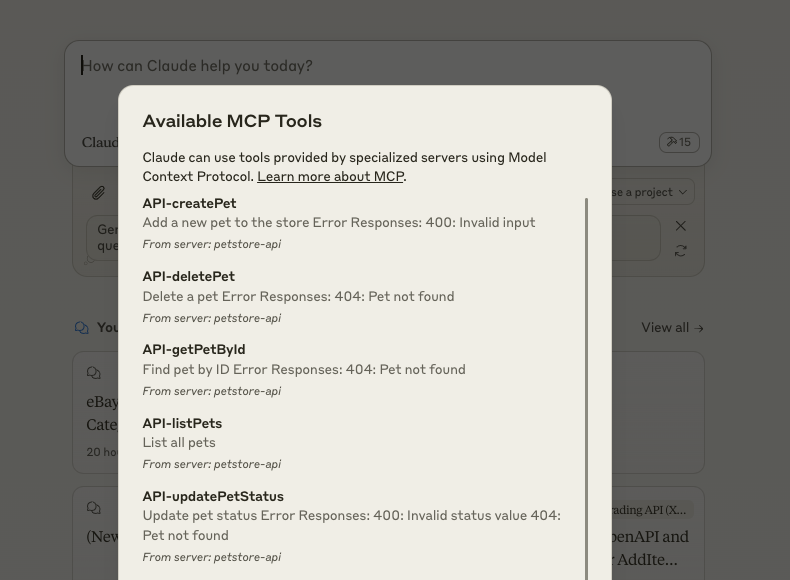
You can then ask Claude natural questions like:
Claude will understand the context and make the appropriate API calls.
The proxy supports file uploads for APIs that accept multipart/form-data. When an endpoint accepts file uploads (indicated by type: string, format: binary in the OpenAPI spec), you can provide local file paths and the proxy will handle reading and uploading the files.
/users/{userId}/avatar:
  post:
    summary: Upload a user's profile picture
    requestBody:
      content:
        multipart/form-data:
          schema:
            type: object
            properties:
              avatar:
                type: string
                format: binary
                description: Profile picture (JPEG/PNG)
              cropInfo:
                type: object
                properties:
                  x: { type: number }
                  y: { type: number }
                  width: { type: number }
                  height: { type: number }
You can ask Claude:
/documents:
  post:
    summary: Upload documents for processing
    requestBody:
      content:
        multipart/form-data:
          schema:
            type: object
            properties:
              document:
                type: string
                format: binary
                description: PDF or Word document
              language:
                type: string
                enum: [en, es, fr]
                description: Document language
              processOCR:
                type: boolean
                description: Whether to extract text using OCR
Natural language commands:
/batch-upload:
  post:
    summary: Upload multiple files in one request
    requestBody:
      content:
        multipart/form-data:
          schema:
            type: object
            properties:
              files:
                type: array
                items:
                  type: string
                  format: binary
              tags:
                type: array
                items:
                  type: string
You can say:
Security
Performance
Limitations
Configure Claude Desktop:
Add this to your claude_desktop_config.json:
{
  "mcpServers": {
    "petstore-api": {
      "command": "npx",
      "args": ["openapi-mcp-server", "/abs/path/to/petstore-openapi.json"]
    }
  }
}
Restart Claude Desktop and start interacting with your API!
This repository includes a complete example of a Petstore API server that you can use to test the OpenAPI MCP Server. The example server implements a basic CRUD API for managing pets, making it perfect for learning how to use this tool.
See examples/README.md for instructions on running the example server.
The repository includes a command-line tool for testing OpenAPI endpoints:
# List all available methods
pnpm tsx examples/cli/openapi-client.ts http://localhost:3000/openapi.json list

# Call a specific method
pnpm tsx examples/cli/openapi-client.ts http://localhost:3000/openapi.json call API-getPetById '{"id": 1}'
The CLI tool demonstrates how to use both the OpenAPIToMCPConverter and HttpClient classes to interact with OpenAPI-compliant servers programmatically.
Local Development
API Integration
Documentation
Outstanding tasks are listed in TODO.md.
Basics:
# Install dependencies
pnpm install

# Run tests
pnpm test

# Build the project
pnpm build

# Link the project to your global node_modules so that npx works
npm link

# Now start claude desktop to use

# After making changes run build again before restarting claude desktop
pnpm build

# Now restart claude desktop to run with latest changes
If you want to convert OpenAPI specs to MCP tools programmatically, you can use the OpenAPIToMCPConverter class:
import { OpenAPIToMCPConverter } from 'openapi-mcp-server'

// Initialize the converter with your OpenAPI spec
const converter = new OpenAPIToMCPConverter(openApiSpec)

// Convert to OpenAI tools format
const openAiTools = await converter.convertToOpenAITools()

// Convert to Anthropic tools format
const anthropicTools = await converter.convertToAnthropicTools()

// Convert to MCP tools format
const { tools, openApiLookup } = converter.convertToMCPTools()
The converter supports multiple tool formats, making it easy to integrate with different LLM providers. The converted tools maintain all the type information and descriptions from your OpenAPI spec, ensuring accurate parameter validation and helpful documentation.
You can use the HttpClient class to make API calls directly without going through an LLM:
import { HttpClient, OpenAPIToMCPConverter } from 'openapi-mcp-server'

// Initialize the converter and client
const converter = new OpenAPIToMCPConverter(openApiSpec)
const httpClient = new HttpClient({ baseUrl: 'https://api.example.com' }, openApiSpec)

// Get operation details from the converter
const { openApiLookup } = converter.convertToMCPTools()
const operation = openApiLookup['API-getPetById']

// Make the API call
const response = await httpClient.executeOperation(operation, {
  petId: 123
})
The HttpClient handles:
MIT
Built with ❤️ for making APIs more accessible through natural language.
Claim this server with your GitHub account to request manual ownership verification.
Link to the catalog listing for OpenAPI MCP Server from your README. This badge does not certify ownership, compatibility or security.
[](https://awesome-mcp.com/servers/openapi-mcp-server-asabya)Public repository statistics could not be verified. Check the configured source address; unavailable counts are not zero.
Separate sources, scopes and periods. Never combined or treated as installations, active users or security reviews.
No reviewed package or image identity; download statistics are not listed yet.
Alternative and complementary servers in the same category
A directory listing describing a cancellation-letter and mailing-address service. The configured public GitHub repository returned 404 during source verification.

A hosted MCP service for browsing and searching through Singapore mobile-network proxies.

A directory listing describing a Markdown-to-PDF service. The configured public GitHub repository returned 404 during source verification.