
A directory listing describing a cancellation-letter and mailing-address service. The configured public GitHub repository returned 404 during source verification.
Repository stats unavailable
Developer Tools
A Model Context Protocol server that provides Opentrons API documentation and direct robot control tools.
Opentrons MCP Server is cataloged as an MCP server attributed to yerbymatey. A Model Context Protocol server that provides Opentrons API documentation and direct robot control tools. It is categorized under developer tools. See the capability inspector for recorded interfaces and their independent review status; consult upstream documentation for the current interface.
Installation configuration is not reviewed. No executable setup is offered for this entry; inspect the source repository before proceeding.
Catalog license label: Not specified. Check the source repository's current license and terms before using, modifying or distributing this software.
Capability definitions are not reviewed. Unreviewed imports are not exposed as trusted interfaces.
No reviewed records to display. This does not establish that upstream lacks this capability.
No reviewed records to display. This does not establish that upstream lacks this capability.
No reviewed records to display. This does not establish that upstream lacks this capability.
Email delivery is not connected. This page does not collect email addresses or create subscriptions.
Browse the registry for current listings instead.
Reviews for Opentrons MCP Server are not available yet
Review publishing and storage are not connected. This page does not collect or publish ratings or comments, including after sign-in.
It lets users search API endpoints, get endpoint details, list endpoints by category, and view an API overview.
It supports protocol management, run control, robot health checks, and hardware control such as homing and lights.
It supports play, pause, stop, and resume-from-recovery actions.
README.md · 10ef58c8980a · Fetched 2026-11-13 08:20:55 UTC
Original upstream text, without AI rewriting. Scripts, forms and unsafe links are filtered for safety.
Showing the last retrieved documentation snapshot; check the source for current changes.
A Model Context Protocol (MCP) server for Opentrons robot automation and API documentation. This tool provides both comprehensive API documentation and direct robot control capabilities for Opentrons Flex and OT-2 robots.
npm install -g opentrons-mcp
git clone https://github.com/yerbymatey/opentrons-mcp.git
cd opentrons-mcp
npm install
Add to your Claude Desktop configuration file:
macOS: ~/Library/Application Support/Claude/claude_desktop_config.json
Windows: %APPDATA%\Claude\claude_desktop_config.json
{
  "mcpServers": {
    "opentrons": {
      "command": "opentrons-mcp",
      "args": []
    }
  }
}
If installed from source:
{
  "mcpServers": {
    "opentrons": {
      "command": "node",
      "args": ["/path/to/opentrons-mcp/index.js"]
    }
  }
}
Search Opentrons HTTP API endpoints by functionality, method, path, or keyword.
query (required): Search termmethod (optional): Filter by HTTP method (GET, POST, PUT, DELETE, PATCH)tag (optional): Filter by API categoryinclude_deprecated (optional): Include deprecated endpointsGet comprehensive details about a specific API endpoint.
method (required): HTTP methodpath (required): API endpoint pathList all endpoints in a specific functional category.
category (required): API category (Health, Control, Protocol Management, etc.)Get high-level overview of the Opentrons HTTP API structure and capabilities.
Upload a protocol file to an Opentrons robot.
robot_ip (required): Robot IP addressfile_path (required): Path to protocol file (.py or .json)protocol_kind (optional): "standard" or "quick-transfer" (default: "standard")key (optional): Client tracking keyrun_time_parameters (optional): Runtime parameter valuesList all protocols stored on the robot.
robot_ip (required): Robot IP addressprotocol_kind (optional): Filter by protocol typeCreate a new protocol run on the robot.
robot_ip (required): Robot IP addressprotocol_id (required): ID of protocol to runrun_time_parameters (optional): Runtime parameter valuesControl run execution (play, pause, stop, resume).
robot_ip (required): Robot IP addressrun_id (required): Run ID to controlaction (required): "play", "pause", "stop", or "resume-from-recovery"List all runs on the robot.
robot_ip (required): Robot IP addressGet detailed status of a specific run.
robot_ip (required): Robot IP addressrun_id (required): Run ID to checkCheck robot health and connectivity.
robot_ip (required): Robot IP addressTurn robot lights on or off.
robot_ip (required): Robot IP addresson (required): true to turn lights on, false to turn offHome robot axes or specific pipette.
robot_ip (required): Robot IP addresstarget (optional): "robot" for all axes, "pipette" for specific mountmount (optional): "left" or "right" (required if target is "pipette")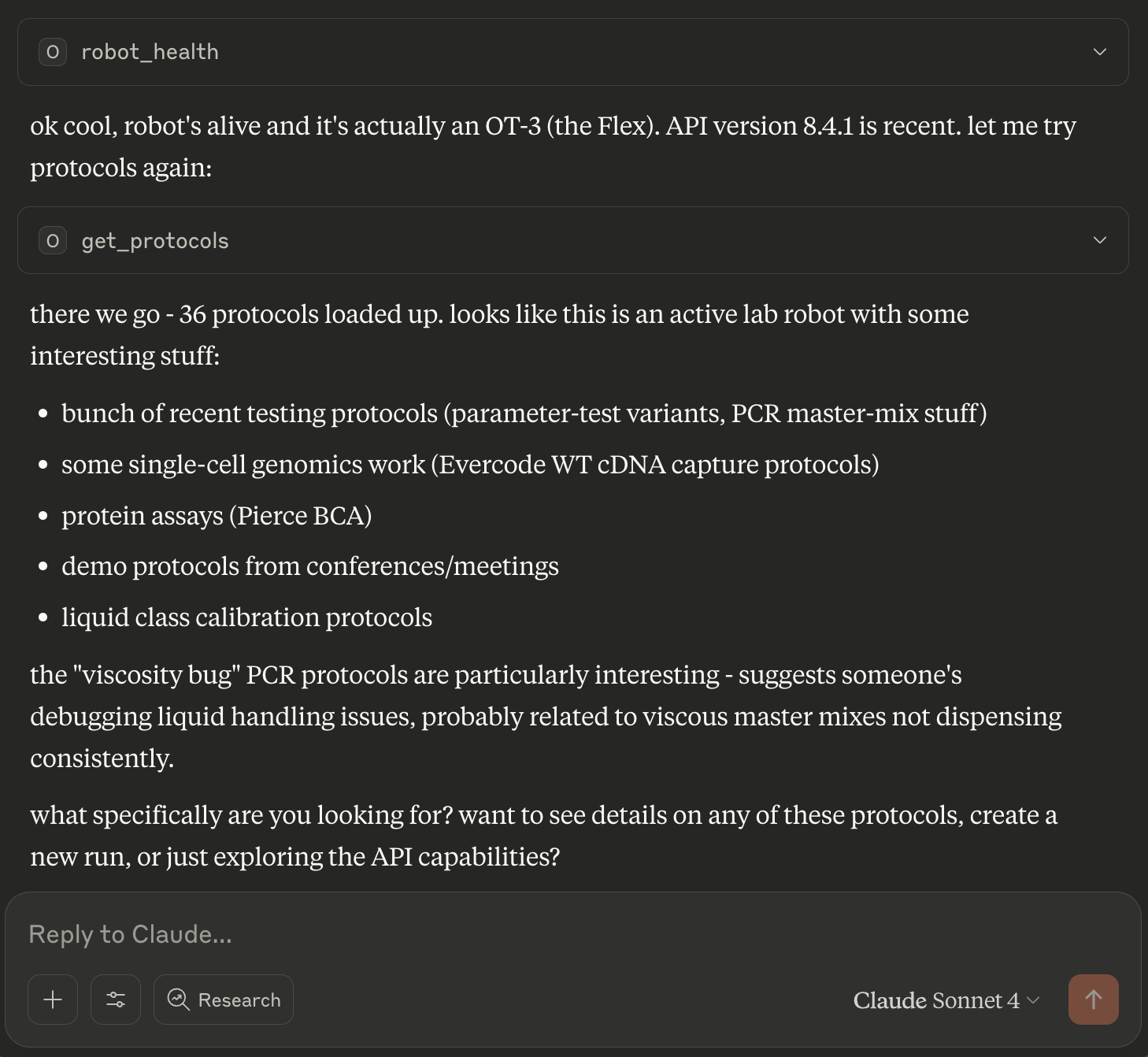 Screenshot showing the Opentrons MCP server in action with Claude Desktop after asking for current protocols with opentrons for the Flex, give it the robot ip!
Once configured, you can use natural language to control your robot:
Upload a protocol:
Upload the protocol file at /path/to/my_protocol.py to my robot at 192.168.1.100
Check robot status:
Check if my robot at 192.168.1.100 is healthy and ready
Run a protocol:
List all protocols on my robot, then create and start a run for the latest one
Monitor progress:
Show me the status of run abc123 on my robot
import { Client } from "@modelcontextprotocol/sdk/client/index.js";

// Connect to MCP server
const client = new Client(/* transport */);

// Upload protocol
await client.request({
  method: "tools/call",
  params: {
    name: "upload_protocol",
    arguments: {
      robot_ip: "192.168.1.100",
      file_path: "/path/to/protocol.py",
      protocol_kind: "standard"
    }
  }
});
Ensure your Opentrons robot is:
You can verify connectivity by visiting http://your-robot-ip:31950/health in a browser.
This tool provides access to the complete Opentrons HTTP API, including:
For detailed API documentation, use the search and documentation tools provided by this MCP server.
Contributions are welcome! Please feel free to submit issues and pull requests.
No license go brazy
Claim this server with your GitHub account to request manual ownership verification.
Link to the catalog listing for Opentrons MCP Server from your README. This badge does not certify ownership, compatibility or security.
[](https://awesome-mcp.com/servers/opentrons)Public repository statistics could not be verified. Check the configured source address; unavailable counts are not zero.
Separate sources, scopes and periods. Never combined or treated as installations, active users or security reviews.
No reviewed package or image identity; download statistics are not listed yet.
Alternative and complementary servers in the same category
A directory listing describing a cancellation-letter and mailing-address service. The configured public GitHub repository returned 404 during source verification.

A hosted MCP service for browsing and searching through Singapore mobile-network proxies.

A directory listing describing a Markdown-to-PDF service. The configured public GitHub repository returned 404 during source verification.